
1. அறிமுகம்
This manual provides detailed instructions for the installation, operation, and maintenance of your VIKVIZ 5MP PTZ IP PoE Security Camera. Please read this manual thoroughly before using the product to ensure proper setup and functionality. Keep this manual for future reference.
2. தயாரிப்பு முடிந்துவிட்டதுview
The VIKVIZ 5MP PTZ IP PoE Camera is an advanced outdoor surveillance solution designed for comprehensive monitoring. It features high-definition imaging, extensive pan/tilt/zoom capabilities, and intelligent detection functions.
முக்கிய அம்சங்கள்:
- 5MP HD Image & 18X Optical Zoom: Provides clear 3840*2160@20fps resolution with a 4.7mm~84.6mm lens for detailed viewதொலைதூர பொருட்களின் ing.
- பான் & டில்ட் செயல்பாடு: Offers 360° pan and 90° tilt for full area coverage without blind spots.
- ஐஆர் நைட் விஷன்: Equipped with 6 infrared LED lights for clear images up to 328 feet (100 meters) in low light or total darkness.
- Human Auto Tracking & Detection: Supports human/vehicle detection and automatic tracking, reducing false alarms and sending real-time snapshots.
- PoE (பவர் ஓவர் ஈதர்நெட்): Simplifies installation with a single network cable for both power and data transmission.
- IP66 வானிலை எதிர்ப்பு: Certified for outdoor use, resistant to dust and water immersion.
- இருவழி ஆடியோ: Built-in microphone and speaker enable real-time conversation.
- Remote P2P Access: Easy access via the Videolink mobile app for live viewஇங், பிளேபேக் மற்றும் விழிப்பூட்டல்கள்.
- சேமிப்பு: Supports up to 512GB MicroSD card (not included) and compatibility with NVRs and FTP servers.
- H.265+ Encoding: Efficient video compression saves bandwidth and storage space.
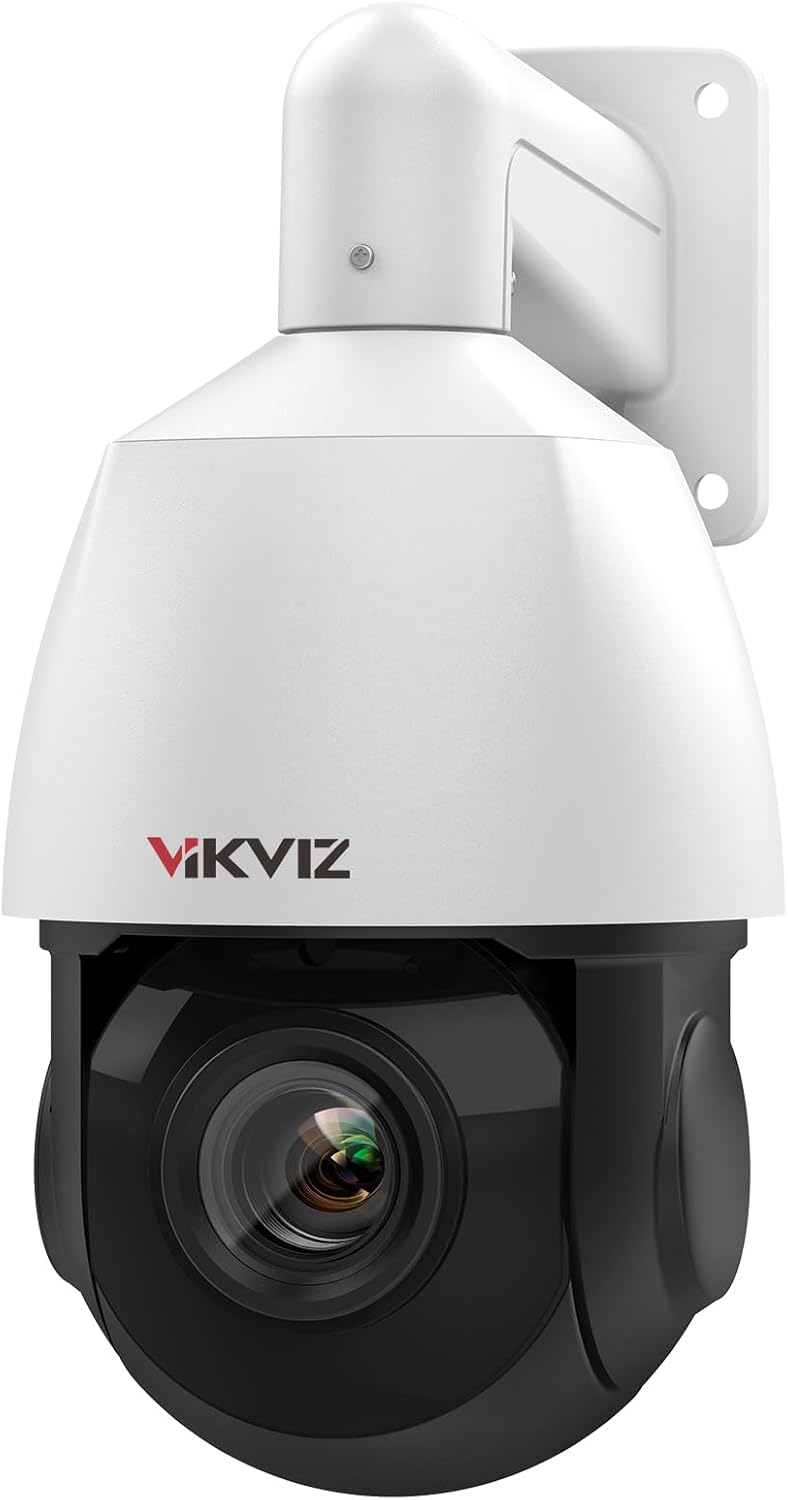
படம் 2.1: முன் view of the VIKVIZ 5MP PTZ IP PoE Security Camera.

படம் 2.2: மேல்view of the camera's main features including 5MP HD, two-way audio, human auto tracking, IP66 protection, H.265+ encoding, P2P mobile viewing, and MicroSD storage.
3. தொகுப்பு உள்ளடக்கங்கள்
கீழே பட்டியலிடப்பட்டுள்ள அனைத்து பொருட்களும் உங்கள் தொகுப்பில் சேர்க்கப்பட்டுள்ளதா என்பதைச் சரிபார்க்கவும். ஏதேனும் பொருட்கள் காணவில்லை அல்லது சேதமடைந்திருந்தால், வாடிக்கையாளர் ஆதரவைத் தொடர்பு கொள்ளவும்.
- VIKVIZ 5MP PTZ IP PoE Camera
- அறிவுறுத்தல் கையேடு
- மவுண்டிங் ஸ்க்ரூ கிட்
- Power Adapter (for non-PoE setup)
- Stand / Mounting Bracket
- நீர்ப்புகா தொப்பி
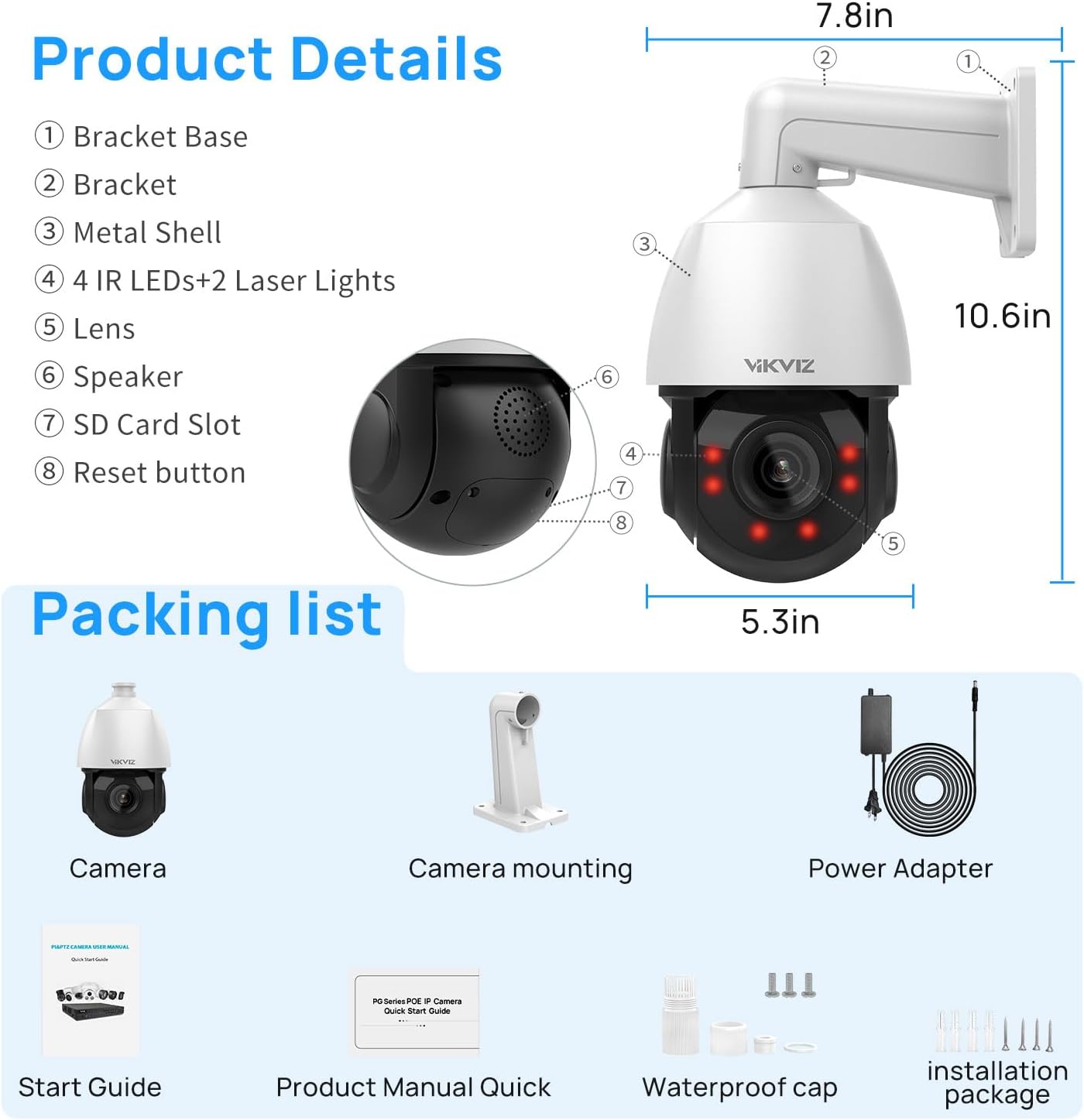
Figure 3.1: Illustration of the camera's components and the items included in the package, such as the camera, mounting accessories, power adapter, and manuals.
4. நிறுவல் மற்றும் அமைவு
4.1 மவுண்டிங் விருப்பங்கள்
The camera supports both ceiling mount and wall mount installations. Choose a location that provides the desired viewing angle and is within range of your network and power source (if not using PoE).
- Secure the mounting bracket to the chosen surface using the provided screws.
- கேமராவை மவுண்டிங் பிராக்கெட்டில் இணைக்கவும்.
- Adjust the camera's orientation as needed before final tightening.
4.2 மின்சாரம் மற்றும் நெட்வொர்க் இணைப்பு
The camera offers two primary connection methods:
- PoE (பவர் ஓவர் ஈதர்நெட்): Connect a single Ethernet cable from a PoE-enabled NVR or PoE switch directly to the camera's Ethernet port. This cable will provide both power and data.
- Standard Power & Network: Connect the provided power adapter to the camera's power input and plug it into an electrical outlet. Then, connect an Ethernet cable from your router or switch to the camera's Ethernet port.
Ensure all connections are secure and, for outdoor installations, use the waterproof cap for the Ethernet connection to protect against environmental elements.

Figure 4.1: The camera supports PoE for simplified wiring and is IP66 weatherproof for outdoor durability.
5. இயக்க வழிமுறைகள்
5.1 ஆரம்ப அணுகல் மற்றும் கட்டமைப்பு
After connecting the camera, you can access it via a compatible NVR, a web browser, or the Videolink mobile application. Refer to the quick start guide for initial network discovery and login credentials.
5.2 பான், டில்ட் மற்றும் ஜூம் (PTZ) கட்டுப்பாடு
The camera offers extensive PTZ capabilities:
- பான்: 360° horizontal rotation for wide area coverage.
- சாய்: 90° vertical rotation to adjust the viewing கோணம்.
- ஆப்டிகல் ஜூம்: 18X optical zoom (4.7mm~84.6mm lens) allows you to magnify distant objects without loss of image quality.
- டிஜிட்டல் ஜூம்: 30X digital zoom provides further magnification, though with potential pixelation.
Control PTZ functions through your NVR interface, web browser, or the Videolink app.

Figure 5.1: The camera's 18X optical zoom allows for clear magnification of distant details, such as vehicle license plates.
5.3 Human/Vehicle Detection and Auto Tracking
The camera can intelligently distinguish between human and vehicle movement, reducing false alarms from other sources like animals or swaying branches. When a person or vehicle enters the detection area, the camera can:
- Automatically track the subject's movement.
- Send real-time snapshots and alerts to your mobile device.
- Trigger recording.
Detection areas and sensitivity can be adjusted in the camera's settings.

Figure 5.2: Smart motion detection identifies humans and vehicles, triggering timely alerts and actions.

Figure 5.3: The camera's human tracking and auto cruise features provide continuous monitoring of subjects and predefined patrol routes.
5.4 இருவழி ஆடியோ
The integrated microphone and speaker allow for two-way communication. You can listen to audio from the camera's location and speak through the camera using the mobile app or compatible software.

Figure 5.4: Two-way audio enables direct communication through the camera, facilitating interaction with visitors or deterring intruders.
5.5 பதிவு விருப்பங்கள்
The camera supports multiple recording methods:
- மைக்ரோ எஸ்டி கார்டு: Insert a MicroSD card (up to 512GB, not included) into the camera's slot for local storage.
- NVR (நெட்வொர்க் வீடியோ ரெக்கார்டர்): Connect the camera to a compatible NVR for continuous or event-based recording. The camera supports RTSP and ONVIF protocols for broad compatibility.
- FTP சேவையகம்: Configure the camera to upload recordings to an FTP server for remote storage.
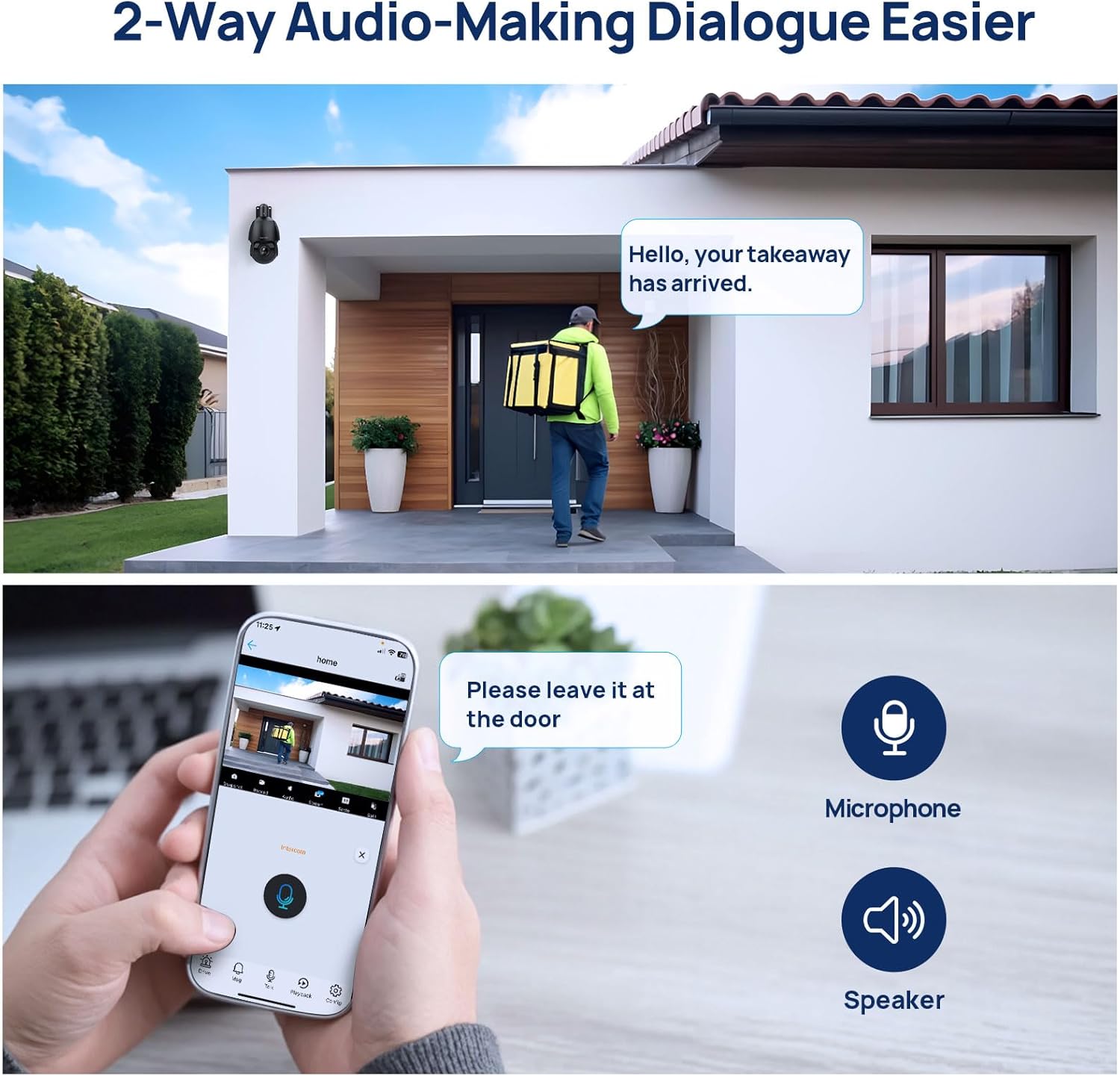
Figure 5.5: The camera offers flexible recording options including MicroSD card, NVR integration, and FTP server support.
6. பராமரிப்பு
வழக்கமான பராமரிப்பு உங்கள் கேமராவின் உகந்த செயல்திறன் மற்றும் நீண்ட ஆயுளை உறுதி செய்கிறது.
- சுத்தம்: Periodically clean the camera lens and dome with a soft, damp cloth. Avoid abrasive cleaners that could scratch the surface.
- நிலைபொருள் புதுப்பிப்புகள்: உற்பத்தியாளரைச் சரிபார்க்கவும் website or the Videolink app for available firmware updates. Keeping the firmware updated can improve performance, add features, and enhance security.
- கேபிள் ஆய்வு: Regularly inspect all cables for signs of wear or damage, especially for outdoor installations. Ensure waterproof caps are securely in place.
- சுற்றுச்சூழல் சோதனைகள்: Although IP66 rated, ensure the camera is not exposed to extreme conditions beyond its operating limits. Clear any obstructions that might block the camera's view அல்லது காற்றோட்டம்.
7. சரிசெய்தல்
உங்கள் கேமராவில் சிக்கல்கள் ஏற்பட்டால், பின்வரும் பொதுவான சிக்கல்கள் மற்றும் தீர்வுகளைப் பார்க்கவும்:
| பிரச்சனை | சாத்தியமான காரணம் | தீர்வு |
|---|---|---|
| படம்/வீடியோ ஊட்டம் இல்லை. | No power; Network cable disconnected; Incorrect IP address/network settings. | Check power connection (PoE or adapter). Verify Ethernet cable is securely connected. Ensure camera is on the same network as your viewing device. Use the discovery tool or app to find the camera's IP address. |
| PTZ functions not responding | Network connectivity issues; Firmware outdated; Mechanical obstruction. | Check network connection. Reboot the camera. Ensure no physical obstructions are impeding movement. Update camera firmware. |
| Poor image quality or focus issues | Dirty lens; Auto-focus struggling; Low light conditions. | Clean the camera lens. Allow the auto-focus mechanism time to adjust (can take up to 15 seconds). Ensure sufficient lighting for optimal image clarity. |
| இயக்கம் கண்டறிதலிலிருந்து தவறான அலாரங்கள் | Sensitivity too high; Detection area too broad; Environmental factors (e.g., swaying trees, animals). | Adjust motion detection sensitivity settings. Refine the detection area to exclude irrelevant zones. Utilize human/vehicle detection to filter out non-human/vehicle movements. |
| Cannot access camera via app/NVR | Incorrect network configuration; Firewall blocking connection; App/NVR compatibility issues. | Verify camera and viewing device are on the same network segment. Check firewall settings on your router or NVR. Ensure your NVR supports ONVIF/RTSP protocols. Try accessing via web browser first. |
8. தொழில்நுட்ப விவரக்குறிப்புகள்
Below are the detailed technical specifications for the VIKVIZ 5MP PTZ IP PoE Security Camera.
| அம்சம் | விவரக்குறிப்பு |
|---|---|
| மாதிரி | B0FN44CQH7 |
| அதிகபட்சம் Webகேம் படத் தீர்மானம் | 5 MP (3840*2160@20fps) |
| ஆப்டிகல் ஜூம் | 18x |
| டிஜிட்டல் பெரிதாக்கு | 30x |
| பான் ஆங்கிள் | 360 டிகிரி |
| சாய்வு கோணம் | 90 டிகிரி |
| நைட் விஷன் ரேஞ்ச் | 328 அடி (100 மீட்டர்) |
| சர்வதேச பாதுகாப்பு மதிப்பீடு | IP66 |
| இணைப்பு தொழில்நுட்பம் | ஈதர்நெட் (PoE) |
| இணைப்பு நெறிமுறை | Ethernet, ONVIF |
| வீடியோ குறியாக்கம் | எச்.265, எச்.264 |
| ஃபிளாஷ் நினைவக ஆதரவு அளவு அதிகபட்சம் | 512 ஜிபி (மைக்ரோ எஸ்டி) |
| ஆடியோ விஷுவல் ரெக்கார்டிங் திறன்கள் | Audio (Two-Way Talk) |
| மவுண்டிங் வகை | உச்சவரம்பு மவுண்ட், சுவர் மவுண்ட் |
| பொருள் | உலோகம் |
| சக்தி ஆதாரம் | கம்பிவட மின்சாரம் (12V DC) |
| பொருளின் எடை | 4.18 பவுண்டுகள் |
| தொகுப்பு பரிமாணங்கள் | 11 x 7.4 x 7.4 அங்குலம் |
9. உத்தரவாதம் மற்றும் வாடிக்கையாளர் ஆதரவு
VIKVIZ products are designed for reliability and performance. For specific warranty details, please refer to the warranty card included in your package or visit the official VIKVIZ webதளம்.
If you require technical assistance, have questions about your product, or need to report a defect, please contact VIKVIZ customer support. You can often find support contact information or FAQs by visiting the VIKVIZ Store on Amazon அல்லது அவர்களின் அதிகாரி webதளம்.