
1. அறிமுகம்
Thank you for choosing the Temtop W100 Lite Professional Weather Station. This device provides real-time monitoring of indoor and outdoor temperature and humidity, atmospheric pressure, weather forecasts, moon phases, and includes an alarm clock function. This manual will guide you through the setup, operation, and maintenance of your weather station to ensure optimal performance.
2. தொகுப்பு உள்ளடக்கங்கள்
அன்பாக்சிங் செய்யும்போது தொகுப்பு உள்ளடக்கங்களைச் சரிபார்க்கவும்:
- Weather Station Main Unit
- வெளிப்புற சென்சார்
- பவர் அடாப்டர்
- பயனர் கையேடு

Image: Contents of the Temtop W100 Lite package, showing the main weather station unit, the outdoor sensor, and the power adapter.
3. தயாரிப்பு முடிந்துவிட்டதுview
Familiarize yourself with the main components and display features of your Temtop W100 Lite Weather Station.
3.1 Main Unit Display

படம்: முன்பக்கம் view of the Temtop W100 Lite Weather Station, displaying various weather parameters and time information.
The main unit features a clear color display that shows the following information:
- வெளிப்புற வெப்பநிலை மற்றும் ஈரப்பதம்
- உட்புற வெப்பநிலை மற்றும் ஈரப்பதம்
- Weather Forecast (Sunny, Partially Sunny, Cloudy, Rainy, Snowy)
- நேரம் மற்றும் தேதி
- சந்திரன் கட்டம்
- வளிமண்டல அழுத்தம்
- Comfort Level Indicator (Wet, Comfort, Dry)
- Sunrise and Sunset Times (for selected city)
3.2 Main Unit Buttons and Outdoor Sensor

படம்: விரிவானது view of the weather station display with labels indicating each data field.
படம்: பின்புறம் view of the weather station, highlighting the battery compartment, power input, and control buttons.
The main unit features several control buttons on the back for settings adjustment:
- அமை பொத்தான்: Enters/confirms settings.
- UP/CH Button: Adjusts values upwards, changes channels.
- DOWN/MEM Button: Adjusts values downwards, accesses min/max memory.
- ALERT Button: Sets temperature alerts.
- அலாரம் பட்டன்: அலாரம் நேரத்தை அமைக்கிறது.
- CITY Button: Selects city for sunrise/sunset times.
The outdoor sensor transmits temperature and humidity data wirelessly to the main unit.
4 அமைவு
4.1 சாதனத்தை இயக்குதல்
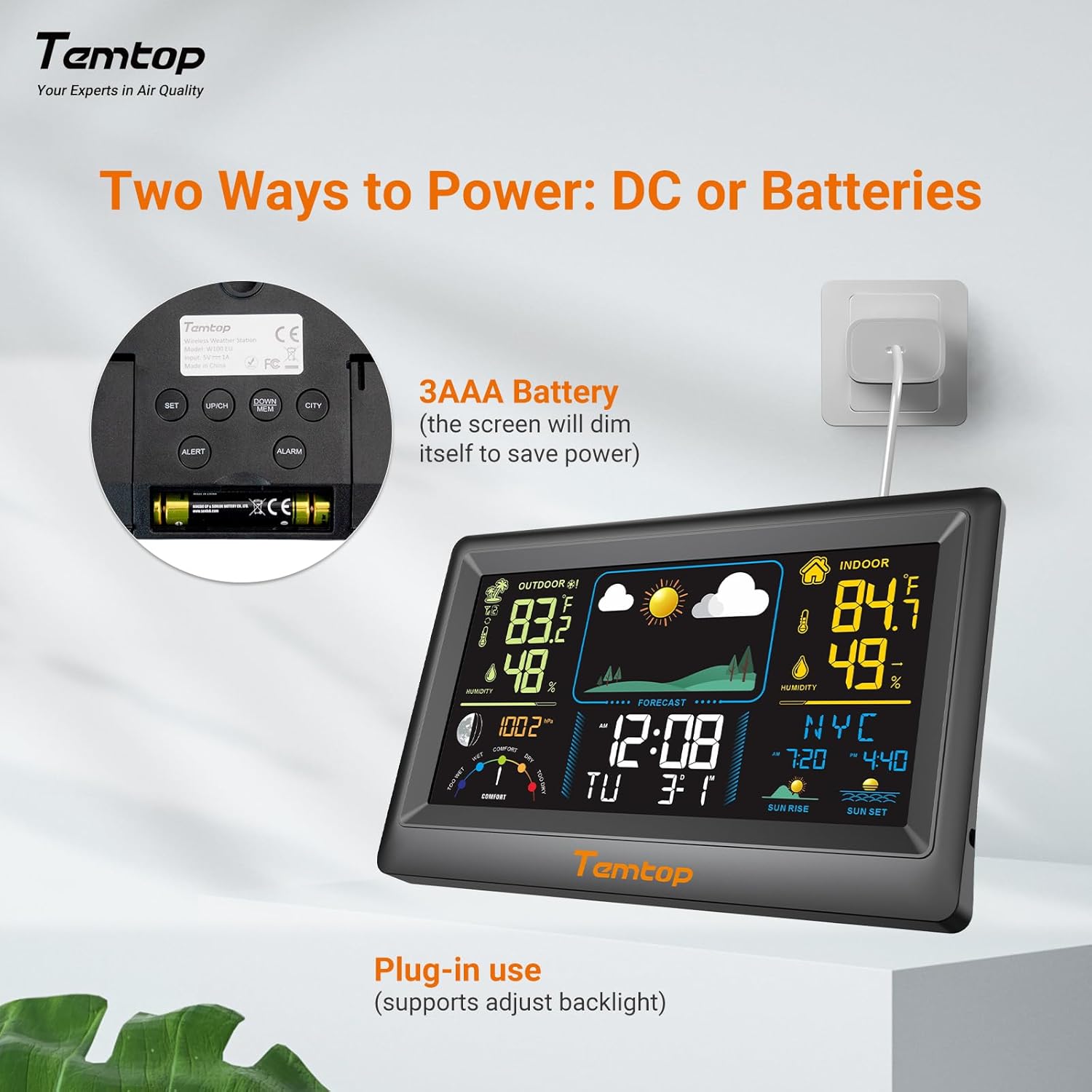
The weather station can be powered by either the included AC adapter or 3x AAA batteries (not included for the main unit, but included for the outdoor sensor). For continuous backlight and optimal performance, AC power is recommended.
- முக்கிய அலகு: Insert the AC adapter into the power port on the back of the unit and plug it into a wall outlet. Alternatively, insert 3x AAA batteries into the battery compartment.
- வெளிப்புற சென்சார்: Insert 2x AAA batteries into the outdoor sensor's battery compartment.

படம்: Example of digital displays, illustrating the clear readouts of temperature and humidity.

Image: Illustration of power modes, showing the weather station connected via AC adapter and the battery compartment. AC mode allows adjustable backlight, while battery mode conserves power by dimming the display.
4.2 வெளிப்புற சென்சார் வேலை வாய்ப்பு
Place the outdoor sensor in a shaded area, protected from direct sunlight and rain, to ensure accurate temperature and humidity readings. The sensor has a wireless range of up to 100 meters (328 feet) in an open, unobstructed area.

Image: Diagram showing the wireless range of the outdoor sensor from the main unit, suitable for gardens, terraces, or rooftops.
4.3 Initial Settings (Time, Date, City)
Follow these steps to set the correct time, date, and city for accurate sunrise/sunset times:
- அழுத்திப் பிடிக்கவும் அமைக்கவும் button to enter setting mode. The hour field will begin to flash.
- பயன்படுத்தவும் UP/CH மற்றும் கீழே/MEM மணிநேரத்தை சரிசெய்ய பொத்தான்கள்.
- அழுத்தவும் அமைக்கவும் to confirm the hour and move to the next item (minute, year, month, day). Repeat the adjustment and confirmation process for each.
- After setting the date, briefly press the நகரம் button. The city code will flash.
- பயன்படுத்தவும் UP/CH button to scroll through the list of cities until you find your location.
- இறுதியாக, அழுத்தவும் அமைக்கவும் to confirm your city selection. The sunrise, sunset times, and date will now be accurately displayed.
Video: This video demonstrates how to set the time, date, and city on your Temtop W100 Lite Weather Station to ensure accurate display of local sunrise and sunset times.
5. ஆபரேஷன்
5.1 Display Interpretation
The main display is divided into several sections for easy reading:
- வெளிப்புறப் பிரிவு: Shows current outdoor temperature and humidity, and temperature trend.
- உட்புறப் பிரிவு: Displays current indoor temperature and humidity, and temperature trend.
- வானிலை முன்னறிவிப்பு: Icons indicate the predicted weather for the next 12 hours (Sunny, Partially Sunny, Cloudy, Rainy, Snowy).
- நேரம் & தேதி: தற்போதைய நேரம், வாரத்தின் நாள் மற்றும் தேதி.
- சந்திரனின் கட்டம்: தற்போதைய நிலவின் கட்டத்தைக் காட்டுகிறது.
- வளிமண்டல அழுத்தம்: Shows current barometric pressure and its trend.
- ஆறுதல் நிலை: A gauge indicating indoor comfort levels (Wet, Comfort, Dry).
- சூரிய உதயம் சூரிய அஸ்தமனம்: Displays the local sunrise and sunset times for the selected city.

Image: Visual representation of the five weather forecast modes and moon phases displayed on the weather station.
5.2 வெப்பநிலை அலகு தேர்வு
To switch between Celsius (°C) and Fahrenheit (°F), briefly press the UP/CH button during normal display mode.
5.3 Min/Max Temperature and Humidity Records
The weather station automatically records the minimum and maximum temperature and humidity values over a 24-hour period. Briefly press the கீழே/MEM பொத்தான் view these records. Press again to cycle through min/max indoor and outdoor values.
5.4 அலாரங்களை அமைத்தல்
The device supports both time alarms and temperature alerts.
- நேர அலாரம்: அழுத்தவும் அலாரம் அலாரம் அமைப்பு பயன்முறையில் நுழைய பொத்தானை அழுத்தவும். பயன்படுத்தவும் UP/CH மற்றும் கீழே/MEM to adjust the alarm time, and அலாரம் to confirm. The snooze function can be activated by pressing any button (except ALARM) when the alarm sounds.
- வெப்பநிலை எச்சரிக்கைகள்: அழுத்தவும் எச்சரிக்கை button to set high/low temperature alerts for indoor or outdoor readings. Use UP/CH மற்றும் கீழே/MEM to set the desired temperature thresholds.
6. பராமரிப்பு
- காட்சியை சுத்தம் செய்து, casing உடன் மென்மையான, damp துணி. சிராய்ப்பு கிளீனர்கள் அல்லது கரைப்பான்களைப் பயன்படுத்த வேண்டாம்.
- Replace batteries in the outdoor sensor when the low battery indicator appears on the main unit.
- பிரதான அலகை நேரடி சூரிய ஒளி, தீவிர வெப்பநிலை அல்லது ஈரப்பதத்திற்கு வெளிப்படுத்துவதைத் தவிர்க்கவும்.
7. சரிசெய்தல்
| பிரச்சனை | சாத்தியமான காரணம் | தீர்வு |
|---|---|---|
| பிரதான அலகில் காட்சி இல்லை. | மின்சாரம் இல்லை அல்லது பேட்டரிகள் குறைவாக உள்ளன. | Ensure AC adapter is properly connected or replace batteries. |
| Outdoor readings are inaccurate or not displayed. | Sensor out of range, interference, or low sensor batteries. | Move sensor closer to main unit, reduce obstructions, or replace sensor batteries. |
| வானிலை முன்னறிவிப்பு தவறாகத் தெரிகிறது. | The forecast is based on atmospheric pressure changes and is an estimation. | Allow time for the station to calibrate (up to 24 hours). It provides a general trend, not a precise forecast. |
8. விவரக்குறிப்புகள்
| அம்சம் | விவரம் |
|---|---|
| பிராண்ட் | டெம்ப்டாப் |
| மாதிரி | EU-W100-Lite |
| சக்தி ஆதாரம் | Battery (Main Unit: 3x AAA, Sensor: 2x AAA) / AC Adapter |
| சிறப்பு அம்சங்கள் | Customizable Alarms, Wireless Connectivity |
| இணைப்பு தொழில்நுட்பம் | வயர்லெஸ் |
| நிறம் | கருப்பு |
| சென்சார் தொழில்நுட்பம் | வயர்லெஸ் |
| Operating Temperature (Upper) | 40 டிகிரி செல்சியஸ் |
| காட்சி வகை | வண்ண காட்சி |
| பொருளின் எடை | 100 கிராம் |
9. உத்தரவாதம் மற்றும் ஆதரவு
Temtop products are designed for reliability and performance. For warranty information, technical support, or service inquiries, please refer to the warranty card included in your package or visit the official Temtop webவாங்கியதற்கான சான்றாக உங்கள் கொள்முதல் ரசீதை வைத்திருங்கள்.