Antec Skeleton 240 ARGB Liquid CPU Cooler User Manual
Model: Skeleton 240 ARGB | Brand: Antec
அறிமுகம்
The Antec Skeleton 240 ARGB is a high-performance 240mm liquid CPU cooler designed for efficient thermal management of your processor. It features a unique skeleton-frame ARGB pump head, dual PWM ARGB fans, and a robust copper base plate to ensure optimal cooling and customizable lighting effects. This manual provides essential information for the proper installation, operation, and maintenance of your liquid CPU cooler.
பகுதி உள்ளடக்கம்
நிறுவலைத் தொடங்குவதற்கு முன் அனைத்து கூறுகளும் உள்ளனவா என்பதைச் சரிபார்க்கவும்.
Image: All components included in the Antec Skeleton 240 ARGB Liquid CPU Cooler package, including the radiator, pump, fans, various mounting brackets, screws, thermal paste, and cables.
240mm Radiator with attached tubing and pump/cold plate
2 x 120மிமீ PWM ARGB மின்விசிறிகள்
Intel Mounting Bracket Set (LGA 115X/1200/1700/20XX)
AMD Mounting Bracket Set (AM4/AM5)
யுனிவர்சல் பேக் பிளேட்
மவுண்டிங் திருகுகள் மற்றும் ஸ்டாண்ட்ஆஃப்கள்
Thermal Paste Syringe
ARGB Controller Cable (if not using motherboard sync)
ஃபேன் ஸ்ப்ளிட்டர் கேபிள்
அமைவு மற்றும் நிறுவல்
Follow these steps carefully to install your Antec Skeleton 240 ARGB Liquid CPU Cooler.
1. Prepare the CPU and Motherboard
உங்கள் சிஸ்டம் ஆஃப் செய்யப்பட்டு, அன்ப்ளக் செய்யப்பட்டுள்ளதா என்பதை உறுதிப்படுத்தவும்.
பழைய வெப்பப் பசையை அகற்ற, CPU மேற்பரப்பை ஐசோபிரைல் ஆல்கஹால் கொண்டு சுத்தம் செய்யவும்.
Apply a pea-sized amount of the provided thermal paste to the center of the CPU's integrated heat spreader (IHS).
2. ரேடியேட்டர் விசிறிகளை நிறுவவும்.
Attach the two 120mm ARGB fans to the radiator using the long fan screws. Ensure the fan orientation is correct for your desired airflow (intake or exhaust).
Image: A single Antec PWM ARGB fan, showcasing its design and lighting capabilities. These fans are mounted onto the radiator.
3. Install Backplate and Standoffs
For Intel Sockets (LGA 115X/1200/1700/20XX):
Position the universal backplate behind the motherboard, aligning the holes with the CPU socket mounting holes.
Secure the appropriate Intel standoffs through the motherboard from the front, screwing them into the backplate.
AMD சாக்கெட்டுகளுக்கு (AM4/AM5):
Remove the existing plastic retention clips from the motherboard, but retain the original AMD backplate.
Screw the appropriate AMD standoffs directly into the original AMD backplate.
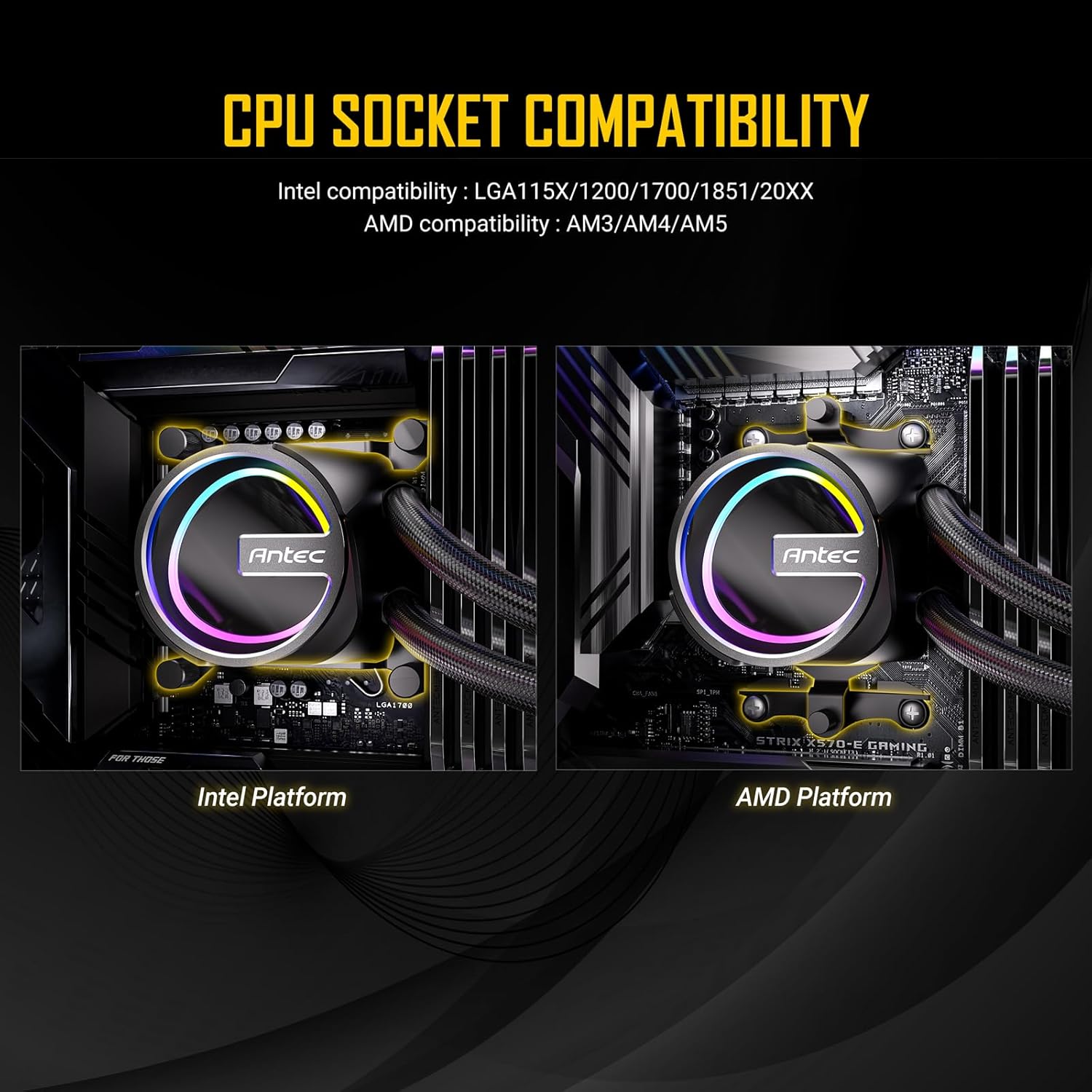
Image: Depicts the Antec Skeleton 240 ARGB pump head mounted on both an Intel platform (left) and an AMD platform (right), highlighting the different mounting mechanisms for each CPU socket type.
4. Install Pump/Cold Plate
Attach the correct mounting brackets for your CPU socket to the pump head.
Carefully place the pump/cold plate assembly onto the CPU, aligning the holes in the brackets with the standoffs.
Secure the pump by tightening the four thumb nuts onto the standoffs in a diagonal pattern until snug. Do not overtighten.
Image: Close-up of the Antec Skeleton 240 ARGB pump head, featuring its unique skeleton-frame design and vibrant ARGB lighting effects.
படம்: அண்டர்சைடு view of the Antec Skeleton 240 ARGB pump, showing the large copper base plate designed for efficient heat transfer from the CPU.
5. Mount Radiator and Connect Cables
Mount the radiator assembly to an available fan mounting location in your PC case (e.g., top, front).
Connect the 4-pin PWM fan cables from the fans to the fan splitter cable, then connect the splitter to a CPU_FAN or SYS_FAN header on your motherboard.
Connect the 3-pin ARGB cables from the fans and pump to the included ARGB controller or directly to a 5V 3-pin ARGB header on your motherboard.
Connect the 3-pin pump power cable to a AIO_PUMP or SYS_FAN header on your motherboard. Ensure it is set to run at full speed in BIOS for optimal pump performance.
Image: The Antec Skeleton 240 ARGB liquid cooler installed inside a computer case, showing the radiator with two ARGB fans mounted at the top, and the illuminated pump head on the CPU.
இயக்க வழிமுறைகள்
ARGB லைட்டிங் கட்டுப்பாடு
If connected to a motherboard's 5V 3-pin ARGB header, lighting effects can be controlled via the motherboard's RGB software (e.g., ASUS Aura Sync, MSI Mystic Light Sync, GIGABYTE RGB Fusion, ASRock Polychrome Sync).
If using the included ARGB controller (if applicable), refer to its specific instructions for cycling through lighting modes and colors.
மின்விசிறி வேகக் கட்டுப்பாடு
Fan speeds are controlled via PWM (Pulse Width Modulation) through your motherboard's BIOS or dedicated fan control software.
It is recommended to set a fan curve that balances cooling performance with noise levels according to your preference.
பராமரிப்பு
வழக்கமான பராமரிப்பு உங்கள் திரவ CPU குளிரூட்டியின் உகந்த செயல்திறன் மற்றும் நீண்ட ஆயுளை உறுதி செய்கிறது.
தூசி சுத்தம் செய்தல்: Periodically clean the radiator fins and fan blades with compressed air to prevent dust buildup, which can impede airflow and cooling efficiency.
காட்சி ஆய்வு: Regularly check the tubing and connections for any signs of leaks or damage.
வெப்ப பேஸ்ட்: While not frequently required, replacing thermal paste every few years can help maintain optimal thermal transfer.
சரிசெய்தல்
Fans or ARGB lighting not working:
Check all fan and ARGB cable connections to the motherboard or controller. Ensure the motherboard's ARGB header is enabled in BIOS and that the correct RGB software is installed and configured.
அதிக CPU வெப்பநிலை:
Verify that the pump is running (you may feel a slight vibration or hear a faint hum). Check fan orientation for proper airflow. Ensure the cold plate is securely mounted to the CPU with adequate thermal paste coverage. Confirm fan speeds are set appropriately in BIOS or software.
Unusual noise from the pump:
A gurgling sound immediately after installation may indicate air in the loop. This usually resolves itself within a few hours of operation as air settles in the radiator. If persistent, gently tilt your PC case to help dislodge air bubbles. Ensure the pump is not running dry.
விவரக்குறிப்புகள்
அம்சம்
விவரம்
தயாரிப்பு பரிமாணங்கள்
10.91"அடி x 4.72"அடி x 1.06"அடி (277மிமீ x 120மிமீ x 27மிமீ)
குளிரூட்டும் முறை
திரவம் (நீர்)
இரைச்சல் நிலை
32 டெசிபல்கள் (அதிகபட்சம்)
அதிகபட்ச சுழற்சி வேகம் (விசிறிகள்)
2000 ஆர்பிஎம்
காற்று ஓட்டம் திறன்
72.29 Cubic Centimeters Per Minute (CFM)
பவர் இணைப்பான் வகை
4-முள் (PWM)
இணக்கமான சாதனங்கள்
டெஸ்க்டாப் பிசிக்கள்
Intel Socket Compatibility
LGA 115X/1200/1700/20XX
AMD Socket Compatibility
AM4/AM5
உத்தரவாதம் மற்றும் ஆதரவு
For detailed warranty information, please refer to the official Antec website or the warranty card included with your product. Antec provides technical support for its products. If you encounter any issues not covered in this manual, please visit the Antec support page or contact their customer service for assistance.
தயாரிப்பு முடிந்துவிட்டதுview வீடியோ
காணொளி: ஒரு ஓவர்view of the Antec Skeleton Liquid CPU Cooler, demonstrating its features and design. This video provides a visual guide to the product's components and aesthetic.
Ask a question about this manual
Ask about setup, troubleshooting, compatibility, parts, safety, or missing instructions. Manuals+ will review the question and use this page’s manual context to help answer it.