
1. அறிமுகம்
This manual provides detailed instructions for the installation, operation, and maintenance of your VIKVIZ 5MP PoE IP Bullet Camera (Model: PG2T56IRC-ZS). Please read this manual thoroughly before using the product to ensure proper setup and functionality. Keep this manual for future reference.
2. தயாரிப்பு முடிந்துவிட்டதுview
2.1 முக்கிய அம்சங்கள்
- 5MP அல்ட்ரா HD தெளிவுத்திறன்: Captures video at 2592 x 1944 resolution at 30 frames per second.
- 5X ஆப்டிகல் ஜூம்: Features a 2.7-13.5mm varifocal lens with a 105° ultra-wide viewing கோணம்.
- முழு வண்ண இரவு பார்வை: Dual illuminated system with 4 warm LEDs and 4 IR LEDs for clear color night vision up to 98 feet.
- ஸ்மார்ட் மோஷன் கண்டறிதல்: Advanced human and vehicle detection to reduce false alarms.
- இருவழி ஆடியோ: நிகழ்நேர தொடர்புக்கு உள்ளமைக்கப்பட்ட மைக்ரோஃபோன் மற்றும் ஸ்பீக்கர்.
- H.265+ வீடியோ சுருக்கம்: Efficiently saves storage space and provides smoother video.
- பவர் ஓவர் ஈதர்நெட் (PoE): Single Ethernet cable for both power and data transmission.
- வானிலை எதிர்ப்பு வடிவமைப்பு: IP66 rated metal casing for outdoor use in various weather conditions.
- நெகிழ்வான சேமிப்பு: Supports NFS, NVR, APP Cloud Storage, or SD cards (up to 256GB, purchased separately).
2.2 தொகுப்பு உள்ளடக்கம்
உங்கள் தொகுப்பில் அனைத்து பொருட்களும் உள்ளதா என சரிபார்க்கவும்:
- VIKVIZ 5MP PoE IP Bullet Camera
- அறிவுறுத்தல் கையேடு
- பெருகிவரும் திருகுகள்

Image: Contents of the VIKVIZ 5MP PoE IP Bullet Camera package, including the camera, instruction manual, and mounting screws.
3 அமைவு
3.1 நிறுவல் இடம்
விரும்பியதை வழங்கும் வெளிப்புற இடத்தைத் தேர்ந்தெடுக்கவும் viewing angle and is within reach of an Ethernet cable. The camera is IP66 weatherproof, suitable for various environmental conditions.

Image: A VIKVIZ bullet camera mounted on an exterior wall, shown operating in rainy conditions, highlighting its IP66 weatherproof rating.
3.2 கேமராவை ஏற்றுதல்
- Mark the drilling points on the wall or ceiling using the camera's mounting base as a template.
- குறிக்கப்பட்ட இடங்களில் பைலட் துளைகளை துளைக்கவும்.
- Insert the provided wall anchors (if necessary for your surface).
- Secure the camera's mounting base to the surface using the mounting screws.
- கேமரா கோணத்தை தேவைக்கேற்ப சரிசெய்யவும்.
3.3 மின்சாரம் மற்றும் நெட்வொர்க் இணைப்பு (PoE)
The camera supports Power over Ethernet (PoE), simplifying installation by using a single Ethernet cable for both power and data.
- Connect one end of an Ethernet cable to the camera's PoE port.
- Connect the other end of the Ethernet cable to a PoE-enabled NVR, PoE switch, or PoE injector.
- Ensure the NVR/switch/injector is powered on. The camera will power up automatically.
குறிப்பு: A PoE NVR/switch/injector and DC power adapter are not included. If PoE is not available, a 12V DC power adapter (not included) can be used with a standard Ethernet connection.

Image: A VIKVIZ PoE camera connected to a Network Video Recorder (NVR) using a single Ethernet cable, illustrating the Power over Ethernet setup for data, sound, and power.
3.4 ஆரம்ப கட்டமைப்பு
For initial setup and configuration, use the recommended software:
- For Windows and MAC: Use AjDevTools software.
- For professional playback and recording: Blue Iris software is recommended.
- மொபைல் அணுகல்: Download the "videolink" app for smartphone access.
The camera works with most major web browsers including Google Chrome, Microsoft Edge, and Safari.
4. ஆபரேஷன்
4.1 Remote Access via Mobile App
The "videolink" app allows you to view வாழ்க footage, receive motion alerts, and manage camera settings from your smartphone.
- Download and install the "videolink" app from your device's app store.
- Follow the in-app instructions to add your camera. This typically involves scanning a QR code on the camera or manually entering its details.
- சேர்த்தவுடன், நீங்கள் நேரலையை அணுகலாம் view, playback recordings, and configure settings.
4.2 Smart Motion Detection (Human/Vehicle)
The camera features advanced recognition technology to accurately identify human and vehicle movement, minimizing false alarms.
- Configure detection zones and sensitivity settings within the camera's software or mobile app.
- When a person or vehicle is detected, the camera can trigger an event, sending notifications via email, FTP, or push alerts to your smartphone.
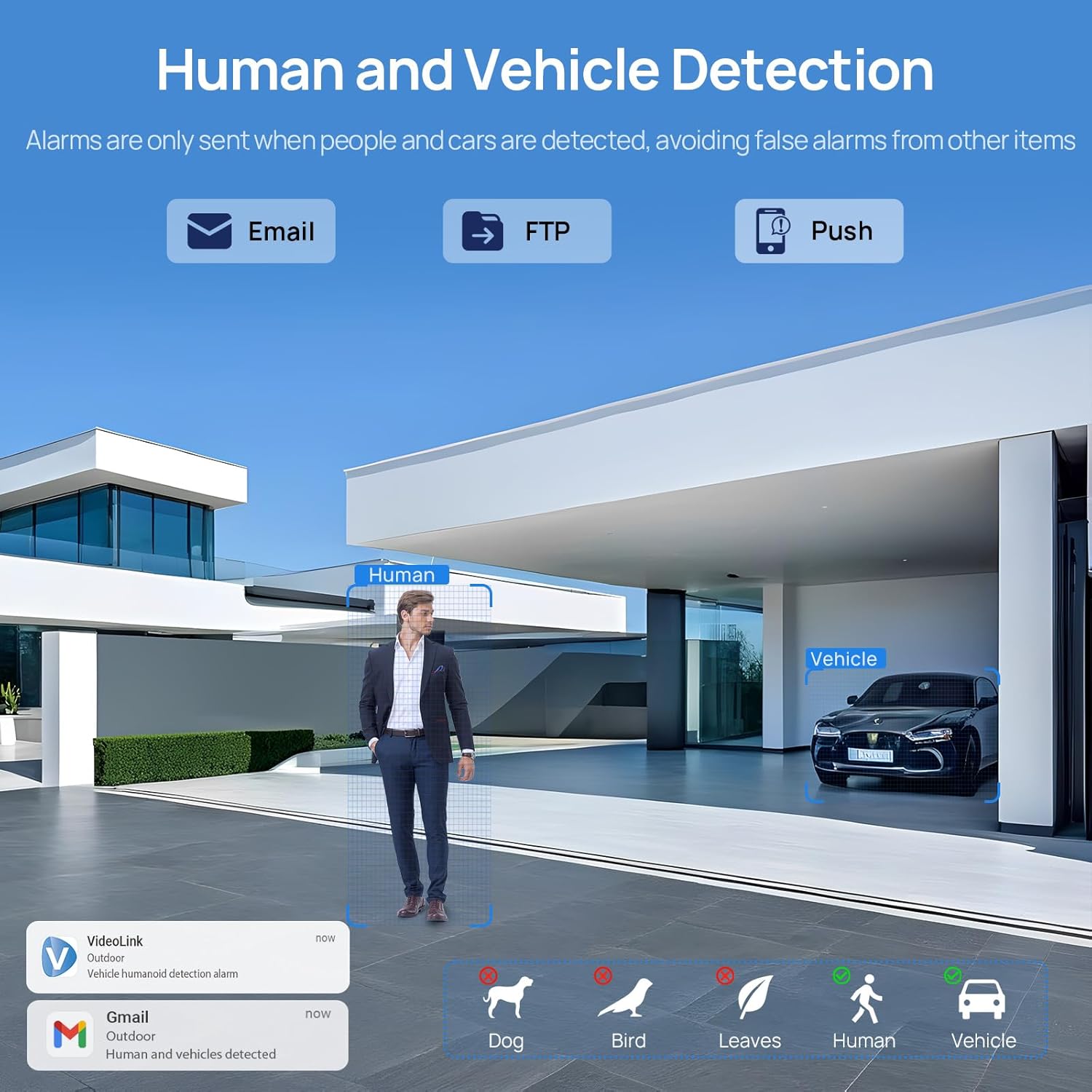
Image: A scene demonstrating the camera's human and vehicle detection capabilities, showing alerts for detected individuals and cars while ignoring animals or environmental factors.
4.3 இரவு பார்வை முறைகள்
The camera offers versatile night vision capabilities:
- ஐஆர் நைட் விஷன்: By default, the IR illuminator is active at night for black and white surveillance.
- முழு வண்ண இரவு பார்வை: When a target is detected, the spotlight activates to record in full color. The spotlight will warn the target in the area.
- Smart Dual Illumination: The camera intelligently switches between IR light and warm light (spotlight) depending on the situation, providing color details when needed.

Image: A split image showing a scene at night with the spotlight off (black and white IR vision) and with the spotlight on (full-color night vision), demonstrating the camera's dual illumination feature.
4.4 5X ஆப்டிகல் ஜூம்
The 2.7-13.5mm varifocal lens allows for 5X optical zoom, enabling you to adjust the viewing angle from 32° to 100° and focus on specific details without losing image quality.
- Adjust the zoom level through the camera's software or mobile application.
- The optical zoom maintains clarity even at maximum magnification.

Image: A series of images demonstrating the 5X optical zoom capability of the camera, showing a wide view and then progressively zoomed-in views of a specific area, highlighting the detail retention.
4.5 இருவழி ஆடியோ
The integrated microphone and speaker enable two-way communication, allowing you to listen to the environment and speak through the camera.
- Access the two-way audio function via the mobile app.
- Use it to greet visitors or deter unwanted individuals.

Image: A scenario depicting a delivery person at a door, with a VIKVIZ camera facilitating a two-way audio conversation between the homeowner (via smartphone app) and the delivery person.
5. பராமரிப்பு
- வழக்கமான சுத்தம்: கேமரா லென்ஸை அவ்வப்போது மென்மையான, டி-துணியால் சுத்தம் செய்யவும்.amp தெளிவான படத் தரத்தை உறுதி செய்ய துணியைப் பயன்படுத்துங்கள். சிராய்ப்பு கிளீனர்களைத் தவிர்க்கவும்.
- நிலைபொருள் புதுப்பிப்புகள்: உற்பத்தியாளரைச் சரிபார்க்கவும் website or app for available firmware updates to ensure optimal performance and security.
- கேபிள் ஆய்வு: Regularly inspect the Ethernet cable for any signs of wear or damage, especially in outdoor installations.
- சுற்றுச்சூழல் பாதுகாப்பு: While the camera is weatherproof (IP66), ensure it is not submerged in water or exposed to extreme conditions beyond its operating temperature range (-10°C to 50°C).
6. சரிசெய்தல்
- சக்தி இல்லை: Ensure the PoE NVR/switch/injector is powered on and the Ethernet cable is securely connected. If using a DC adapter, verify the power source and connection.
- வீடியோ ஊட்டம் இல்லை: Check network connectivity. Ensure the camera is properly configured in your NVR or app. Verify the IP address and network settings.
- மோசமான படத்தின் தரம்: Clean the camera lens. Check for obstructions in the field of view. Ensure sufficient lighting for night vision modes. Adjust focus if applicable.
- தவறான இயக்க எச்சரிக்கைகள்: Adjust the sensitivity settings for human/vehicle detection in the camera's software or app. Refine detection zones to exclude irrelevant areas.
- இருவழி ஆடியோ சிக்கல்கள்: Check microphone and speaker settings in the app. Ensure network bandwidth is sufficient for real-time audio.
- கேமராவை தொலைவிலிருந்து அணுக முடியாது: Verify your internet connection. Ensure port forwarding (if required by your network setup) is correctly configured on your router. Check firewall settings.
7. விவரக்குறிப்புகள்
| அம்சம் | விவரக்குறிப்பு |
|---|---|
| மாதிரி பெயர் | PG2T56IRC-ZS |
| தீர்மானம் | 5MP (2592 x 1944) @ 30fps |
| ஆப்டிகல் ஜூம் | 5X (2.7-13.5mm varifocal lens) |
| Viewing கோணம் | 105° (wide) to 32° (telephoto) |
| நைட் விஷன் ரேஞ்ச் | 98 அடி (30 மீட்டர்) வரை |
| இரவு பார்வை வகை | Full Color, IR, Smart Hybrid Light |
| ஆடியோ | இருவழி ஆடியோ (உள்ளமைக்கப்பட்ட மைக் & ஸ்பீக்கர்) |
| வீடியோ சுருக்கம் | H.265+, H.265, H.264 |
| இணைப்பு | Ethernet (PoE), ONVIF |
| சேமிப்பக விருப்பங்கள் | NFS, NVR, APP Cloud Storage, Micro SD Card (up to 256GB) |
| வானிலை எதிர்ப்பு மதிப்பீடு | IP66 |
| இயக்க வெப்பநிலை | -10°C முதல் 50°C வரை (14°F முதல் 122°F வரை) |
| சக்தி ஆதாரம் | PoE (Power over Ethernet) or 12V DC (adapter not included) |
| பொருள் | உலோகம் |
| பரிமாணங்கள் | 12.7 x 5.11 x 4.72 அங்குலம் |
| எடை | 2.2 பவுண்டுகள் |
8. உத்தரவாதம் மற்றும் ஆதரவு
8.1 திரும்பக் கொள்கை
This product is eligible for a return within 30 days of purchase for a refund or replacement, subject to the retailer's terms and conditions.
8.2 தொழில்நுட்ப ஆதரவு
For technical assistance, troubleshooting, or warranty inquiries, please contact VIKVIZ customer support through their official website or the retailer where the product was purchased. Refer to your purchase documentation for specific contact details.