
1. அறிமுகம்
This manual provides detailed instructions for the proper use and maintenance of your BAOFENG UV-32 10W Ham Radio. The UV-32 is a multi-band two-way radio featuring 10W selectable power, GPS navigation, a 2.0-inch color display, and multiple programming options including wireless app connectivity. Please read this manual thoroughly before operating the device to ensure safe and efficient communication.
2. பாதுகாப்பு தகவல்
Observe the following safety precautions to prevent injury or damage to the radio:
- வெடிக்கும் வளிமண்டலங்களில் (எ.கா., எரியக்கூடிய வாயுக்கள், தூசி துகள்கள், உலோகப் பொடிகள்) ரேடியோவை இயக்க வேண்டாம்.
- Do not transmit without an antenna connected.
- Keep the antenna at least 2.5 cm (1 inch) away from your body when transmitting.
- Use only BAOFENG-approved batteries and chargers. Unauthorized accessories may cause damage or fire.
- Do not disassemble or modify the radio. Repairs should only be performed by qualified technicians.
- நேரடி சூரிய ஒளி அல்லது அதிக வெப்பநிலையில் நீண்ட நேரம் வெளிப்படுவதைத் தவிர்க்கவும்.
- Do not operate the radio while driving or performing other activities that require full attention.
3. தொகுப்பு உள்ளடக்கங்கள்
உங்கள் தொகுப்பில் அனைத்து பொருட்களும் உள்ளதா என சரிபார்க்கவும்:
- 1 x BAOFENG UV-32 Radio
- 1 x 2500mAh பேட்டரி
- 1 x USB-C Charger
- 1 x Desktop Charger Base
- 1 x Standard UV Antenna
- 1 x Long Airband Antenna
- 1 x ஹெட்செட்
- 1 x பெல்ட் கிளிப்
- 1 x Radio Case Holder

Image: The BAOFENG UV-32 radio shown with its complete set of accessories, including the battery, charger, antennas, headset, belt clip, and case holder.
4. தயாரிப்பு முடிந்துவிட்டதுview
உங்கள் UV-32 வானொலியின் முக்கிய கூறுகளுடன் உங்களைப் பழக்கப்படுத்திக் கொள்ளுங்கள்.

படம்: முன்பக்கம் view of the BAOFENG UV-32 radio, highlighting the 2.0-inch color display, alphanumeric keypad, and function buttons.
முக்கிய கூறுகள்:
- ஆண்டெனா இணைப்பான்: For attaching the standard UV or airband antenna.
- பவர்/வால்யூம் நாப்: Turns the radio on/off and adjusts volume.
- காட்சி: 2.0-inch color screen showing frequency, channel, battery status, and other indicators.
- PTT பொத்தான்: பரிமாற்றத்திற்கான புஷ்-டு-டாக் பொத்தான்.
- Side Keys (P1, P2): Customizable function keys.
- விசைப்பலகை: Alphanumeric input for frequencies, channels, and menu navigation.
- USB-C சார்ஜிங் போர்ட்: For direct battery charging.
- Accessory Jack: For connecting the headset or programming cable.
5 அமைவு
5.1 பேட்டரி நிறுவல் மற்றும் சார்ஜிங்
- Align the 2500mAh Li-ion battery with the grooves on the back of the radio.
- பேட்டரி சரியான இடத்தில் சொடுக்கும் வரை மேல்நோக்கி ஸ்லைடு செய்யவும்.
- To charge, connect the USB-C charger directly to the battery's USB-C port or place the radio with the battery attached into the desktop charging base.
- The charging indicator on the desktop base will show red during charging and green when fully charged.

Image: A close-up of the 2500mAh Li-ion battery for the UV-32, highlighting its integrated USB-C charging port.
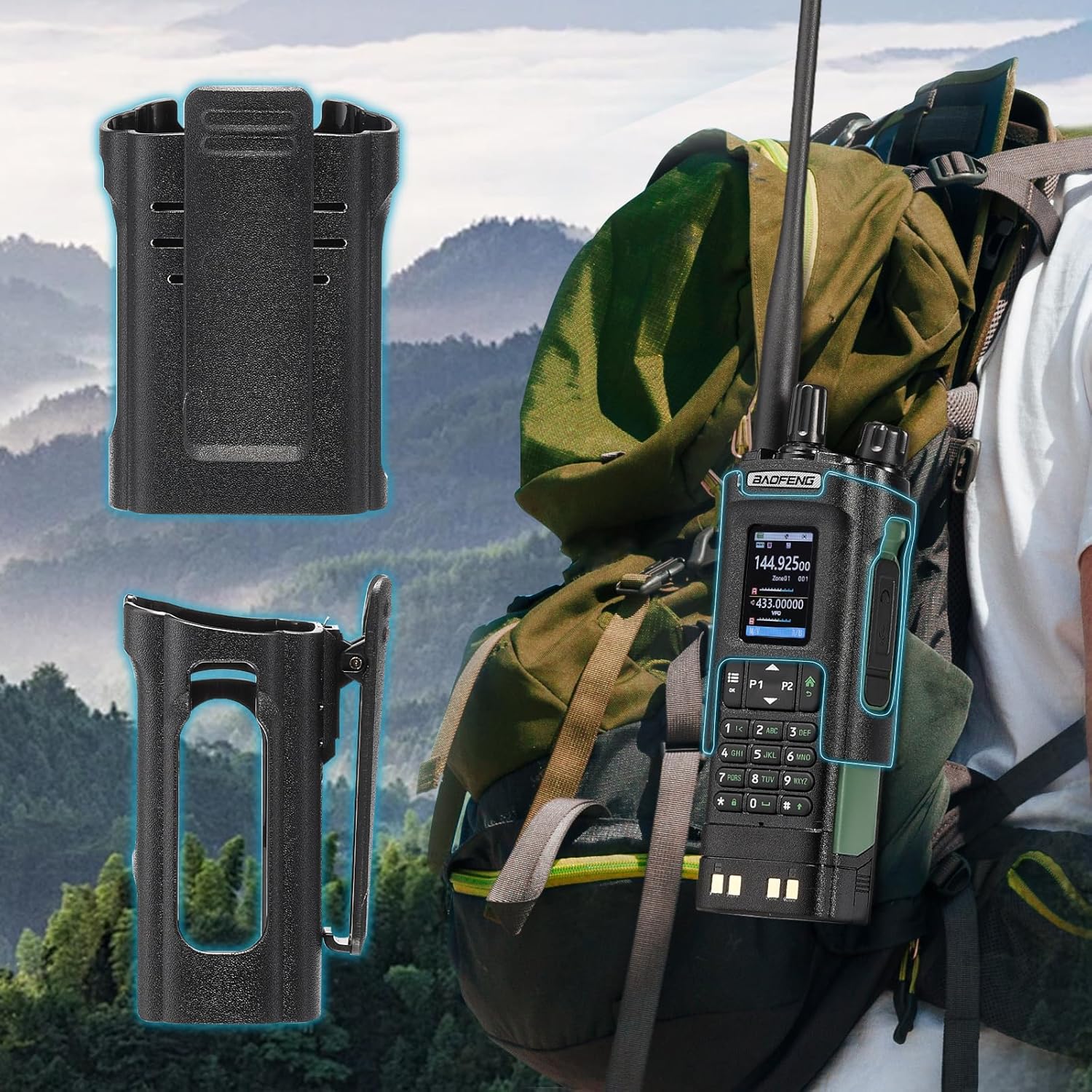
Image: The BAOFENG UV-32 radio demonstrating both direct USB-C charging and charging via its desktop cradle.
5.2 ஆண்டெனா நிறுவல்
- Select the appropriate antenna: the standard UV antenna for general VHF/UHF use or the long airband antenna for enhanced aviation signal reception.
- Screw the chosen antenna clockwise onto the antenna connector at the top of the radio until it is finger-tight. Do not overtighten.

Image: The BAOFENG UV-32 radio illustrating the use of two different antennas: a standard antenna for UHF/VHF and a longer antenna specifically designed for airband reception.
5.3 Belt Clip Installation
- ரேடியோவின் பின்புறத்தில் உள்ள திருகு துளைகளுடன் பெல்ட் கிளிப்பை சீரமைக்கவும்.
- Secure the belt clip using the provided screws.
- The radio case holder can be used to attach the radio to a backpack or belt for secure carrying.

Image: The BAOFENG UV-32 radio securely mounted to a backpack strap using its belt clip and an additional case holder, demonstrating portability.
6. வானொலியை இயக்குதல்
6.1 பவர் ஆன்/ஆஃப் மற்றும் ஒலியளவு
Rotate the Power/Volume knob clockwise to turn the radio on and increase volume. Rotate counter-clockwise to decrease volume and turn the radio off.
6.2 காட்சி முடிந்ததுview
The 2.0-inch color display provides essential information:
- அதிர்வெண்/சேனல்: Displays the current operating frequency or channel number.
- பேட்டரி நிலை: மீதமுள்ள பேட்டரி சார்ஜ் குறிக்கிறது.
- சிக்னல் வலிமை: Shows the strength of received signals.
- பயன்முறை குறிகாட்டிகள்: Icons for various functions like GPS, Bluetooth, power level, etc.

Image: A close-up of the BAOFENG UV-32's 2-inch color display, showing detailed frequency, channel, and status information.
6.3 Channel Mode vs. Frequency Mode
The radio operates in two primary modes:
- அதிர்வெண் முறை (VFO): Allows direct input of frequencies for scanning or temporary use.
- சேனல் பயன்முறை (MR): Uses pre-programmed channels for quick access to stored frequencies.
அழுத்தவும் மெனு button and navigate to the mode setting to switch between VFO and MR modes.
6.4 அதிர்வெண் தேர்வு
- விசைப்பலகை: In Frequency Mode, directly enter the desired frequency using the numeric keypad.
- Quick Channel Knob: Rotate the top knob to quickly scroll through frequencies or channels.
- மேல்/கீழ் அம்புகள்: Use the arrow keys (P1/P2) to fine-tune frequencies or navigate channels.
6.5 அனுப்புதல் மற்றும் பெறுதல்
- Ensure an antenna is properly connected.
- Select the desired frequency or channel.
- அனுப்ப, அழுத்திப் பிடிக்கவும் PTT button on the side of the radio. Speak clearly into the microphone.
- விடுவிக்கவும் PTT button to stop transmitting and return to receive mode.
- சக்தி நிலைகள்: The UV-32 offers High (H), Medium (M), and Low (L) power settings. Adjust this in the menu to balance range and battery life.
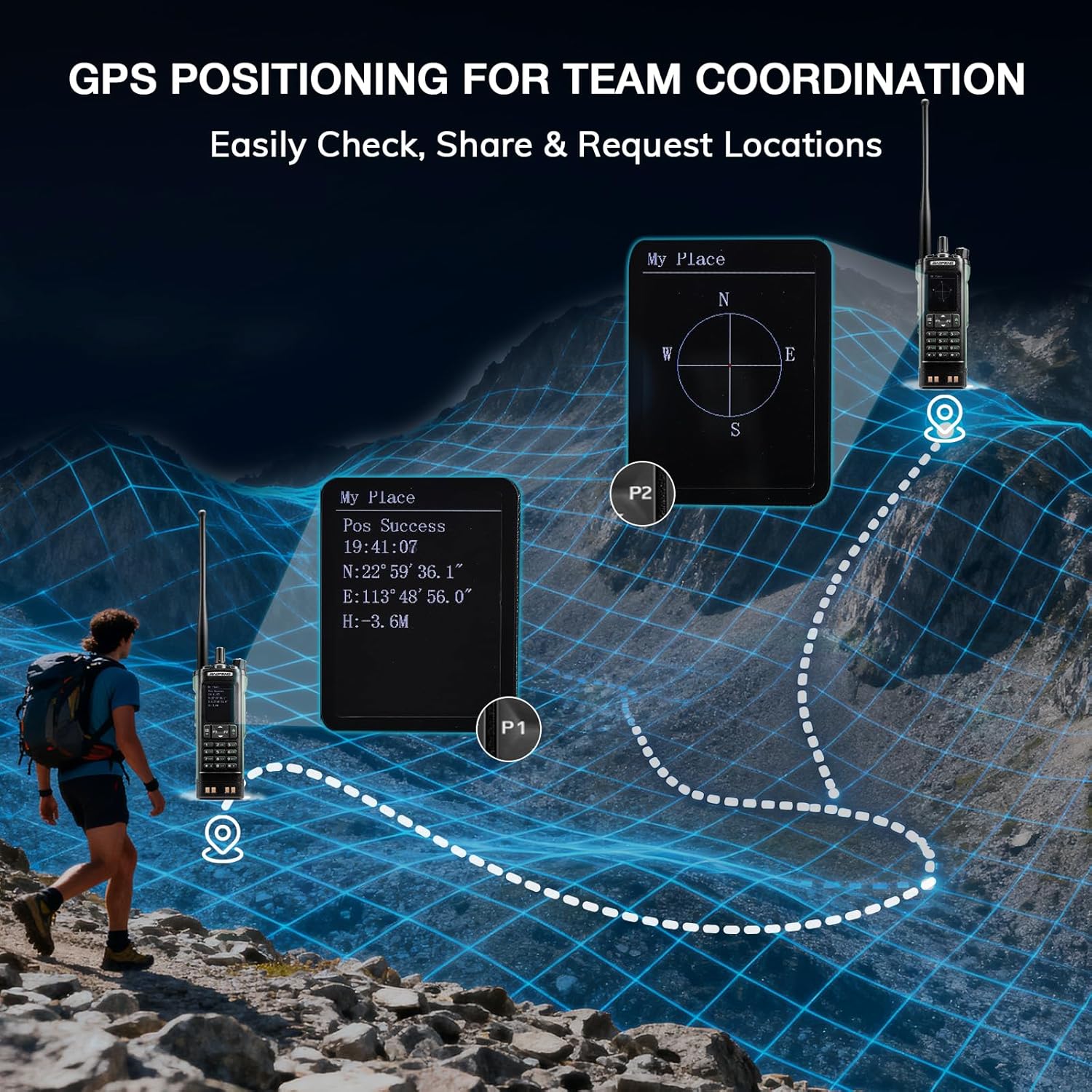
Image: The BAOFENG UV-32 radio's display showing different power output levels (High, Medium, Low) and an external SWR meter for measurement.
6.6 Programming Options
The UV-32 offers several methods for programming frequencies and settings:
- Wireless APP Programming: Connect your radio to a smartphone (iOS/Android) via Bluetooth using the dedicated BT app for quick and wireless programming.
- CHIRP Software: For advanced or bulk programming, use CHIRP software on a PC. Select "UV-17ProGPS" as the radio model in CHIRP.
- Keypad Programming: Basic programming can be done directly on the radio using the keypad and menu system.
- One-Key Frequency Copy: This feature allows for easy cloning of frequencies from another radio. Refer to the radio's on-screen prompts or full manual for specific steps.

Image: An illustration depicting the various programming methods available for the BAOFENG UV-32, including mobile app (Bluetooth), CPS software, CHIRP software, and direct keypad input.

Image: Two BAOFENG radios illustrating the one-key frequency copy function, allowing for quick and easy channel cloning between devices.
6.7 ஜிபிஎஸ் வழிசெலுத்தல்
The integrated GPS module provides real-time location data:
- Access the GPS function through the radio's menu.
- View your current latitude, longitude, and altitude.
- The radio supports sharing your location or requesting coordinates from other team members for improved coordination.

Image: A visual representation of the BAOFENG UV-32's GPS functionality, showing how it displays coordinates and facilitates location sharing for team coordination in outdoor environments.
6.8 Enhanced Airband Reception
For clearer reception of aviation signals, utilize the dedicated AM antenna included with your UV-32. This specialized antenna is designed to provide more accurate and stable airband listening compared to standard UV dual-band antennas.
6.9 NOAA வானிலை வானொலி
The UV-32 can receive NOAA weather alerts. Consult the radio's menu for instructions on how to scan for and select NOAA channels in your area.
6.10 Customizable Side Keys
The radio features four customizable side keys (P1, P2, and two others). These can be programmed via the menu or programming software to quickly access frequently used functions such as scan, monitor, or power level adjustment.

Image: A close-up of the BAOFENG UV-32's side, highlighting the customizable P1 and P2 function keys.
7. பராமரிப்பு
7.1 வானொலியை சுத்தம் செய்தல்
ரேடியோவின் மேற்பரப்பை மென்மையான, d துணியால் துடைக்கவும்.amp துணி. கடுமையான இரசாயனங்கள் அல்லது சிராய்ப்பு கிளீனர்களைப் பயன்படுத்த வேண்டாம். பயன்படுத்துவதற்கு முன்பு அனைத்து போர்ட்களும் உலர்ந்திருப்பதை உறுதிசெய்யவும்.
7.2 பேட்டரி பராமரிப்பு
- முதல் பயன்பாட்டிற்கு முன் பேட்டரியை முழுமையாக சார்ஜ் செய்யுங்கள்.
- பேட்டரியை அதிகமாக சார்ஜ் செய்வதையோ அல்லது முழுமையாக வடிகட்டுவதையோ தவிர்க்கவும்.
- நீண்ட நேரம் பயன்படுத்தாதபோது, பேட்டரியை குளிர்ந்த, உலர்ந்த இடத்தில் சேமிக்கவும்.
7.3 சேமிப்பு
When storing the radio for a long time, remove the battery and store it separately. Keep the radio in a dry, dust-free environment away from direct sunlight and extreme temperatures.
8. சரிசெய்தல்
| பிரச்சனை | சாத்தியமான காரணம் | தீர்வு |
|---|---|---|
| ரேடியோ இயக்கப்படவில்லை. | பேட்டரி சரியாக நிறுவப்படவில்லை அல்லது சார்ஜ் ஆகவில்லை. | Ensure battery is securely attached. Charge the battery fully. |
| கடத்த முடியாது | Antenna not connected. Incorrect frequency/channel. Low power setting. | Attach antenna. Verify frequency/channel. Increase power level. |
| மோசமான வரவேற்பு/பரிமாற்ற வரம்பு | Obstructions. Low power setting. Incorrect antenna. | Move to an open area. Increase power. Ensure correct antenna is used and properly connected. |
| Programming errors with CHIRP/APP | Incorrect radio model selected. Connection issues. Outdated software/firmware. | Ensure "UV-17ProGPS" is selected in CHIRP. Re-establish Bluetooth connection. Update software/firmware if available. |
9. விவரக்குறிப்புகள்
| அம்சம் | விவரம் |
|---|---|
| பிராண்ட் | BAOFENG |
| மாதிரி எண் | UV-32 |
| சேனல்களின் எண்ணிக்கை | 1000 |
| அதிர்வெண் வரம்பு | UHF, VHF |
| சக்தி வெளியீடு | Up to 10W (selectable High, Medium, Low) |
| காட்சி | 2.0" வண்ணக் காட்சி |
| பேட்டரி | 2500mAh லி-அயன் (சேர்க்கப்பட்டுள்ளது) |
| சார்ஜ் செய்கிறது | USB-C, Desktop Charger Base |
| சிறப்பு அம்சங்கள் | Digital Display, Dual Band, USB-C Rechargeable, Wireless APP Programming, Wireless Channel Clone, GPS, NOAA Reception |
| இணைப்பு நெறிமுறை | புளூடூத் |
| தயாரிப்பு பரிமாணங்கள் | 1.2"டி x 2.2"அடி x 4"ஹெட் |
| நீர் எதிர்ப்பு நிலை | வாட்டர் ரெசிஸ்டண்ட் இல்லை |
10. உத்தரவாதம் மற்றும் ஆதரவு
Your BAOFENG UV-32 radio comes with an 18 மாத உத்தரவாதம். BAOFENG also provides வாழ்நாள் ஆதரவு இந்த தயாரிப்புக்காக.
For technical assistance, warranty claims, or further inquiries, please visit the official BAOFENG website or contact their customer support directly. Keep your purchase receipt as proof of purchase for warranty services.