
1. அறிமுகம்
This manual provides essential information for setting up, operating, maintaining, and troubleshooting your Apple Watch Series 11 GPS + Cellular 42mm. Please read it thoroughly to ensure optimal use of your device.
பெட்டியில் என்ன இருக்கிறது
- ஆப்பிள் வாட்ச் சீரிஸ் 11 கேஸ்
- விளையாட்டு இசைக்குழு
- 1 மீ காந்த சார்ஜிங் கேபிள்
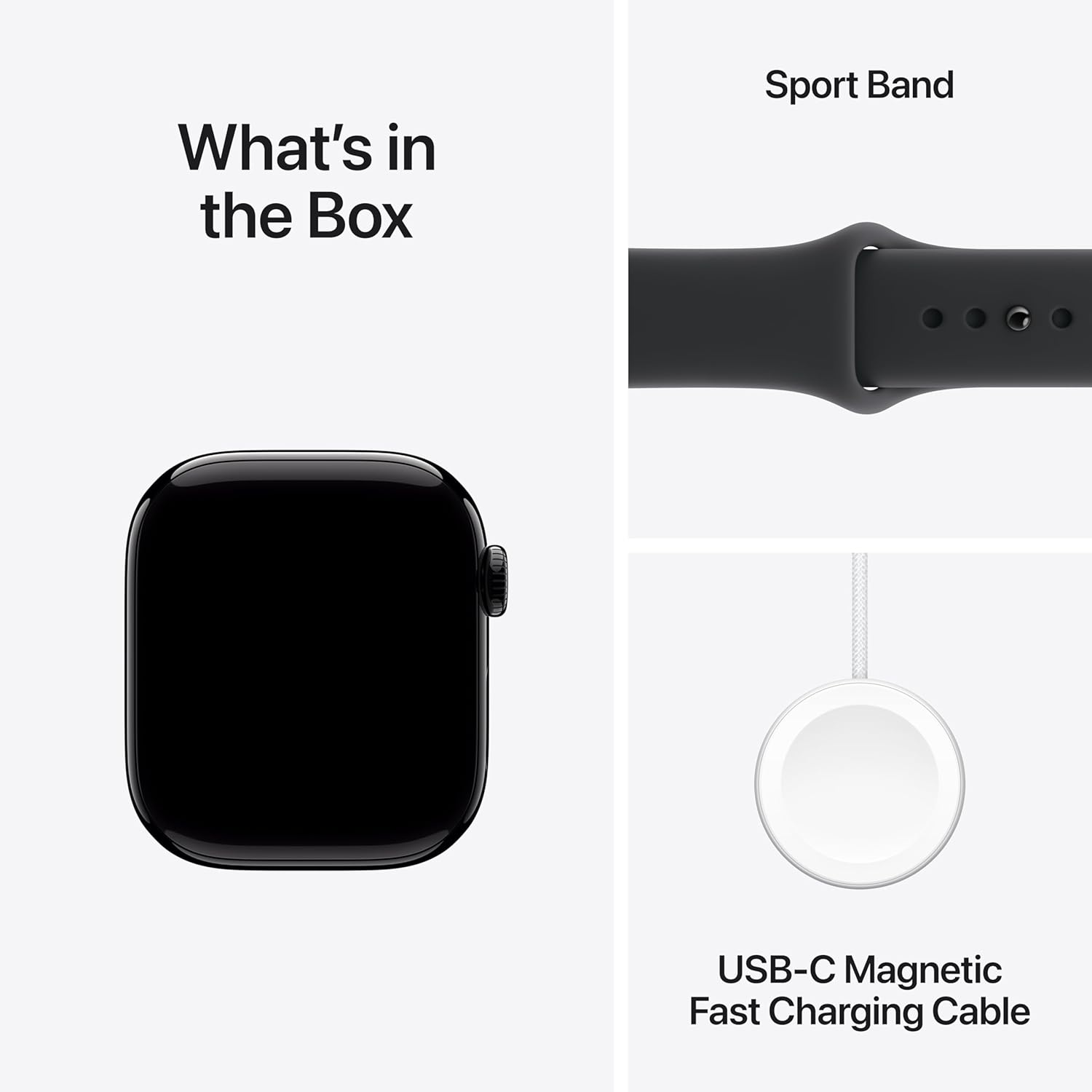
Image: Included components in the Apple Watch Series 11 packaging.
முக்கிய அம்சங்கள்
- தூக்க மதிப்பெண்: Track and understand your sleep quality for more restorative rest.
- மேம்பட்ட சுகாதார கண்காணிப்பு: Take an ECG, receive notifications for high/low heart rate and irregular rhythm, view overnight health metrics with the Vitals app, and measure blood oxygen levels.
- பிரமிக்க வைக்கும் வடிவமைப்பு: Thin and lightweight, designed for comfortable wear during exercise and sleep.
- சக்திவாய்ந்த உடற்பயிற்சி கூட்டாளர்: Advanced metrics for workouts, including Pacer, Heart Rate Zones, training load, and Workout Buddy powered by Apple Intelligence from your iPhone.
- நீட்டிக்கப்பட்ட பேட்டரி ஆயுள்: Up to 24 hours of normal use, with fast charging providing up to 8 hours of use in just 15 minutes.
2 அமைவு
இசைக்குழுவை இணைக்கிறது
Align the band with the slots on the Apple Watch case and slide it in until you hear a click. Ensure both ends of the band are securely attached before wearing the watch.
ஐபோனுடன் இணைத்தல்
- உங்கள் ஐபோன் சமீபத்திய iOS பதிப்பிற்கு புதுப்பிக்கப்பட்டுள்ளதையும், புளூடூத் இயக்கப்பட்டிருப்பதையும் உறுதிசெய்யவும்.
- ஆப்பிள் லோகோ தோன்றும் வரை பக்கவாட்டு பொத்தானை அழுத்திப் பிடிப்பதன் மூலம் உங்கள் ஆப்பிள் வாட்சை இயக்கவும்.
- Bring your iPhone near your Apple Watch. A pairing animation will appear on your iPhone. Tap தொடரவும்.
- உங்கள் ஐபோனை ஆப்பிள் வாட்ச் தோன்றும் வகையில் வைக்கவும் viewகண்டுபிடிப்பாளர்.
- விரும்பினால் செல்லுலார் சேவையை அமைப்பது உட்பட, இணைத்தல் செயல்முறையை முடிக்க, உங்கள் iPhone மற்றும் Apple Watch இரண்டிலும் திரையில் உள்ள வழிமுறைகளைப் பின்பற்றவும்.

Image: Apple Watch display during initial setup or showing key features.
3. இயக்க வழிமுறைகள்
அடிப்படை வழிசெலுத்தல்
- டிஜிட்டல் கிரீடம்: Rotate to scroll, zoom, or adjust values. Press once to go to the watch face or app list. Double-press to switch between your last two apps. Press and hold for Siri.
- பக்க பட்டன்: Press once to open the Dock (recently used apps). Double-press for Apple Pay. Press and hold for emergency services or to power off.
- தொடுதிரை: Tap to select, swipe to navigate, force touch for additional options (if available).
Making Calls and Sending Messages (Cellular Model)
With the GPS + Cellular model, you can make and receive calls and send messages directly from your Apple Watch, even when your iPhone is not nearby. Ensure cellular service is activated through your carrier.
- அழைப்புகள்: Open the Phone app, select a contact, or dial a number.
- செய்திகள்: Open the Messages app, select a contact, and use dictation, Scribble, or pre-written replies.
4. Health and Fitness Features
Your Apple Watch Series 11 is equipped with advanced sensors to monitor your health and track your fitness activities.
செயல்பாடு கண்காணிப்பு
The Activity app tracks your daily movement, exercise, and stand goals. Close your rings to stay motivated.

Image: Tracking daily activity and workouts on Apple Watch.
இதய ஆரோக்கிய கண்காணிப்பு
- ECG செயலி: ஏட்ரியல் ஃபைப்ரிலேஷனின் (AFib) அறிகுறிகளைச் சரிபார்க்க எலக்ட்ரோ கார்டியோகிராம் எடுக்கவும்.
- Heart Rate Notifications: Receive alerts for unusually high or low heart rates, and irregular heart rhythms.
- இரத்த ஆக்ஸிஜன் செயலி: தேவைக்கேற்ப உங்கள் இரத்த ஆக்ஸிஜன் செறிவூட்டலை அளவிடவும்.
Sleep Tracking and Vitals App
Monitor your sleep patterns and receive a sleep score. The Vitals app provides overnight health metrics for a comprehensive overview உங்கள் நலனில்.

Image: Meaningful health insights including heart rate and overnight vitals.
5. இணைப்பு
The Apple Watch Series 11 GPS + Cellular offers robust connectivity options.
GPS and Cellular
Integrated GPS allows for accurate tracking of your location and workouts without your iPhone. Cellular connectivity (requires a compatible plan) enables calls, messages, and data usage independently from your iPhone.

Image: Demonstrating 5G connectivity on the Apple Watch.
புளூடூத்
Connect your Apple Watch to Bluetooth headphones, heart rate monitors, and other accessories.
6. பேட்டரி மற்றும் சார்ஜிங்
உங்கள் ஆப்பிள் வாட்சை சார்ஜ் செய்கிறது
Use the included 1m Magnetic Charging Cable to charge your Apple Watch. Connect the magnetic end to the back of your watch and the USB-C end to a compatible power adapter (sold separately).
- பேட்டரி ஆயுள்: Up to 24 hours of normal use.
- வேகமாக சார்ஜ் செய்தல்: Achieve up to 8 hours of normal use with just 15 minutes of charging.
7. பராமரிப்பு
உங்கள் ஆப்பிள் வாட்சை சுத்தம் செய்தல்
உங்கள் ஆப்பிள் வாட்சை சுத்தம் செய்ய, சிராய்ப்பு இல்லாத, பஞ்சு இல்லாத துணியால் துடைக்கவும். தேவைப்பட்டால், லேசாக dampen the cloth with fresh water. Do not use soaps or other cleaning products.
நீர் எதிர்ப்பு
Apple Watch Series 11 is water resistant. It can be used for shallow-water activities like swimming in a pool or ocean. It should not be used for scuba diving, waterskiing, or other activities involving high-velocity water or submersion below shallow depths.
மென்பொருள் புதுப்பிப்புகள்
Keep your Apple Watch software updated to the latest version for optimal performance and security. Updates are managed through the Watch app on your paired iPhone.
8. சரிசெய்தல்
பொதுவான சிக்கல்கள் மற்றும் தீர்வுகள்
- Watch not pairing: புளூடூத் இயக்கத்தில் இருப்பதையும், இரண்டு சாதனங்களும் சார்ஜ் செய்யப்பட்டுள்ளதையும் உறுதிசெய்து, உங்கள் iPhone மற்றும் Apple Watch இரண்டையும் மறுதொடக்கம் செய்ய முயற்சிக்கவும்.
- பேட்டரி விரைவாக தீர்ந்துவிடும்: Check for background app refresh, reduce screen brightness, or disable unnecessary notifications.
- செயலிகள் பதிலளிக்கவில்லை: Force quit the app by pressing the side button, then the Digital Crown to open the app switcher, swipe left on the app, and tap the 'X' button.
- கடிகாரம் இயக்கப்படவில்லை: Place the watch on its charger for at least 30 minutes. If it still doesn't turn on, contact support.
Restarting Your Apple Watch
Press and hold the side button until the power off slider appears. Drag the slider to turn off. To turn it back on, press and hold the side button again until the Apple logo appears.
9. விவரக்குறிப்புகள்
| அம்சம் | விவரம் |
|---|---|
| மாதிரி எண் | MF854HN/A |
| பொதுவான பெயர் | ஆப்பிள் வாட்ச் தொடர் 11 |
| இயக்க முறைமை | வாட்ச்ஓஎஸ் |
| நினைவக சேமிப்பு திறன் | 64 ஜிபி |
| பொருளின் எடை | 29.6 கிராம் |
| பேட்டரி திறன் | 0.1 மில்லிamp Hours (typical usage up to 24 hours) |
| இணைப்பு தொழில்நுட்பம் | புளூடூத், செல்லுலார் |
| சிறப்பு அம்சங்கள் | Activity Tracker, Alarm Clock, Always On Display, Fall Detection, GPS |
| உற்பத்தியாளர் | ஆப்பிள் |
| பிறப்பிடமான நாடு | சீனா |
10. உத்தரவாதம் மற்றும் ஆதரவு
தயாரிப்பு உத்தரவாதம்
Your Apple Watch Series 11 is covered by Apple's standard limited warranty. For detailed terms and conditions, please refer to the warranty information provided with your purchase or visit the official Apple webதளம்.
AppleCare Service
வாங்குவதைக் கருத்தில் கொள்ளுங்கள்asing AppleCare for extended coverage and technical support. A 1-Year Protect+ with AppleCare Service is available for purchase.
வாடிக்கையாளர் ஆதரவு
மேலும் உதவி, தொழில்நுட்ப ஆதரவு அல்லது சேவை விசாரணைகளுக்கு, தயவுசெய்து அதிகாரியைப் பார்வையிடவும் ஆப்பிள் ஆதரவு webதளம் அல்லது ஆப்பிள் வாடிக்கையாளர் சேவையை நேரடியாகத் தொடர்பு கொள்ளவும்.