
அறிமுகம்
The ShanWan Wireless Controller is a versatile gaming peripheral designed for use across multiple platforms, including PC, iPhone, Android, Nintendo Switch, and Steam. It offers tri-mode connectivity (Bluetooth, 2.4G wireless, and USB-C wired) to ensure a seamless gaming experience. This manual provides detailed instructions for setup, operation, maintenance, and troubleshooting to help you maximize your controller's performance.
Note: This controller is not compatible with Xbox or PlayStation 4/5 consoles.
தொகுப்பு உள்ளடக்கங்கள்
- ShanWan Wireless Controller
- USB-C சார்ஜிங் கேபிள்
- 2.4G வயர்லெஸ் டாங்கிள்
- பயனர் கையேடு (இந்த ஆவணம்)
கன்ட்ரோலர் ஓவர்view
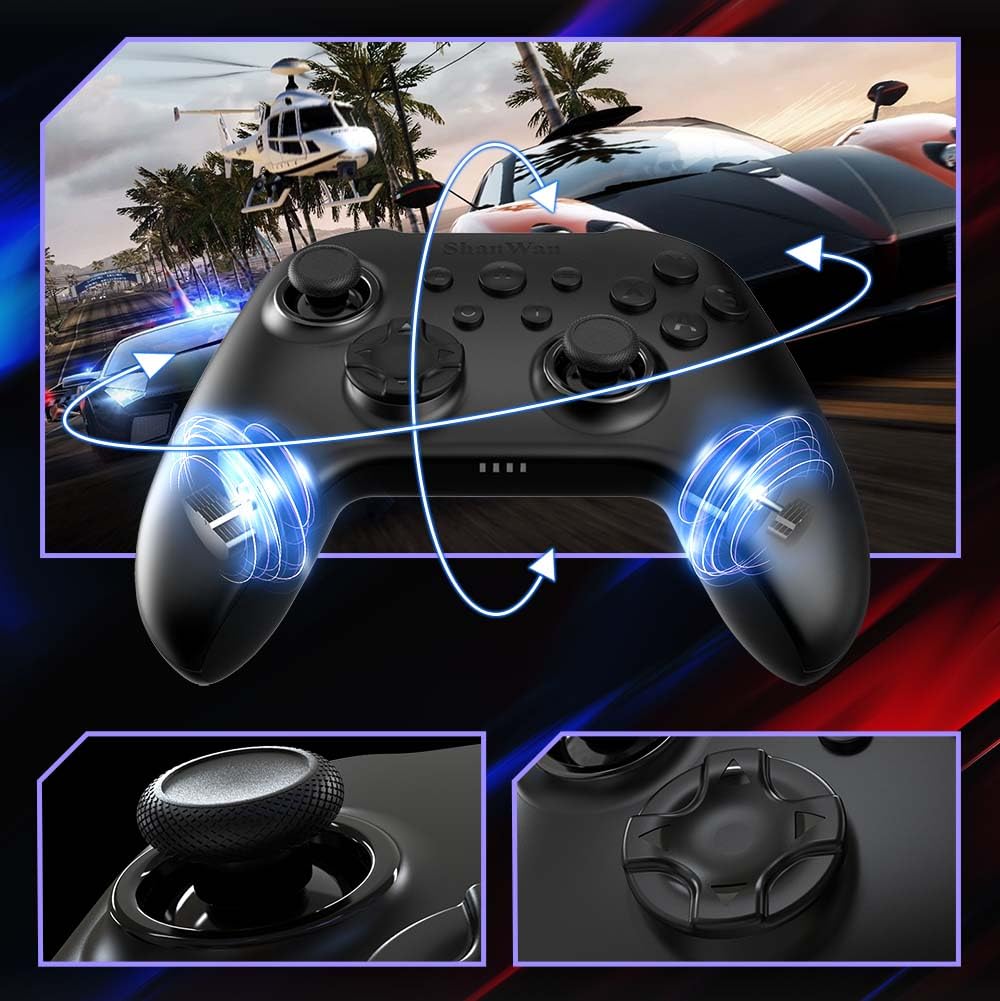
படம்: முன் view of the ShanWan Wireless Controller, showcasing its ergonomic design, dual joysticks, D-pad, and face buttons (A, B, X, Y).
படம்: மீண்டும் view of the ShanWan Wireless Controller, highlighting the mode switch for different platforms (X, D, S).
முக்கிய அம்சங்கள்:
- ஹால் எஃபெக்ட் ஜாய்ஸ்டிக்ஸ்: Designed for precision with no dead zones and anti-drift capabilities.
- Durable Gel Buttons: Conductive gel buttons tested for 1 million clicks for long-lasting performance.
- 6-அச்சு கைரோஸ்கோப்: Provides precise motion sensing for immersive gameplay.
- இரட்டை அதிர்வு மோட்டார்கள்: Delivers strong and subtle haptic feedback for an enhanced gaming experience.
- டர்போ செயல்பாடு: விரைவாகவும், மீண்டும் மீண்டும் பொத்தான் அழுத்தங்களை அனுமதிக்கிறது.
அமைவு
1. கட்டுப்படுத்தியை சார்ஜ் செய்தல்
Before initial use, fully charge the controller using the provided USB-C cable. Connect the USB-C end to the controller and the USB-A end to a power source (e.g., computer USB port, USB wall adapter). The charging indicator lights will show charging status and turn off when fully charged.
2. சாதனங்களுடன் இணைத்தல்
The ShanWan Wireless Controller supports three connection modes: Bluetooth, 2.4G Wireless, and USB-C Wired. Ensure the mode switch on the back of the controller is set to the appropriate platform before attempting to connect.

படம்: Visual representation of the controller's tri-mode connectivity, illustrating Bluetooth, 2.4G wireless, and USB-C wired options.
Mode Switch Settings:
- 'S' Mode: For Nintendo Switch.
- 'X' Mode: For PC (X-input), Android.
- 'D' Mode: For PC (D-input), iOS.
புளூடூத் இணைப்பு:
- Set the mode switch on the back of the controller to the desired platform ('S', 'X', or 'D').
- Press and hold the pairing button (usually a small button on the top or back) until the indicator lights flash rapidly.
- On your device (PC, iPhone, Android, Switch), go to Bluetooth settings and search for new devices.
- Select "ShanWan Controller" or a similar name from the list to pair.
- Once paired, the indicator lights on the controller will become solid.
2.4G Wireless Connection (for PC/Switch):
- Set the mode switch on the back of the controller to 'X' (for PC) or 'S' (for Switch).
- Insert the 2.4G wireless dongle into a USB port on your PC or Switch dock.
- Press the Home button on the controller to power it on. It should automatically connect to the dongle.
- The indicator lights will become solid once connected.
USB-C கம்பி இணைப்பு:
- Connect the USB-C cable to the controller and the other end to your PC or Switch dock.
- The controller will automatically be recognized as a wired device.
- No specific mode switch setting is required for wired connection, but setting it to the correct platform mode ('X' for PC, 'S' for Switch) is recommended for optimal compatibility.
இயக்க வழிமுறைகள்
பவர் ஆன்/ஆஃப்:
- பவர் ஆன்: Press the Home button once.
- பவர் ஆஃப்: Press and hold the Home button for 3-5 seconds, or the controller will automatically power off after a period of inactivity.
இயக்க கட்டுப்பாடு:
The built-in 6-axis gyroscope provides motion control capabilities, particularly useful for games on Nintendo Switch or other compatible platforms. Ensure the game supports motion controls for this feature to function.
அதிர்வு கருத்து:
The dual vibration motors provide haptic feedback during gameplay. The intensity of the vibration can often be adjusted through game settings or the Gamepad Space app.
டர்போ செயல்பாடு:
To activate the Turbo function for a specific button:
- Press and hold the button you wish to set to Turbo.
- While holding the button, press the Turbo button (refer to controller layout for location).
- The button will now repeatedly register presses as long as it is held down.
To deactivate Turbo for a button, repeat the process.
Software Customization (Gamepad Space App):
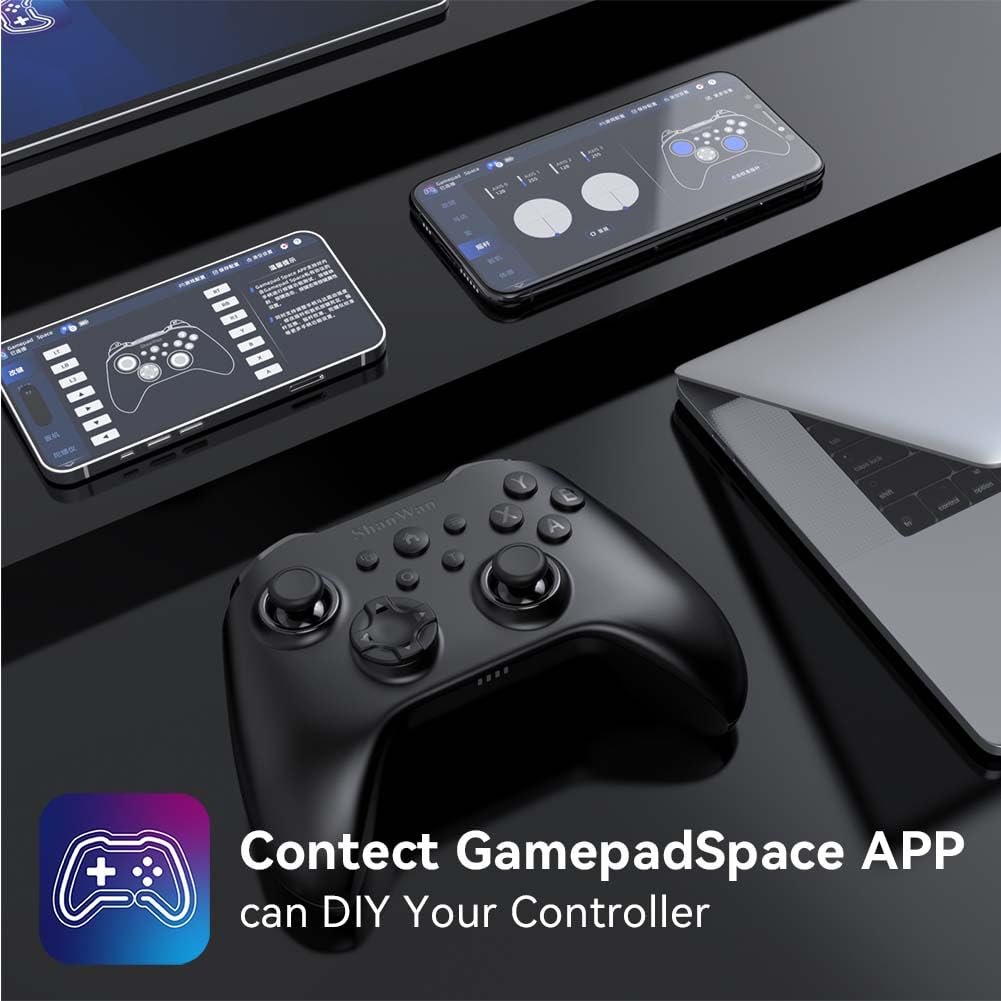
Enhance your gaming experience by customizing controller settings using the Gamepad Space mobile application.

படம்: A ShanWan controller alongside smartphones displaying the Gamepad Space app, illustrating options for calibration and on-the-fly adjustments.
- Download the "Gamepad Space" app from your mobile device's app store.
- Connect your controller to your mobile device via Bluetooth.
- பயன்பாட்டிற்குள், நீங்கள்:
- ஃபார்ம்வேரை மேம்படுத்தவும்.
- Adjust stick and trigger dead zones.
- Customize vibration intensity.
- Test buttons.
பராமரிப்பு
- சுத்தம்: கட்டுப்படுத்தியை சுத்தம் செய்ய மென்மையான, உலர்ந்த துணியைப் பயன்படுத்தவும். கடுமையான இரசாயனங்கள் அல்லது சிராய்ப்புப் பொருட்களைப் பயன்படுத்துவதைத் தவிர்க்கவும்.
- சேமிப்பு: நேரடி சூரிய ஒளி மற்றும் தீவிர வெப்பநிலையிலிருந்து விலகி, குளிர்ந்த, உலர்ந்த இடத்தில் கட்டுப்படுத்தியை சேமிக்கவும்.
- பேட்டரி பராமரிப்பு: பேட்டரி ஆயுளை நீட்டிக்க, கட்டுப்படுத்தியை அடிக்கடி முழுமையாக டிஸ்சார்ஜ் செய்வதைத் தவிர்க்கவும். தொடர்ந்து பயன்படுத்தாவிட்டாலும், அதை தொடர்ந்து சார்ஜ் செய்யவும்.
சரிசெய்தல்
கட்டுப்படுத்தி இணைக்கப்படவில்லை:
- கட்டுப்படுத்தி சார்ஜ் செய்யப்பட்டுள்ளதா என்பதை உறுதிப்படுத்தவும்.
- Verify the mode switch on the back of the controller is set correctly for your platform (S, X, or D).
- For Bluetooth, ensure your device's Bluetooth is on and the controller is in pairing mode.
- For 2.4G wireless, ensure the dongle is properly inserted and the controller is in the correct mode.
- கட்டுப்படுத்தியையும் உங்கள் சாதனத்தையும் மறுதொடக்கம் செய்ய முயற்சிக்கவும்.
உள்ளீட்டு தாமதம் அல்லது துண்டிப்புகள்:
- அருகில் வலுவான மின்காந்த குறுக்கீடுகள் இல்லை என்பதை உறுதிப்படுத்திக் கொள்ளுங்கள்.
- Move closer to your device for a stronger wireless signal.
- Ensure the controller's battery is not low.
- Consider using a wired USB-C connection for the most stable experience.
Joystick Drift or Unresponsive Buttons:
- Calibrate the joysticks and test buttons using the Gamepad Space app.
- Ensure the controller's firmware is up to date via the Gamepad Space app.
- Clean around the buttons and joysticks to remove any debris.
விவரக்குறிப்புகள்
| மாதிரி | B0FS13DT2B |
| இணைப்பு தொழில்நுட்பம் | ப்ளூடூத், 2.4G வயர்லெஸ், USB-C வயர்டு |
| இணக்கமான சாதனங்கள் | Android, iOS, Nintendo Switch, Nintendo Switch 2, PC |
| கட்டுப்படுத்தி வகை | கேம்பேட் |
| பொத்தான் அளவு | 12 |
| சிறப்பு அம்சங்கள் | Hall Effect Joysticks, 6-Axis Gyroscope, Dual Vibration, Turbo Function, Software Customization |
| சக்தி ஆதாரம் | பேட்டரி மூலம் இயங்கும் |
| பொருளின் எடை | 300 கிராம் |
| பொருளின் பரிமாணங்கள் (D x W x H) | 2.5" x 4" x 6" |
உத்தரவாதம் மற்றும் ஆதரவு
ShanWan products are designed for reliability and performance. For specific warranty information, please refer to the documentation included with your purchase or visit the official ShanWan support website. If you encounter any issues not covered in this manual, please contact ShanWan customer support for assistance.
ஆன்லைன் ஆதரவு: Visit the ShanWan Store on Amazon