
1. அறிமுகம்
Thank you for choosing the Yigars Y300 Robot Vacuum and Mop 2-in-1. This device is designed to provide efficient and convenient cleaning for your home, combining powerful vacuuming with effective mopping. Please read this manual thoroughly before use to ensure proper operation and maintenance.
2. பாதுகாப்பு தகவல்
காயம் அல்லது சேதத்தின் அபாயத்தைக் குறைக்க, இந்தப் பாதுகாப்பு வழிமுறைகளை கவனமாகப் படித்து, எதிர்காலக் குறிப்புக்காக அவற்றை வைத்திருங்கள்.
- 8 வயது மற்றும் அதற்கு மேற்பட்ட குழந்தைகள் மற்றும் குறைந்த உடல், உணர்ச்சி அல்லது மன திறன்கள் அல்லது அனுபவம் மற்றும் அறிவு இல்லாமை உள்ளவர்கள், பாதுகாப்பான முறையில் சாதனத்தைப் பயன்படுத்துவது குறித்து மேற்பார்வை அல்லது அறிவுறுத்தல் வழங்கப்பட்டிருந்தால் மற்றும் அதில் உள்ள ஆபத்துகளைப் புரிந்துகொண்டால், இந்த கருவியைப் பயன்படுத்தலாம். .
- குழந்தைகள் கருவியுடன் விளையாடாமல் இருப்பதை உறுதி செய்ய கண்காணிக்க வேண்டும்.
- மேற்பார்வையின்றி குழந்தைகளால் சுத்தம் மற்றும் பயனர் பராமரிப்பு செய்யக்கூடாது.
- ஈரமான சூழல்களிலோ அல்லது தண்ணீருக்கு அருகிலோ ரோபோவைப் பயன்படுத்த வேண்டாம்.
- Ensure the charging base is placed on a flat surface against a wall, with clear space around it.
- சுத்தம் செய்யும் பாதையில் இருந்து தளர்வான கேபிள்கள், சிறிய பொருட்கள் அல்லது உடையக்கூடிய பொருட்களை அறுவை சிகிச்சைக்கு முன் அகற்றவும்.
- பெரிய குப்பைகள், திரவங்கள் அல்லது எரியும் பொருட்களை எடுக்க ரோபோவைப் பயன்படுத்த வேண்டாம்.
- ரோபோவுடன் வழங்கப்பட்ட அசல் பவர் அடாப்டர் மற்றும் சார்ஜிங் பேஸை மட்டும் பயன்படுத்தவும்.
3. தொகுப்பு உள்ளடக்கங்கள்
தொகுப்பில் அனைத்து கூறுகளும் இருப்பதை உறுதிசெய்யவும்:
- Y300 Robot Vacuum (x1)
- Charging Station (x1)
- ரிமோட் கண்ட்ரோல் (x1)
- பவர் அடாப்டர் (x1)
- பக்க தூரிகைகள் (x2)
- HEPA வடிகட்டி (x2)
- சுத்தம் செய்யும் தூரிகை (x1)
- Water Tank (x1)
- மாப் பேட் (x2)
- அறிவுறுத்தல் கையேடு (x1)

Image: All items included in the Yigars Y300 Robot Vacuum and Mop package, laid out for identification.
4. தயாரிப்பு முடிந்துவிட்டதுview
Familiarize yourself with the main components of your Yigars Y300 robot vacuum.
Robot Main Unit

படம்: மேல் view of the Yigars Y300 robot vacuum, showing the power button and clean/pause indicator.
குப்பை தொட்டி மற்றும் தண்ணீர் தொட்டி
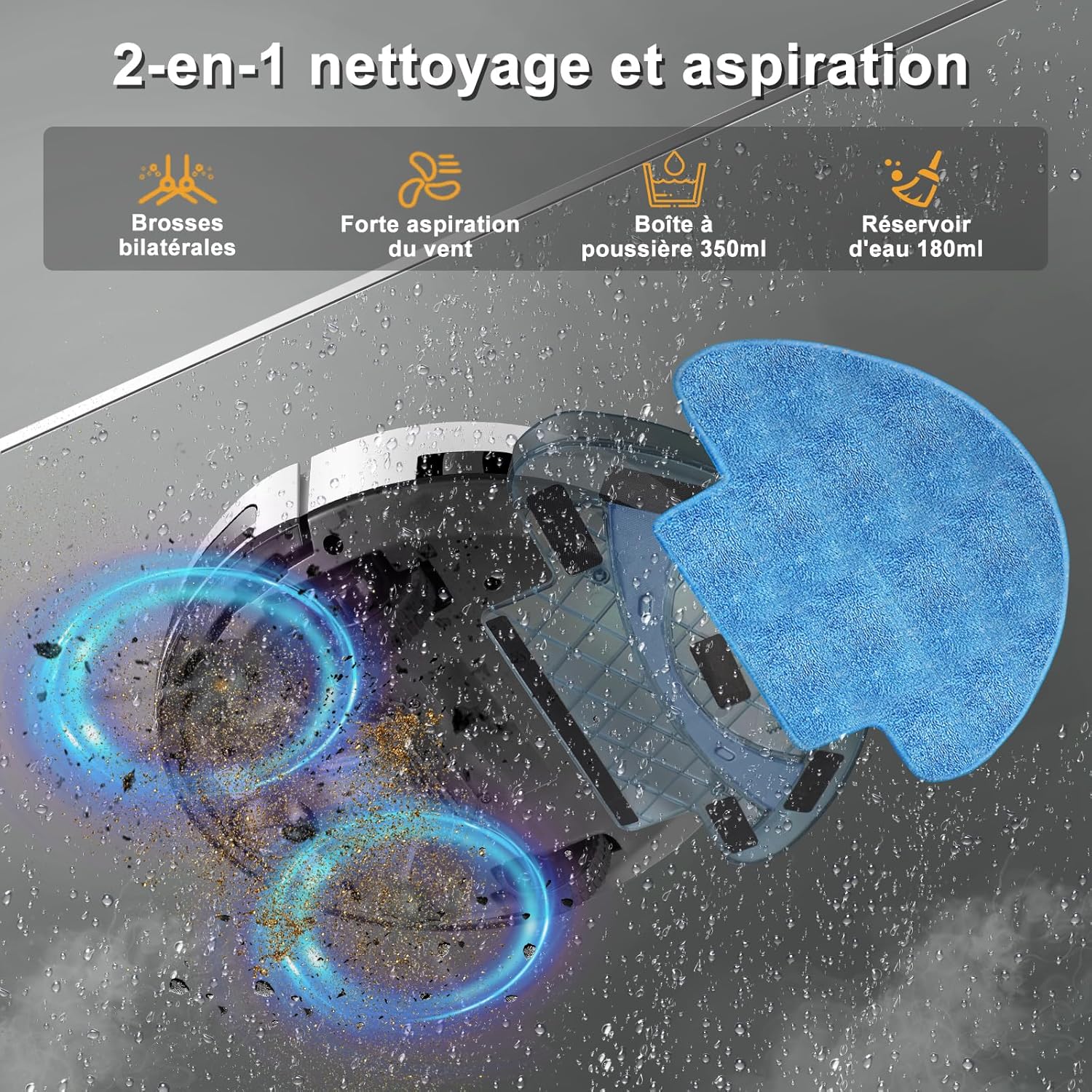
Image: The Yigars Y300 robot vacuum with its dustbin and water tank assembly, highlighting the 2-in-1 cleaning capability.
5 அமைவு
5.1 சார்ஜிங் பேஸ் பிளேஸ்மென்ட்
Place the charging base against a wall in an open area. Ensure there is at least 0.5 meters (1.6 feet) of clear space on both sides and 1.5 meters (4.9 feet) in front of the charging base. Connect the power adapter to the charging base and plug it into a wall outlet.
5.2 ஆரம்ப சார்ஜிங்
Place the robot onto the charging base. Ensure the charging contacts on the robot align with those on the base. The robot will begin charging automatically. For first-time use, fully charge the robot for 4-6 hours.

Image: The Yigars Y300 robot vacuum automatically docking with its charging station, illustrating the automatic recharge feature.
5.3 App Connection (Wi-Fi Setup)
The Yigars Y300 supports app control via a 2.4GHz Wi-Fi network. Follow these steps to connect:
- உங்கள் ஸ்மார்ட்போனின் ஆப் ஸ்டோரிலிருந்து "துயா ஸ்மார்ட்" அல்லது "ஸ்மார்ட் லைஃப்" செயலியைப் பதிவிறக்கவும்.
- உங்கள் கணக்கில் பதிவு செய்யுங்கள் அல்லது உள்நுழைக.
- உங்கள் தொலைபேசி 2.4GHz வைஃபை நெட்வொர்க்குடன் இணைக்கப்பட்டுள்ளதா என்பதை உறுதிப்படுத்திக் கொள்ளுங்கள்.
- Open the app, tap "Add Device" or the "+" icon.
- Select "Small Home Appliances" > "Robot Vacuum" or search for "Y300".
- Follow the in-app instructions to reset the robot's Wi-Fi (usually by pressing and holding a button on the robot until an indicator light flashes).
- Enter your Wi-Fi network name and password in the app.
- Confirm the connection process in the app. Once connected, you can control the robot remotely.

Image: A step-by-step guide on how to connect the Yigars Y300 robot vacuum to a 2.4GHz Wi-Fi network using a smartphone app.
6. இயக்க வழிமுறைகள்
6.1 சுத்தம் செய்வதைத் தொடங்குதல் மற்றும் நிறுத்துதல்
- ரோபோ பட்டன் வழியாக: Press the power button on the robot once to start or pause cleaning.
- ரிமோட் கண்ட்ரோல் வழியாக: Use the "Auto Cleaning" button on the remote control to start or pause.
- ஆப் மூலம்: Use the "Start" or "Pause" function in the Tuya Smart/Smart Life app.
- குரல் கட்டுப்பாடு வழியாக: Compatible with Alexa and Google Assistant. Say "Alexa, turn on the Y300" or "Ok Google, start cleaning with Y300."

Image: A user interacting with a smart speaker to control the Yigars Y300 robot vacuum using voice commands, highlighting compatibility with Alexa and Google Assistant.

Image: A detailed diagram of the remote control for the Yigars Y300 robot vacuum, showing buttons for power, recharge, direction, automatic cleaning, intelligent cleaning, water mode, and suction mode.
6.2 துப்புரவு முறைகள்
The Y300 offers multiple cleaning modes:
- தானியங்கி சுத்தம்: The robot intelligently navigates to clean the entire area.
- ஸ்பாட் சுத்தம்: ஒரு குறிப்பிட்ட அழுக்குப் பகுதியில் கவனம் செலுத்தி, சுழல் வடிவத்தில் சுத்தம் செய்கிறது.
- சீரற்ற சுத்தம்: Cleans by moving in random directions.
- கைமுறை கட்டுப்பாடு: Use the remote control or app to direct the robot manually.

Image: Illustrations of the Yigars Y300 robot vacuum performing different cleaning modes: Spot Cleaning, Random Cleaning, and Manual Cleaning.
6.3 Suction Levels
The robot features three adjustable suction levels (up to 4500Pa) to suit different cleaning needs:
- Quiet (800Pa): For light dust and quiet operation.
- Standard (1600Pa): For general debris.
- Maximum (3000-4500Pa): For fine particles, pet hair, and stubborn dirt.

Image: Visual representation of the Yigars Y300 robot vacuum's three suction power levels (Calm, Standard, Maximum) and the types of debris they handle, from dust to coffee beans.
6.4 மோப்பிங் செயல்பாடு
மாப்பிங் செயல்பாட்டைப் பயன்படுத்த:
- Fill the 180ml water tank with clean water.
- தண்ணீர் தொட்டியில் துடைப்பான் திண்டை பாதுகாப்பாக இணைக்கவும்.
- Install the water tank assembly into the robot.
- சுத்தம் செய்யும் சுழற்சியைத் தொடங்குங்கள். ரோபோ ஒரே நேரத்தில் வெற்றிட சுத்தம் செய்து துடைக்கும்.
The fine mop pad ensures even water distribution for effective stain removal. Remove the mop pad and empty the water tank after each use.

Image: A diagram showing the Yigars Y300 robot vacuum's internal components for 2-in-1 cleaning, including the 350ml dustbin, 180ml water tank, and washable mop pad.
6.5 தடைகளைத் தவிர்ப்பது மற்றும் வழிசெலுத்தல்
The Y300 is equipped with infrared sensors for automatic obstacle detection and fall prevention. Its slim design (7.8cm height) allows it to clean under furniture. It can also climb over obstacles up to 15mm, such as door sills and thin carpets.

Image: The Yigars Y300 robot vacuum navigating around furniture, demonstrating its automatic obstacle avoidance capabilities.

Image: The Yigars Y300 robot vacuum's slim profile (7.8cm) and its ability to climb over 15mm obstacles, such as carpet edges.
7. பராமரிப்பு
வழக்கமான பராமரிப்பு உகந்த செயல்திறனை உறுதிசெய்து உங்கள் ரோபோ வெற்றிடத்தின் ஆயுட்காலத்தை நீட்டிக்கிறது.
7.1 குப்பைத் தொட்டியை காலி செய்தல்
Open the robot's top cover and remove the dustbin. Open the dustbin lid and empty its contents into a trash bin. It is recommended to empty the dustbin after each cleaning cycle.
7.2 வடிகட்டியை சுத்தம் செய்தல்
Remove the HEPA filter from the dustbin. Tap the filter gently to remove dust. The filter can be rinsed with water; ensure it is completely dry before re-installing. Replace the HEPA filter every 3-6 months, or as needed.
7.3 பக்கவாட்டு தூரிகைகளை சுத்தம் செய்தல்
Periodically check the side brushes for tangled hair or debris. Use the provided cleaning brush or scissors to remove any obstructions. If brushes are worn, replace them.
7.4 Cleaning the Mop Pad
Remove the mop pad from the water tank after each use. Rinse it thoroughly with water and allow it to air dry completely before storing or reusing.
7.5 சென்சார்களை சுத்தம் செய்தல் மற்றும் தொடர்புகளை சார்ஜ் செய்தல்
Wipe the robot's sensors (cliff sensors, anti-collision sensors) and the charging contacts on both the robot and the charging base with a clean, dry cloth. This prevents dust buildup from affecting performance.
8. சரிசெய்தல்
If you encounter issues with your Yigars Y300, refer to the following common problems and solutions:
| பிரச்சனை | சாத்தியமான காரணம் | தீர்வு |
|---|---|---|
| ரோபோ தொடங்கவோ பதிலளிக்கவோ இல்லை. | பேட்டரி குறைவு; மின் சுவிட்ச் ஆஃப்; ரோபோ சிக்கியது. | Charge the robot; Ensure power switch is ON; Clear obstructions. |
| ரோபோ சார்ஜ் செய்யாது. | Charging contacts dirty; Charging base unplugged; Robot not properly docked. | Clean charging contacts; Plug in charging base; Re-dock the robot. |
| மோசமான சுத்தம் செயல்திறன். | Dustbin full; Filter clogged; Side brushes worn/tangled. | குப்பைத் தொட்டியை காலியாக்கு; வடிகட்டியை சுத்தம் செய்/மாற்று; பக்கவாட்டு தூரிகைகளை சுத்தம் செய்/மாற்று. |
| ரோபோவால் வைஃபை/ஆப்ஸுடன் இணைக்க முடியவில்லை. | Incorrect Wi-Fi password; Not 2.4GHz network; Robot too far from router. | Verify password; Connect to 2.4GHz Wi-Fi; Move robot closer to router; Reset Wi-Fi on robot. |
| ரோபோ அடிக்கடி சிக்கிக் கொள்கிறது. | Too many obstacles; Cliff sensors dirty; High thresholds. | Clear cleaning area; Clean sensors; Use virtual barriers if available. |
| ரோபோ சார்ஜிங் தளத்திற்குத் திரும்பவில்லை. | Charging base obstructed; Robot too far from base; Low battery. | Clear area around base; Manually place robot near base; Ensure sufficient battery. |
9. விவரக்குறிப்புகள்
| அம்சம் | விவரக்குறிப்பு |
|---|---|
| மாதிரி பெயர் | Y300 |
| பிராண்ட் | Yigars |
| நிறம் | Bwhite |
| பரிமாணங்கள் (L x W x H) | 32 x 32 x 7.8 செ.மீ |
| எடை | 3 கிலோகிராம் |
| உறிஞ்சும் சக்தி | Up to 4500Pa (3000Pa nominal) |
| டஸ்ட்பின் கொள்ளளவு | 350 மி.லி |
| தண்ணீர் தொட்டி கொள்ளளவு | 180 மி.லி |
| பேட்டரி ஆயுள் | 100 நிமிடங்கள் வரை |
| இரைச்சல் நிலை | Less than 70 Decibels |
| சார்ஜிங் நேரம் | 4-6 மணி நேரம் |
| ஏறும் திறன் | 15 மி.மீ |
| கட்டுப்பாட்டு வகை | App Control, Button Control, Voice Control, Remote Control |
| சிறப்பு அம்சங்கள் | Simultaneous vacuuming and mopping, Low noise, Washable filter, Wet/Dry, Obstacle avoidance |
| இணக்கத்தன்மை | Smartphone (2.4GHz Wi-Fi), Alexa, Google Assistant |
10. உத்தரவாதத் தகவல்
Yigars products are covered by a standard manufacturer's warranty. Please refer to the warranty card included in your package or contact customer support for specific details regarding warranty duration and terms. Keep your purchase receipt as proof of purchase for warranty claims.
11. ஆதரவு
For further assistance, technical support, or inquiries, please contact Yigars customer service through the following channels:
- மின்னஞ்சல்: [வாடிக்கையாளர் சேவை மின்னஞ்சலை இங்கே செருகவும்]
- தொலைபேசி: [வாடிக்கையாளர் சேவை தொலைபேசி எண்ணை இங்கே செருகவும்]
- Webதளம்: Visit the official Yigars webஅடிக்கடி கேட்கப்படும் கேள்விகள் மற்றும் ஆதரவு ஆதாரங்களுக்கான தளம்.
When contacting support, please have your product model (Y300) and purchase information ready.