
1. அறிமுகம்
Thank you for choosing the Yigars Y580 Robot Vacuum and Mop. This manual provides essential information for the safe operation, maintenance, and troubleshooting of your device. Please read it thoroughly before use and retain it for future reference.
2. பாதுகாப்பு வழிமுறைகள்
- Ensure the robot is used indoors only.
- ஈரமான சூழல்களிலோ அல்லது தண்ணீருக்கு அருகிலோ ரோபோவைப் பயன்படுத்த வேண்டாம்.
- ரோபோவை அதன் பாதையிலிருந்து விலக்கி வைக்கக்கூடிய தளர்வான கேபிள்கள், திரைச்சீலைகள் மற்றும் பிற பொருட்களை வைத்திருங்கள்.
- ரோபோ இயங்கும்போது குழந்தைகள் மற்றும் செல்லப்பிராணிகளை மேற்பார்வையிடவும்.
- Use only the original charging base and power adapter.
- ரோபோவை நீங்களே பழுதுபார்க்கவோ அல்லது மாற்றவோ முயற்சிக்காதீர்கள். உதவிக்கு வாடிக்கையாளர் ஆதரவைத் தொடர்பு கொள்ளவும்.
- சிறந்த செயல்திறனைப் பராமரிக்க, குப்பைத் தொட்டியை தவறாமல் காலி செய்யவும்.
3. தொகுப்பு உள்ளடக்கங்கள்
தொகுப்பில் அனைத்து பொருட்களும் உள்ளதா என சரிபார்க்கவும்:
- Yigars Y580 Robot Vacuum and Mop
- சார்ஜிங் பேஸ்
- பவர் அடாப்டர்
- பக்கவாட்டு தூரிகைகள் (2 ஜோடிகள்)
- துடைப்பான் பட்டைகள் (2)
- HEPA Filter (1 spare)
- பயனர் கையேடு
4. தயாரிப்பு முடிந்துவிட்டதுview
The Yigars Y580 combines vacuuming, sweeping, and mopping functionalities. It features 360° LiDAR navigation for precise mapping and obstacle avoidance.

Image: The Yigars Y580 Robot Vacuum and Mop, showcasing its sleek white design, LiDAR sensor, side brushes, and included accessories like a filter and a smartphone displaying the app interface.
5 அமைவு
5.1 சார்ஜிங் பேஸ் பிளேஸ்மென்ட்
Place the charging base against a wall in an open area, ensuring there are no obstacles within 1 meter (3 feet) to the sides and 2 meters (6 feet) in front. Connect the power adapter to the charging base and plug it into a power outlet.
5.2 ஆரம்ப கட்டணம்
Place the robot on the charging base. Ensure the charging contacts on the robot align with those on the base. The robot will begin charging automatically. For first-time use, fully charge the robot before operation.
5.3 App Connection (Wi-Fi 2.4 GHz)
The Yigars Y580 can be controlled via a mobile application (Smart Life or Tuya APP). Follow these steps to connect:
- Download the Smart Life or Tuya APP from your smartphone's app store.
- உங்கள் கணக்கில் பதிவு செய்யுங்கள் அல்லது உள்நுழைக.
- உங்கள் ஸ்மார்ட்போன் a உடன் இணைக்கப்பட்டுள்ளதா என்பதை உறுதிப்படுத்தவும் 2.4 GHz Wi-Fi நெட்வொர்க். The robot does not support 5 GHz Wi-Fi.
- Add a new device in the app, selecting 'Robot Vacuum' or similar.
- Follow the in-app instructions to connect the robot to your Wi-Fi network. This usually involves resetting the robot's Wi-Fi and entering your Wi-Fi password.

Image: A visual guide demonstrating the step-by-step process of connecting the Yigars Y580 robot vacuum to a smartphone application, including downloading the app, adding the device, connecting to a 2.4 GHz Wi-Fi network, and confirming successful connection.
5.4 குரல் உதவியாளர் ஒருங்கிணைப்பு
The Yigars Y580 is compatible with Amazon Alexa and Google Assistant. Once connected to the Smart Life/Tuya app, you can link your account to Alexa or Google Home apps to enable voice control. Refer to the respective voice assistant app's instructions for linking smart home devices.
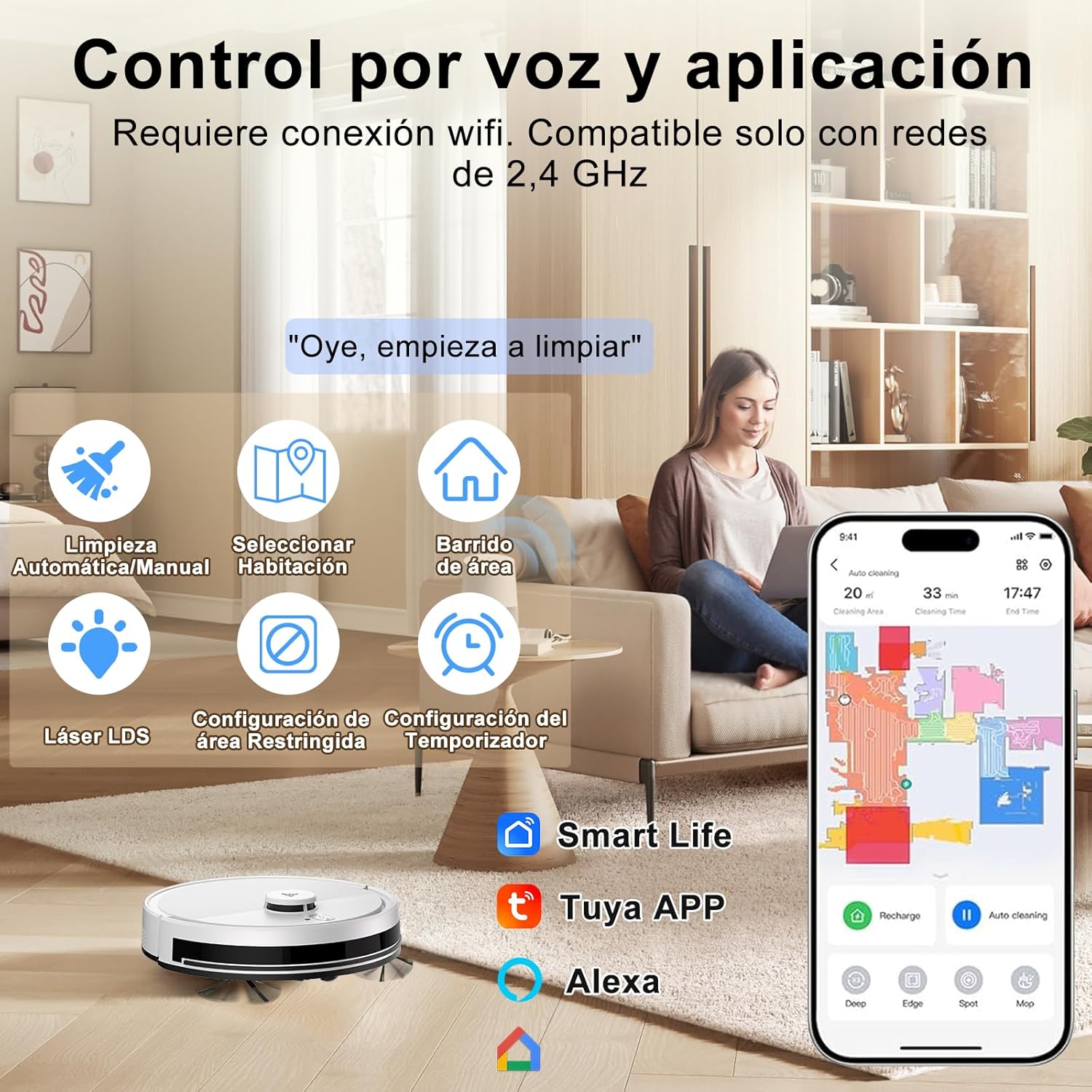
Image: An illustration showing the Yigars Y580 robot vacuum being controlled via voice commands and a smartphone app, highlighting features like automatic/manual cleaning, room selection, area sweeping, LDS laser, restricted area settings, and timer functions. Compatible with Smart Life, Tuya APP, and Alexa.
6. இயக்க வழிமுறைகள்
6.1 துப்புரவு முறைகள்
The robot offers various cleaning modes accessible via the mobile app:
- தானியங்கி பயன்முறை: The robot intelligently plans its cleaning path for the entire area.
- திட்டமிடப்பட்ட சுத்தம்: ரோபோ தானாகவே சுத்தம் செய்ய குறிப்பிட்ட நேரங்களை அமைக்கவும்.
- மண்டலத்தை சுத்தம் செய்தல்: ரோபோ சுத்தம் செய்ய வேண்டிய குறிப்பிட்ட பகுதிகளை வரைபடத்தில் வரையறுக்கவும்.
- ஸ்பாட் சுத்தம்: ஒரு செறிவான பகுதியை சுத்தம் செய்ய ரோபோவை இயக்கவும்.

Image: An illustration showing the Yigars Y580 robot vacuum cleaning a living room, with icons representing various cleaning modes: Automatic Mode, Scheduled Cleaning (S-shape path), Spot Mode, and Timed Mode.
6.2 வெற்றிடமாக்கல் மற்றும் துடைத்தல்
The Yigars Y580 performs 3-in-1 cleaning: vacuuming, sweeping, and mopping. It features a 350 ml dustbin and a 250 ml water tank with three adjustable humidity levels. The suction power can reach up to 4000Pa (with three adjustable speeds) and is suitable for all floor types, including short-pile carpets (under 1.5 cm).

படம்: ஒரு வெட்டுப்பாதை view of the Yigars Y580 robot vacuum demonstrating its sweeping and mopping capabilities, highlighting the 2700Pa suction power and its effectiveness against pet hair, dust, crumbs, and pet food pellets.
6.3 தடைகளைத் தவிர்ப்பது மற்றும் வழிசெலுத்தல்
Equipped with 360° LiDAR laser technology, the robot precisely maps your home environment and plans efficient cleaning routes. It can overcome obstacles up to 18 mm high and ascend inclines of up to 15°, allowing it to navigate thresholds and carpets effectively.

Image: The Yigars Y580 robot vacuum demonstrating its 360° LiDAR obstacle avoidance capabilities, showing its ability to navigate around objects and over small thresholds.
6.4 Smart Mapping and Management
The robot uses fast mapping technology and can automatically save up to five different maps. This allows for multi-floor cleaning and customized cleaning zones. You can set virtual walls and restricted areas via the app to prevent the robot from entering specific zones.

Image: A diagram illustrating the Yigars Y580 robot vacuum's ability to automatically save up to five different maps, supporting area selection and zone cleaning functions for multi-floor homes.

Image: A visual representation of the Yigars Y580 robot vacuum's virtual wall and restricted zone configuration capabilities, allowing users to define areas where the robot should not clean.
6.5 பேட்டரி மேலாண்மை
The robot is equipped with a high-efficiency battery providing up to 120 minutes of runtime. When the battery level drops below 20%, the robot automatically returns to its charging base. Once sufficiently recharged (to 90%), it will resume cleaning from where it left off.

Image: A diagram illustrating the Yigars Y580 robot vacuum automatically returning to its charging base when the battery level is low (20%) and then resuming cleaning from its last position after recharging.
7. பராமரிப்பு
Regular maintenance ensures optimal performance and extends the lifespan of your Yigars Y580.
7.1 குப்பைத் தொட்டி மற்றும் தண்ணீர் தொட்டி
- காலியான குப்பைத் தொட்டி: After each cleaning cycle, remove and empty the dustbin.
- சுத்தமான தண்ணீர் தொட்டி: After mopping, empty any remaining water from the tank and allow it to air dry.
7.2 தூரிகைகள்
- பக்கவாட்டு தூரிகைகள்: Check for tangled hair or debris weekly. Remove and clean if necessary. Replace if worn.
- முக்கிய தூரிகை: Remove the main brush cover and clean any tangled hair or debris from the brush and its bearings. Perform this monthly or as needed.
7.3 வடிப்பான்கள்
- ஹெபா வடிகட்டி: Tap the filter to remove dust. Do not wash the HEPA filter with water. Replace every 3-6 months depending on usage.
7.4 சென்சார்கள்
- Wipe the cliff sensors, wall sensors, and charging contacts with a clean, dry cloth monthly to ensure proper function.
8. சரிசெய்தல்
If you encounter issues with your Yigars Y580, refer to the following common problems and solutions:
| பிரச்சனை | சாத்தியமான காரணம் | தீர்வு |
|---|---|---|
| ரோபோ இயக்கப்படவில்லை | பேட்டரி குறைவாக உள்ளது; பவர் ஸ்விட்ச் ஆஃப் செய்யப்பட்டுள்ளது. | ரோபோவை சார்ஜ் செய்யுங்கள்; பவர் சுவிட்ச் இயக்கத்தில் இருப்பதை உறுதிசெய்யவும். |
| ரோபோவால் சார்ஜ் செய்ய முடியாது. | சார்ஜிங் காண்டாக்ட்கள் அழுக்காக உள்ளன; சார்ஜிங் பேஸ் பவர் செய்யப்படவில்லை. | சார்ஜிங் தொடர்புகளை சுத்தம் செய்யவும்; பேஸுக்கு மின் இணைப்பைச் சரிபார்க்கவும். |
| ரோபோ அடிக்கடி சிக்கிக் கொள்கிறது. | Too many obstacles; Loose cables | Clear the cleaning area; Secure loose items |
| மோசமான துப்புரவு செயல்திறன் | குப்பைத் தொட்டி நிரம்பியுள்ளது; அடைபட்ட வடிகட்டி; தேய்ந்து போன தூரிகைகள் | Empty dustbin; Clean/replace filter; Clean/replace brushes |
| App connection failed | Incorrect Wi-Fi (5GHz); Wrong password; Robot too far from router | 2.4GHz வைஃபையை உறுதி செய்யவும்; கடவுச்சொல்லை மீண்டும் உள்ளிடவும்; ரோபோவை ரூட்டருக்கு அருகில் நகர்த்தவும். |
For further assistance, please contact Yigars customer support.
9. விவரக்குறிப்புகள்
| அம்சம் | விவரம் |
|---|---|
| பிராண்ட் | Yigars |
| மாதிரி பெயர் | Y580 |
| மாதிரி எண் | 001 |
| நிறம் | வெள்ளை |
| உறிஞ்சும் சக்தி | Up to 4000Pa (3 adjustable speeds) |
| வழிசெலுத்தல் | 360° LiDAR Laser (LDS) |
| பேட்டரி ஆயுள் | 120 நிமிடங்கள் வரை |
| பேட்டரி திறன் | 2600mAh |
| டஸ்ட்பின் கொள்ளளவு | 350 மி.லி |
| தண்ணீர் தொட்டி கொள்ளளவு | 250 ml (3 humidity levels) |
| இரைச்சல் நிலை | தோராயமாக 60 டி.பி |
| தடைகளை ஏறும் திறன் | Up to 18 mm (15° incline) |
| இணக்கமான சாதனங்கள் | Smartphones (Wi-Fi 2.4GHz), Amazon Alexa, Google Home |
| வடிகட்டி வகை | ஹெபா |
| பரிமாணங்கள் | 33L x 33W x 10H செ.மீ |
| தயாரிப்பு எடை | 3 கிலோ |

Image: The Yigars Y580 robot vacuum highlighting its 2600mAh battery capacity, providing up to 120 minutes of cleaning time, and its low operating noise level of approximately 60dB.

Image: The Yigars Y580 robot vacuum illustrating its support for OTA (Over-The-Air) firmware and software updates, ensuring the system remains current with the latest features and improvements.
10. உத்தரவாதம் மற்றும் ஆதரவு
The Yigars Y580 Robot Vacuum and Mop comes with a standard manufacturer's warranty. Please refer to the warranty card included in your package for specific terms and conditions. For technical support, troubleshooting assistance, or warranty claims, please contact Yigars customer service through the contact information provided in your product documentation or on the official Yigars webதளம்.