
1. தயாரிப்பு முடிந்துவிட்டதுview
The ALITOVE 12V 3A 36W Universal AC Adapter (Model ALT-1203) is designed to provide stable 12-volt DC power to a wide range of electronic devices. It features a universal input voltage range (AC 100-240V) and comes with 14 interchangeable DC tips, ensuring compatibility with various devices such as LED strip lights, CCTV cameras, PC monitors, and DVD players. The adapter incorporates multiple safety features for reliable and secure operation.
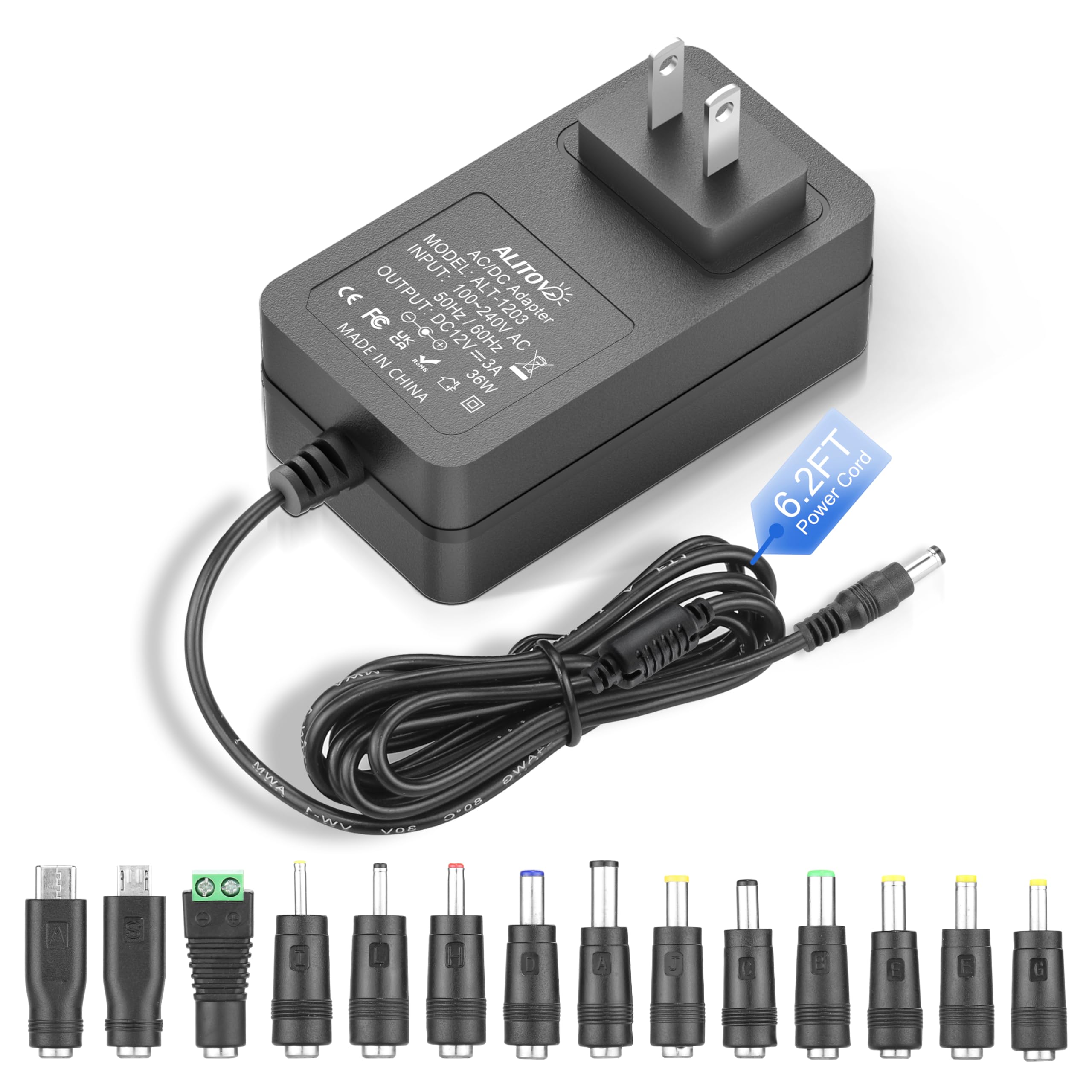
Image 1.1: The ALITOVE 12V 3A 36W Universal AC Adapter with its included 14 DC tips, showcasing அதன் பல்துறை திறன்.
2. முக்கியமான பாதுகாப்பு குறிப்புகள்
- தொகுதிtagமின் மற்றும் தற்போதைய இணக்கத்தன்மை: Before connecting, verify that your device's working voltage is 12V and its current requirement does not exceed 3A. Using the adapter with incompatible devices may cause damage.
- Not a Battery Charger: This product is a power supply adapter, not a battery charger. Do not use it for charging batteries.
- உட்புற பயன்பாட்டிற்கு மட்டும்: This adapter is designed for indoor use. Do not expose it to water, moisture, or high humidity.
- காற்றோட்டம்: Ensure adequate ventilation around the adapter during operation to prevent overheating. Do not cover the adapter.
- சேத ஆய்வு: Regularly inspect the power cord and adapter for any signs of damage. Do not use if damaged.
- குழந்தைகள் மற்றும் செல்லப்பிராணிகள்: Keep the adapter and its components out of reach of children and pets.
- துருவமுனைப்பு: The connector polarity is internal positive (+) and outer negative (-). Ensure this matches your device's requirements.

Image 2.1: Diagram illustrating the 6-point safety system of the ALITOVE power adapter, including short circuit, over voltage, over current, overload, anti-EMI, and surge protection.
3. தொகுப்பு உள்ளடக்கங்கள்
பின்வரும் பொருட்களுக்கு தொகுப்பைச் சரிபார்க்கவும்:
- 1x ALITOVE 12V 3A Power Supply Adapter
- 14x Universal DC Tips

Image 3.1: The ALITOVE power adapter shown alongside its complete set of 14 interchangeable DC tips.
4. அமைவு வழிமுறைகள்
- சாதனத் தேவைகளைச் சரிபார்க்கவும்: Before connecting, confirm your device requires 12V DC power and draws no more than 3A (36W). Check your device's parameter label for this information.
- Select Correct DC Tip: Identify the correct DC tip from the 14 included tips that matches your device's power input port. The adapter's original connector is 5.5x2.5mm. The included tips cover various sizes such as 6.5x4.4mm+Pin, 5.5x2.1mm, 5.5x3.0mm+Pin, 5.0x2.5mm, 6.3x3.0mm, 5.5x1.7mm, 4.8x1.7mm, 4.0x1.7mm, 3.5x1.35mm, 3.0x1.1mm, 2.5x0.7mm, Micro-USB, Type-C, and a DC terminal connector.
- Attach DC Tip: Firmly attach the selected DC tip to the adapter's output cable. Ensure a secure connection.
- சாதனத்துடன் இணைக்கவும்: Plug the DC tip into your device's power input port.
- பவர் அவுட்லெட்டுடன் இணைக்கவும்: Plug the AC adapter into a standard AC 100-240V wall outlet. The adapter features a 6.2ft power cord for flexible placement.
- பவர் ஆன்: Once connected, your device should receive power.

Image 4.1: Visual guide on how to select the appropriate DC tip by checking device parameters and power interface dimensions.

படம் 4.2: விரிவானது view of the adapter's dimensions and the standard 5.5x2.5mm DC connector, highlighting the inner positive and outer negative polarity.
5. இயக்க வழிமுறைகள்
The ALITOVE 12V 3A 36W Universal AC Adapter is designed for straightforward operation. Once properly connected to your device and a power outlet, it will automatically supply stable 12V DC power. The adapter features an internal positive (+) and outer negative (-) polarity, which is standard for many 12V devices. Always ensure the adapter is used within its specified voltage and current limits to prevent damage to both the adapter and the connected device.

Image 5.1: The adapter's 6.2ft power cord providing extended reach for flexible device placement.
6. பராமரிப்பு
To ensure the longevity and optimal performance of your ALITOVE 12V 3A 36W Universal AC Adapter, follow these maintenance guidelines:
- சுத்தம்: Disconnect the adapter from the power outlet and your device before cleaning. Use a soft, dry cloth to wipe the exterior. Do not use liquid cleaners or solvents.
- சேமிப்பு: When not in use, store the adapter in a cool, dry place away from direct sunlight and extreme temperatures. Avoid tightly coiling the power cord to prevent damage.
- கேபிள் பராமரிப்பு: Do not bend, twist, or pull the power cord excessively. Avoid placing heavy objects on the cord.
- ஆய்வு: Periodically inspect the adapter casing, power cord, and DC tips for any signs of wear, cuts, or damage. If any damage is observed, discontinue use and replace the adapter.

Image 6.1: The power cord is designed for durability, having passed over 5000 bending tests for long-term reliability.
7. சரிசெய்தல்
If you encounter issues with your ALITOVE power adapter, refer to the following common troubleshooting steps:
| பிரச்சனை | சாத்தியமான காரணம் | தீர்வு |
|---|---|---|
| சாதனத்திற்கு சக்தி இல்லை |
|
|
| Device not functioning correctly |
|
|
| அடாப்டர் சூடாக உணர்கிறது |
|
|
8. தயாரிப்பு விவரக்குறிப்புகள்
| அம்சம் | விவரம் |
|---|---|
| மாதிரி எண் | ALT-1203 |
| உள்ளீடு தொகுதிtage | AC 100-240V, 50/60Hz |
| வெளியீடு தொகுதிtage | DC 12V |
| வெளியீடு மின்னோட்டம் | 3 Ampகள் (அதிகபட்சம்) |
| வெளியீடு வாட்tage | 36 வாட்ஸ் (அதிகபட்சம்) |
| பவர் கார்டு நீளம் | 6.2 ft (approx. 1.9 meters) |
| இணைப்பான் துருவமுனைப்பு | Internal Positive (+), Outer Negative (-) |
| Included DC Tips | 14 universal tips (e.g., 6.5x4.4mm+Pin, 5.5x2.1mm, 5.5x3.0mm+Pin, 5.0x2.5mm, 6.3x3.0mm, 5.5x1.7mm, 4.8x1.7mm, 4.0x1.7mm, 3.5x1.35mm, 3.0x1.1mm, 2.5x0.7mm, Micro-USB, Type-C, DC terminal connector) |
| பாதுகாப்பு அம்சங்கள் | Automatic overload protection, over-voltage protection, over-current protection, over-temperature protection, short circuit protection, anti-EMI interference, surge protection. |
| சான்றிதழ்கள் | CE, FCC, RoHS |
| நிறம் | கருப்பு |
| உற்பத்தியாளர் | Shenzhen ALITOVE Electronic Technology Co., Ltd |
9. உத்தரவாதத் தகவல்
The ALITOVE 12V 3A 36W Universal AC Adapter comes with a 24 மாத உத்தரவாதம் from the date of purchase. This warranty covers manufacturing defects and issues arising from normal use. It does not cover damage caused by misuse, accidents, unauthorized modifications, or improper installation. Please retain your proof of purchase for warranty claims.
10. வாடிக்கையாளர் ஆதரவு
For technical assistance, troubleshooting beyond this manual, or warranty inquiries, please contact ALITOVE customer support. Refer to the contact information provided with your product packaging or visit the official ALITOVE webமிகவும் புதுப்பித்த ஆதரவு விவரங்களுக்கான தளம்.
ஆன்லைன் ஆதாரங்கள்: You may find additional information and FAQs on the ALITOVE brand store page on Amazon: ALITOVE Store


