
அறிமுகம்
The GenXenon M02S AI Smart Glasses are an innovative wearable device combining advanced optical technology with smart features. These glasses are equipped with an 8MP HD camera for 1080P video recording, real-time translation capabilities, a voice assistant, and AI photo recognition. Designed for versatility, they feature detachable lenses, allowing seamless switching between polarized sunglasses and blue light filter lenses. This manual provides essential information for setup, operation, and maintenance to ensure optimal performance and user experience.
பெட்டியில் என்ன இருக்கிறது
- கேமரா கண்ணாடிகள்
- Sunglass Lenses
- துப்புரவு துணி
- தரவு கேபிள்
- பயனர் கையேடு
- Eyewear Pouch

படம்: ஒரு விரிவான view of all items included in the GenXenon M02S Smart Glasses packaging, including the glasses, various lenses, charging cable, cleaning cloth, user manual, and a soft pouch.
அமைவு
1. ஆன் / ஆஃப் செய்தல்
To power on the glasses, long-press the front button located on the right temple for 2 seconds. To power off, long-press the same button for 2 seconds. The indicator light will confirm the status.
2. ஆப் பதிவிறக்கம் & இணைத்தல்
Download the "HeyCyan" app on your smartphone (iOS/Android). Ensure Bluetooth is enabled on your phone. Open the app and follow the on-screen instructions to pair your GenXenon M02S Smart Glasses. The app will guide you through the initial setup and control functions.

Image: A smartphone screen showing the "HeyCyan" app interface, with the GenXenon M02S Smart Glasses positioned next to it, illustrating app compatibility and management.
3. சார்ஜ்
Connect the provided data cable to the charging port located on the inside of the right temple. Connect the other end to a USB power source. The indicator light will show red during charging and turn blue when fully charged. A full charge takes approximately 60 minutes and provides 7-9 hours of music listening or 30-40 minutes of video recording.
இயக்க வழிமுறைகள்
கேமரா & வீடியோ பதிவு
The glasses feature an 8MP HD camera capable of recording 1080P/30fps video with a wide-angle lens. They include 16GB of built-in memory for storing photos and videos.
- புகைப்படம் எடு: Single tap the front physical button. The indicator light on the outside of the glasses will flash.
- வீடியோ பதிவு: Double tap the front physical button to start recording. Single tap again to save/pause. The indicator light will stay on during recording.
- One-Tap Transfer & Auto-Clearing Storage: Instantly import photos and videos to the HeyCyan app with a single tap. After transfer, the storage is automatically cleared.

Image: An illustration highlighting the AI Smart Glasses with camera, showing various smart functions like Wi-Fi transfer, image analysis, photography, and video recording.
Audio & Calls
Enjoy open-ear audio for music and calls, allowing you to stay aware of your surroundings.
- இசையை இயக்கவும்/இடைநிறுத்தவும்: Single tap the right touch-responsive key.
- அடுத்த ட்ராக்: Double tap the right touch-responsive key.
- வால்யூம் அதிக/கீழ்: Long press the right touch-responsive key.
- பதில்/முடிவு அழைப்பு: Single tap the right touch-responsive key.
- அழைப்பை நிராகரி: Double tap the right touch-responsive key.
AI அம்சங்கள்
Leverage built-in AI for enhanced functionality.
- AI குரல் உதவியாளர்: Activate by saying "Hey Cyan." Use voice commands to capture content or adjust settings.
- நிகழ்நேர மொழிபெயர்ப்பு: Supports 139 languages for live transcription and translation. Manual source/target language selection is required in the app.
- AI Photo Recognition: Enables real-time object recognition through the camera.

Image: A man tapping his temple to activate the voice assistant on his GenXenon M02S Smart Glasses, with a speech bubble showing "Hey, Cyan! Call Mum."
லென்ஸ்கள்
The M02S glasses feature a detachable lens design for various uses.
- UV400 Polarized Lenses: For outdoor use as sunglasses.
- Blue Light Filter Lenses: For indoor use to reduce eye strain.

Image: An illustration showing four different lens options for the GenXenon M02S Smart Glasses: regular lenses, photochromic lenses, gray graduated lenses, and blue graduated lenses, demonstrating their versatility.
ஊடக ஒருங்கிணைப்பு
தயாரிப்பு படங்கள்
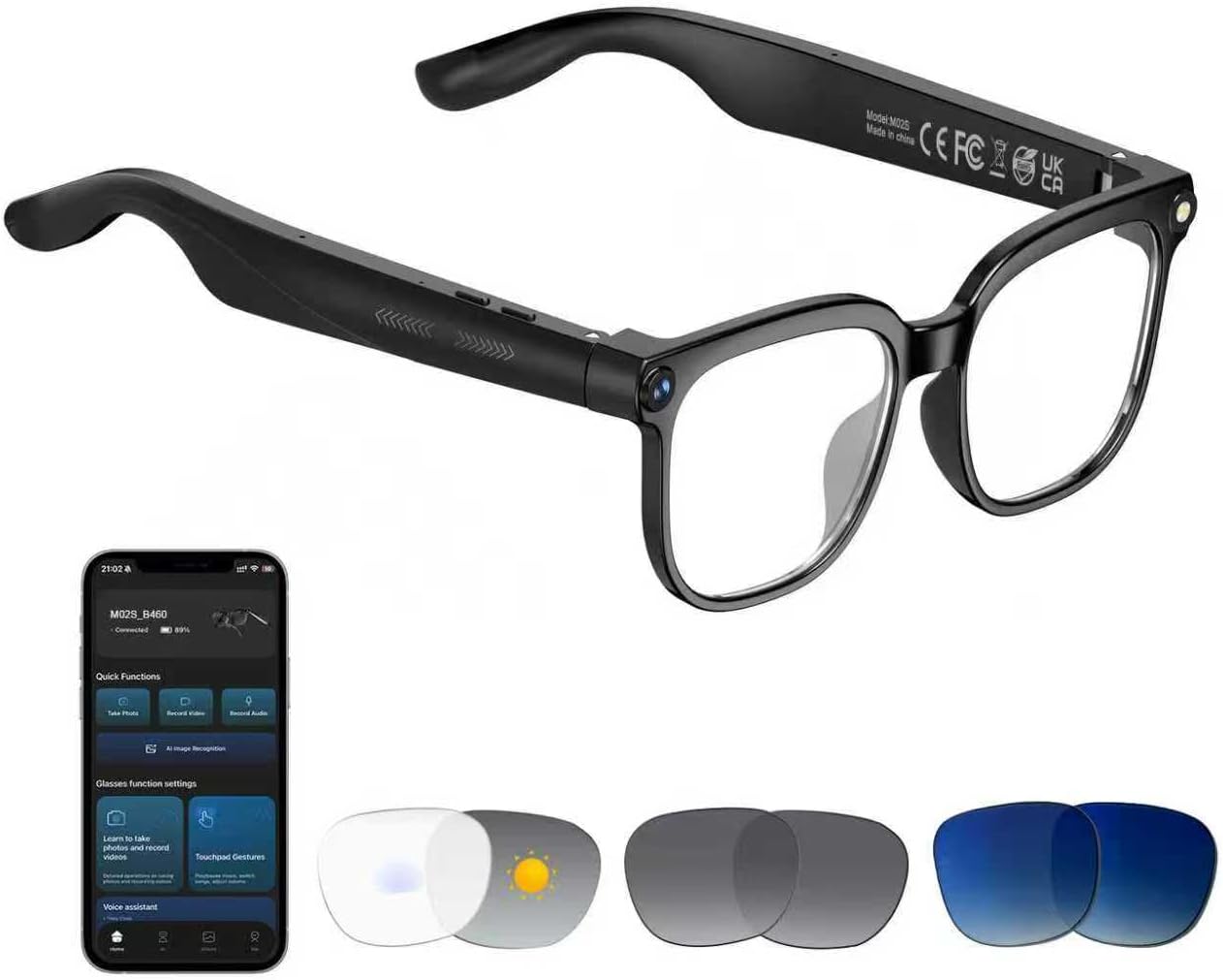
Image: The main product image of the GenXenon M02S AI Smart Glasses, showcasing அவர்களின் நேர்த்தியான வடிவமைப்பு.
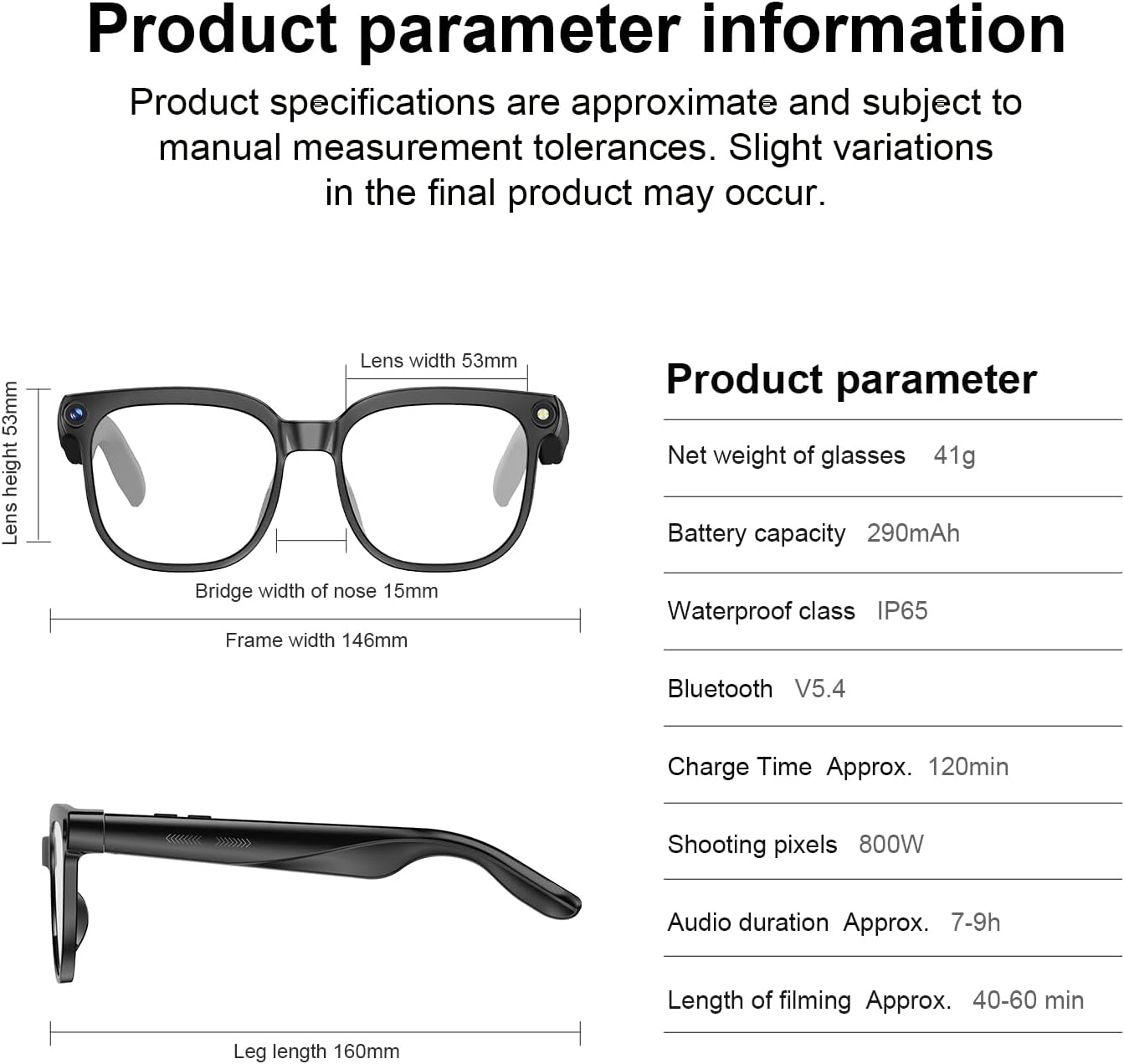
Image: A diagram illustrating the product dimensions of the GenXenon M02S Smart Glasses, including lens width, lens height, bridge width, frame width, and leg length.

Image: A woman smiling while cycling outdoors, wearing the GenXenon M02S Smart Glasses, demonstrating hands-free recording for active lifestyles.

Image: An image depicting the real-time translation capabilities of the GenXenon M02S Smart Glasses, showing text being translated on the lenses.
அதிகாரப்பூர்வ தயாரிப்பு வீடியோக்கள்
காணொளி: ஒரு ஓவர்view of the GenXenon M02S Smart Glasses, highlighting their camera and smart features. This video demonstrates the physical aspects and basic functionalities of the glasses.
Video: A demonstration of the MZ08 Smart Sunglasses, showcasing their design and smart capabilities. This video provides a visual representation of the product in use.
Video: A promotional video for the GenXenon smart AI glasses with camera, detailing their features and benefits. This video offers a comprehensive look at the product's functionalities.
Video: A focused look at the M02S Camera Glasses, highlighting their camera features and design. This video provides close-up views and demonstrations of the camera in action.
Video: A vertical format video showcasing the G06-Brown-AI Smart glasses, focusing on their aesthetic and smart features. This video is optimized for mobile viewing.
Video: A vertical format video demonstrating the M02S video camera glasses with 4k resolution and audio, highlighting their recording capabilities. This video is optimized for mobile viewing.
பராமரிப்பு
சுத்தம் செய்தல்
Use the provided cleaning cloth to gently wipe the lenses and frame. Avoid using harsh chemicals or abrasive materials that could damage the glasses.
பேட்டரி பராமரிப்பு
To prolong battery life, avoid fully discharging the glasses frequently. Charge them regularly, especially if they will not be used for an extended period.
சரிசெய்தல்
- Why is the video quality limited? These smart camera glasses feature an 8MP HD camera. Use them in well-lit environments for daily use. The pixel count is sufficient for general purposes, not comparable to smartphones with 50-200 megapixels.
- How do I set up the glasses for the first time? Turn on the smart glasses, enable Bluetooth on your phone, find the Bluetooth name of the smart glasses, connect them, then open the "HeyCyan" app and follow the instructions.
- Why isn't the AI Assistant working? To use the AI voice assistant, activate it with the English wake phrase "Hey Cyan." Once activated, you can ask questions in your preferred language. Note: Each wake phrase triggers a single question. To ask another question, say "Hey Cyan" again.
- How many languages are supported for real-time translation, and how do I switch between them? Real-time translation currently supports 139 languages. To switch languages, open the "AI Translate" feature in the HeyCyan app. Select your desired translation mode and use the dropdown menus to choose the source and target languages.
- பேட்டரி ஏன் இவ்வளவு விரைவாக தீர்ந்து போகிறது? The 290mAh battery provides up to 200h standby, 7-9H music, or 40-60 minutes of video recording. High-power tasks like recording and exporting data drain the battery more quickly.
விவரக்குறிப்புகள்
| பிராண்ட் | ஜென்செனான் |
| மாதிரி எண் | M02S |
| பொருளின் எடை | 41 கிராம் (1.45 அவுன்ஸ்) |
| பேட்டரி திறன் | 290 மில்லிamp Hours (2 Lithium Polymer batteries included) |
| கேமரா தீர்மானம் | 8MP HD (1080P Video Recording) |
| நினைவக சேமிப்பு திறன் | 16 GB (Built-in) |
| இணைப்பு தொழில்நுட்பம் | புளூடூத் |
| வயர்லெஸ் தொடர்பு தரநிலை | புளூடூத் |
| சிறப்பு அம்சங்கள் | 1080P Video Recording, 8MP HD Camera, AI Smart Glasses for Travel/Meetings/Vlogging, Real Time Translation, Voice Assistant, Open-Ear Audio, UV400 Polarized Lenses, AI Voice Assistant |
| நீர்ப்புகா வகுப்பு | IP65 |
உத்தரவாதம் மற்றும் ஆதரவு
Specific warranty and support details are not provided in the available product information. Please refer to the manufacturer's official website or contact customer support for comprehensive warranty information and assistance.