
1. பாதுகாப்பு தகவல்
Operating a generator requires adherence to strict safety guidelines to prevent injury or property damage. Always read and understand the entire manual before operating the GENMAX GM12500iET generator.
கார்பன் மோனாக்சைடு (CO) பாதுகாப்பு
This generator is equipped with a built-in CO sensor for enhanced safety. The CO sensor is designed to shut down the generator if harmful levels of carbon monoxide accumulate in the operating area. However, this feature is a supplement and does not replace safe operating practices.
- Operate Outdoors Only: Always operate the generator outdoors in a well-ventilated area, far away from windows, doors, and vents to prevent carbon monoxide from entering enclosed spaces.
- Exhaust Direction: Ensure the exhaust is directed away from people and buildings.
- CO அலாரங்கள்: Install battery-operated carbon monoxide alarms in your home or RV and check them regularly.
எரிபொருள் பாதுகாப்பு
- Flammable Fuels: Gasoline, propane (LPG), and natural gas (NG) are highly flammable. Handle all fuels with extreme caution.
- No Smoking: Do not smoke or allow open flames near the generator or fuel storage areas.
- எரிபொருள் நிரப்புதல்: Always turn off the generator and allow it to cool before refueling with gasoline.
- சேமிப்பு: Store fuels in approved containers in a well-ventilated area, away from ignition sources.
மின் பாதுகாப்பு
- உலர் நிலைமைகள்: ஈரமான சூழ்நிலையிலோ, மழையிலோ அல்லது பனியிலோ ஜெனரேட்டரை ஒருபோதும் இயக்க வேண்டாம். மின் கூறுகளைக் கையாளும் போது கைகளை உலர வைக்கவும்.
- அடிப்படை: Ensure the generator is properly grounded according to local electrical codes.
- அதிக சுமை பாதுகாப்பு: Do not overload the generator. Utilize the circuit breakers to prevent damage.
- GFCI விற்பனை நிலையங்கள்: The generator features GFCI outlets for protection against electric shock.
2. தயாரிப்பு முடிந்துவிட்டதுview
The GENMAX GM12500iET is a powerful and versatile tri-fuel inverter generator designed for various applications, including home backup, RV use, and camping. It offers flexible fueling options, clean power output, and multiple starting methods.

Image: The GENMAX GM12500iET Tri-Fuel Inverter Generator shown with gasoline, propane, and natural gas options, highlighting its versatile fuel technology.
முக்கிய அம்சங்கள்
- மூன்று எரிபொருள் திறன்: Operates on Gasoline (12500 surge, 10500 running watts), Propane (LPG 11500 surge, 9500 running watts), and Natural Gas (NG 10000 surge, 8500 running watts).
- Clean Inverter Power: Delivers less than 3% Total Harmonic Distortion (THD), making it safe for sensitive electronics.
- High-Capacity Output: Features a 458cc OHV engine with multiple outlets including 120V/240V 50A (NEMA 14-50R), 120V 30A, 120V 20A, 12V DC, and dual USB ports.
- Smart Digital Control: Digital display shows wattage, தொகுதிtage, frequency, runtime, fuel level, and alerts.
- 4-Way Start: Electric Start, Bluetooth App, 2-Wire Auto Start, and Recoil Backup.
- சுற்றுச்சூழல் முறை: Automatically adjusts engine speed to load, reducing noise and extending runtime.
- போர்ட்டபிள் வடிவமைப்பு: Equipped with a robust frame, wheels, and a foldable handle for easy transport.
- பாதுகாப்பு அம்சங்கள்: Includes a built-in CO sensor and comprehensive protection against overload, over/under voltagஇ, ஷார்ட் சர்க்யூட் மற்றும் அதிக வெப்பம்.

Image: The GENMAX GM12500iET generator is depicted as suitable for multiple scenarios, including home backup, RV travel, camping, and powering tools at job sites.
3 அமைவு
Before starting the generator, proper setup is crucial for safe and efficient operation.
3.1 பெட்டியை வெளியே எடுத்தல் மற்றும் ஆய்வு செய்தல்
- Carefully remove the generator and all accessories from the packaging.
- Inspect the generator for any signs of shipping damage. If damage is found, contact customer support immediately.
- Verify all included components are present as listed in the 'What Comes in the Box' section.

Image: A visual representation of the items included in the GENMAX GM12500iET package, such as a spark plug wrench, screwdriver, remote control key, funnel, battery charger, NG quick connector, LPG hose, NG hose, and automatic start/stop cable.
3.2 சக்கரம் மற்றும் கைப்பிடி அசெம்பிளி
Attach the wheels and foldable handle using the provided hardware. This design facilitates easy transport of the generator.
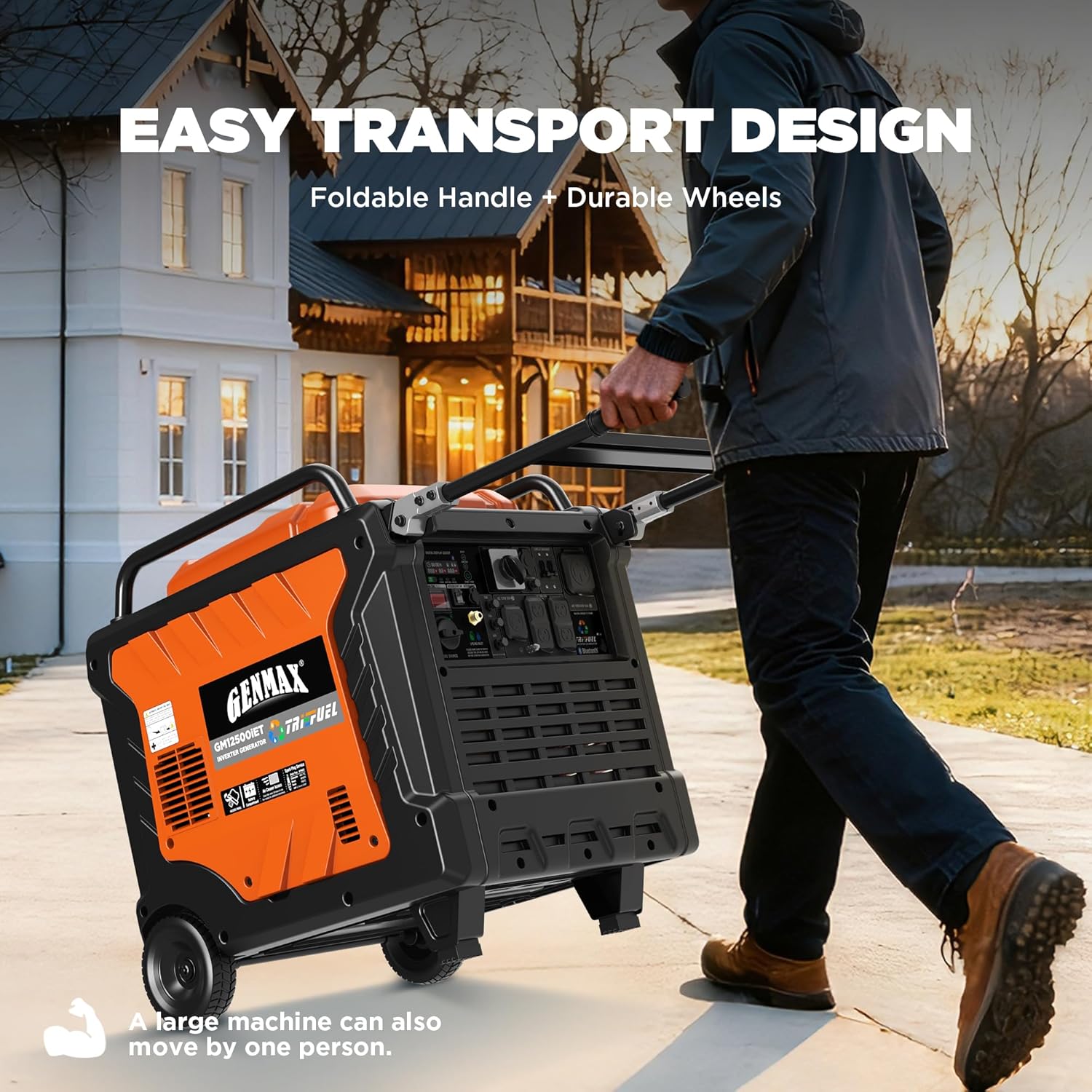
Image: A person easily transporting the GENMAX GM12500iET generator across a lawn, demonstrating its easy transport design with a foldable handle and durable wheels.
3.3 என்ஜின் எண்ணெயைச் சேர்க்கவும்
- எண்ணெய் நிரப்பு மூடி/டிப்ஸ்டிக்கைக் கண்டறியவும்.
- ஜெனரேட்டர் ஒரு சமதள மேற்பரப்பில் இருப்பதை உறுதிசெய்யவும்.
- Using the provided funnel, slowly add the recommended engine oil (refer to specifications for type and capacity) until it reaches the upper mark on the dipstick. Do not overfill.
- எண்ணெய் நிரப்பு மூடியை பாதுகாப்பாக மாற்றவும்.
3.4 Connect Battery
- பேட்டரி பெட்டியைக் கண்டறியவும்.
- Connect the positive (+) battery cable (red) to the positive (+) terminal and the negative (-) battery cable (black) to the negative (-) terminal. Ensure connections are secure.
3.5 எரிபொருள் இணைப்பு
The GM12500iET supports three fuel types: Gasoline, Propane (LPG), and Natural Gas (NG).
- பெட்ரோல்: Fill the fuel tank with fresh, unleaded gasoline. Do not use E85 or mixed fuels.
- புரோபேன் (எல்பிஜி): Connect a standard propane tank to the dedicated LPG inlet using the provided LPG hose. Ensure all connections are tight to prevent leaks.
- இயற்கை எரிவாயு (NG): Connect to a natural gas supply line using the provided NG hose and quick connector. Ensure connections are secure and leak-free.
முக்கியமானது: Only use one fuel type at a time. Select the desired fuel using the fuel selector switch on the control panel.
Video: A detailed instructional video (22:55) covering the setup and initial preparation of the GENMAX GM12500iET Tri-Fuel Inverter Generator.
4. இயக்க வழிமுறைகள்
Follow these steps to safely start and operate your GENMAX GM12500iET generator.
4.1 கண்ட்ரோல் பேனல் முடிந்துவிட்டதுview
Familiarize yourself with the control panel components before operation.

படம்: ஒரு நெருக்கமான படம் view of the generator's control panel, showing the digital display, main switch, fuel source switch, LPG/NG inlet, AC breakers, ground terminal, various AC outlets (50A, 30A, 20A), DC 12V outlet, USB ports, and the battery charging port.
4.2 ஜெனரேட்டரைத் தொடங்குதல்
The GM12500iET offers four starting methods:
- மின் தொடக்கம்:
- ஜெனரேட்டர் ஒரு சமதள மேற்பரப்பில் இருப்பதையும், அனைத்து இணைப்புகளும் பாதுகாப்பாக இருப்பதையும் உறுதிசெய்யவும்.
- Select the desired fuel type using the fuel source switch.
- Turn the main switch to the 'ON' position.
- Press and hold the 'START/STOP' button until the engine starts.
- Bluetooth App Start:
- Download the GENMAX app to your smartphone.
- Pair your device with the generator via Bluetooth.
- Follow the in-app instructions to start the generator remotely.
- 2-Wire Auto Start (for Home Backup):
- Connect the provided 2-wire auto start cable to a compatible automatic transfer switch (ATS) or home backup system.
- Ensure the 'AUTO GEN START SW' is in the 'ON' position.
- The generator will automatically start when power is lost and shut down when utility power returns.

Image: The GENMAX GM12500iET generator is shown providing power to an RV, illustrating the convenience of its Auto Gen Start feature with a communication cable for automatic starting and stopping.
- Recoil Backup Start:
- Ensure the main switch is 'ON' and fuel is selected.
- இயந்திரம் தொடங்கும் வரை ரீகோயில் ஸ்டார்ட்டர் கைப்பிடியை உறுதியாகவும் சீராகவும் இழுக்கவும்.
4.3 Eco-Mode Operation
Engage Eco-Mode by pressing the 'ECO' button on the control panel. In Eco-Mode, the engine speed automatically adjusts to the electrical load, which reduces fuel consumption and noise levels, especially during light load conditions. This feature extends runtime and is ideal for quiet environments.

Image: The GENMAX GM12500iET generator operating outdoors, demonstrating its stable sine wave and low-noise technology, with a sound level indicator showing 62 dB at 7 meters.
4.4 மின் சுமைகளை இணைத்தல்
- Once the generator is running stably, plug in your electrical devices or connect to your transfer switch.
- ஜெனரேட்டரின் மதிப்பிடப்பட்ட இயங்கும் அளவை விட அதிகமாக இருக்கக்கூடாது.tage. Monitor the digital display for wattagஇ வெளியீடு.
- Ensure all connected devices are in good working order and their power requirements are within the generator's capacity.
Video: An instructional video (4:28) demonstrating the operational procedures and features of the GENMAX GM12500iET generator.
5. பராமரிப்பு
Regular maintenance ensures the longevity and reliable performance of your GENMAX GM12500iET generator.
5.1 என்ஜின் ஆயில்
- எண்ணெய் அளவை சரிபார்க்கவும்: Before each use, check the engine oil level and add if necessary.
- எண்ணெய் மாற்றம்: Change the engine oil after the first 20 hours of operation, then every 100 hours or annually, whichever comes first. Refer to the specifications for recommended oil type.
5.2 காற்று வடிகட்டி
- ஆய்வு: Inspect the air filter element every 50 hours or monthly.
- சுத்தம் செய்தல்/மாற்றுதல்: Clean or replace the air filter element as needed, especially in dusty conditions. A dirty air filter can reduce engine performance and increase fuel consumption.
5.3 தீப்பொறி பிளக்
- ஆய்வு: ஒவ்வொரு 100 மணி நேரத்திற்கும் அல்லது ஆண்டுதோறும் தீப்பொறி பிளக்கைச் சரிபார்க்கவும்.
- சுத்தம் செய்தல்/மாற்றுதல்: Clean or replace the spark plug if it is fouled or worn. Ensure the gap is set correctly according to the engine specifications.
5.4 எரிபொருள் அமைப்பு
- எரிபொருள் வடிகட்டி: Inspect and clean or replace the fuel filter as recommended in the full manual.
- எரிபொருள் சேமிப்பு: For gasoline, use a fuel stabilizer if storing the generator for extended periods. Drain the carburetor if storing for more than 30 days without stabilizer.
5.5 பொது சுத்தம் மற்றும் சேமிப்பு
- ஜெனரேட்டரை சுத்தமாகவும் குப்பைகள் இல்லாமல் வைக்கவும்.
- Store the generator in a dry, well-ventilated area, away from direct sunlight and extreme temperatures.
- If storing for an extended period, perform all necessary maintenance, including draining fuel (for gasoline) or disconnecting propane/natural gas lines.
6. சரிசெய்தல்
This section provides solutions to common operational issues. For more complex problems, contact GENMAX technical support.
| பிரச்சனை | சாத்தியமான காரணம் | தீர்வு |
|---|---|---|
| எஞ்சின் ஸ்டார்ட் ஆகாது |
|
|
| Low power output / Engine stalls under load |
|
|
| Generator runs but no power output |
|
|
| CO sensor shutdown |
|
|
Video: A brief instructional video (3:36) that may cover common troubleshooting steps or specific features of the generator.
7. விவரக்குறிப்புகள்
Detailed technical specifications for the GENMAX GM12500iET Tri-Fuel Inverter Generator.
| அம்சம் | விவரக்குறிப்பு |
|---|---|
| மாதிரி பெயர் | GM12500iET |
| பிராண்ட் | ஜென்மேக்ஸ் |
| எஞ்சின் வகை | 4 ஸ்ட்ரோக், OHV |
| எஞ்சின் இடமாற்றம் | 458 கன சென்டிமீட்டர்கள் |
| எரிபொருள் வகை | மூன்று எரிபொருள் (பெட்ரோல், புரொப்பேன், இயற்கை எரிவாயு) |
| Gasoline Starting Wattage | 12500 வாட்ஸ் |
| Gasoline Running Wattage | 10500 வாட்ஸ் |
| Propane (LPG) Starting Wattage | 11500 வாட்ஸ் |
| Propane (LPG) Running Wattage | 9500 வாட்ஸ் |
| Natural Gas (NG) Starting Wattage | 10000 வாட்ஸ் |
| Natural Gas (NG) Running Wattage | 8500 வாட்ஸ் |
| தொட்டியின் அளவு | 6.1 கேலன்கள் |
| மொத்த ஹார்மோனிக் சிதைவு (THD) | ≤3% |
| Noise Level (25% load) | 62 dB(A) வரை குறைவாக |
| தயாரிப்பு பரிமாணங்கள் (L x W x H) | 30.9" x 22.63" x 29.33" |
| பொருளின் எடை | 251.92 பவுண்டுகள் |
| சிறப்பு அம்சங்கள் | CO Sensor, Bluetooth, 2-Wire Auto Start, Eco-Mode |
| உள்ளிட்ட கூறுகள் | Spark Plug Socket Wrench, Wrench, Remote Control Key, Funnel, Battery Charger, NG Quick Connector, LPG Hose, NG Hose, Automatic Start/Stop Cable |
8. உத்தரவாதம் மற்றும் ஆதரவு
GENMAX is committed to providing reliable products and customer satisfaction.
8.1 உத்தரவாதத் தகவல்
The GENMAX GM12500iET Tri-Fuel Inverter Generator is backed by a 3 வருட வரையறுக்கப்பட்ட உத்தரவாதம். இந்த உத்தரவாதமானது சாதாரண பயன்பாடு மற்றும் சேவையின் கீழ் பொருட்கள் மற்றும் வேலைப்பாடுகளில் ஏற்படும் குறைபாடுகளை உள்ளடக்கும். உத்தரவாதக் கோரிக்கைகளுக்கு உங்கள் வாங்கியதற்கான ஆதாரத்தை வைத்திருங்கள்.
For specific terms and conditions of the warranty, please refer to the warranty card included with your product or visit the official GENMAX webதளம்.
8.2 தொழில்நுட்ப ஆதரவு
Should you encounter any issues or require assistance with your generator, GENMAX offers ongoing technical support. Please have your model number (GM12500iET) and serial number ready when contacting support.
Contact information for technical support can typically be found on the GENMAX website or in the documentation provided with your generator.