
1. அறிமுகம்
நன்றி, நன்றி.asing the ELEPHAS BL128MINI Mini Projector. This manual provides essential information for setting up, operating, and maintaining your projector. Please read it thoroughly before use to ensure optimal performance and longevity of the device.
2. தொகுப்பு உள்ளடக்கங்கள்
கீழே பட்டியலிடப்பட்டுள்ள அனைத்து பொருட்களும் உங்கள் தொகுப்பில் சேர்க்கப்பட்டுள்ளதா என்பதை சரிபார்க்கவும்:
- 1 x ELEPHAS BL128MINI Projector
- 1 x ரிமோட் கண்ட்ரோல்
- 1 x பயனர் கையேடு (இந்த ஆவணம்)
- 1 x HDMI கேபிள்
- 1 x Detachable Tripod
3. தயாரிப்பு முடிந்துவிட்டதுview
3.1 முக்கிய அம்சங்கள்
- 1080P முழு HD தெளிவுத்திறன்: Supports 1920 x 1080 resolution for clear images.
- 24-bit True Color: துடிப்பான மற்றும் துல்லியமான வண்ணங்களை வழங்குகிறது.
- பெரிய திரைத் திட்டம்: Capable of projecting up to a 200-inch screen.
- Detachable Tripod: Provides stable placement and flexible positioning.
- Built-in HIFI Speaker: Offers integrated audio output.
- பல இணைப்பு விருப்பங்கள்: Includes USB, HDMI, AV, and Audio ports.

Image 3.1: The ELEPHAS BL128MINI Projector offers 1080P Full HD resolution with 24-bit true color, an 8000:1 contrast ratio, and enhanced brightness for a vivid viewஅனுபவம்.
3.2 Projector Ports and Controls
Familiarize yourself with the various ports and controls on your projector for proper connection and operation.

Image 3.2: Rear panel of the ELEPHAS BL128MINI Projector, highlighting DC power input, USB ports, HDMI port, AV port, and audio output. Compatible devices include Xbox, TV Stick, PC, Smartphone, USB drives, speakers, and headphones.
4 அமைவு
4.1 மின் இணைப்பு
- ப்ரொஜெக்டரில் உள்ள DC IN போர்ட்டுடன் பவர் அடாப்டரை இணைக்கவும்.
- பவர் அடாப்டரை ஒரு சுவர் கடையில் செருகவும்.
4.2 Tripod Installation
The included detachable tripod allows for stable placement on various surfaces.
- Locate the tripod mounting screw hole on the bottom of the projector.
- Screw the tripod securely into the mounting hole.
- Adjust the tripod legs to achieve the desired height and angle for projection.

Image 4.2: The detachable tripod provides stability for the projector, whether placed on a desktop or uneven outdoor surfaces.
4.3 இடம் மற்றும் திட்ட தூரம்
Position the projector on a flat, stable surface. The optimal projection distance ranges from 3.3 to 9.8 feet for screen sizes between 50 and 200 inches.

Image 4.3: Recommended projection distances for achieving various screen sizes, from 50 to 200 inches.
5. இயக்க வழிமுறைகள்
5.1 பவர் ஆன்/ஆஃப்
- பவர் ஆன்: ப்ரொஜெக்டர் அல்லது ரிமோட் கண்ட்ரோலில் உள்ள ஆற்றல் பொத்தானை அழுத்தவும்.
- பவர் ஆஃப்: Press the power button again. The projector will enter standby mode.
5.2 கவனம் சரிசெய்தல்
ப்ரொஜெக்ட் செய்யப்பட்ட படம் தெளிவாகவும் கூர்மையாகவும் இருக்கும் வரை ப்ரொஜெக்டர் லென்ஸில் ஃபோகஸ் ரிங்கை சுழற்றுங்கள்.
5.3 உள்ளீட்டு மூலத் தேர்வு
Use the 'Source' button on the remote control or the projector to select the desired input source (HDMI, USB, AV).
5.4 வெளிப்புற சாதனங்களை இணைத்தல்
The projector supports various external devices:
- , HDMI: Connect laptops, PCs, TV boxes, TV sticks, gaming consoles (e.g., Xbox), or other HDMI-enabled devices using the provided HDMI cable.
- USB: மீடியாவை இயக்க USB போர்ட்டில் USB ஃபிளாஷ் டிரைவைச் செருகவும். fileநேரடியாக கள்.
- ஏ.வி: Use the AV port for older devices with composite video output.
- ஸ்மார்ட்போன்கள்/டேப்லெட்டுகள்: For iOS and Android devices, an additional HDMI adapter (not included) is required for connection.
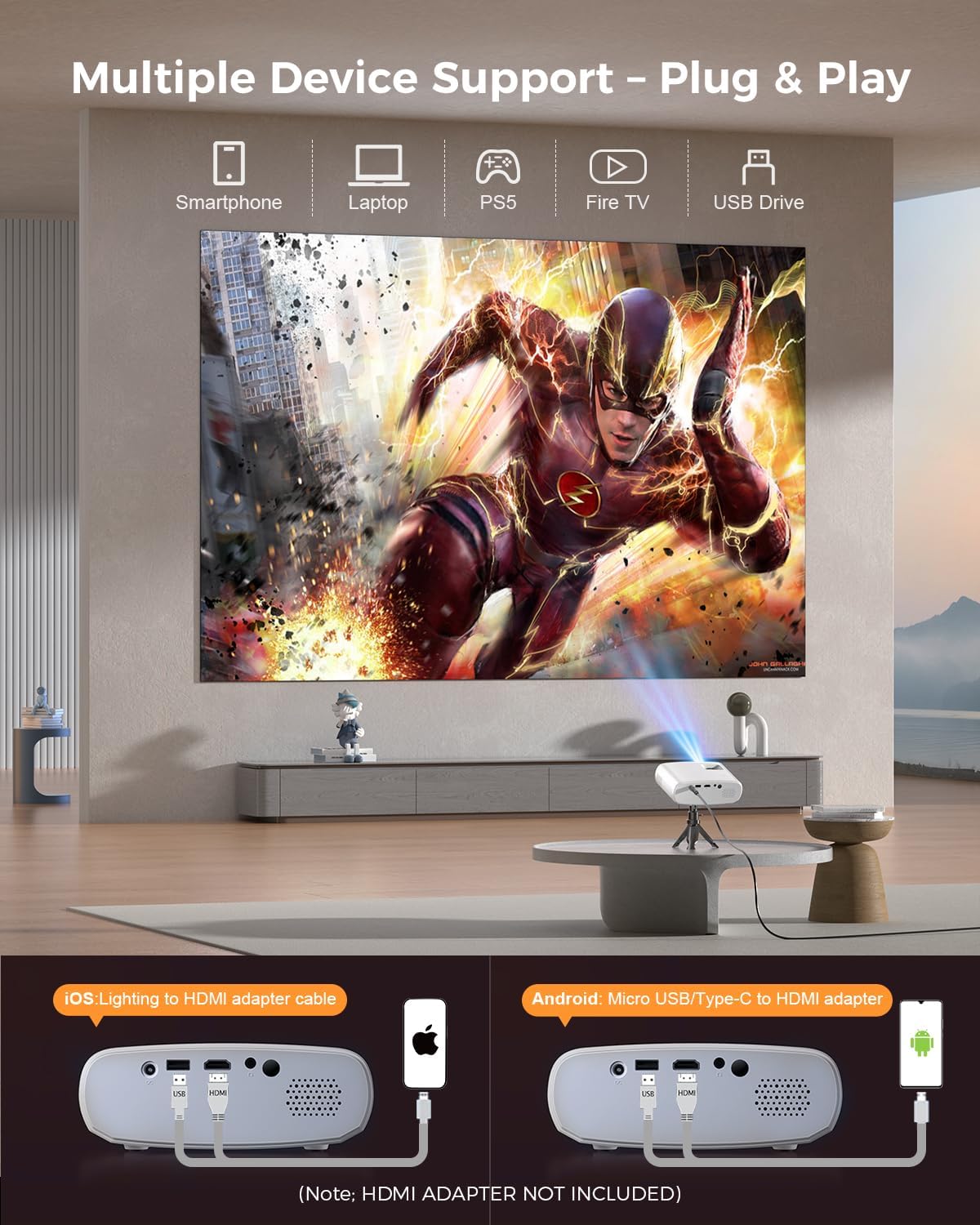
Image 5.4: The projector supports multiple devices via HDMI and USB. Note that an HDMI adapter is required for direct smartphone connection (not included).
5.5 ஆடியோ வெளியீடு
The projector has a built-in HIFI speaker. For external audio, connect headphones or external speakers to the Audio Out port.
6. பராமரிப்பு
6.1 சுத்தம் செய்தல்
- லென்ஸ்: Use a soft, lint-free cloth or lens cleaning paper. Avoid abrasive materials.
- Casing: ப்ரொஜெக்டரை துடைக்கவும் casing with a soft, dry cloth. Do not use liquid cleaners or solvents.
- காற்றோட்டம்: அதிக வெப்பமடைவதைத் தடுக்க காற்றோட்டத் திறப்புகள் தூசி மற்றும் தடைகள் இல்லாமல் இருப்பதை உறுதி செய்யவும்.
6.2 சேமிப்பு
When not in use, store the projector in a cool, dry place, away from direct sunlight and extreme temperatures. Use the original packaging or a protective bag to prevent dust accumulation.
7. சரிசெய்தல்
| பிரச்சனை | சாத்தியமான காரணம் | தீர்வு |
|---|---|---|
| எந்தப் படமும் வெளியிடப்படவில்லை. | Power cable loose; Incorrect input source; Device not connected properly. | Check power connection; Select correct input source; Reconnect HDMI/USB cable. |
| படம் மங்கலாக உள்ளது | கவனம் சரிசெய்யப்படவில்லை; புரொஜெக்டர் திரைக்கு மிக அருகில்/தொலைவில் உள்ளது. | Adjust focus ring; Adjust projection distance. |
| ஒலி இல்லை | ஒலி அளவு மிகவும் குறைவாக உள்ளது; ஒலியடக்கப்பட்டது; வெளிப்புற ஆடியோ சாதனம் இணைக்கப்படவில்லை. | ஒலியளவை அதிகரிக்கவும்; ஒலியை இயக்கவும்; வெளிப்புற ஆடியோ இணைப்புகளைச் சரிபார்க்கவும். |
| ரிமோட் கண்ட்ரோல் வேலை செய்யவில்லை | Batteries low/dead; Obstruction between remote and projector. | பேட்டரிகளை மாற்றவும்; ஐஆர் ரிசீவரை தெளிவாகப் பார்க்கும் கோட்டை உறுதி செய்யவும். |
| Cannot play Netflix/Hulu/Prime Video | HDCP copyright protection. | Use an external streaming device like Amazon Fire Stick or Roku Stick (not included). |
8. விவரக்குறிப்புகள்
| அம்சம் | விவரம் |
|---|---|
| மாதிரி | BL128MINI |
| பிராண்ட் | எலிபாஸ் |
| காட்சித் தீர்மானம் | 1920 x 1080 (1080P முழு HD) |
| இணைப்பு தொழில்நுட்பம் | HDMI, USB, AV, Audio Out |
| சிறப்பு அம்சங்கள் | HDMI Connectivity, Portable, Built-in Speakers, Detachable Tripod |
| பரிந்துரைக்கப்பட்ட பயன்பாடு | உட்புறம்/வெளிப்புறம் |
| பொருளின் எடை | 1.96 பவுண்டுகள் (தோராயமாக 0.89 கிலோ) |
| தயாரிப்பு பரிமாணங்கள் | 6 x 4.4 x 2.4 அங்குலம் (தோராயமாக 15.2 x 11.2 x 6.1 செ.மீ) |
9. உத்தரவாதம் மற்றும் ஆதரவு
ELEPHAS projectors are certified with CE, FCC, and RoHS standards.
- Factory Support: We provide 3-years factory support for this product.
- தொழில்நுட்ப ஆதரவு: வாழ்நாள் முழுவதும் தொழில்நுட்ப ஆதரவு கிடைக்கிறது.
- வாடிக்கையாளர் சேவை: 24/7 professional service is provided.
- வருமானம்: A 30-day return or exchange policy is in place.
For further assistance, please refer to the contact information provided on the product packaging or the official ELEPHAS webதளம்.

Image 9.1: ELEPHAS offers comprehensive customer support, including 24/7 professional service, a 30-day return policy, and lifetime technical support.