
1. அறிமுகம்
This user manual provides comprehensive instructions for the installation, operation, and maintenance of your Polarlander B5350 Car Stereo. Please read this manual thoroughly before using the product to ensure proper functionality and to prevent damage. Keep this manual for future reference.
2. பாதுகாப்பு தகவல்
- ஓட்டுநர் பாதுகாப்பு: Always prioritize safe driving. Do not operate the system in a way that distracts you from the road.
- நிறுவல்: Professional installation is recommended. Ensure all wiring is correctly connected to prevent short circuits or damage.
- மின்சாரம்: Connect the unit to a 9-30V DC power supply. Incorrect voltage சேதத்தை ஏற்படுத்தக்கூடும்.
- வெப்பநிலை: Operate the unit within the specified temperature range of -20℃ to 60℃.
- ஈரப்பதம்: அலகு தண்ணீர் மற்றும் அதிகப்படியான ஈரப்பதத்திலிருந்து விலகி வைக்கவும்.
3. தொகுப்பு உள்ளடக்கங்கள்
தொகுப்பில் அனைத்து பொருட்களும் உள்ளதா என சரிபார்க்கவும்:
- பிரதான அலகு (கார் ஸ்டீரியோ)
- Waterproof Power Cord
- Fixed Mounting Bracket Set (Hardware bracket + Sunshade)
- MINI-USB to USB2.0 Cable
- பயனர் கையேடு (இந்த ஆவணம்)

Image 3.1: Contents of the Polarlander B5350 package, including the main unit, power cord, mounting bracket, and USB cable.
4. தயாரிப்பு முடிந்துவிட்டதுview
The Polarlander B5350 is a double DIN car stereo featuring a 5.0-inch touchscreen display with 800x480 resolution. It supports wireless CarPlay and Android Auto, Bluetooth 5.0, and various media playback options.
4.1 முன் பலகம் மற்றும் காட்சி
The front panel features the 5.0-inch touchscreen, which is the primary interface for controlling the unit. The display provides access to various functions including navigation, media playback, and phone calls.

படம் 4.1: எ.கா.amples of the user interface display, showing various application icons and menu layouts.
4.2 Side and Rear Connections
The unit includes several ports for connectivity and expansion:
- தலையணி ஜாக்: தனிப்பட்ட ஆடியோ கேட்பதற்கு.
- TF அட்டை ஸ்லாட்: For media playback from a TransFlash (MicroSD) card.
- MINI to USB Interface: For connecting USB devices or the provided MINI-USB to USB2.0 cable.
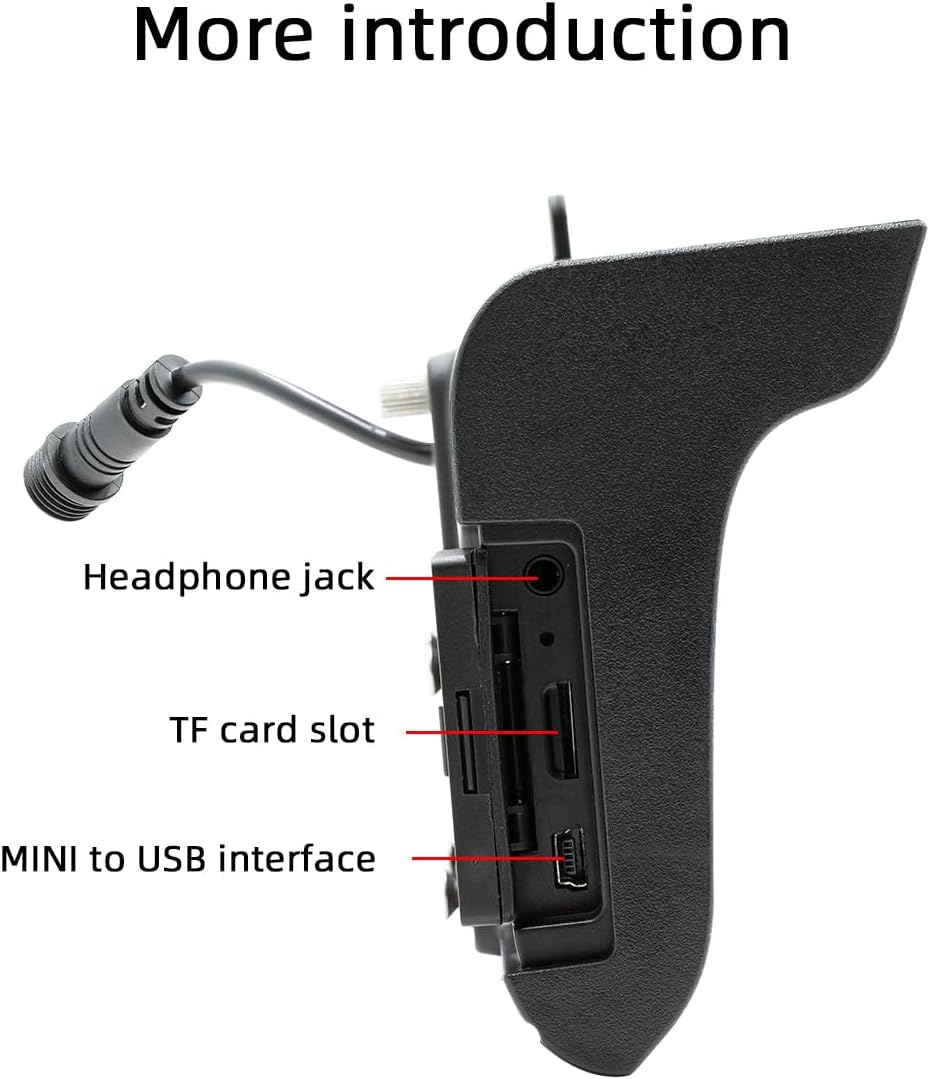
படம் 4.2: பக்கம் view illustrating the headphone jack, TF card slot, and MINI to USB interface.
The rear of the unit houses a built-in 1W speaker and mounting points for the bracket.

படம் 4.3: பின்புறம் view of the unit, highlighting the built-in 1W speaker.
5. நிறுவல்
This unit is designed for double DIN installation. Due to the complexity of vehicle wiring and dashboard configurations, professional installation is highly recommended. Incorrect installation can lead to vehicle damage or malfunction of the stereo unit.
5.1 பொதுவான நிறுவல் படிகள் (ஒரு நிபுணரை அணுகவும்)
- மின் தடைகளைத் தடுக்க வாகனத்தின் பேட்டரியைத் துண்டிக்கவும்.
- Remove the existing car stereo or dashboard trim to access the double DIN slot.
- Connect the wiring harness from the vehicle to the stereo's power and speaker connections. Ensure correct polarity.
- Connect any additional inputs/outputs such as the reversing camera, AUX-in, or RCA audio outputs.
- Mount the stereo securely into the double DIN slot using the provided mounting bracket set.
- வாகனத்தின் பேட்டரியை மீண்டும் இணைத்து, யூனிட்டின் செயல்பாட்டைச் சோதிக்கவும்.
- டாஷ்போர்டு டிரிமை மீண்டும் இணைக்கவும்.
Note: The waterproof power cord should be routed carefully to avoid damage and ensure proper sealing.
6. ஆரம்ப அமைப்பு
6.1 பவர் ஆன்/ஆஃப்
The unit will power on automatically when the vehicle's ignition is turned on. To power off, turn off the vehicle's ignition.
6.2 மொழி அமைப்புகள்
Upon first use, you may be prompted to select your preferred language. Navigate through the on-screen menu to select from English, Chinese, Spanish, Portuguese, Russian, German, French, Polish, Turkish, Arabic, Hebrew, Italian, Czech, Japanese, or Korean.
7. இயக்க வழிமுறைகள்
7.1 தொடுதிரை வழிசெலுத்தல்
The 5-inch touchscreen is the primary control interface. Tap icons to open applications, swipe to navigate menus, and use pinch-to-zoom gestures where applicable (e.g., in navigation apps).
7.2 ஸ்டீயரிங் வீல் கட்டுப்பாடு
If your vehicle supports steering wheel controls, connect the appropriate wires during installation. The unit supports programmable steering wheel controls, allowing you to map functions like volume, track skip, and mode selection to your vehicle's buttons.
7.3 Seven-Color Key Backlights
The unit features adjustable seven-color key backlights. Access the settings menu to customize the backlight color to match your vehicle's interior lighting or your personal preference.
8. இணைப்பு
8.1 புளூடூத் 5.0
The unit features Bluetooth 5.0 for wireless audio streaming and hands-free calling. The default Bluetooth name is "SWL-BT".
- உங்கள் மொபைல் போனில் ப்ளூடூத்தை இயக்கவும்.
- கார் ஸ்டீரியோவில், புளூடூத் மெனுவிற்குச் செல்லவும்.
- தேடுங்கள் available devices on your phone and select "SWL-BT".
- கேட்கப்பட்டால் இணைத்தல் குறியீட்டை உறுதிப்படுத்தவும்.
The unit supports connecting to two Bluetooth devices simultaneously, such as a mobile phone and a Bluetooth earphone.

Image 8.1: Illustration of the dual Bluetooth connection capability, powered by a Bluetooth 5.0 chip.
8.2 Wireless & Wired CarPlay / Android Auto
Connect your smartphone to access functions like navigation, phone calls, messages, and music directly on the car stereo display. Both wired and wireless connections are supported.

Image 8.2: Display showing the CarPlay and Android Auto interfaces, demonstrating mobile phone function integration.
8.2.1 வயர்லெஸ் இணைப்பு
For wireless CarPlay or Android Auto, ensure your phone's Wi-Fi and Bluetooth are enabled. Follow the on-screen prompts on the car stereo to pair your device wirelessly.
8.2.2 கம்பி இணைப்பு
Connect your smartphone to the unit's USB port using a compatible USB cable. The system will automatically detect and launch CarPlay or Android Auto.
9. மீடியா பிளேபேக்
The Polarlander B5350 supports multiple methods for media playback:
- Bluetooth (BT) Playback: உங்கள் இணைக்கப்பட்ட ஸ்மார்ட்போனிலிருந்து வயர்லெஸ் முறையில் ஆடியோவை ஸ்ட்ரீம் செய்யுங்கள்.
- TF கார்டு பிளேபேக்: Insert a TF (MicroSD) card into the designated slot to play audio and video files.
- யூ.எஸ்.பி பிளேபேக்: Connect a USB flash drive to the USB port for audio and video file பின்னணி.
- ஆக்ஸ்-இன்: துணை உள்ளீடு வழியாக வெளிப்புற ஆடியோ சாதனங்களை இணைக்கவும்.
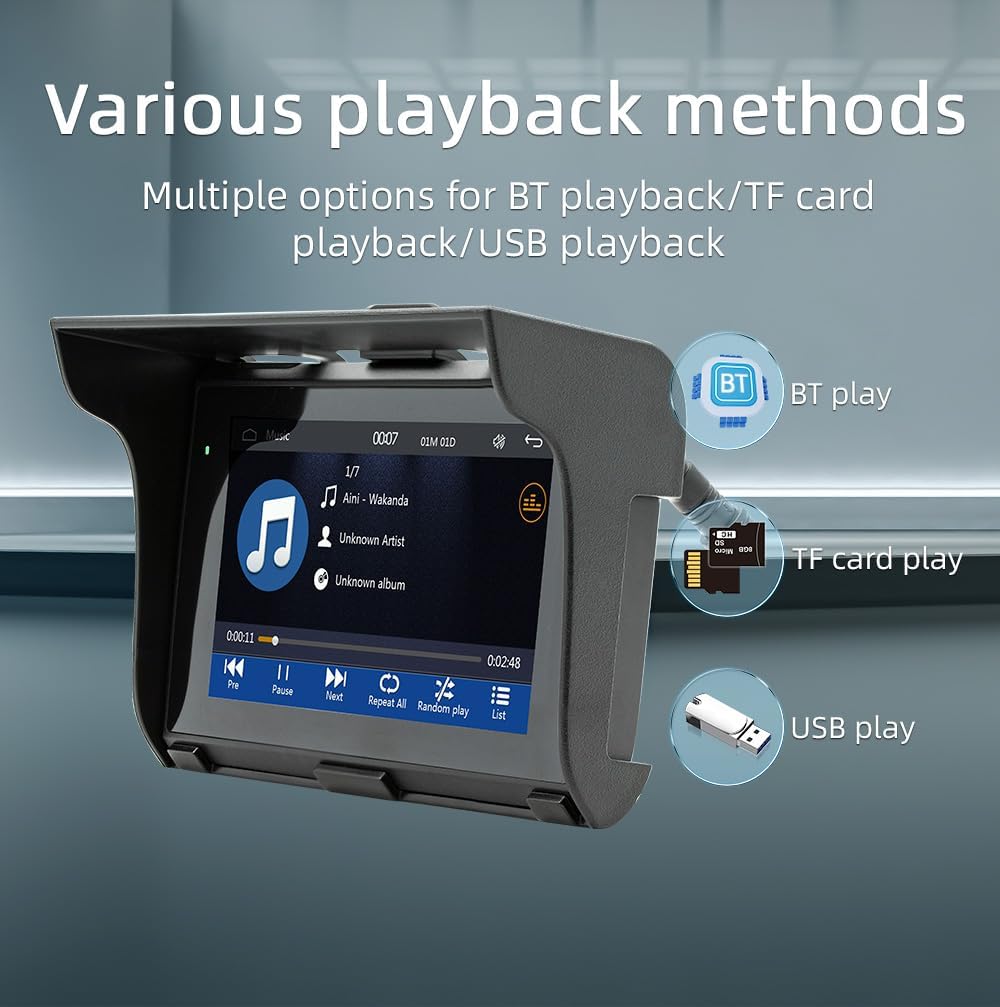
Image 9.1: Visual representation of the various media playback methods available: Bluetooth, TF card, and USB.
9.1 ஆதரிக்கப்படும் ஊடக வடிவங்கள்
- ஆடியோ வடிவங்கள்: MP3, AAC, APE, OGG, M4A, RA, WAV
- வீடியோ வடிவங்கள்: H263, H264, H265, DIVX HD, AVI, FLV, MKV, MPEG, MP4, WMV9, VC, ASF, TS, QT
- பட வடிவங்கள்: JPEG, PNG, BMP, GIF, TIFF
10. AM/FM வானொலி செயல்பாடு
The unit includes an AM/FM radio receiver. To access the radio function, select the "Radio" icon from the main menu.
- ஸ்கேனிங்: Use the scan function to automatically search for and save available radio stations.
- கையேடு சரிப்படுத்தும்: Manually tune to specific frequencies using the on-screen controls.
- முன்னமைவுகள்: விரைவான அணுகலுக்காக உங்களுக்குப் பிடித்த நிலையங்களை முன்னமைக்கப்பட்ட பொத்தான்களில் சேமிக்கவும்.
The radio allows you to stay updated with real-time traffic, news broadcasts, and weather forecasts.
11. Driving Recorder Function (Optional)
The Polarlander B5350 supports an optional car driving recorder. When connected, the unit can display and record your driving dynamics, providing additional security and peace of mind.

Image 11.1: The car stereo displaying footage from an optional driving recorder camera.
Note: The driving recorder camera is an optional accessory and is not included in the standard package.
12. சரிசெய்தல்
| பிரச்சனை | சாத்தியமான காரணம் | தீர்வு |
|---|---|---|
| அலகு இயங்காது. | No power connection or incorrect wiring. | Check power cables and fuse. Ensure correct 9-30V DC supply. |
| ஒலி இல்லை. | Volume too low, mute activated, or speaker wiring issue. | Increase volume, check mute status, verify speaker connections. |
| புளூடூத் இணைப்பு தோல்வியடைந்தது. | Bluetooth not enabled on phone/unit, or device out of range. | Ensure Bluetooth is active on both devices. Move phone closer to unit. Re-pair device. |
| CarPlay/Android Auto இணைக்கப்படவில்லை. | Incorrect cable, phone settings, or app issues. | Use a certified USB cable. Check phone settings for CarPlay/Android Auto. Restart phone and unit. |
| தொடுதிரை பதிலளிக்கவில்லை. | System freeze or temporary software issue. | Restart the unit (turn off/on ignition). If issue persists, consult support. |
13. விவரக்குறிப்புகள்
| அம்சம் | விவரம் |
|---|---|
| தயாரிப்பு வகை | Car Stereo (Double Din) |
| காட்சி அளவு | 5.0 அங்குலம் |
| காட்சித் தீர்மானம் | 800x480 |
| வெளியீட்டு சக்தி | உள்ளமைக்கப்பட்ட 1W ஸ்பீக்கர் |
| வேலை தொகுதிtage | 9~30V DC |
| இயக்க வெப்பநிலை | -20℃ முதல் 60℃ வரை |
| புளூடூத் பதிப்பு | 5.0 (Default name: SWL-BT) |
| இயங்கும் நினைவகம் | 1Gbit DRAM |
| ஆதரிக்கப்படும் ஆடியோ வடிவங்கள் | MP3, AAC, APE, OGG, M4A, RA, WAV |
| ஆதரிக்கப்படும் வீடியோ வடிவங்கள் | H263, H264, H265, DIVX HD, AVI, FLV, MKV, MPEG, MP4, WMV9, VC, ASF, TS, QT |
| ஆதரிக்கப்பட்ட பட வடிவங்கள் | JPEG, PNG, BMP, GIF, TIFF |
| உள்ளீடு/வெளியீடு | SD Card, USB, AUX-in, RCA Audio output, Reversing camera input |
| உற்பத்தியாளர் பகுதி எண் | B5350 |
14. பராமரிப்பு
- காட்சியை சுத்தம் செய்தல்: தொடுதிரையை மெதுவாகத் துடைக்க மென்மையான, பஞ்சு இல்லாத துணியைப் பயன்படுத்தவும். சிராய்ப்பு கிளீனர்கள் அல்லது கரைப்பான்களைப் பயன்படுத்த வேண்டாம்.
- பொது சுத்தம்: Keep the unit free from dust and debris. Use a soft brush or compressed air for hard-to-reach areas.
- கேபிள் இணைப்புகள்: அனைத்து கேபிள் இணைப்புகளும் பாதுகாப்பாக இருப்பதை உறுதிசெய்ய அவ்வப்போது அவற்றைச் சரிபார்க்கவும்.
15. உத்தரவாதம் மற்றும் ஆதரவு
உத்தரவாதத் தகவல் மற்றும் தொழில்நுட்ப ஆதரவிற்கு, வாங்கும் போது வழங்கப்பட்ட ஆவணங்களைப் பார்க்கவும் அல்லது உங்கள் சில்லறை விற்பனையாளரைத் தொடர்பு கொள்ளவும். எந்தவொரு உத்தரவாதக் கோரிக்கைகளுக்கும் உங்கள் வாங்கியதற்கான ஆதாரத்தை வைத்திருங்கள்.
For further assistance, visit the official Polarlander webதளம் அல்லது அவர்களின் வாடிக்கையாளர் சேவைத் துறையைத் தொடர்புகொள்ளவும்.