
அறிமுகம்
This manual provides essential information for the proper use, setup, operation, and maintenance of your LIVALL BH51M NSO Smart Bluetooth Bike Helmet. Please read this manual thoroughly before using the helmet to ensure optimal performance and safety.
பாதுகாப்பு தகவல்
The LIVALL BH51M NSO helmet is CE and CPSC1203 certified, ensuring it meets safety standards. Proper fit is crucial for protection. Always ensure the helmet is securely fastened and adjusted to your head size before riding.
The helmet features patented fall detection and an SOS alert system. In the event of a fall, the system can automatically send an alert with your GPS location to pre-set emergency contacts via the LIVALL App. This feature requires the helmet to be connected to the app and your smartphone to have network access.
While the helmet provides audio features, always maintain situational awareness of your surroundings, including traffic sounds, when listening to music or making calls.
தயாரிப்பு முடிந்துவிட்டதுview
கூறுகள்
- LIVALL BH51M NSO Smart Bike Helmet
- Bling Remote Controller BR80
- காந்த USB சார்ஜிங் கேபிள்

Image: LIVALL BH51M NSO Cycling Package, showing the helmet, Bling Remote Controller BR80, and Magnetic USB Charging Cable.
முக்கிய அம்சங்கள்
- அதிவேக ஆடியோ அனுபவம்: Integrated JBL speakers provide enhanced sound quality for music and phone calls. The open-ear speaker design allows for situational awareness.
- உள்ளமைக்கப்பட்ட மைக்ரோஃபோன்: Wind-proof microphone for clear communication during calls.
- Enhanced Visibility with Smart Lighting: Built-in LED lights with a 270-degree angle function as flashing, stopping, and warning lights. Integrated smart LED turn signals and brake warning lights improve visibility.
- Patented Fall Detection & SOS Alert: Automatically triggers an SOS alert via the LIVALL App to emergency contacts with real-time GPS positioning in case of a fall.
- ஹேண்ட்ஸ்-ஃப்ரீ தொடர்பு: Effortlessly handle calls and utilize voice navigation through the helmet's Bluetooth speakers and microphone.
- PTT Walkie-Talkie: Connect with other cyclists using the PTT Walkie-Talkie function via the LIVALL app for group communication.
- LIVALL App Connectivity: Full utilization of smart features requires connection to the LIVALL App.
- IPX5 நீர்ப்புகா: பல்வேறு காலநிலைகளை தாங்கும் வகையில் வடிவமைக்கப்பட்டுள்ளது.
- நீண்ட பேட்டரி ஆயுள்: 12 மணிநேரம் வரை பேட்டரி ஆயுள்.
- சரிசெய்யக்கூடிய ஃபிட் சிஸ்டம்: Features a rotary adjustment system for a secure and comfortable fit.

Image: LIVALL BH51M NSO Smart Helmet with JBL sound system, illustrating the integrated speakers for an immersive audio experience.
அமைவு
1. Charging the Helmet
Connect the magnetic USB charging cable to the helmet's charging port and a suitable USB power source. Ensure the helmet is fully charged before its first use. A full charge typically provides up to 12 hours of battery life.
2. Fitting the Helmet Correctly
Place the helmet on your head. Use the rotary adjustment system at the back of the helmet to tighten or loosen the fit until it is snug but comfortable. Adjust the chin straps so they form a 'V' shape below your ears and the buckle is centered under your chin. The helmet should not move excessively when you shake your head.
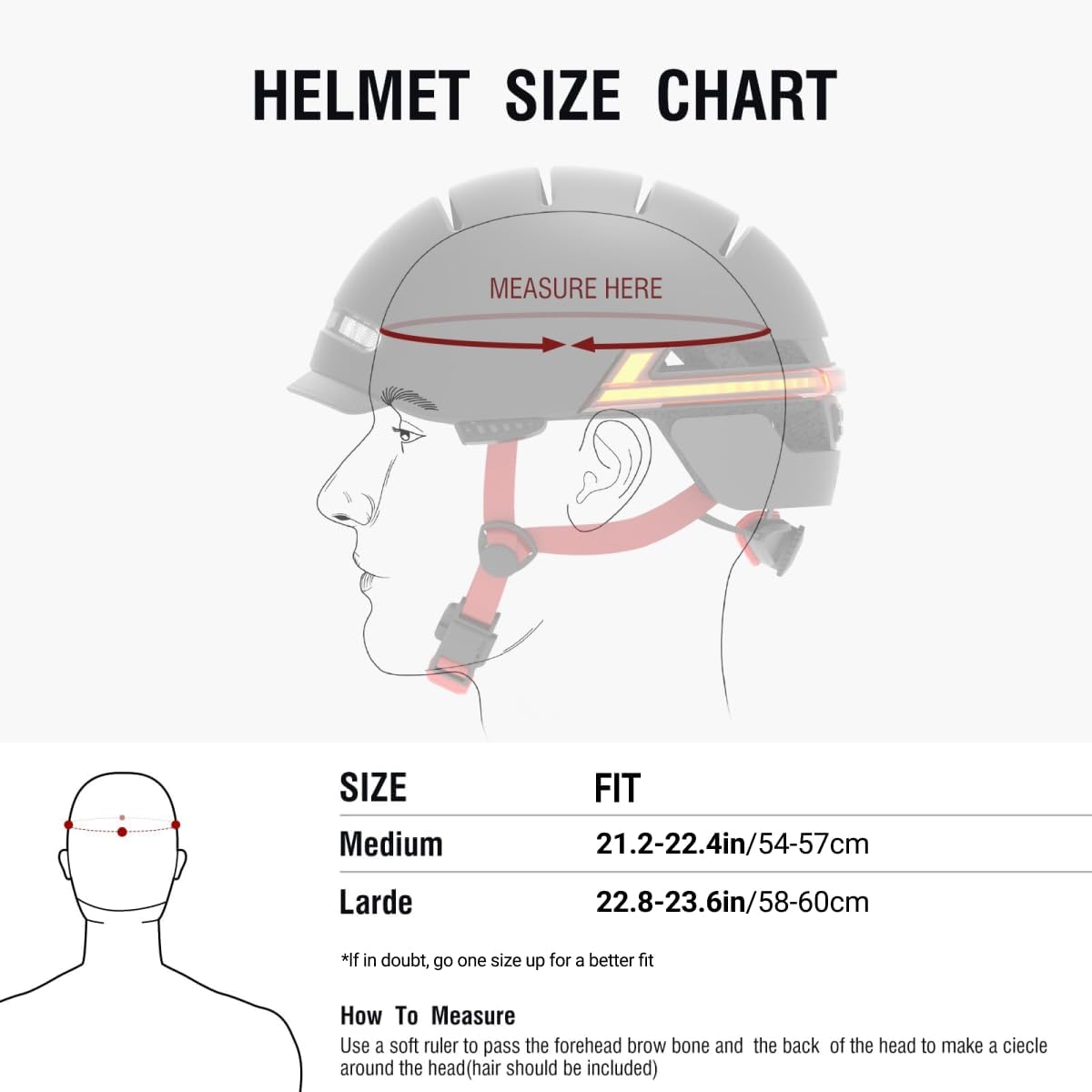
Image: Helmet size chart with instructions on how to measure your head circumference to select the correct helmet size.
Video: Instructions on how to wear the LIVALL BH51M NSO helmet correctly, demonstrating proper adjustment and fit.
3. Connecting to the LIVALL Riding App
Download the LIVALL Riding App from your smartphone's app store. Ensure Bluetooth is enabled on your phone. Open the app and follow the on-screen instructions to pair your BH51M NSO helmet and the Bling Remote Controller. This connection is essential for accessing all smart features, including GPS positioning, SOS alerts, and PTT Walkie-Talkie.

Image: A smartphone showing the LIVALL Riding App, indicating the need to download the app to unlock helmet features.
4. Pairing the Remote Controller
If you need to connect a new remote controller or re-pair an existing one, turn on the helmet by holding the power button. Place the remote controller close to the helmet and press the confirm button on the remote. The helmet will emit a ticking beep. Press the power button on the helmet to confirm the connection. After successful connection, you can test the turn signals using the remote.
Video: Detailed instructions on how to connect the LIVALL BH51M NSO helmet to its remote controller.
இயக்க வழிமுறைகள்
1. பவர் ஆன்/ஆஃப்
To power on the helmet, press and hold the power button located at the back of the helmet until the lights illuminate. To power off, press and hold the power button again until the lights turn off.
2. Smart Lighting
The helmet features automatic inductive lighting, which adjusts based on ambient light conditions. The 270° visible LEDs provide all-around visibility. Use the Bling Remote Controller to activate the turn signals. Press the left button for a left turn signal and the right button for a right turn signal. The helmet also has an automatic brake warning light that illuminates when you decelerate.

Image: Two cyclists wearing LIVALL BH51M NSO helmets, showcasing the 270-degree visible LEDs for enhanced safety during night rides.

Image: The LIVALL BH51M NSO helmet with an activated turn signal, demonstrating how riders can indicate turns without removing hands from handlebars.
3. Audio Functions (Calls, Music, Voice Commands)
Once connected to your smartphone via Bluetooth, you can use the helmet's integrated JBL speakers and microphone for various audio functions. Use the remote controller to answer or end calls, adjust volume, and control music playback. The remote's voice button can activate your phone's voice assistant for hands-free commands and navigation.
4. Fall Detection & SOS Alert
The helmet's sensors detect sudden impacts indicative of a fall. If a fall is detected, the LIVALL App will initiate a 90-second countdown. If the user does not cancel the alert within this time, an SOS message with the user's GPS location will be sent to pre-selected emergency contacts. Ensure your emergency contacts are up-to-date in the LIVALL App.

Image: A person on the ground after a fall, with a smartphone showing the LIVALL SOS system by app, indicating an alert with exact GPS location.
5. Anti-Loss Function
The anti-loss function, when enabled in the LIVALL App, will alert you if the helmet and your smartphone exceed a certain distance (approximately 15 meters). This helps prevent leaving your helmet behind unintentionally.
Video: Demonstration of how to activate and use the LIVALL helmet's anti-loss function via the app.
பராமரிப்பு
1. சுத்தம் செய்தல்
The helmet features a removable liner for easy cleaning. Gently remove the liner and wash it with mild soap and water. Allow it to air dry completely before reinserting. For the outer shell, wipe with a damp துணி. கடுமையான இரசாயனங்கள் அல்லது சிராய்ப்பு கிளீனர்களைப் பயன்படுத்துவதைத் தவிர்க்கவும்.

படம்: உட்புறம் view of the LIVALL BH51M NSO helmet, showing the removable liner and 13 ventilation vents for comfort and breathability.
2. நீர்ப்புகாப்பு
The BH51M NSO helmet is built to IPX5 standards, meaning it is protected against low-pressure water jets from any direction. It is suitable for use in rain but should not be submerged in water.

Image: The LIVALL BH51M NSO helmet with water droplets, demonstrating its IPX5 waterproof rating, suitable for riding in various weather conditions.
3. பேட்டரி பராமரிப்பு
To prolong battery life, avoid fully discharging the helmet frequently. Charge the helmet regularly, especially if it will be stored for an extended period. Store the helmet in a cool, dry place.
சரிசெய்தல்
இணைப்புச் சிக்கல்கள்
- Helmet not connecting to app: Ensure Bluetooth is enabled on your phone and the helmet is powered on. Try restarting both the helmet and the app.
- Remote controller not pairing: Follow the pairing instructions in the Setup section. Ensure the remote is close to the helmet during pairing.
ஆடியோ சிக்கல்கள்
- ஸ்பீக்கர்களில் இருந்து ஒலி இல்லை: Check the volume settings on both the helmet (if applicable) and your connected smartphone. Ensure the helmet is properly paired.
- Other party cannot hear you during calls: Verify the microphone is not obstructed. Check microphone permissions for the LIVALL App on your smartphone.
Light Issues
- விளக்குகள் வேலை செய்யவில்லை: Ensure the helmet is charged and powered on. Check light settings within the LIVALL App.
- Turn signals not responding: Verify the remote controller is paired and its battery is not depleted.
விவரக்குறிப்புகள்
| அம்சம் | விளக்கம் |
|---|---|
| பிராண்ட் | லிவல் |
| மாதிரி பெயர் | BH51M NSO smart helmet with J-B-L sound |
| மாதிரி எண் | BH51MNSO-JBL-B |
| அளவு | Large (58-60cm) |
| பொருளின் எடை | 1.07 கிலோகிராம் |
| வெளிப்புற பொருள் | பாலிகார்பனேட் (பிசி) |
| உள் பொருள் | நுரை |
| சிறப்பு அம்சங்கள் | Smart Bluetooth with speakers & microphone; Smart lighting, brake warning light, turn signal; One-click answer, voice navigation; Patented fall detection & SOS alert |
| நீர்ப்புகா மதிப்பீடு | IPX5 |
உத்தரவாதம் மற்றும் ஆதரவு
For warranty information, technical support, or further inquiries, please refer to the official LIVALL website or contact LIVALL customer service. You can also visit the LIVALL Store on Amazon கூடுதல் ஆதாரங்களுக்கு.


