
1. அறிமுகம்
நன்றி, நன்றி.asing the Sharp PS-916 Bluetooth Party Speaker System. This system includes two identical portable Bluetooth speakers designed to deliver powerful audio with versatile connectivity options. Please read this manual carefully before using the product to ensure proper operation and to maximize your listening experience.
தொகுப்பு உள்ளடக்கம்:
- 2 x Sharp PS-916 Party Speakers
- 1 x சார்ஜிங் கேபிள்
- 1 x ரிமோட் கண்ட்ரோல்
- 1 x பயனர் கையேடு

Image: The Sharp PS-916 system includes two speakers for a complete stereo experience.
2 அமைவு
2.1 Charging the Speakers
The PS-916 speakers are equipped with rechargeable batteries, providing up to 12 hours of playback. Before initial use, fully charge both speakers.
- Connect the charging cable to the DC IN port on the rear of each speaker.
- Plug the other end of the charging cable into a suitable power adapter (not included) or USB power source.
- The charging indicator light will illuminate. It will change color or turn off once charging is complete.
2.2 பவர் ஆன்/ஆஃப்
To power on or off each speaker, press and hold the ON/STAND BY INPUT கட்டுப்பாட்டு பலகத்தில் அமைந்துள்ள பொத்தான்.
2.3 புளூடூத் இணைத்தல் (ஒற்றை ஸ்பீக்கர்)
- Ensure the speaker is powered on and in Bluetooth mode. The Bluetooth indicator will flash, indicating it is ready for pairing.
- உங்கள் மொபைல் சாதனத்தில், புளூடூத்தை இயக்கி, கிடைக்கும் சாதனங்களைத் தேடவும்.
- Select "Sharp PS-916" from the list of devices.
- Once connected, the Bluetooth indicator will stop flashing and remain solid.
2.4 ட்ரூ வயர்லெஸ் ஸ்டீரியோ (TWS) இணைத்தல் (இரண்டு ஸ்பீக்கர்கள்)
TWS allows you to connect two PS-916 speakers wirelessly for a stereo sound experience.
- Power on both PS-916 speakers.
- Ensure neither speaker is currently connected to a Bluetooth device.
- On one of the speakers (this will be the primary speaker), press the TWS button. The speaker will enter TWS pairing mode.
- The primary speaker will automatically search for the secondary speaker. Once connected, you will hear an audible confirmation, and the TWS indicator lights on both speakers will illuminate.
- இப்போது, பிரிவு 2.3 இல் விவரிக்கப்பட்டுள்ளபடி, உங்கள் மொபைல் சாதனத்தை புளூடூத் வழியாக முதன்மை ஸ்பீக்கருடன் இணைக்கவும். ஸ்டீரியோவில் இரண்டு ஸ்பீக்கர்கள் மூலமாகவும் ஆடியோ இயங்கும்.
3. இயங்குகிறது
3.1 கண்ட்ரோல் பேனல் முடிந்துவிட்டதுview

Image: Main control panel for the Sharp PS-916 speaker.
- ON/STAND BY INPUT: Power on/off, switch input modes (Bluetooth, USB, TF, AUX, FM).
- PLAY/PAUSE (►/∕∕): ஆடியோ பிளேபேக்கை இயக்கு அல்லது இடைநிறுத்து.
- PREVIOUS (◀◀): முந்தைய தடத்திற்குச் செல்லவும்.
- NEXT (▶▶): அடுத்த தடத்திற்கு செல்க.
- தொகுதி பொத்தான்: Rotate to adjust the master volume.
- TWS: Initiate or disconnect True Wireless Stereo pairing.
- தகுதி: Cycle through preset equalizer modes.
- பாஸ்: Activate or deactivate bass boost.
- ஒளி: Change or turn off the LED light effects.
- MIC CONTROL: Adjust microphone volume or echo (if applicable).
3.2 உள்ளீட்டு துறைமுகங்கள்
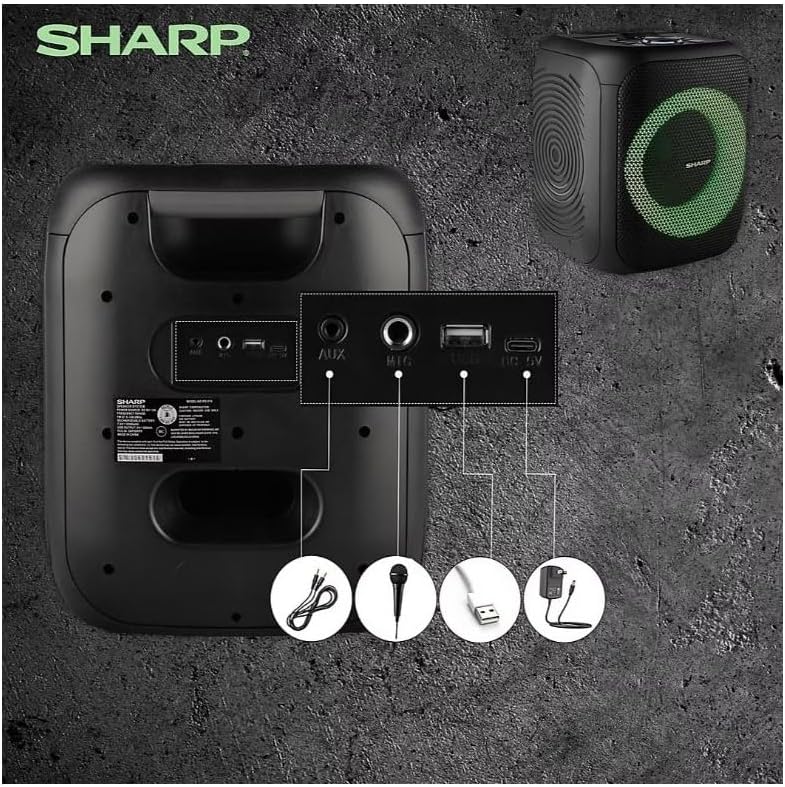
Image: Rear panel with various input and charging ports.
- ஆக்ஸ் இன்: 3.5மிமீ ஆடியோ கேபிளைப் பயன்படுத்தி வெளிப்புற ஆடியோ சாதனங்களை இணைக்கவும்.
- MIC IN: Connect a microphone (sold separately) for karaoke or announcements.
- USB: ஆடியோ பிளேபேக்கிற்கு USB ஃபிளாஷ் டிரைவைச் செருகவும்.
- TF அட்டை: Insert a TF (microSD) card for audio playback.
- டிசி ஐஎன்: Connect the charging cable to power and charge the speaker.
3.3 Playing Audio from USB/TF Card
- Insert a USB flash drive or TF card into the corresponding port.
- அழுத்தவும் ON/STAND BY INPUT button repeatedly until the display shows the USB or TF mode.
- பிளேபேக் தானாகவே தொடங்கும். இதைப் பயன்படுத்தவும் விளையாடு/இடைநிறுத்தம், முந்தைய, மற்றும் அடுத்தது பிளேபேக்கைக் கட்டுப்படுத்த பொத்தான்கள்.
3.4 Using AUX Input
- Connect one end of a 3.5mm audio cable to the AUX IN port on the speaker.
- மறுமுனையை உங்கள் வெளிப்புற சாதனத்தின் ஹெட்ஃபோன் ஜாக் அல்லது ஆடியோ வெளியீட்டில் இணைக்கவும்.
- அழுத்தவும் ON/STAND BY INPUT button repeatedly until the display shows AUX mode.
- உங்கள் வெளிப்புற சாதனத்திலிருந்து பிளேபேக் மற்றும் ஒலியளவைக் கட்டுப்படுத்தவும்.
3.5 FM வானொலி செயல்பாடு

Image: The PS-916 features an integrated FM Tuner.
- அழுத்தவும் ON/STAND BY INPUT button repeatedly until the display shows FM mode.
- அழுத்திப் பிடிக்கவும் விளையாடு/இடைநிறுத்தம் கிடைக்கக்கூடிய FM நிலையங்களை தானாக ஸ்கேன் செய்து சேமிக்க பொத்தானை அழுத்தவும்.
- பயன்படுத்தவும் முந்தைய மற்றும் அடுத்தது சேமித்த நிலையங்கள் வழியாக செல்ல பொத்தான்கள்.
3.6 LED Light Effects
அழுத்தவும் ஒளி button to cycle through different LED light modes or to turn the lights off.
4. பராமரிப்பு
4.1 சுத்தம் செய்தல்
- சுத்தம் செய்வதற்கு முன் எப்போதும் ஸ்பீக்கரை அணைத்துவிட்டு, மின் இணைப்பிலிருந்து துண்டிக்கவும்.
- வெளிப்புற மேற்பரப்புகளைத் துடைக்க மென்மையான, உலர்ந்த துணியைப் பயன்படுத்தவும்.
- திரவ கிளீனர்கள், ஏரோசோல்கள் அல்லது கரைப்பான்களைப் பயன்படுத்த வேண்டாம், ஏனெனில் இவை பூச்சு அல்லது உள் கூறுகளை சேதப்படுத்தக்கூடும்.
4.2 சேமிப்பு
- ஸ்பீக்கர்களை நேரடி சூரிய ஒளி மற்றும் தீவிர வெப்பநிலையிலிருந்து விலகி குளிர்ந்த, உலர்ந்த இடத்தில் சேமிக்கவும்.
- நீண்ட நேரம் சேமித்து வைத்தால், பேட்டரியின் ஆரோக்கியத்தைப் பராமரிக்க, ஒவ்வொரு சில மாதங்களுக்கும் பேட்டரியை தோராயமாக 50% சார்ஜ் செய்யவும்.
5. சரிசெய்தல்
If you encounter issues with your Sharp PS-916 speakers, please refer to the following common problems and solutions:
| பிரச்சனை | சாத்தியமான தீர்வு |
|---|---|
| ஸ்பீக்கர் இயக்கப்படவில்லை. | பேட்டரி சார்ஜ் செய்யப்பட்டுள்ளதா என்பதை உறுதிப்படுத்திக் கொள்ளுங்கள். சார்ஜிங் கேபிளை இணைத்து மீண்டும் முயற்சிக்கவும். |
| பேச்சாளரிடமிருந்து எந்த சத்தமும் இல்லை. | ஸ்பீக்கர் மற்றும் இணைக்கப்பட்ட சாதனம் இரண்டிலும் ஒலி அளவைச் சரிபார்க்கவும். சரியான உள்ளீட்டு முறை தேர்ந்தெடுக்கப்பட்டுள்ளதா என்பதை உறுதிப்படுத்தவும். |
| புளூடூத் சாதனத்தை இணைக்க முடியாது. | Ensure the speaker is in Bluetooth pairing mode (indicator flashing). Move your device closer to the speaker. Disconnect from other Bluetooth devices. |
| TWS இணைத்தல் தோல்வியடைகிறது. | Ensure both speakers are powered on and not connected to any other Bluetooth devices. Try initiating TWS pairing again. |
| சிதைந்த ஒலி. | Reduce the volume on both the speaker and your connected device. Ensure the audio source is not distorted. |
6. விவரக்குறிப்புகள்
| அம்சம் | விவரம் |
|---|---|
| பிராண்ட் | கூர்மையான |
| மாதிரி பெயர் | பிஎஸ்-916 |
| பேச்சாளர் கட்டமைப்பு | 8" Woofer, 1" Tweeter (per speaker) |
| உச்ச வெளியீட்டு சக்தி | 400 வாட்ஸ் (ஒரு ஸ்பீக்கருக்கு) |
| ஆர்.எம்.எஸ் வெளியீட்டு சக்தி | 40 வாட்ஸ் (ஒரு ஸ்பீக்கருக்கு) |
| இணைப்பு தொழில்நுட்பம் | புளூடூத் |
| கூடுதல் உள்ளீடுகள் | USB, TF Card, 3.5mm AUX, Microphone Input |
| பேட்டரி ஆயுள் | 12 மணிநேரம் வரை |
| சிறப்பு அம்சங்கள் | True Wireless Stereo (TWS) Pairing, Bass Boost, LED Light Effects, FM Tuner |
| நிறம் | கருப்பு |
| பொருளின் எடை | 6.5 பவுண்டுகள் (ஒரு பேச்சாளருக்கு) |
| UPC | 728434122111 |
| GTIN | 728434122111 |
7. உத்தரவாதம் & ஆதரவு
7.1 உத்தரவாதத் தகவல்
This Sharp PS-916 product comes with a 90-day limited warranty. This warranty covers manufacturing defects under normal use. It does not cover damage caused by misuse, accidents, unauthorized modifications, or normal wear and tear.
7.2 வாடிக்கையாளர் ஆதரவு
For technical assistance, warranty claims, or further inquiries, please refer to the contact information provided with your purchase documentation or visit the official Sharp support webதளம்.