
J-TREK JX03
J-TREK JX03 Motorcycle Intercom Instruction Manual
Model: JX03 | Brand: J-TREK
அறிமுகம்
Thank you for choosing the J-TREK JX03 Motorcycle Intercom. This device is designed to enhance your riding experience with advanced communication and audio features. Please read this manual thoroughly before use to ensure proper installation, operation, and maintenance. Keep this manual for future reference.
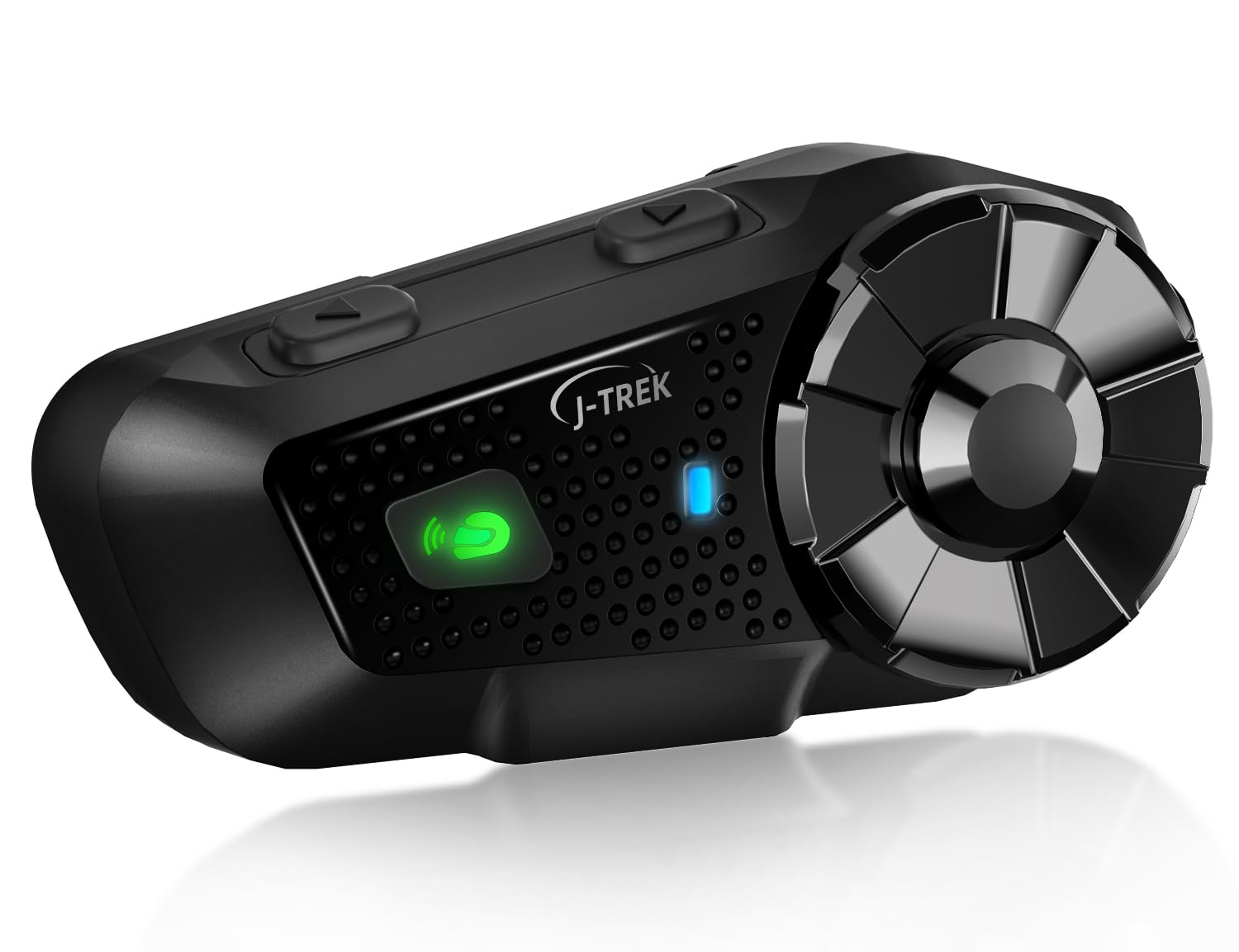
Image: J-TREK JX03 Motorcycle Intercom main unit.
முக்கிய அம்சங்கள்
- Qualcomm Dual Bluetooth 5.2 Chip: Equipped with two independent chips for simultaneous media audio (music/navigation) and communication audio (intercom calls). The system automatically adjusts audio priority for seamless multitasking.
- JMC1.0 Mesh Network Technology: Proprietary mesh technology supports up to 8 riders over a 1500m range. Features intelligent interference countermeasures, host-free network reconstruction, and superior obstacle avoidance for stable team communication.
- High-Quality Speakers Optimized for Riding: 40mm large speakers, developed through extensive wind tunnel acoustic testing, deliver enhanced bass and clear sound even amidst engine noise. Effective wind noise suppression ensures call clarity up to 80km/h.
- Large Knob & Anti-slip Buttons: Designed for reliable operation even with thick motorcycle gloves, allowing quick and precise volume adjustment and function switching.
- Voice Command & Japanese Voice Guide: Supports voice commands for Siri or Google Assistant for hands-free operation. Features natural Japanese voice guidance for system notifications (e.g., battery level, connection status).
- பல சாதன இணக்கத்தன்மை: Connects with other J-TREK models and is compatible with certain intercoms or Bluetooth devices from other brands (e.g., Cardo, Sena) to expand communication range.
தொகுப்பு உள்ளடக்கங்கள்
கீழே பட்டியலிடப்பட்டுள்ள அனைத்து பொருட்களும் உங்கள் தொகுப்பில் சேர்க்கப்பட்டுள்ளதா என்பதை சரிபார்க்கவும்:

Image: All components included in the J-TREK JX03 intercom package.
- Main Unit (x1)
- Jet Helmet Microphone (x1)
- Full-Face Microphone (x1)
- மவுண்டிங் பிராக்கெட் (x1)
- USB Type-C சார்ஜிங் கேபிள் (x1)
- Speaker (x1 pair)
- Audio Conversion Cable (x1)
- Mounting Adhesive Tape (Red) (x1)
- Jet Helmet Microphone Fixing Tape (x1)
- Speaker Position Adjustment Pads (x2)
- Clip-Type Adhesive Tape (White) (x3)
- அறிவுறுத்தல் கையேடு (x1)
- விரைவு தொடக்க வழிகாட்டி (x1)
- Mount Clip (x1)
- Full-Face Microphone Adhesive Tape (x1)
அமைவு
1. சாதனத்தை சார்ஜ் செய்தல்
Before first use, fully charge the JX03. Connect the USB Type-C charging cable to the charging port on the unit and to a USB power source. The LED indicator will show charging status. A full charge takes approximately 1.5 hours.
2. Installing on Helmet
Choose between the clip-type mount or adhesive tape mount based on your helmet type and preference. Ensure the unit is securely attached and does not obstruct your vision or helmet functionality.
- பேச்சாளர் இடம்: Position the speakers inside the helmet's ear pockets, ensuring they are aligned with your ears for optimal sound. Use the provided adjustment pads if needed.
- மைக்ரோஃபோன் இணைப்பு: Select the appropriate microphone (jet helmet or full-face) and attach it to the inside of the helmet, ensuring it is close to your mouth for clear voice pickup. Secure the cable neatly within the helmet lining.
3. Initial Pairing (Bluetooth)
To pair with your smartphone or other Bluetooth devices:
- Ensure the JX03 is off.
- Press and hold the Power button until the LED indicator flashes red and blue, indicating pairing mode.
- On your smartphone, enable Bluetooth and search for "J-TREK JX03".
- இணைக்க வேண்டிய சாதனத்தைத் தேர்ந்தெடுக்கவும். குரல் அறிவிப்பு வெற்றிகரமான இணைப்பை உறுதிப்படுத்தும்.
இயக்க வழிமுறைகள்
1. பவர் ஆன்/ஆஃப்
- பவர் ஆன்: Press and hold the Power button for 3 seconds. A voice prompt will confirm power on.
- பவர் ஆஃப்: Press and hold the Power button for 5 seconds. A voice prompt will confirm power off.
2. தொகுதி கட்டுப்பாடு
Rotate the large knob clockwise to increase volume and counter-clockwise to decrease volume.
3. Intercom Communication (Mesh & Bluetooth)

Image: Multiple riders connected via JMC1.0 Mesh Communication.
- மெஷ் இண்டர்காம்: To initiate mesh communication, briefly press the Mesh button. The system will automatically search for and connect to other JX03 units within range (up to 8 riders, 1500m).
- புளூடூத் இண்டர்காம்: For one-on-one Bluetooth intercom with another compatible device, follow the pairing instructions for that specific device.
4. Music Playback & FM Radio

Image: Music sharing and FM radio functionality between two riders.
- இசை பின்னணி: Once paired with your smartphone, music will play automatically. Use the multi-function button to play/pause.
- அடுத்த / முந்தைய ட்ராக்: Briefly press the forward/backward buttons to skip tracks.
- எஃப்.எம் வானொலி: Press the FM button to activate the FM radio. Briefly press again to scan for stations.
- இசை பகிர்வு: The JX03 supports sharing music with another paired JX03 unit. Refer to the quick start guide for specific button combinations.
5. Voice Assistant & Phone Calls
- குரல் உதவியாளரைச் செயலாக்கு: Briefly press the Voice Assistant button to activate Siri or Google Assistant on your paired smartphone.
- பதில்/முடிவு அழைப்பு: Briefly press the multi-function button to answer an incoming call or end an ongoing call.
- அழைப்பை நிராகரி: உள்வரும் அழைப்பை நிராகரிக்க, பல செயல்பாட்டு பொத்தானை 2 வினாடிகள் அழுத்திப் பிடிக்கவும்.
பராமரிப்பு

Image: JX03 Intercom with IP65 full protection, shown in rainy conditions.
- சுத்தம்: அலகு ஒரு மென்மையான, d உடன் துடைக்கவும்amp துணி. கடுமையான இரசாயனங்கள் அல்லது சிராய்ப்பு கிளீனர்களைப் பயன்படுத்த வேண்டாம்.
- நீர் எதிர்ப்பு: The JX03 is IP65 rated, meaning it is protected against dust and low-pressure water jets. While it can withstand rain, avoid submerging the device in water. Ensure the USB port cover is securely closed.
- சேமிப்பு: பயன்பாட்டில் இல்லாதபோது சாதனத்தை குளிர்ந்த, உலர்ந்த இடத்தில் சேமிக்கவும். தீவிர வெப்பநிலையைத் தவிர்க்கவும்.
- பேட்டரி பராமரிப்பு: பேட்டரி ஆயுளை நீட்டிக்க, அடிக்கடி பேட்டரியை முழுமையாக டிஸ்சார்ஜ் செய்வதைத் தவிர்க்கவும். நீண்ட நேரம் பயன்படுத்தப்படாவிட்டாலும், சாதனத்தை தொடர்ந்து சார்ஜ் செய்யவும்.
சரிசெய்தல்
| பிரச்சனை | சாத்தியமான காரணம் | தீர்வு |
|---|---|---|
| சாதனம் இயங்கவில்லை. | குறைந்த பேட்டரி. | சாதனத்தை குறைந்தது 30 நிமிடங்களுக்கு சார்ஜ் செய்யவும். |
| ஸ்மார்ட்போனுடன் இணைக்க முடியாது. | Device not in pairing mode; Bluetooth off on phone. | Ensure JX03 is in pairing mode (flashing red/blue LED). Enable Bluetooth on your phone. |
| இண்டர்காம் இணைப்பு நிலையற்றது. | வரம்பிற்கு வெளியே; சுற்றுச்சூழல் குறுக்கீடு. | Move closer to other riders. Avoid areas with strong radio interference. Mesh technology will attempt to re-establish connection automatically. |
| ஸ்பீக்கர்களில் இருந்து ஒலி இல்லை. | Volume too low; speakers disconnected; incorrect audio source. | Increase volume. Check speaker connections. Ensure correct audio source is selected (e.g., music, intercom). |
| மைக்ரோஃபோன் குரலை ஏற்கவில்லை. | Microphone not positioned correctly; microphone disconnected. | Adjust microphone closer to your mouth. Check microphone connection to the unit. |
விவரக்குறிப்புகள்

Image: Battery performance details for the JX03 Intercom.
| அம்சம் | விவரம் |
|---|---|
| மாதிரி | JX03 |
| புளூடூத் பதிப்பு | 5.2 (Dual Chip) |
| இண்டர்காம் வகை | Mesh (JMC1.0) & Bluetooth |
| Max Mesh Riders | 8 |
| அதிகபட்ச தொடர்பு வரம்பு | 1500m (Mesh) |
| பேச்சாளர் அளவு | 40மிமீ |
| பேட்டரி திறன் | 1000mAh |
| பேச்சு நேரம் | 28 மணி நேரம் வரை |
| இசை நேரம் | 30 மணி நேரம் வரை |
| காத்திருப்பு நேரம் | 350 மணி நேரம் வரை |
| சார்ஜிங் நேரம் | தோராயமாக 1.5 மணி நேரம் |
| சார்ஜிங் போர்ட் | USB வகை-C |
| நீர் எதிர்ப்பு | IP65 |
| பிறப்பிடமான நாடு | சீனா |
உத்தரவாதம் மற்றும் ஆதரவு
The J-TREK JX03 Motorcycle Intercom comes with a 1 வருட உத்தரவாதம் வாங்கிய தேதியிலிருந்து. இந்த உத்தரவாதமானது சாதாரண பயன்பாட்டின் கீழ் உற்பத்தி குறைபாடுகள் மற்றும் செயலிழப்புகளை உள்ளடக்கும். தவறான பயன்பாடு, விபத்துக்கள், அங்கீகரிக்கப்படாத மாற்றங்கள் அல்லது இயற்கை பேரழிவுகளால் ஏற்படும் சேதத்தை இது உள்ளடக்காது.
For technical support, warranty claims, or any questions regarding your JX03 intercom, please contact J-TREK customer service through the retailer where you purchased the product or visit the official J-TREK webதொடர்பு தகவலுக்கான தளம்.
Ask a question about this manual
Ask about setup, troubleshooting, compatibility, parts, safety, or missing instructions. Manuals+ will review the question and use this page’s manual context to help answer it.