
அறிமுகம்
The Tiksounds X7 AI Translation Earbuds are designed to facilitate real-time language translation, music playback, and call management. These earbuds support 134 languages and feature multiple translation modes, Bluetooth 5.4 connectivity, and extended battery life. This manual provides instructions for proper setup, operation, and maintenance of your device.
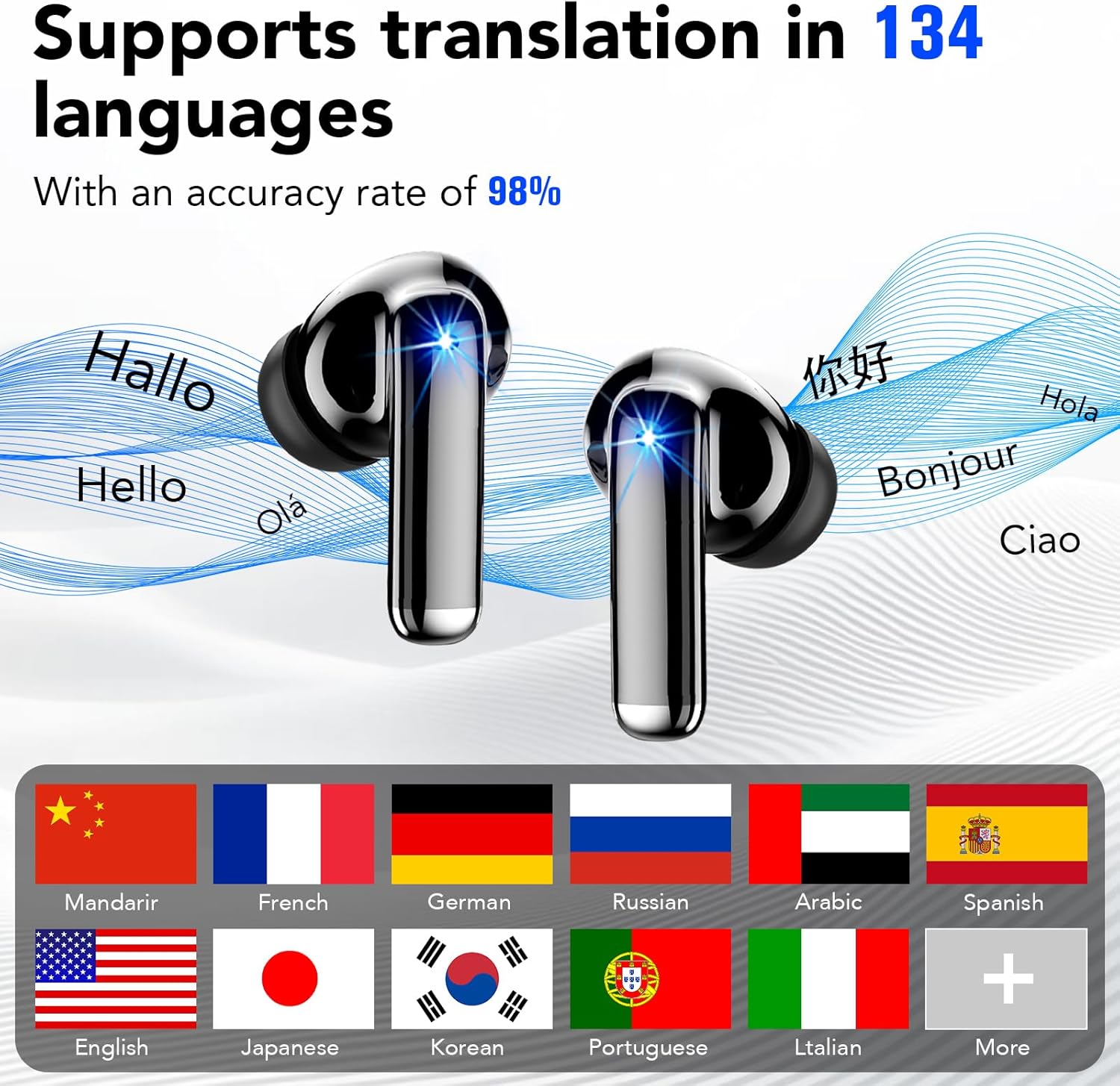
Image: Tiksounds X7 AI Translation Earbuds and charging case. The earbuds are black with a metallic sheen, shown next to their charging case which has an LED display.
பெட்டியில் என்ன இருக்கிறது
உங்கள் தயாரிப்பு தொகுப்பில் பின்வரும் அனைத்து பொருட்களும் சேர்க்கப்பட்டுள்ளதா என்பதை உறுதிப்படுத்திக் கொள்ளுங்கள்:
- Wireless Earbuds (Tiksounds X7)
- சார்ஜிங் கேஸ்
- சிலிகான் காது குறிப்புகள் (S, M, L)
- யூ.எஸ்.பி டைப்-சி கேபிள்
- பயனர் கையேடு

Image: The contents of the Tiksounds X7 package, neatly arranged. It includes the earbuds, charging case, various sizes of silicone ear tips, a USB-C charging cable, and the user manual.
அமைவு
1. இயர்பட்ஸ் மற்றும் கேஸை சார்ஜ் செய்தல்
Before first use, fully charge the earbuds and charging case. Connect the provided USB Type-C cable to the charging case and a power source. The LED digital display on the case will indicate the charging status and battery level.

Image: The Tiksounds X7 charging case open, showing the earbuds inside and the LED digital display indicating battery percentage. A USB-C cable is also shown.
2. Connecting to the "NebulaBuds" App
- பயன்பாட்டைப் பதிவிறக்கவும்: Download the "NebulaBuds" app from your device's app store (App Store for iOS or Google Play Store for Android).
- புளூடூத்தை இயக்கு: உங்கள் ஸ்மார்ட்போனில் புளூடூத் இயக்கப்பட்டுள்ளதை உறுதிசெய்யவும்.
- இயர்பட்களை இணைத்தல்: சார்ஜிங் கேஸில் இருந்து இயர்பட்களை எடுக்கவும். அவை தானாகவே இணைத்தல் பயன்முறையில் நுழையும்.
- ஆப் மூலம் இணைக்கவும்: Open the "NebulaBuds" app, navigate to the device connection interface, and select "Connect device". Follow the on-screen prompts to complete the connection.

Image: A four-panel graphic illustrating the steps to connect the earbuds to the "NebulaBuds" app, showing app download, Bluetooth pairing, and in-app connection confirmation.
இயக்க வழிமுறைகள்
தொடு கட்டுப்பாடுகள்
இயர்பட்கள் பல்வேறு செயல்பாடுகளுக்கு ஸ்மார்ட் டச் கட்டுப்பாடுகளைக் கொண்டுள்ளன:
| செயல் | செயல்பாடு |
|---|---|
| ஒற்றை தட்டு | இசையை இயக்கு/இடைநிறுத்து, அழைப்பை ஏற்கு/முடி |
| இருமுறை தட்டவும் (இடது இயர்பட்) | முந்தைய ட்ராக் |
| இரட்டைத் தட்டு (வலது இயர்பட்) | அடுத்த ட்ராக் |
| லாங் பிரஸ் (இடது இயர்பட்) | வால்யூம் டவுன் |
| லாங் பிரஸ் (வலது இயர்பட்) | வால்யூம் அப் |
| மூன்று முறை தட்டவும் | குரல் உதவியாளரை இயக்கு / அழைப்பை நிராகரி |

Image: A visual representation of the touch control functions for the Tiksounds X7 earbuds, showing icons for voice answer, call management, volume, and track navigation.
மொழிபெயர்ப்பு முறைகள்
The earbuds support multiple translation modes via the "NebulaBuds" app:
- நிகழ்நேர மொழிபெயர்ப்பு: Utilizes simultaneous translation technology for instant language conversion. This mode supports 134 languages. Speak into your earbud, and the translation will be played back in the target language.
- Audio and Video Call Translation: Enables real-time language conversion during voice and video calls. This feature helps facilitate communication with individuals speaking different languages during online meetings or personal calls.
- Headphone + Phone Mode / Dual Ear Mode: Designed for quick two-way communication, such as ordering food or asking for directions. One person speaks into the phone, and the other listens via an earbud, or both use earbuds for direct conversation.
- புகைப்பட மொழிபெயர்ப்பு: Use your phone's camera through the app to translate text from images, such as menus, street signs, or documents. This mode supports 102 languages.
- Meeting Recording / Voice Notes: Converts spoken language to text and can generate mind maps from recordings. This mode is suitable for international conferences or lectures, allowing for later review.
- AI அரட்டை முறை: Powered by advanced AI models, this mode provides intelligent conversations, answers questions, and offers assistance for writing or creative tasks.

Image: A screenshot of the "NebulaBuds" app interface demonstrating the real-time translation feature, showing two-way language conversion.

Image: A screenshot of the "NebulaBuds" app interface showing the audio and video call translation feature, with a video call in progress and translated text displayed.

Image: Two individuals in a business setting, each wearing an earbud, demonstrating the face-to-face translation mode for direct communication.

Image: A smartphone displaying the photo translation feature, with text from a book being translated on the screen.

Image: A group of people in a meeting, with a smartphone screen showing the voice notes feature actively recording and transcribing speech.

Image: A screenshot of the "NebulaBuds" app displaying the AI Chat Mode, showing an AI assistant providing information and answering questions.
பராமரிப்பு
- சுத்தம்: மென்மையான, உலர்ந்த, பஞ்சு இல்லாத துணியால் இயர்பட்கள் மற்றும் சார்ஜிங் கேஸை தவறாமல் சுத்தம் செய்யவும். சிராய்ப்பு கிளீனர்கள் அல்லது கரைப்பான்களைப் பயன்படுத்த வேண்டாம்.
- நீர் எதிர்ப்பு: The earbuds are IPX7 waterproof, meaning they can withstand immersion in up to 1 meter of water for 30 minutes. However, the charging case is not waterproof. Ensure earbuds are dry before placing them back in the charging case. Avoid exposing the charging case to liquids.
- சேமிப்பு: Store the earbuds and charging case in a cool, dry place away from direct sunlight and extreme temperatures.
- பேட்டரி பராமரிப்பு: பேட்டரி ஆயுளை நீட்டிக்க, அடிக்கடி பேட்டரியை முழுமையாக டிஸ்சார்ஜ் செய்வதைத் தவிர்க்கவும். நீண்ட நேரம் பயன்படுத்தப்படாவிட்டாலும், சாதனத்தை தொடர்ந்து சார்ஜ் செய்யவும்.

Image: A graphic illustrating the IPX7 waterproof rating and ergonomic design of the earbuds, with an individual wearing them comfortably.
சரிசெய்தல்
If you encounter issues with your Tiksounds X7 earbuds, refer to the following common problems and solutions:
- இயர்பட்ஸ் இணைக்கப்படவில்லை:
- இயர்பட்கள் சார்ஜ் செய்யப்பட்டுள்ளதா என்பதை உறுதிப்படுத்திக் கொள்ளுங்கள்.
- உங்கள் தொலைபேசியின் புளூடூத்தை அணைத்துவிட்டு இயக்கவும்.
- Place earbuds back in the case, close it, then reopen and try pairing again.
- Ensure the "NebulaBuds" app is installed and open.
- Translation inaccuracy:
- Ensure a stable internet connection for optimal performance.
- தெளிவாகவும் மிதமான வேகத்திலும் பேசுங்கள்.
- Minimize background noise.
- பயன்பாட்டில் சரியான மூல மற்றும் இலக்கு மொழிகள் தேர்ந்தெடுக்கப்பட்டுள்ளதா என்பதைச் சரிபார்க்கவும்.
- இயர்பட்களில் இருந்து சத்தம் இல்லை:
- Check the volume level on your phone and the earbuds.
- இயர்பட்கள் உங்கள் சாதனத்துடன் சரியாக இணைக்கப்பட்டுள்ளதா என்பதை உறுதிப்படுத்திக் கொள்ளுங்கள்.
- Try reconnecting the earbuds.
- App not working:
- உங்கள் தொலைபேசியின் இயக்க முறைமை புதுப்பித்த நிலையில் இருப்பதை உறுதிசெய்யவும்.
- Update the "NebulaBuds" app to the latest version.
- Restart the app or your phone.
அடிக்கடி கேட்கப்படும் கேள்விகள் (FAQ)
- Q: Is there a subscription fee?
- A: No subscription is required. All core features are free to use permanently after pairing your earbuds with the "NebulaBuds" app.
- கே: எந்த மொழிகள் ஆதரிக்கப்படுகின்றன?
- A: The earbuds support 134 international languages, including English, Chinese, and German, covering most commonly used languages for travel, business, and study.
- Q: How accurate is the translation?
- A: Powered by advanced AI speech recognition and machine translation, the device delivers high accuracy for daily conversations and travel scenarios, with an accuracy rate of up to 98%.
விவரக்குறிப்புகள்
| அம்சம் | விவரம் |
|---|---|
| பிராண்ட் | டிக்சவுண்ட்ஸ் |
| மாதிரி எண் | X7 |
| நிறம் | கருப்பு |
| காது வைப்பு | காதில் |
| இணைப்பு தொழில்நுட்பம் | வயர்லெஸ் (புளூடூத்) |
| புளூடூத் பதிப்பு | 5.4 |
| நீர் எதிர்ப்பு நிலை | IPX7 (இயர்பட்ஸ் மட்டும்) |
| பேட்டரி ஆயுள் (இயர்பட்ஸ்) | ஒரு முறை சார்ஜ் செய்தால் 6-8 மணி நேரம் |
| மொத்த பேட்டரி ஆயுள் (கேஸுடன்) | 40 மணி நேரம் வரை |
| சார்ஜிங் நேரம் | தோராயமாக முழு சார்ஜ் செய்ய 1.5 மணி நேரம் |
| கட்டுப்பாட்டு முறை | தொடவும் |
| ஆதரிக்கப்படும் மொழிகள் | 134 (Real-Time Translation, AI Chat, Voice Notes) |
| Supported Languages (Photo Translation) | 102 |
| Supported Languages (Audio/Video Call) | 21 |
உத்தரவாதம் மற்றும் ஆதரவு
உத்தரவாதத் தகவல்: The product comes with a 1-year warranty. Please retain your proof of purchase for warranty claims.
வாடிக்கையாளர் ஆதரவு: For further assistance, technical support, or warranty inquiries, please refer to the contact information provided in the physical user manual included with your product or visit the official Tiksounds webதளம்.