
1. முக்கியமான பாதுகாப்பு வழிமுறைகள்
இந்த சாதனத்தைப் பயன்படுத்துவதற்கு முன் அனைத்து வழிமுறைகளையும் கவனமாகப் படித்து, எதிர்கால குறிப்புக்காக அவற்றை வைத்திருங்கள். இந்த வழிமுறைகளைப் பின்பற்றத் தவறினால் மின்சார அதிர்ச்சி, தீ அல்லது கடுமையான காயம் ஏற்படலாம்.
- Always place the fan on a stable, flat surface to prevent tipping.
- சேதமடைந்த கம்பி அல்லது பிளக்கைக் கொண்டு மின்விசிறியை இயக்க வேண்டாம். விநியோக கம்பி சேதமடைந்தால், ஆபத்தைத் தவிர்க்க உற்பத்தியாளர், அதன் சேவை முகவர் அல்லது அதே போன்ற தகுதி வாய்ந்த நபர்களால் அதை மாற்ற வேண்டும்.
- மின்விசிறியை தண்ணீரிலிருந்தோ அல்லது பிற திரவங்களிலிருந்தோ விலக்கி வைக்கவும். மின்விசிறியை தண்ணீரில் மூழ்கடிக்க வேண்டாம்.
- Do not insert fingers or foreign objects into the fan grille during operation.
- பயன்பாட்டில் இல்லாதபோது, சுத்தம் செய்வதற்கு முன் அல்லது நகர்த்துவதற்கு முன், மின்விசிறியை மின் இணைப்பிலிருந்து துண்டிக்கவும்.
- இந்த சாதனம் அவர்களின் பாதுகாப்பிற்குப் பொறுப்பான ஒருவரால் உபகரணத்தைப் பயன்படுத்துவது தொடர்பான மேற்பார்வை அல்லது அறிவுறுத்தல் வழங்கப்படாவிட்டால், குறைந்த உடல், உணர்ச்சி அல்லது மன திறன்கள் அல்லது அனுபவம் மற்றும் அறிவு இல்லாமை கொண்ட நபர்கள் (குழந்தைகள் உட்பட) பயன்படுத்துவதை நோக்கமாகக் கொண்டிருக்கவில்லை.
- குழந்தைகள் கருவியுடன் விளையாடாமல் இருப்பதை உறுதி செய்ய கண்காணிக்க வேண்டும்.
- திரைச்சீலைகள், செடிகள் அல்லது மின்விசிறிக்குள் இழுக்கக்கூடிய பிற பொருட்களுக்கு அருகில் மின்விசிறியைப் பயன்படுத்த வேண்டாம்.
- தொகுதி உறுதிtage indicated on the fan matches the local power supply voltagஇ இணைக்கும் முன்.
2. தொகுப்பு உள்ளடக்கங்கள்
பொட்டலத்தைத் திறந்தவுடன் அனைத்துப் பொருட்களும் உள்ளனவா என்பதையும், நல்ல நிலையில் உள்ளனவா என்பதையும் சரிபார்க்கவும்.
- 1 x DREO Tower Fan (DR-HTF024S)
- 1 x Remote Control (includes 2 x AAA Batteries)
- 1 x பயனர் கையேடு
- A Set of Accessories (for base assembly)
3. தயாரிப்பு வரைபடம்
Familiarize yourself with the components of your DREO Smart Tower Fan.

படம்: ஒட்டுமொத்தமாக view of the DREO Smart Tower Fan, highlighting its sleek design and powerful airflow.

Image: The fan demonstrating its adjustable height feature, extending from 40 to 45 inches.
The fan features a control panel on top, a main tower body with air outlets, and a stable circular base. The adjustable height mechanism is located at the base of the tower.
4 அமைவு
Follow these steps to assemble and prepare your tower fan for use.
- அடிப்படை சட்டசபை: Take the two halves of the circular base. Align them and rotate until they securely snap together to form a single unit.
- Attach Tower: Carefully place the main tower fan body onto the assembled base. Ensure it is firmly seated and locked into position. The cord can be routed through designated channels underneath the base.
- மின் இணைப்பு: பவர் கார்டை ஒரு நிலையான மின் நிலையத்தில் செருகவும்.

Image: Illustration of the fan's one-step height adjustment, allowing it to extend from 40 to 45 inches.
5. இயக்க வழிமுறைகள்
Your DREO Smart Tower Fan offers multiple ways to control its functions.
5.1 கண்ட்ரோல் பேனல்
The intuitive control panel located on the top of the fan allows for direct operation.
- பவர் பட்டன்: மின்விசிறியை ஆன்/ஆஃப் செய்கிறது.
- பயன்முறை பொத்தான்: Cycles through Normal, Natural, Sleep, and Auto modes.
- வேக பொத்தான்கள் (+/-): Adjusts fan speed from 1 to 9.
- அலைவு பொத்தான்: 90° அலைவுகளைச் செயல்படுத்துகிறது/முடக்குகிறது.
- டைமர் பட்டன்: தானியங்கி ஆஃப் டைமரை அமைக்கிறது (12 மணிநேரம் வரை).
5.2 தொலை கட்டுப்பாடு
The included remote control provides convenient access to all fan functions from a distance.
- Ensure the remote control batteries (2 x AAA) are correctly installed.
- உகந்த பதிலுக்காக ரிமோட் கண்ட்ரோலை நேரடியாக விசிறியின் ரிசீவரை நோக்கிச் சுட்டிக்காட்டவும்.
5.3 DREO App Control & Smart Integration
For enhanced control and smart features, download the DREO app and connect your fan.
- Download the DREO app from your smartphone's app store.
- Follow the in-app instructions to pair your fan via Bluetooth or Wi-Fi.
- Once connected, you can control all fan functions, set schedules, and customize modes from your phone.
- The fan is compatible with Google Assistant and Amazon Alexa for voice control. Refer to the DREO app for instructions on linking your fan to these smart home platforms.

Image: A user controlling the DREO Smart Tower Fan via the DREO mobile application.

Image: Screenshot of the DREO app demonstrating customizable sleep modes and scheduling options.
5.4 முறைகள் மற்றும் வேகங்கள்
The fan offers 4 distinct modes and 9 speed settings for personalized comfort.
- இயல்பான பயன்முறை: நீங்கள் தேர்ந்தெடுத்த வேகத்தில் நிலையான காற்றோட்டத்தை வழங்குகிறது.
- இயற்கை பயன்முறை: விசிறி வேகத்தை மாற்றுவதன் மூலம் இயற்கையான காற்றை உருவகப்படுத்துகிறது.
- தூக்க முறை: Operates at a lower speed with reduced noise for undisturbed rest.
- ஆட்டோ பயன்முறை: Adjusts fan speed automatically based on ambient room temperature.
- 9 வேகம்: Fine-tune the airflow intensity from a gentle breeze (Speed 1) to powerful cooling (Speed 9).
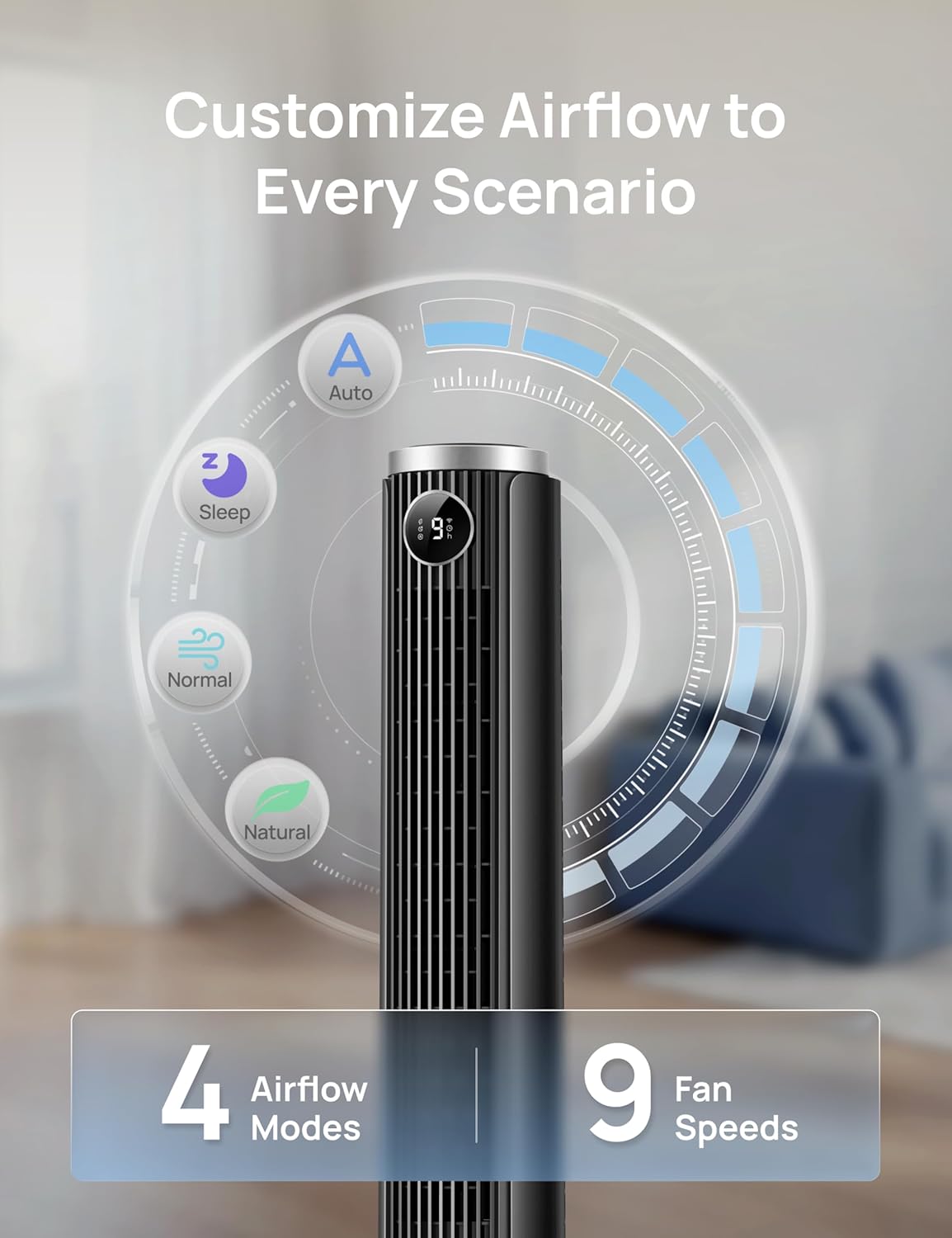
Image: Visual representation of the fan's 4 airflow modes (Auto, Sleep, Normal, Natural) and 9 speed settings.
5.5 அலைவு
Activate oscillation for wider air distribution.
- The fan oscillates 90° to cover a larger area, ensuring even air circulation throughout the room.

Image: The DREO Smart Tower Fan demonstrating its 90-degree oscillation feature, distributing air across a wide area.
5.6 டைமர்
குறிப்பிட்ட நேரத்திற்குப் பிறகு மின்விசிறி தானாகவே அணைந்துவிடும்படி அமைக்கவும்.
- The timer can be set for up to 12 hours, allowing you to conserve energy and enjoy cooling as you fall asleep.
5.7 Adjustable Height
Customize the fan's height to suit your needs.
- The fan's height can be adjusted from 40 inches to 45 inches by pressing the foot pedal at the base. This allows you to direct airflow effectively whether you are sitting or standing.
6. பராமரிப்பு
வழக்கமான பராமரிப்பு உங்கள் விசிறியின் உகந்த செயல்திறன் மற்றும் நீண்ட ஆயுளை உறுதி செய்கிறது.
6.1 சுத்தம் செய்தல்
- சுத்தம் செய்வதற்கு முன் எப்போதும் மின்விசிறியை அவிழ்த்து விடுங்கள்.
- ஒரு மென்மையான, டி பயன்படுத்தவும்amp வெளிப்புற மேற்பரப்புகளைத் துடைக்க துணி. சிராய்ப்பு கிளீனர்கள் அல்லது கரைப்பான்களைப் பயன்படுத்த வேண்டாம்.
- காற்று உட்கொள்ளும் மற்றும் வெளியேறும் கிரில்களில் இருந்து தூசியை மெதுவாக அகற்ற, தூரிகை இணைப்புடன் கூடிய வெற்றிட கிளீனரைப் பயன்படுத்தவும்.
- மின்விசிறியின் உட்புறத்தில் தண்ணீர் சொட்ட அனுமதிக்காதீர்கள்.
6.2 சேமிப்பு
- மின்விசிறியை நீண்ட நேரம் சேமித்து வைத்தால், அதை நன்கு சுத்தம் செய்யவும்.
- Store the fan in its original packaging or a suitable box in a cool, dry place.
- Avoid placing heavy objects on top of the fan during storage.
7. சரிசெய்தல்
பொதுவான பிரச்சினைகளுக்கான தீர்வுகளுக்கு இந்தப் பகுதியைப் பார்க்கவும்.
| பிரச்சனை | சாத்தியமான காரணம் | தீர்வு |
|---|---|---|
| மின்விசிறி இயக்கப்படவில்லை. | மின்சாரம் இல்லை. மின் கம்பி சரியாக இணைக்கப்படவில்லை. ரிமோட் கண்ட்ரோல் பேட்டரிகள் இறந்துவிட்டன. | மின் இணைப்பு வேலை செய்கிறதா என்று சரிபார்க்கவும். Ensure the power cord is securely plugged into the outlet and the fan. ரிமோட் கண்ட்ரோல் பேட்டரிகளை மாற்றவும். |
| பலவீனமான காற்றோட்டம். | விசிறி வேகம் மிகக் குறைவு. காற்று நுழைவாயில்கள்/வெளியீடுகள் தடுக்கப்பட்டுள்ளன. | விசிறி வேக அமைப்பை அதிகரிக்கவும். Clean any dust or obstructions from the grilles. |
| மின்விசிறி சத்தமாக உள்ளது. | Fan is on a high speed setting. மின்விசிறி நிலையான மேற்பரப்பில் இல்லை. உள் அடைப்பு. | விசிறி வேகத்தை குறைக்கவும். விசிறியை ஒரு தட்டையான, நிலையான மேற்பரப்பில் வைக்கவும். Unplug and check for any foreign objects inside the grilles. |
| ரிமோட் கண்ட்ரோல் வேலை செய்யவில்லை. | பேட்டரிகள் செயலிழந்துவிட்டன அல்லது தவறாகச் செருகப்பட்டுள்ளன. ரிமோட்டுக்கும் ஃபேனுக்கும் இடையில் அடைப்பு. | பேட்டரிகளை மாற்றி சரியான துருவமுனைப்பை உறுதி செய்யவும். Ensure a clear line of sight between the remote and the fan. |
| பயன்பாட்டுக் கட்டுப்பாடு வேலை செய்யவில்லை. | Fan not connected to Wi-Fi/Bluetooth. App requires update. | Check app for connection status and re-pair if necessary. Ensure Wi-Fi is active. Update the DREO app to the latest version. |
8. விவரக்குறிப்புகள்
Detailed technical specifications for the DREO Smart Tower Fan (DR-HTF024S).
| அம்சம் | விவரக்குறிப்பு |
|---|---|
| பிராண்ட் | DREO |
| மாதிரி பெயர் | DR-HTF024S |
| நிறம் | கருப்பு |
| மின்சார விசிறி வடிவமைப்பு | தரை மின்விசிறி (கோபுரம்) |
| சக்தி ஆதாரம் | கம்பியூட்டப்பட்ட மின்சாரம் |
| தயாரிப்பு பரிமாணங்கள் (அளவு x அளவு x அளவு) | 33D x 33W x 115H சென்டிமீட்டர்கள் |
| சரிசெய்யக்கூடிய உயரம் | 40" - 45" |
| சிறப்பு அம்சங்கள் | App Operable, Oscillating, Portable, Quiet Operation, Remote Controlled |
| பரிந்துரைக்கப்பட்ட பயன்பாடுகள் | Air Circulation, Cooling, Ventilating |
| கட்டுப்படுத்தி வகை | App Control, Remote Control, Touchpad Control |
| வேகங்களின் எண்ணிக்கை | 9 |
| இரைச்சல் நிலை | 20 டெசிபல்கள் (குறைந்தபட்சம்) |
| வாட்tage | 50 வாட்ஸ் |
| காற்று ஓட்டம் திறன் | நிமிடத்திற்கு 1473 கன அடி |
| அலைவு கோணம் | 90° |
| டைமர் | 12 மணிநேரம் |
| பொருள் வகை | பிளாஸ்டிக் |
| பொருளின் எடை | 7.92 பவுண்டுகள் |
| சான்றிதழ் | ETL |
9. உத்தரவாதம் மற்றும் ஆதரவு
DREO provides a warranty for this product. Please refer to the official DREO website or your purchase documentation for the most current and detailed warranty information.
- உத்தரவாதக் காலம்: Typically, DREO products come with a 1-year limited warranty from the date of purchase.
- வருமானம்: Products purchased from Amazon.ca generally have a 30-day return policy for refund or replacement.
- வாடிக்கையாளர் ஆதரவு: For technical assistance, warranty claims, or general inquiries, please contact DREO customer support through their official webதளம் அல்லது உங்கள் தயாரிப்பு பேக்கேஜிங்கில் வழங்கப்பட்ட தொடர்புத் தகவல்.
- ஆன்லைன் ஆதாரங்கள்: Visit the official DREO webஅடிக்கடி கேட்கப்படும் கேள்விகள், தயாரிப்பு பதிவு மற்றும் கூடுதல் ஆதரவு ஆதாரங்களுக்கான தளம்.