
அறிமுகம்
This manual provides essential information for the safe and efficient use of your Xiaomi 55-inch 4K UHD Smart Quantum MagiQ S Mini LED Google TV. Please read these instructions thoroughly before operating the device and retain them for future reference.
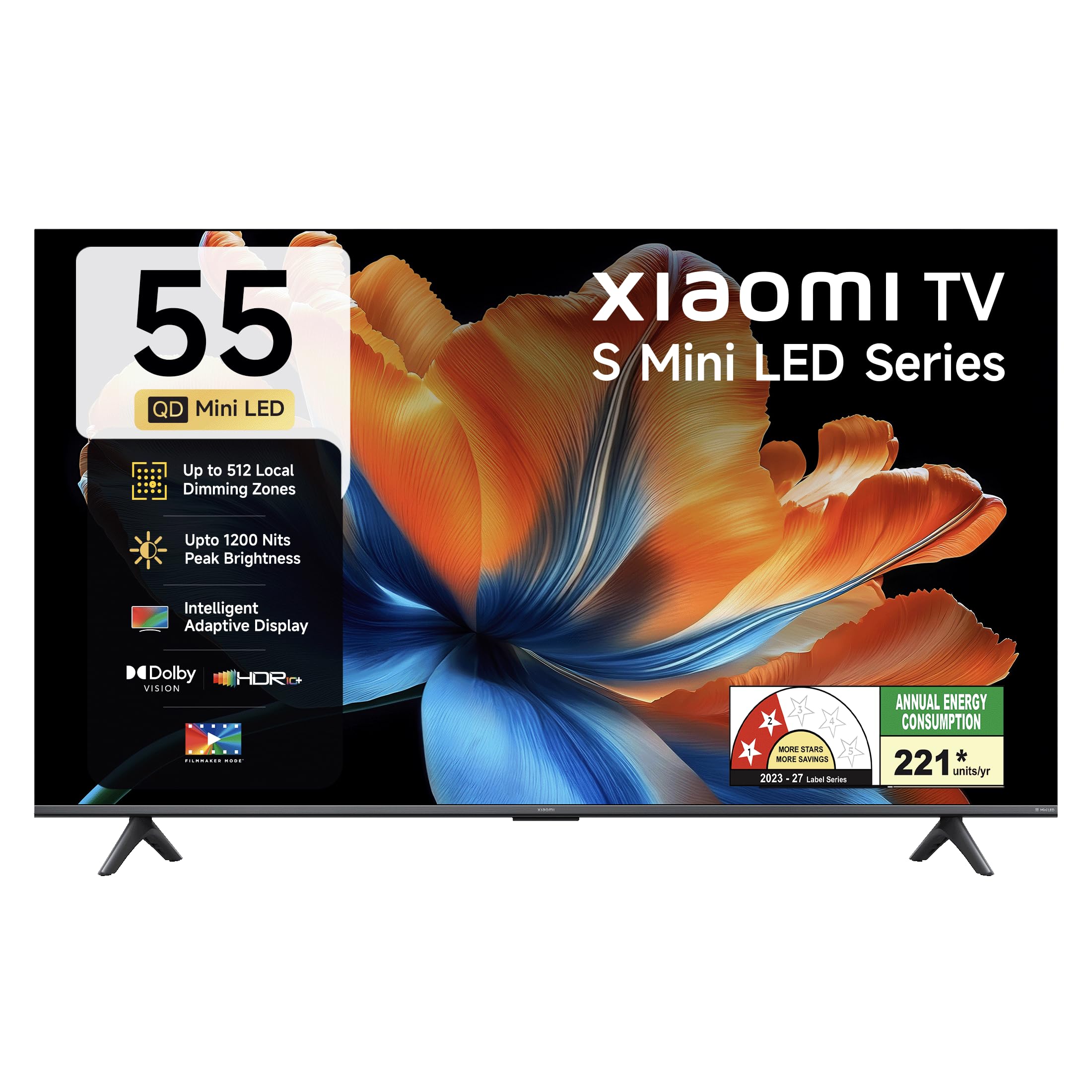
படம்: முன்பக்கம் view of the Xiaomi 55-inch 4K UHD Smart Quantum MagiQ S Mini LED Google TV, showcasing அதன் மெல்லிய பெசல் வடிவமைப்பு.
அமைவு வழிகாட்டி
1. பிரித்தெடுத்தல் மற்றும் சேர்க்கப்பட்ட கூறுகள்
Carefully remove all items from the packaging. Ensure all components listed below are present and undamaged.

Image: Contents of the product box, including the TV unit, remote control, user manual, two stand units, four screws, two AAA batteries, and a power cord.
- 1 LED டிவி யூனிட்
- 1 தொலை கட்டுப்பாடு
- 1 பயனர் கையேடு (இந்த ஆவணம்)
- 2 Stand Units
- 4 Screws for stand installation
- 2 AAA பேட்டரிகள் (ரிமோட் கண்ட்ரோலுக்கு)
- 1 பவர் கார்டு
2. Stand Installation or Wall Mounting
Your television supports both table-top stand installation and wall mounting. Choose the method suitable for your environment.
- ஸ்டாண்ட் நிறுவலுக்கு: Attach the two provided stand units to the bottom of the TV using the four screws. Ensure they are securely fastened.
- சுவர் பொருத்துவதற்கு: Use a compatible VESA wall mount (sold separately). Follow the instructions provided with your wall mount kit. Ensure the wall can support the TV's weight.
3. வெளிப்புற சாதனங்களை இணைத்தல்
Connect your external devices such as set-top boxes, gaming consoles, or audio systems to the TV's ports.

படம்: பின்புறம் view of the TV highlighting connectivity ports: Optical, Earphone, AV In, 3 HDMI ports (one with eARC), 2 USB 2.0 ports, Antenna, and Ethernet.
- HDMI போர்ட்கள் (x3): Connect gaming consoles, Blu-ray players, or set-top boxes. One port supports eARC for enhanced audio return channel functionality.
- USB போர்ட்கள் (x2): மீடியா பிளேபேக்கிற்கு USB சேமிப்பக சாதனங்களை இணைக்கவும்.
- ஈதர்நெட் போர்ட்: கம்பி இணைய இணைப்புக்கு.
- ஒளியியல் வெளியீடு: வெளிப்புற ஆடியோ அமைப்புகளுடன் இணைப்பதற்கு.
- ஏ.வி. இன்: கூட்டு வீடியோ மற்றும் ஸ்டீரியோ ஆடியோவைப் பயன்படுத்தி பழைய சாதனங்களை இணைக்க.
- ஆண்டெனா: தரைவழி அல்லது கேபிள் ஆண்டெனாவை இணைப்பதற்கு.
4. ஆரம்ப பவர் ஆன் மற்றும் அமைப்பு
After connecting all necessary cables, plug the power cord into an electrical outlet. Press the power button on the remote control or the TV to turn it on. Follow the on-screen instructions for initial setup, which typically includes:
- மொழி தேர்வு
- நெட்வொர்க் இணைப்பு (வைஃபை அல்லது ஈதர்நெட்)
- கூகிள் கணக்கு உள்நுழைவு
- சேனல் ஸ்கேனிங்
Operating Your Xiaomi Smart TV
1. ரிமோட் கண்ட்ரோல் செயல்பாடுகள்
The included remote control provides access to all TV functions. Insert the two AAA batteries into the remote control, ensuring correct polarity.

Image: Xiaomi remote control, featuring dedicated quick access buttons for popular streaming services and Google Assistant voice control.
- பவர் பட்டன்: டிவியை ஆன் அல்லது ஆஃப் செய்கிறது.
- கூகிள் உதவியாளர் பட்டன்: Activates voice control for searching content, controlling smart home devices, and more.
- வழிசெலுத்தல் திண்டு: மெனுக்களில் செல்லவும் உருப்படிகளைத் தேர்ந்தெடுக்கவும் பயன்படுகிறது.
- வால்யூம் அதிக/கீழ்: ஆடியோ ஒலியளவை சரிசெய்கிறது.
- சேனல் மேல்/கீழ்: டிவி சேனல்களை மாற்றுகிறார்.
- விரைவு அணுகல் பொத்தான்கள்: Dedicated buttons for Netflix, Prime Video, YouTube, Disney+ Hotstar, SonyLIV, and Live TV.
- முடக்கு பொத்தான்: டிவி ஆடியோவை அமைதிப்படுத்துகிறது.
2. Google TV Interface and Applications
Your TV runs on the Android 14 OS with Google TV, offering a personalized content experience. Access a wide range of applications from the Google Play Store.

Image: The PatchWall interface, providing customized content recommendations and curation from various streaming platforms.
- உள்ளடக்க முதல் UI: Organizes content from all your streaming services in one place.
- தனிப்பட்ட ப்ரோfiles: தனிப்பட்ட சார்பு உருவாக்கவும்files for personalized recommendations.
- ஆதரிக்கப்படும் பயன்பாடுகள்: Pre-installed and downloadable apps include Netflix, Prime Video, YouTube, Zee5, JioCinema, SonyLiv, and more.
- Google உதவியாளர்: Use voice commands for navigation, search, and smart home control.
3. படம் மற்றும் ஒலி அமைப்புகள்
உங்கள் viewபல்வேறு படம் மற்றும் ஒலி முறைகள் மூலம் பதிவிறக்கம் மற்றும் கேட்கும் அனுபவத்தை வழங்குதல்.
பட அமைப்புகள்:
- திரைப்பட தயாரிப்பாளர் பயன்முறை: Disables post-processing effects to display content as intended by the director.
- டால்பி விஷன்: Enhances HDR content with dynamic metadata for optimized image quality frame by frame.
- HDR10+: Uses dynamic data to enhance every frame, providing an immersive viewஅனுபவம்.
- கண் ஆறுதல் பயன்முறை: Reduces blue light and flicker for a more comfortable viewஅனுபவம்.
- MEMC Engine: வேகமான காட்சிகளில் மென்மையான இயக்கத்திற்கான இயக்க மதிப்பீடு, இயக்க இழப்பீட்டு தொழில்நுட்பம்.
- AI Picture Optimization Engine: Advanced AI algorithms analyze content in real-time to enhance clarity, contrast, and color reproduction.

Image: Filmmaker Mode, designed to preserve original colors, contrast, and motion for an authentic cinematic experience.

Image: Dolby Vision technology, optimizing image quality with deeper blacks and brighter highlights.

Image: HDR10+ dynamic frame-by-frame tuning, ensuring consistent detail across dark and bright scenes.

Image: Eye Care Mode, providing flicker-free visuals with DC Dimming and reduced blue light for comfortable viewing.
ஆடியோ அமைப்புகள்:
- 34 வாட்ஸ் வெளியீடு: Powerful built-in box speakers.
- டால்பி ஆடியோ: செழுமையான, தெளிவான மற்றும் சக்திவாய்ந்த ஒலியை வழங்குகிறது.
- DTS-X & DTS மெய்நிகர்:X: ஆழமான, பல பரிமாண ஆடியோவை வழங்குகிறது.
- சியோமி ஒலி: Preset audio configurations developed for optimal sound quality.

Image: Xiaomi Sound, offering tailored audio experiences through expert-developed configurations.
4. Connectivity and Streaming
Your TV offers versatile connectivity options for seamless streaming and device integration.
- இரட்டை அலைவரிசை வைஃபை: Connects to 2.4GHz and 5GHz wireless networks.
- புளூடூத்: வயர்லெஸ் ஹெட்ஃபோன்கள், ஸ்பீக்கர்கள் அல்லது பிற புளூடூத் துணைக்கருவிகளை இணைக்கவும்.
- Google Cast Built-in: Stream content directly from compatible apps on your smartphone or tablet.
- ஆப்பிள் ஏர்ப்ளே 2: ஆப்பிள் சாதனங்களிலிருந்து உள்ளடக்கத்தை ஸ்ட்ரீம் செய்யுங்கள்.
- அதிசயம்: Mirror your Android device's screen wirelessly.

Image: Stream content from your phone using Google Cast or Apple AirPlay 2.
பராமரிப்பு மற்றும் பராமரிப்பு
சரியான பராமரிப்பு உங்கள் டிவியின் நீண்ட ஆயுளையும் உகந்த செயல்திறனையும் உறுதி செய்கிறது.
- திரையை சுத்தம் செய்தல்: மென்மையான, பஞ்சு இல்லாத துணியால் திரையை மெதுவாகத் துடைக்கவும். பிடிவாதமான அடையாளங்களுக்கு, திரையில் நேரடியாகப் பயன்படுத்தாமல், துணியில் தடவப்பட்ட திரை-குறிப்பிட்ட துப்புரவுக் கரைசலைப் பயன்படுத்தவும்.
- உடல் சுத்தம்: Wipe the TV's frame and back panel with a soft, dry cloth. Avoid abrasive cleaners or solvents.
- காற்றோட்டம்: டிவியைச் சுற்றி போதுமான காற்றோட்டத்தை உறுதி செய்யுங்கள். காற்றோட்ட திறப்புகளை அடைக்காதீர்கள்.
- பவர் ஆஃப்: டிவியை சுத்தம் செய்வதற்கு முன்பு அல்லது நீண்ட நேரம் பயன்படுத்தப்படாமல் இருந்தால், எப்போதும் அதை அணைத்துவிட்டு, மின் இணைப்பிலிருந்து அதைத் துண்டிக்கவும்.
- மென்பொருள் புதுப்பிப்புகள்: Periodically check for and install software updates to ensure optimal performance and security.
பொதுவான சிக்கல்களைச் சரிசெய்தல்
Refer to this section for solutions to common operational problems.
| பிரச்சனை | தீர்வு |
|---|---|
| டிவி ஆன் ஆகவில்லை | Ensure the power cord is securely plugged into both the TV and a working electrical outlet. Check if the power outlet is active. Try pressing the power button on the TV itself. |
| படம் இல்லை, ஆனால் ஒலி உள்ளது. | Check the input source. Ensure the connected device (e.g., set-top box) is turned on and functioning. Try a different HDMI cable or port. |
| ஒலி இல்லை, ஆனால் படம் உள்ளது. | Check the volume level and ensure the TV is not muted. Verify audio output settings (e.g., internal speakers, external sound system). Check audio cables for external devices. |
| ரிமோட் கண்ட்ரோல் பதிலளிக்கவில்லை | Replace the AAA batteries in the remote control. Ensure there are no obstructions between the remote and the TV. Re-pair the Bluetooth remote if necessary (refer to TV settings). |
| Wi-Fi உடன் இணைக்க முடியவில்லை | Ensure your Wi-Fi router is on and working. Re-enter the Wi-Fi password. Try restarting both the TV and the router. Check if other devices can connect to the Wi-Fi network. |
தொழில்நுட்ப விவரக்குறிப்புகள்
Detailed specifications for the Xiaomi 55-inch 4K UHD Smart Quantum MagiQ S Mini LED Google TV (Model L55MC-IN).

Image: Physical dimensions and weight of the Xiaomi 55-inch TV, both with and without the stand.
| அம்சம் | விவரக்குறிப்பு |
|---|---|
| மாதிரி எண் | L55MC-IN |
| திரை அளவு | 55 அங்குலம் (138 செமீ) |
| காட்சி தொழில்நுட்பம் | மினி LED |
| தீர்மானம் | 4K அல்ட்ரா HD (3840 x 2160) |
| புதுப்பிப்பு விகிதம் | 60 Hz (DLG 120 Hz) |
| உச்ச பிரகாசம் | 1200 நிட்கள் வரை |
| இயக்க முறைமை | Android 14 OS with Google TV |
| ரேம் | 2 ஜிபி |
| ROM (உள் சேமிப்பு) | 32 ஜிபி |
| ஒலி வெளியீடு | 34 வாட்ஸ் |
| ஆடியோ டெக்னாலஜிஸ் | டால்பி ஆடியோ, டிடிஎஸ்-எக்ஸ், டிடிஎஸ் விர்ச்சுவல்:எக்ஸ் |
| இணைப்பு | Dual Band Wi-Fi, Bluetooth, 3 HDMI (1 eARC), 2 USB, Optical, Ethernet, AV In |
| ஸ்கிரீன் மிரரிங் | Google Cast, Apple AirPlay 2, Miracast |
| சிறப்பு அம்சங்கள் | Filmmaker Mode, MEMC, Eye Comfort Mode, AI Picture Optimization Engine |
| தயாரிப்பு பரிமாணங்கள் (அளவு x அளவு x அளவு) | 31.2D x 31.2W x 76.9H Centimeters (with stand) |
| Item Weight Without Stand | 11.6 கிலோகிராம் |
| மின் நுகர்வு | 230 வாட்ஸ் |
| பிறப்பிடமான நாடு | இந்தியா |
உத்தரவாத தகவல்
Your Xiaomi TV comes with a comprehensive warranty provided by the brand from the date of purchase.
- நிலையான உத்தரவாதம்: 3-year comprehensive warranty for non-prebook customers (purchases between April 22nd - May 31st).
- Pre-book Customer Warranty: 4-year comprehensive warranty for pre-book customers (purchases between April 22nd - April 30th).
Warranty claims can be made using your Amazon invoice as proof of purchase. For detailed terms and conditions, please refer to the official Xiaomi warranty policy or contact customer support.
வாடிக்கையாளர் ஆதரவு
For any assistance, service requests, or queries regarding your Xiaomi TV, please contact Xiaomi customer support.

படம்: முடிந்ததுview of Xiaomi's customer support commitments, including quick installation, prompt call-backs, and swift doorstep solutions.
- நிறுவல் சேவைகள்: New TV installations are typically completed within 3 hours of your appointment.
- Service Requests: Expect a call back from the support team within 60 minutes for any service request.
- On-site Support: Experts aim to arrive at your home within 24 hours of your service request.
Please visit the official Xiaomi India webமிகவும் புதுப்பித்த ஆதரவு விவரங்களுக்கு உங்கள் தயாரிப்பு பேக்கேஜிங்கில் வழங்கப்பட்டுள்ள தொடர்புத் தகவலை தளத்திற்குச் செல்லவும் அல்லது பார்க்கவும்.