
1. அறிமுகம்
The QCY MeloBuds A30 are advanced wireless earbuds designed to deliver a superior audio experience. They feature active noise cancellation, high-resolution audio support, and a robust wireless connection, making them suitable for various listening environments.
2. தயாரிப்பு முடிந்துவிட்டதுview
Familiarize yourself with the components of your QCY MeloBuds A30 earbuds.

Image: QCY MeloBuds A30 earbuds and charging case.
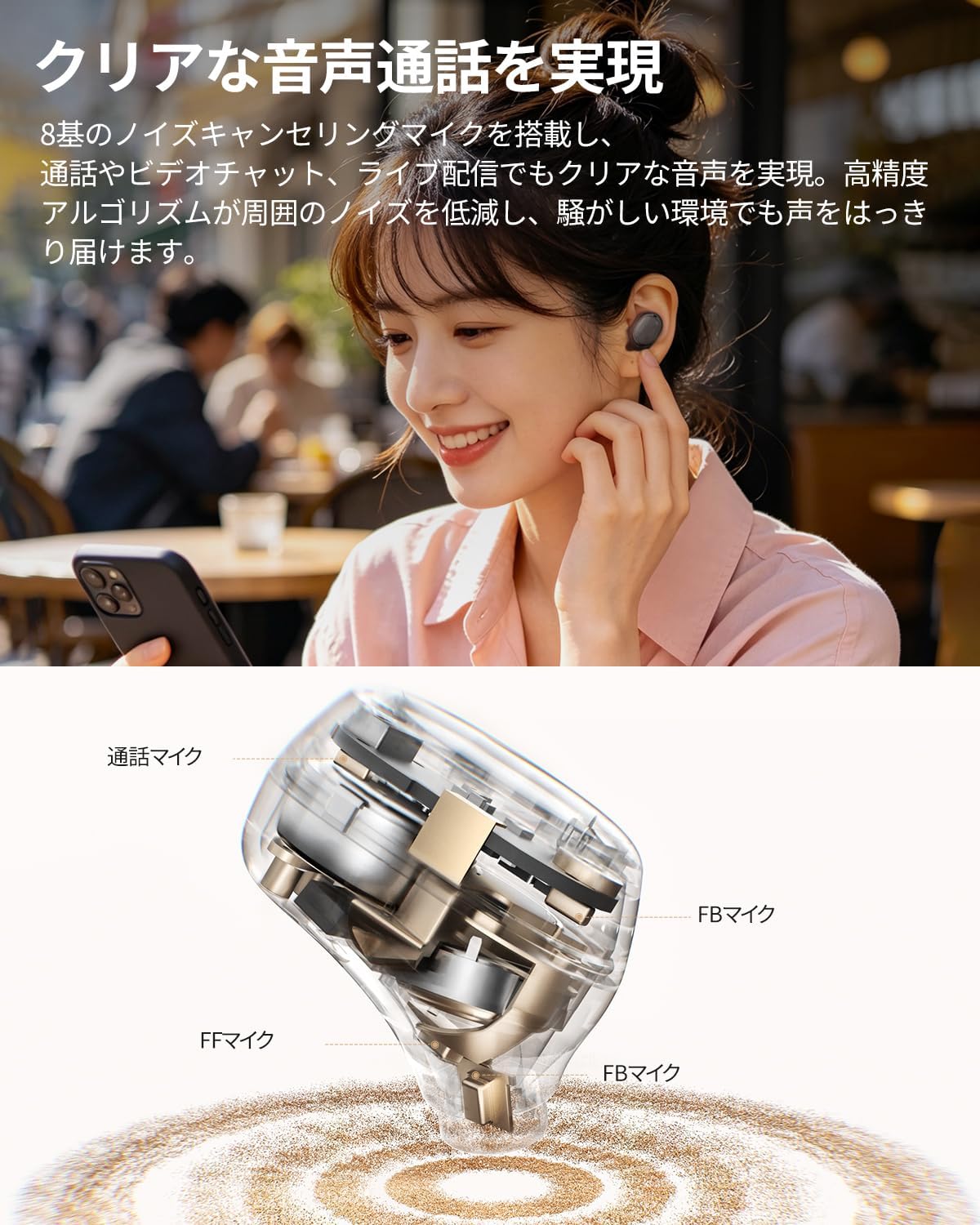
படம்: விரிவான உட்புறம் view of a QCY MeloBuds A30 earbud, highlighting microphone components.
3 அமைவு
3.1 ஆரம்ப இணைத்தல்
- சார்ஜிங் கேஸைத் திறக்கவும். இயர்பட்கள் தானாகவே இணைத்தல் பயன்முறைக்குச் செல்லும்.
- உங்கள் சாதனத்தில் (ஸ்மார்ட்போன், டேப்லெட், பிசி), புளூடூத்தை இயக்கவும்.
- தேடுங்கள் "QCY MeloBuds A30" in the list of available Bluetooth devices and select it to connect.
- இணைக்கப்பட்டதும், வெற்றிகரமான இணைப்பை குரல் அறிவிப்பு உறுதிப்படுத்தும்.
3.2 பல சாதன இணைப்பு
The MeloBuds A30 supports simultaneous connection with up to 3 devices. To switch between connected devices, simply play audio on the desired device. The earbuds will automatically switch to the active audio source.

Image: Man playing game with phone and QCY MeloBuds A30 earbuds, illustrating multi-device connection.
3.3 QCY செயலி நிறுவல்
For full customization and advanced features, download the dedicated QCY app from your device's app store. The app allows for EQ adjustments, firmware updates, and personalized control settings.

Image: Smartphone displaying the QCY app interface for MeloBuds A30, showing various customization options and settings.
4. இயக்க வழிமுறைகள்
4.1 தொடு கட்டுப்பாடுகள்
The MeloBuds A30 feature intuitive touch controls on each earbud. You can customize these controls via the QCY app.
- விளையாடு/இடைநிறுத்தம்: இரண்டு இயர்பட்டில் ஏதேனும் ஒன்றை இருமுறை தட்டவும்.
- அடுத்த ட்ராக்: வலதுபுற இயர்பட்டை மூன்று முறை தட்டவும்.
- முந்தைய ட்ராக்: இடதுபுற இயர்பட்டை மூன்று முறை தட்டவும்.
- பதில்/முடிவு அழைப்பு: இரண்டு இயர்பட்டில் ஏதேனும் ஒன்றை இருமுறை தட்டவும்.
- அழைப்பை நிராகரி: இயர்பட்டை 1.5 வினாடிகள் அழுத்திப் பிடிக்கவும்.
- குரல் உதவியாளர்: இடதுபுற இயர்பட்டை மூன்று முறை தட்டவும்.
- ANC Mode Cycle: Press and hold the right earbud for 1.5 seconds to cycle through ANC ON → ANC OFF → Transparency Mode.

Image: Diagram illustrating touch controls for QCY MeloBuds A30 earbuds.
4.2 செயலில் இரைச்சல் ரத்து (ANC)
The MeloBuds A30 feature up to 60dB hybrid ANC and 5.5kHz wideband noise cancellation. Adaptive ANC automatically adjusts to your environment and wearing conditions. AI scene-adaptive ANC and wind noise-adaptive ANC provide optimal noise cancellation, ensuring a clear listening experience even in windy conditions.

Image: Person wearing QCY MeloBuds A30 earbuds, demonstrating active noise cancellation.

Image: Diagram illustrating the effect of Active Noise Cancellation (ANC) on and off with sound waves around a person wearing QCY MeloBuds A30.
4.3 அழைப்பு செயல்பாடுகள்
Equipped with 8 noise-cancelling microphones and a high-precision algorithm, the MeloBuds A30 effectively reduce ambient noise during calls, video chats, and live streaming. This ensures your voice is clearly transmitted even in noisy environments.

Image: Woman talking on phone while wearing QCY MeloBuds A30 earbuds in an outdoor setting.
5. சார்ஜ்
The earbuds provide approximately 11 hours of continuous playback on a single charge (ANC off), and up to 50 hours with the charging case. With ANC on, the earbuds offer about 6 hours of playback, extending to 27 hours with the charging case.

Image: QCY MeloBuds A30 earbuds and charging case, illustrating battery life with and without ANC.
To charge the earbuds, place them back into the charging case. To charge the case, connect it to a power source using the provided USB-C cable.
6. பராமரிப்பு
- மென்மையான, உலர்ந்த துணியால் இயர்பட்கள் மற்றும் சார்ஜிங் கேஸை தவறாமல் சுத்தம் செய்யவும்.
- சிராய்ப்பு பொருட்கள் அல்லது கடுமையான இரசாயனங்கள் பயன்படுத்துவதை தவிர்க்கவும்.
- Ensure the charging contacts on both the earbuds and case are clean and dry to prevent charging issues.
- இயர்பட்களைப் பயன்படுத்தாதபோது அவற்றை சார்ஜிங் கேஸில் சேமித்து வைக்கவும், இதனால் தூசி மற்றும் சேதத்திலிருந்து பாதுகாக்கப்படும்.
6.1 நீர் எதிர்ப்பு
The MeloBuds A30 are IPX5 water resistant, protecting them from sweat and water splashes. This makes them suitable for workouts and commuting. However, they are not designed for submersion in water.

Image: QCY MeloBuds A30 earbuds with water droplets, demonstrating IPX5 water resistance.
7. சரிசெய்தல்
- இயர்பட்ஸ் இணைக்கப்படவில்லை: இரண்டு இயர்பட்களும் சார்ஜிங் கேஸில் இருப்பதை உறுதிசெய்து, பின்னர் இணைத்தல் பயன்முறையைச் செயல்படுத்த மூடியைத் திறக்கவும். உங்கள் சாதனத்தின் புளூடூத் அமைப்புகளைச் சரிபார்த்து மீண்டும் இணைக்க முயற்சிக்கவும்.
- ஒரு இயர்பட்டிலிருந்து சத்தம் இல்லை: இரண்டு இயர்பட்களையும் மீண்டும் சார்ஜிங் கேஸில் வைத்து, மூடியை மூடி, சில வினாடிகள் காத்திருந்து, பின்னர் மீண்டும் திறக்கவும். இது பெரும்பாலும் இயர்பட்களை மீண்டும் ஒத்திசைக்கிறது.
- சார்ஜிங் சிக்கல்கள்: Clean the charging contacts on both earbuds and the case. Ensure the charging cable is securely connected and the power source is working.
- மோசமான அழைப்பு தரம்: Ensure the microphones are not obstructed. Try adjusting the earbuds' position in your ears.
- பயன்பாட்டு இணைப்பு சிக்கல்கள்: Ensure Bluetooth is enabled and the earbuds are connected to your device. Restart the QCY app or reinstall it if problems persist.
8. விவரக்குறிப்புகள்
| பிராண்ட் | QCY |
| மாதிரி பெயர் | MeloBuds A30 |
| மாதிரி எண் | BH26HT22A |
| நிறம் | கருப்பு |
| இணைப்பு தொழில்நுட்பம் | வயர்லெஸ் |
| புளூடூத் பதிப்பு | 6.0 |
| புளூடூத் வரம்பு | 10 மீட்டர் |
| சத்தம் கட்டுப்பாடு | Active Noise Cancellation, Adaptive Noise Cancellation, Environmental Noise Cancellation |
| ஆடியோ கோடெக்குகள் | LDAC, ஹை-ரெஸ் ஆடியோ வயர்லெஸ் |
| ஒலிவாங்கி | 8-mic system with AI Call Noise Cancelling |
| பின்னணி நேரம் (இயர்பட்ஸ்) | Approx. 11 hours (ANC off), Approx. 6 hours (ANC on) |
| மொத்த பின்னணி நேரம் (கேஸுடன்) | 50 மணிநேரம் வரை (ANC ஆஃப்), 27 மணிநேரம் வரை (ANC ஆன்) |
| நீர் எதிர்ப்பு | IPX5 |
| கட்டுப்பாட்டு முறை | தொடு கட்டுப்பாடு |
| இணக்கமான சாதனங்கள் | Windows/Macbook Air/Pro PCs, iPads, iPhones, Android devices (Galaxy, Huawei, Xiaomi, OPPO, Xperia, Nexus, ASUS, Fujitsu, etc.) |
9. உத்தரவாதம் மற்றும் ஆதரவு
QCY products come with a standard manufacturer's warranty. For detailed warranty information, please refer to the warranty card included in your product packaging or visit the official QCY webதளம்.
For technical support, troubleshooting assistance, or any product-related inquiries, please contact QCY customer service through their official webதளம் அல்லது உங்கள் தயாரிப்பு ஆவணத்தில் வழங்கப்பட்ட தொடர்புத் தகவல்.