1. அறிமுகம்
The Adesso ADP-PU21 is a PS/2 to USB adapter designed to facilitate the use of legacy PS/2 keyboards and mice with modern computer systems that primarily feature USB ports. This adapter allows you to connect two PS/2 devices (one keyboard and one mouse) to a single USB port on your computer, providing a seamless transition for your existing peripherals.

Image 1.1: Adesso ADP-PU21 PS/2 to USB Adapter in its retail packaging, showing the adapter with its USB connector and two PS/2 ports (purple for mouse, green for keyboard).
2. தயாரிப்பு அம்சங்கள்
- Connects two PS/2 input devices (keyboard and mouse) to one USB port.
- Easy installation with no software driver required.
- Compliant with USB 1.0/1.1 Revisions.
- Supports both UHCI and OHCI specifications.
- Bus-powered, eliminating the need for an external power adapter.
- Compatible with computer USB interfaces and PS/2 ports of KVM switches.
3. அமைவு வழிமுறைகள்
Follow these steps to connect your PS/2 devices using the Adesso ADP-PU21 adapter:
- Ensure your computer is powered off or that you are connecting to a hot-swappable USB port.
- Connect your PS/2 keyboard to the பச்சை PS/2 port on the ADP-PU21 adapter.
- Connect your PS/2 mouse to the ஊதா PS/2 port on the ADP-PU21 adapter.
- Plug the USB connector of the ADP-PU21 adapter into an available USB port on your computer.
- Your operating system should automatically detect the adapter and connected devices. No additional drivers are typically required.
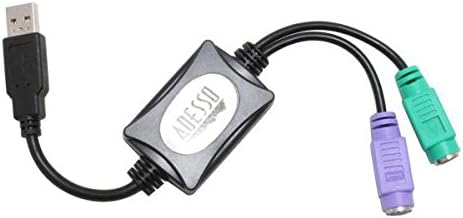
Image 3.1: The Adesso ADP-PU21 adapter, illustrating its USB connector on one end and the green (keyboard) and purple (mouse) PS/2 connectors on the other.
4. இயக்க வழிமுறைகள்
Once the Adesso ADP-PU21 adapter is connected as described in the setup section, your PS/2 keyboard and mouse will function as standard USB input devices. The adapter translates the PS/2 signals into USB signals, allowing your computer to recognize and interact with your legacy peripherals. No special operating procedures are required beyond the normal use of your keyboard and mouse.
5. சரிசெய்தல்
- அங்கீகரிக்கப்படாத சாதனங்கள்:
- Ensure the PS/2 connectors are securely plugged into the correct color-coded ports (green for keyboard, purple for mouse).
- Try plugging the USB connector into a different USB port on your computer.
- Restart your computer with the adapter and devices connected.
- Verify that your PS/2 keyboard and mouse are functional when connected directly to a PS/2 port (if available) or with another adapter.
- இடைப்பட்ட செயல்பாடு:
- Check for loose connections at all points (PS/2 devices to adapter, adapter to USB port).
- Ensure the USB port provides sufficient power. While bus-powered, some older or unpowered USB hubs might not provide enough power for both devices. Try connecting directly to a computer's USB port.
- No Drivers Found:
The Adesso ADP-PU21 is designed to be plug-and-play and does not require specific software drivers. If your operating system prompts for drivers, it may indicate an issue with the adapter itself or the USB port. Try the steps for "Devices Not Recognized."
6. விவரக்குறிப்புகள்
| அம்சம் | விவரம் |
|---|---|
| மாதிரி எண் | ADP-PU21 |
| இணைப்பான் வகை | USB (Type-A Male) to Dual PS/2 (Mini-DIN 6-pin Female) |
| USB இணக்கம் | USB 1.0/1.1 Revisions |
| USB Specifications Supported | UHCI and OHCI |
| சக்தி ஆதாரம் | Bus-Powered (no external adapter needed) |
| நிறம் | கருப்பு |
| பரிமாணங்கள் (L x W x H) | Approximately 2 x 1.5 x 0.5 inches (main adapter body) |
| பொருளின் எடை | தோராயமாக 4.8 அவுன்ஸ் |
| இணக்கமான சாதனங்கள் | PC, KVM Switches |
7. உத்தரவாதம் மற்றும் ஆதரவு
For detailed warranty information, technical support, or to contact customer service, please refer to the official Adesso website or the documentation included with your purchase. Adesso provides support for its products to ensure customer satisfaction.
நீங்கள் பொதுவாக உற்பத்தியாளரின் அதிகாரப்பூர்வ இணையதளத்தில் ஆதரவு ஆதாரங்கள், அடிக்கடி கேட்கப்படும் கேள்விகள் மற்றும் தொடர்புத் தகவல்களைக் காணலாம். webதளம்: www.adesso.com


