அறிமுகம்
This instruction manual provides comprehensive guidance for the safe and effective use of your Vivitar Vivicam V3815 4-megapixel digital camera. Please read this manual thoroughly before operating the camera to ensure proper setup, function, and maintenance. Retain this manual for future reference.
தயாரிப்பு முடிந்துவிட்டதுview
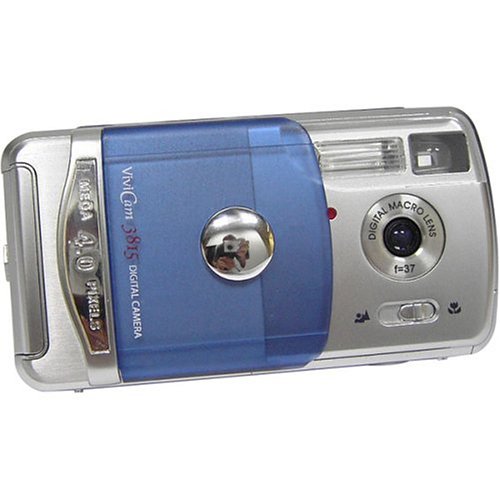
Familiarize yourself with the main components and controls of your Vivitar Vivicam V3815 digital camera.
படம் 1: பின்புறம் View of Vivitar Vivicam V3815 Digital Camera
The image displays the rear view of the Vivitar Vivicam V3815 digital camera. The 1.4-inch LCD screen is visible, displaying a sample image of a person. To the right of the screen are the 'MODE' and 'MENU' buttons, along with a four-way controller with an 'OK/Q' button in the center, and icons for flash and trash.
முக்கிய கூறுகள்:
- லென்ஸ்: Fixed focus lens.
- ஃபிளாஷ்: Built-in autoflash system.
- LCD காட்சி: 1.4-inch color TFT screen for viewபடங்கள், வீடியோக்கள் மற்றும் மெனு விருப்பங்களைப் பதிவேற்றுதல்.
- கட்டுப்பாட்டு பொத்தான்கள்: MODE, MENU, and a directional pad with an OK/Q button for navigation and selection.
- பேட்டரி பெட்டி: Located on the camera body for AA batteries.
- மெமரி கார்டு ஸ்லாட்: For optional SD memory cards.
- USB போர்ட்: கணினியுடன் இணைப்பதற்கு.
- Video Out Port: தொலைக்காட்சியுடன் இணைப்பதற்கு.
அமைவு
1. பேட்டரி நிறுவல்
- Locate the battery compartment cover on the camera.
- Open the cover and insert two AA-size batteries, ensuring correct polarity (+/-) as indicated inside the compartment.
- பேட்டரி பெட்டியின் அட்டையை பாதுகாப்பாக மூடு.
குறிப்பு: Alkaline batteries are included. For extended use, rechargeable Ni-MH batteries are recommended (not included).
2. Memory Card Installation (Optional)
The camera has 16 MB of built-in memory. For additional storage, an SD (Secure Digital) memory card (up to 512 MB) can be used.
- கேமராவில் SD கார்டு ஸ்லாட்டைக் கண்டறியவும்.
- உலோகத் தொடர்புகள் கீழே இருக்கும் வரை, அது சரியான இடத்தில் கிளிக் செய்யும் வரை, SD கார்டைச் செருகவும்.
- அகற்ற, அட்டை வெளியே வரும் வரை மெதுவாக உள்ளே தள்ளவும்.
3. ஆரம்ப பவர் ஆன்
Press the power button to turn on the camera. The LCD display will activate. You may need to set the date and time upon first use or after battery replacement.
இயக்க வழிமுறைகள்
1. ஸ்டில் புகைப்படங்களை எடுத்தல்
- கேமராவை இயக்கவும்.
- Ensure the camera is in still photo mode (indicated on the LCD). Use the MODE button to switch if necessary.
- Frame your shot using the LCD display. The camera features fixed focus.
- படத்தைப் பிடிக்க ஷட்டர் பொத்தானை முழுமையாக அழுத்தவும்.
டிஜிட்டல் ஜூம்: The camera supports 2x digital zoom. Use the zoom controls (often integrated with directional pad) to adjust magnification before taking a photo.
2. Recording Video Clips
- கேமராவை இயக்கவும்.
- Press the MODE button to select movie-clip mode.
- Press the shutter button to start recording. Press it again to stop.
குறிப்பு: Video clips are recorded without audio. Maximum duration is approximately one minute at 320 x 240 resolution.
3. பின்னணி முறை
- Press the MODE button to enter playback mode.
- நீங்கள் கைப்பற்றிய புகைப்படங்கள் மற்றும் வீடியோக்களைப் பார்க்க திசை பொத்தான்களைப் பயன்படுத்தவும்.
- Press the OK/Q button to view a selected item or play a video.
- To delete an image or video, select it and press the trash icon button (often integrated with directional pad). Confirm deletion when prompted.
4. பட்டி அமைப்புகள்
Press the MENU button to access camera settings. Use the directional pad to navigate and the OK/Q button to select options.
- காட்சி முறைகள்: Select from Auto, Sports, Night, Portrait, Landscape, or Back-light for optimized shooting conditions.
- வண்ண முறைகள்: Choose between Color, Black & White, or Sepia-tone.
- Sharpness and Saturation: Adjust these settings to fine-tune image appearance.
- சுய-டைமர்: Set a delay of 5 or 10 seconds before the shutter fires.
- ஃபிளாஷ் முறைகள்: The 4-mode autoflash system automatically adjusts based on lighting conditions.
- தீர்மானம்: Select image resolution (e.g., 2304 x 1728, 1600 x 1200, 1280 x 960, 640 x 480). Higher resolution results in larger file sizes and fewer images stored.
ஒரு கணினியுடன் இணைக்கிறது
To transfer photos and videos to your computer:
- கேமரா அணைக்கப்பட்டுள்ளதா என்பதை உறுதிப்படுத்தவும்.
- வழங்கப்பட்ட USB கேபிளைப் பயன்படுத்தி உங்கள் கணினியுடன் கேமராவை இணைக்கவும்.
- கேமராவை இயக்கவும். உங்கள் கணினி கேமராவை நீக்கக்கூடிய சேமிப்பக சாதனமாக அங்கீகரிக்க வேண்டும்.
- Access the camera's internal memory or SD card (if inserted) to copy fileஉங்கள் கணினிக்கு கள்.
- USB கேபிளைத் துண்டிக்கும் முன், உங்கள் கணினியிலிருந்து கேமராவைப் பாதுகாப்பாக வெளியேற்றவும்.
குறிப்பு: A CD-ROM with necessary software may be included for older operating systems or specific functionalities. For Windows XP and newer, drivers are often not required as the camera functions as a mass storage device.
பராமரிப்பு மற்றும் பராமரிப்பு
- சுத்தம்: Use a soft, dry cloth to clean the camera body. For the lens and LCD screen, use a lens cleaning cloth specifically designed for optical surfaces. Avoid abrasive materials or harsh chemicals.
- சேமிப்பு: Store the camera in a cool, dry place away from direct sunlight, extreme temperatures, and high humidity. If storing for an extended period, remove the batteries.
- பேட்டரி கையாளுதல்: Always use the correct type of batteries. Remove depleted batteries promptly to prevent leakage. Do not mix old and new batteries or different types of batteries.
- நீர் எதிர்ப்பு: This camera is not water-resistant. Avoid exposure to water or moisture.
சரிசெய்தல்
| பிரச்சனை | சாத்தியமான காரணம் / தீர்வு |
|---|---|
| கேமரா இயக்கப்படவில்லை. |
|
| படங்கள் மங்கலாக உள்ளன. |
|
| ஃபிளாஷ் எரியவில்லை. |
|
| Date and time settings reset. |
|
| இடமாற்றம் செய்ய முடியாது fileகணினிக்கு. |
|
விவரக்குறிப்புகள்
| அம்சம் | விவரம் |
|---|---|
| சென்சார் வகை | 4 மெகாபிக்சல் CMOS |
| எஃபெக்டிவ் ஸ்டில் ரெசல்யூஷன் | 4 எம்.பி |
| Maximum Still Resolution | 2304 x 1728 பிக்சல்கள் |
| டிஜிட்டல் பெரிதாக்கு | 2x (4x during playback) |
| கவனம் வகை | Fixed Focus Autofocus |
| காட்சி | 1.4-இன்ச் கலர் TFT LCD |
| உள் நினைவகம் | 16 MB built-in non-volatile flash memory |
| வெளிப்புற நினைவகம் | SD Card (up to 512 MB, not included) |
| வீடியோ பயன்முறை | Yes (320 x 240, approx. 1 minute, no audio) |
| இணைப்பு | USB 1.1/2.0 இணக்கமானது |
| சக்தி ஆதாரம் | 2 x AA Alkaline batteries (included) or Ni-MH (not included) |
| ஃபிளாஷ் | Built-in, 4-mode autoflash system |
| படப்பிடிப்பு முறைகள் | Fully automatic, Scene modes (Auto, Sports, Night, Portrait, Landscape, Back-light) |
| வண்ண முறைகள் | Color, Black & White, Sepia-tone |
| சுய-டைமர் | 5 அல்லது 10 வினாடிகள் |
| எடை | 0.14 Kilograms (without batteries) |
பெட்டியில் என்ன இருக்கிறது
The Vivitar Vivicam V3815 package includes the following items:
- Vivitar Vivicam V3815 Digital Camera
- USB கேபிள்
- வீடியோ கேபிள்
- கை பட்டா
- கேரிங் பை
- 2 x ஏஏ அல்கலைன் பேட்டரிகள்
- அறிவுறுத்தல் கையேடு (இந்த ஆவணம்)
- மென்பொருள் கொண்ட CD-ROM
உத்தரவாதம் மற்றும் ஆதரவு
For warranty information or technical support, please refer to the warranty card included with your product or visit the official Vivitar webஎந்தவொரு உத்தரவாதக் கோரிக்கைகளுக்கும் வாங்கியதற்கான சான்றாக உங்கள் கொள்முதல் ரசீதை வைத்திருங்கள்.


