அறிமுகம்
This manual provides comprehensive instructions for the installation, operation, and maintenance of your Dell DW1397 Broadcom 802.11a/b/g Wireless Card. Please read this manual carefully before proceeding with installation to ensure proper functionality and to avoid potential issues.
Important Compatibility Note: This wireless card is not compatible with IBM, Lenovo, Thinkpad, or HP brand laptops. Attempting to install it in these systems may result in non-functionality or system instability.
தயாரிப்பு முடிந்துவிட்டதுview

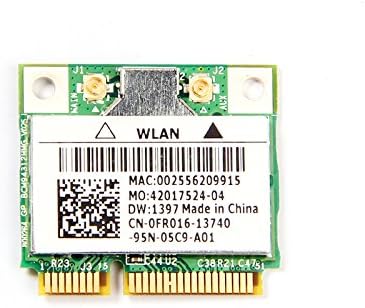
The Dell DW1397 Broadcom Wireless Card is an internal Mini PCI Express component designed to provide wireless network connectivity to compatible laptops. It supports 802.11a/b/g standards, operating on both 2.4 GHz and 5 GHz frequency bands, with a maximum data transfer rate of 54 Mbps.
- மாதிரி: Dell DW1397 (Broadcom BCM94312HMG)
- வயர்லெஸ் தரநிலைகள்: 802.11a/b/g compliant
- அதிர்வெண் பட்டைகள்: 2.4 GHz அல்லது 5 GHz
- தரவு விகிதம்: 54 Mbps வரை
- இடைமுகம்: மினி பிசிஐ எக்ஸ்பிரஸ்
அமைவு மற்றும் நிறுவல்
Installing the Dell DW1397 wireless card requires opening your laptop. If you are not comfortable performing this procedure, it is recommended to seek assistance from a qualified technician. Ensure your laptop is powered off and disconnected from all power sources before beginning.
- உங்கள் பணியிடத்தை தயார் செய்யுங்கள்: சுத்தமான, நிலையான-இலவச மேற்பரப்பில் வேலை செய்யுங்கள். ஆன்டி-ஸ்டேடிக் மணிக்கட்டு பட்டையைப் பயன்படுத்துவதைக் கருத்தில் கொள்ளுங்கள்.
- Power Down Laptop: Shut down your laptop completely and remove the battery. Disconnect the AC adapter.
- Access Mini PCI Express Slot: Refer to your laptop's service manual for instructions on how to open the chassis and locate the Mini PCI Express slot. This often involves removing a bottom panel or keyboard.
- பழைய அட்டையை அகற்று (பொருந்தினால்): If replacing an existing wireless card, carefully disconnect any antenna cables attached to it and remove the screw securing the card. Gently slide the old card out of the slot.
- Install New Card: Align the Dell DW1397 card with the Mini PCI Express slot. Gently push the card into the slot at an angle until it is fully seated. Press the card down and secure it with the screw.
- ஆண்டெனாக்களை இணைக்கவும்: Carefully reattach the antenna cables to the corresponding connectors on the new wireless card. Ensure a secure connection.
- மடிக்கணினியை மீண்டும் இணைக்கவும்: Close the laptop chassis, reinsert the battery, and reconnect the AC adapter.
- இயக்கிகளை நிறுவவும்: Power on your laptop. Windows may automatically detect and install basic drivers. If not, you may need to download the latest drivers from the Dell or Broadcom support website for your specific laptop model and operating system.
இயக்க வழிமுறைகள்
Once the wireless card is installed and drivers are in place, you can connect to wireless networks.
- வைஃபையை இயக்கு: Ensure your laptop's Wi-Fi function is enabled. This is often done via a physical switch, a function key combination (e.g., Fn + F2), or through software settings in your operating system.
- Connect to a Network (Windows):
- Click the Wi-Fi icon in the system tray (usually bottom-right corner).
- Select your desired wireless network from the list of available networks.
- "இணை" என்பதைக் கிளிக் செய்து, கேட்கப்பட்டால் பிணைய பாதுகாப்பு விசையை (கடவுச்சொல்) உள்ளிடவும்.
- Once connected, the Wi-Fi icon will indicate an active connection.
- Connect to a Network (Other OS): Consult your operating system's documentation for specific steps to connect to a wireless network.
பராமரிப்பு
The Dell DW1397 wireless card requires minimal maintenance. Follow these guidelines to ensure optimal performance:
- இயக்கி புதுப்பிப்புகள்: Periodically check the Dell or Broadcom support websites for updated drivers. Keeping your drivers current can improve performance, stability, and security.
- சிஸ்டம் புதுப்பிப்புகள்: Ensure your operating system is up-to-date, as system updates often include network-related improvements.
- உடல் பரிசோதனை: If you experience persistent issues, a physical inspection of the card and antenna connections (after powering down the laptop) can help identify loose connections.
சரிசெய்தல்
| பிரச்சனை | சாத்தியமான காரணம் | தீர்வு |
|---|---|---|
| வைஃபை நெட்வொர்க்குகள் எதுவும் கண்டறியப்படவில்லை. | Wi-Fi disabled, incorrect drivers, card not seated correctly. |
|
| Cannot connect to a specific network. | தவறான கடவுச்சொல், நெட்வொர்க் வரம்பிற்கு வெளியே உள்ளது, ரூட்டர் சிக்கல். |
|
| மெதுவான வைஃபை வேகம். | Interference, outdated drivers, network congestion. |
|
| Card not recognized by laptop. | Incompatible laptop model, improper installation, faulty card. |
|
விவரக்குறிப்புகள்
| அம்சம் | விவரம் |
|---|---|
| பிராண்ட் | பிராட்காம் |
| மாதிரி | DW1397 (BCM94312HMG) |
| வன்பொருள் இடைமுகம் | மினி பிசிஐ எக்ஸ்பிரஸ் |
| வயர்லெஸ் தரநிலைகள் | 802.11a/b/g |
| அதிர்வெண் பட்டைகள் | 2.4 GHz, 5 GHz |
| தரவு பரிமாற்ற வீதம் | 54 Mbps வரை |
| இணக்கமான சாதனங்கள் | Laptop (excluding IBM/Lenovo/Thinkpad/HP) |
| பொருளின் எடை | 0.8 அவுன்ஸ் |
| தொகுப்பு பரிமாணங்கள் | 6.4 x 4.8 x 0.4 அங்குலம் |
| UPC | 613846759409 |
உத்தரவாதம் மற்றும் ஆதரவு
This product is typically covered by the manufacturer's standard warranty. For specific warranty terms, duration, and support, please refer to the documentation provided with your purchase or visit the official Broadcom support website. For driver downloads and further technical assistance, please visit the Dell or Broadcom support portals.
- Broadcom Support: www.broadcom.com/support
- டெல் ஆதரவு: www.dell.com/support


