1. அறிமுகம்
This manual provides detailed instructions for the setup, operation, and maintenance of your Thermaltake URBAN S71 Window Full Tower Computer Case, model VP500M1W2N. The URBAN S71 is designed with a simple and elegant aesthetic, offering ample space and features for a robust computer build.

படம் 1.1: முன் view of the Thermaltake URBAN S71 computer case, showcasing its brushed aluminum finish front door panel and top I/O ports.

படம் 1.2: பக்கம் view of the Thermaltake URBAN S71 computer case, highlighting the transparent window panel for viewing internal components.
2 அமைவு
2.1 பேக்கிங் மற்றும் ஆய்வு
Carefully remove the computer case from its packaging. Inspect the case for any signs of damage that may have occurred during transit. Retain the packaging for future transport or storage.
2.2 Interior Layout and Component Installation
The URBAN S71 offers a spacious interior for easy component installation. The side panel can be removed to access the internal bays and motherboard tray.

Figure 2.1: The Thermaltake URBAN S71 computer case with its side panel open, providing a clear view of the internal structure, drive bays, and fan mounts.
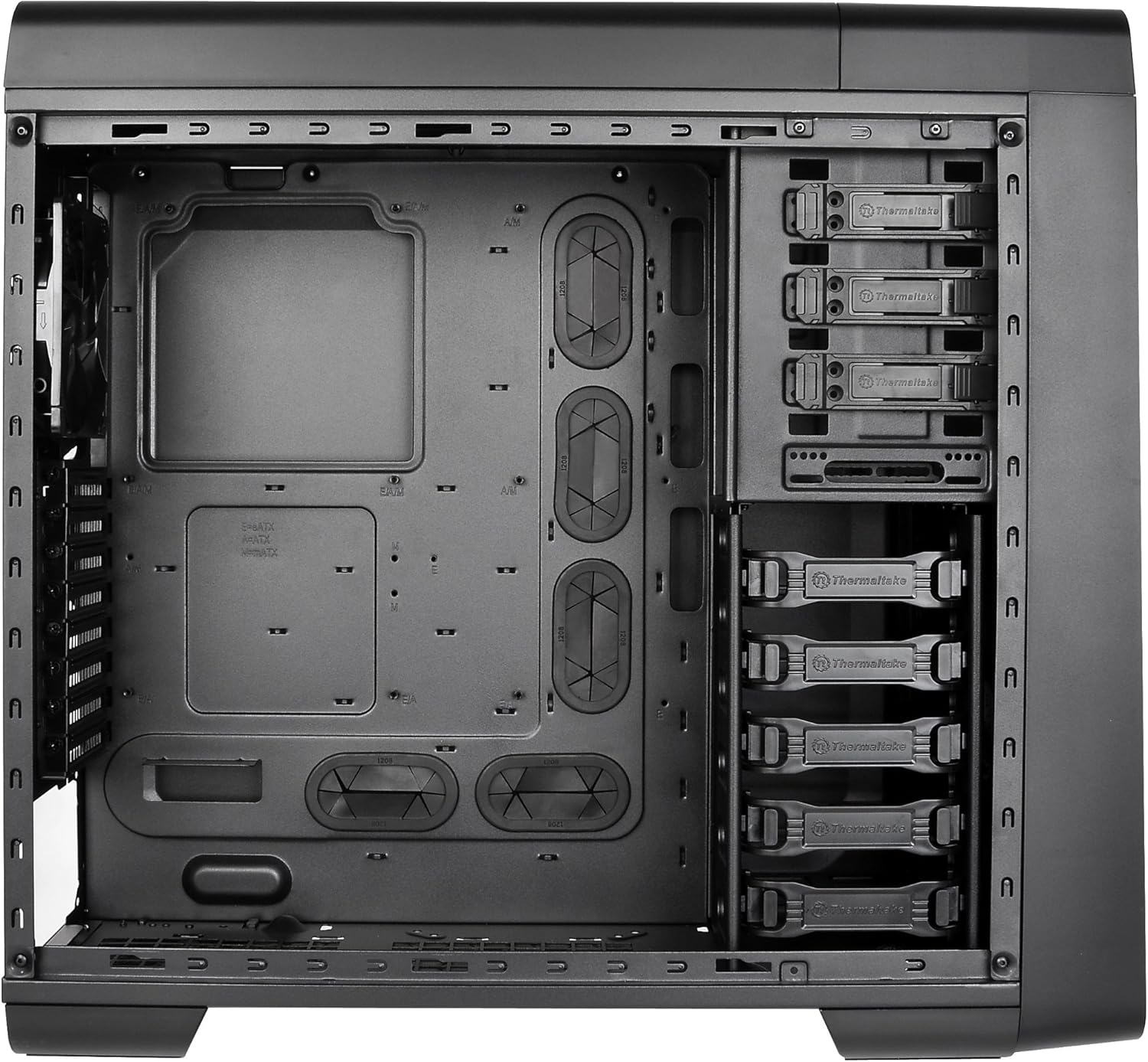
படம் 2.2: ஒரு விரிவான உட்புறம் view of the Thermaltake URBAN S71, showing the motherboard tray, cable management cutouts, and various drive bays.
2.2.1 மதர்போர்டு நிறுவல்
- பெட்டியின் பின்புற திறப்பில் I/O கவசத்தை நிறுவவும்.
- Align your Extended ATX, ATX, or Micro ATX motherboard with the standoffs.
- திருகுகள் மூலம் மதர்போர்டைப் பாதுகாக்கவும்.
2.2.2 டிரைவ் நிறுவல்
The case supports multiple drive configurations:
- External Bays: 4 x 5.25" bays for optical drives or other 5.25" devices.
- உள் விரிகுடாக்கள்: 5 x 3.5" or 2.5" bays for hard drives or SSDs.
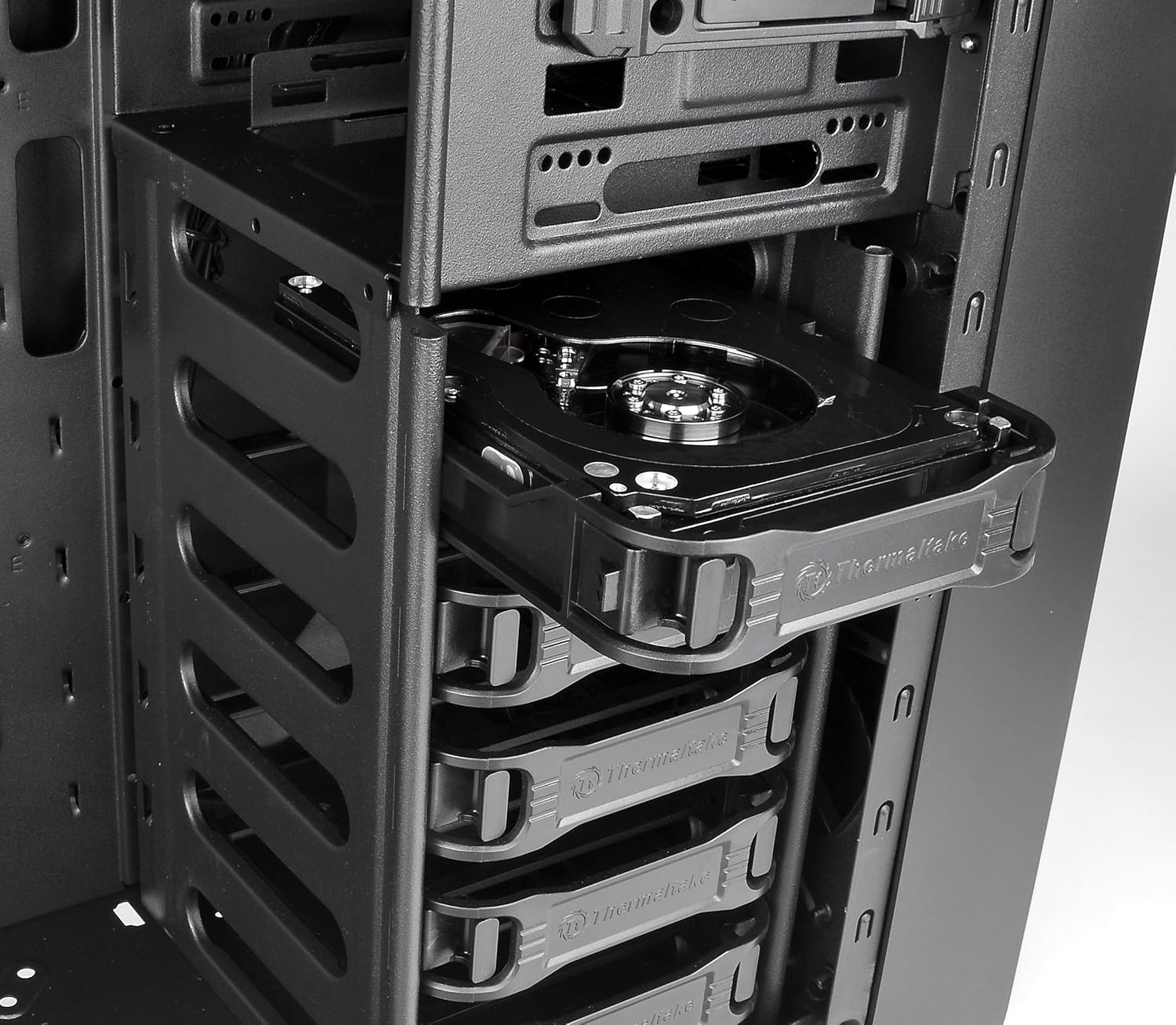
Figure 2.3: An optical drive being installed into one of the 5.25-inch external drive bays, demonstrating the tool-less design.
2.2.3 மின்சாரம் வழங்கல் நிறுவல்
Install your power supply unit (PSU) at the bottom rear of the case. Ensure proper orientation for airflow.
2.2.4 விரிவாக்க அட்டை நிறுவல்
The case features 8 expansion slots. Remove the necessary slot covers and install your graphics cards or other expansion cards, securing them with screws.
2.3 குளிரூட்டும் அமைப்பு
The URBAN S71 comes with preinstalled fans for optimized ventilation:
- 2 x 200mm speed control fans (front and top).
- 1 x 120mm turbo fan (rear).

படம் 2.4: View of the large 200mm fan mounted at the front of the case, providing intake airflow.

படம் 2.5: View of the 200mm fan mounted on the top panel, designed for exhaust airflow.
Additional fan mounting areas are available for customization.
2.4 கேபிள் மேலாண்மை
Utilize the cutouts and space behind the motherboard tray for efficient cable routing. This improves airflow and maintains a clean interior appearance.

படம் 2.6: பின்புறம் view of the case, illustrating the expansion slots, rear fan mount, and rubber grommets for external liquid cooling tubes, which also aid in cable management.
3. இயங்குகிறது
3.1 Front Panel I/O Ports
The top front panel provides convenient access to:
- 2 x USB 3.0 ports for high-speed data transfer.
- 2 x USB 2.0 ports for standard connectivity.
- HD microphone and headset jacks.
- Power and Reset buttons.
3.2 Top-Mounted HDD Docking Station
The case features a top-mounted 2.5" or 3.5" HDD Docking Station for quick and easy hot-swapping of drives.
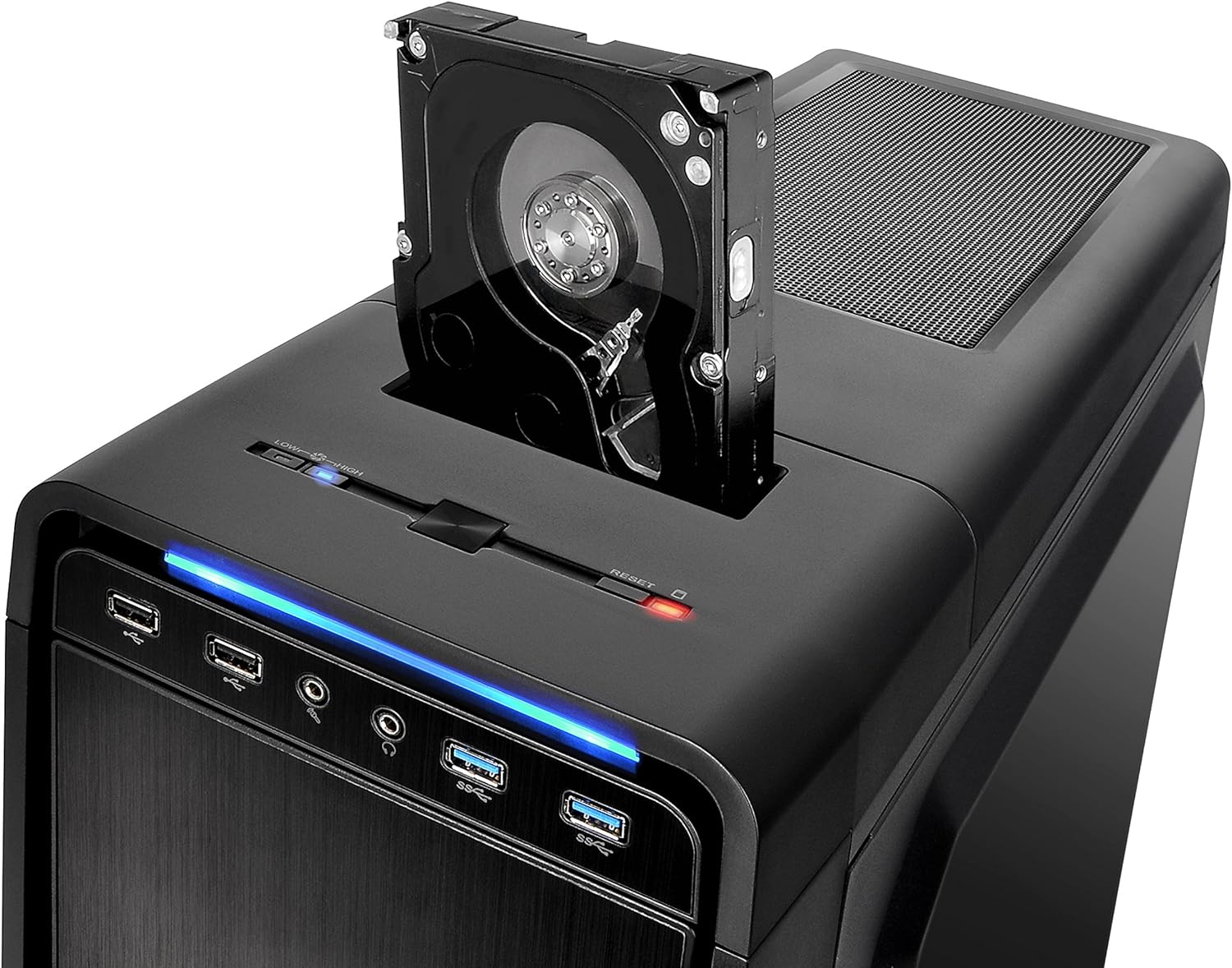
Figure 3.1: Close-up of the top-mounted HDD docking station, showing a hard drive inserted for quick access and data transfer.
- Ensure your system supports hot-swapping for optimal functionality.
- Gently insert a 2.5" or 3.5" SATA drive into the slot until it clicks into place.
- To remove, gently pull the drive upwards.
4. பராமரிப்பு
4.1 தூசி வடிகட்டி சுத்தம் செய்தல்
The URBAN S71 is equipped with removable dust filters to prevent dust buildup inside the case, which can affect component performance and longevity. Regular cleaning is recommended.

Figure 4.1: The removable dust filter located on the top panel, designed to prevent dust from entering the case through the top fan mounts.
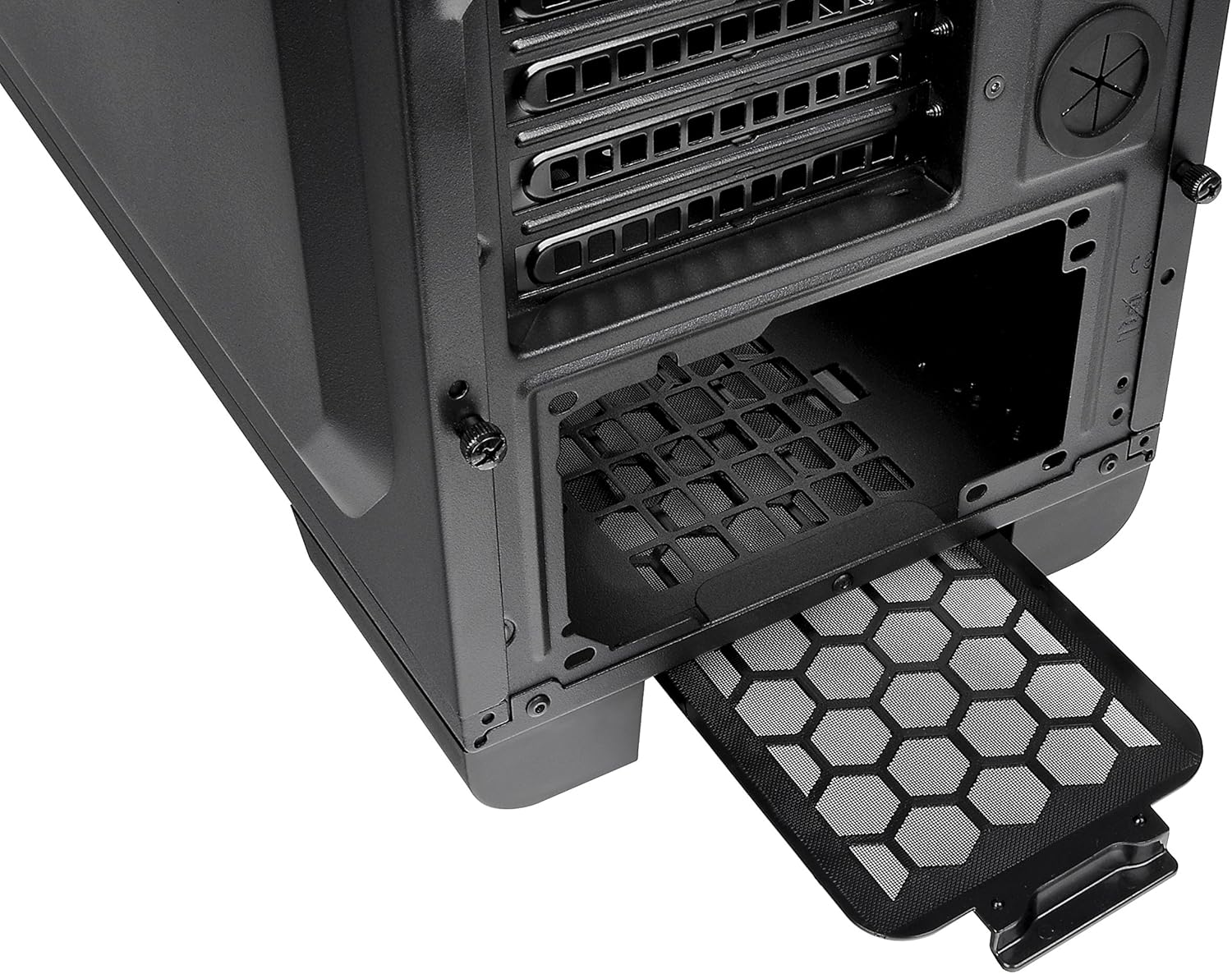
Figure 4.2: The removable dust filter located at the bottom of the case, protecting the power supply and optional bottom fan from dust.
- Gently slide out the dust filters from their respective slots (top and bottom).
- Clean the filters using compressed air or by rinsing them with water. Ensure they are completely dry before reinserting.
- Reinsert the filters into their slots.
4.2 பொது சுத்தம்
ஒரு மென்மையான, d துணியால் உறையின் வெளிப்புறத்தைத் துடைக்கவும்.amp துணி. பூச்சுக்கு சேதம் விளைவிக்கும் கடுமையான இரசாயனங்கள் அல்லது சிராய்ப்பு பொருட்களைப் பயன்படுத்துவதைத் தவிர்க்கவும்.
5. சரிசெய்தல்
5.1 மின் சிக்கல்கள்
- சக்தி இல்லை: Ensure the power supply is properly connected to the motherboard and all components. Check that the power button cable from the case is correctly connected to the motherboard's front panel header.
- சுழலாத ரசிகர்கள்: Verify that all fan cables are securely connected to the motherboard or fan controller.
5.2 USB போர்ட்கள் செயல்படவில்லை.
- Check that the USB 3.0 and USB 2.0 cables from the front panel are correctly connected to the corresponding headers on your motherboard.
5.3 HDD Docking Station Not Detected
- Ensure the SATA data and power cables for the docking station are securely connected to your motherboard and power supply.
- Verify that hot-swapping is enabled in your motherboard's BIOS/UEFI settings if you encounter detection issues.
6. விவரக்குறிப்புகள்
Below are the technical specifications for the Thermaltake URBAN S71 Window Full Tower Computer Case (VP500M1W2N).
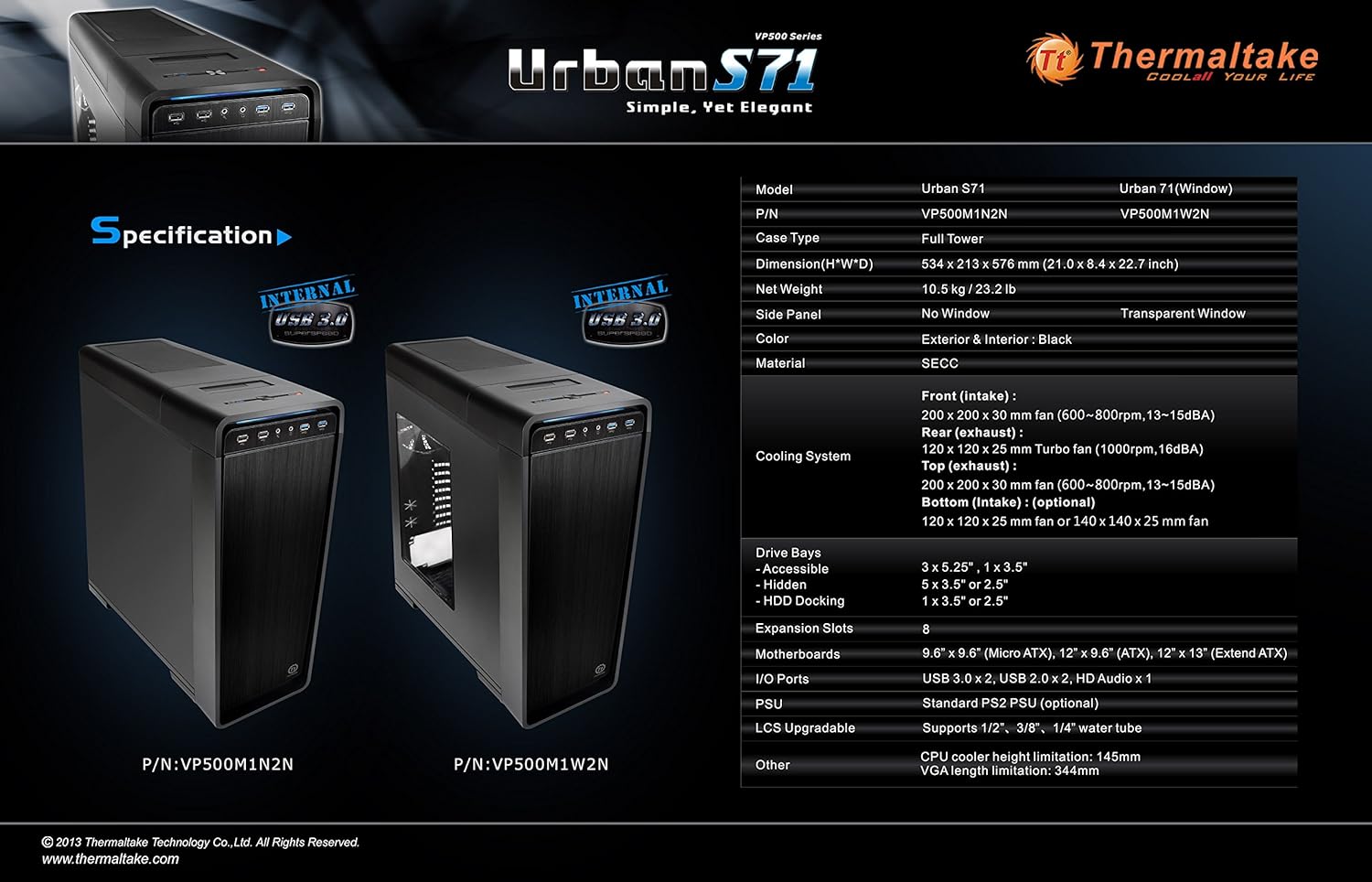
Figure 6.1: Official specification diagram for the Thermaltake URBAN S71, detailing dimensions, drive bays, cooling system, and I/O ports.
| அம்சம் | விவரக்குறிப்பு |
|---|---|
| பிராண்ட் | தெர்மால்டேக் |
| மாதிரி எண் | VP500M1W2N |
| வழக்கு வகை | முழு கோபுரம் |
| பரிமாணங்கள் (H x W x D) | 58.39 x 21.31 x 53.39 செமீ (22.99 x 8.39 x 21.02 அங்குலம்) |
| எடை | 10.5 கிலோ (23.15 பவுண்ட்) |
| பொருள் | எஸ்இசிசி |
| நிறம் | கருப்பு |
| மதர்போர்டு இணக்கத்தன்மை | நீட்டிக்கப்பட்ட ATX, ATX, மைக்ரோ ATX |
| External Drive Bays | 4 x 5.25" |
| உள் இயக்கி விரிகுடாக்கள் | 5 x 3.5" or 2.5" |
| HDD நறுக்குதல் நிலையம் | 1 x 3.5" or 2.5" (Top-mounted) |
| விரிவாக்க இடங்கள் | 8 |
| முன்னணி I / O துறைமுகங்கள் | 2 x USB 3.0, 2 x USB 2.0, HD Audio (Mic & Headset) |
| Preinstalled Fans | Front: 1 x 200mm (speed control) Top: 1 x 200mm (speed control) Rear: 1 x 120mm (turbo fan) |
| குளிரூட்டும் முறை | Air, Water (supports liquid cooling solutions) |
| CPU கூலர் உயர வரம்பு | 145மிமீ |
| VGA நீள வரம்பு | 344மிமீ |
7. உத்தரவாதம் மற்றும் ஆதரவு
7.1 உத்தரவாதத் தகவல்
Please refer to the warranty card included with your product or visit the official Thermaltake webவிரிவான உத்தரவாத விதிமுறைகள் மற்றும் நிபந்தனைகளுக்கான தளம். உத்தரவாதக் கோரிக்கைகளுக்கு உங்கள் வாங்கியதற்கான ஆதாரத்தை வைத்திருங்கள்.
7.2 தொழில்நுட்ப ஆதரவு
For technical assistance, troubleshooting beyond this manual, or inquiries about replacement parts, please contact Thermaltake customer support. You can find contact information on the official Thermaltake webதளம்: www.thermaltake.com.


