1. அறிமுகம்
Thank you for choosing the TPC Ultrasonic Cleaner UC400. This manual provides essential information for the safe and efficient operation, maintenance, and troubleshooting of your ultrasonic cleaner. Please read this manual thoroughly before operating the device and keep it for future reference. The UC400 is designed for professional cleaning applications, utilizing high-frequency sound waves to create cavitation bubbles that gently yet effectively clean various items.
2. பாதுகாப்பு தகவல்
அலகுக்கு காயம் அல்லது சேதம் ஏற்படாமல் தடுக்க பின்வரும் பாதுகாப்பு முன்னெச்சரிக்கை நடவடிக்கைகளை எப்போதும் பின்பற்றவும்.
- Do not operate the unit without liquid in the tank. Dry running can damage the transducer.
- Ensure the unit is placed on a stable, level surface away from heat sources and direct sunlight.
- Do not immerse the main unit in water or other liquids. Only the tank is designed for liquid.
- Always unplug the unit before cleaning, filling, or emptying the tank.
- Use only cleaning solutions recommended for ultrasonic cleaners. Avoid flammable, corrosive, or abrasive solutions.
- குழந்தைகளுக்கு எட்டாத இடத்தில் வைக்கவும்.
- Do not touch the tank or solution during operation, as it may become warm.
- If the unit shows signs of damage, do not operate it. Contact qualified service personnel.
3. தயாரிப்பு முடிந்துவிட்டதுview
The TPC Ultrasonic Cleaner UC400 features a durable stainless steel tank and cover, designed for efficient and thorough cleaning.
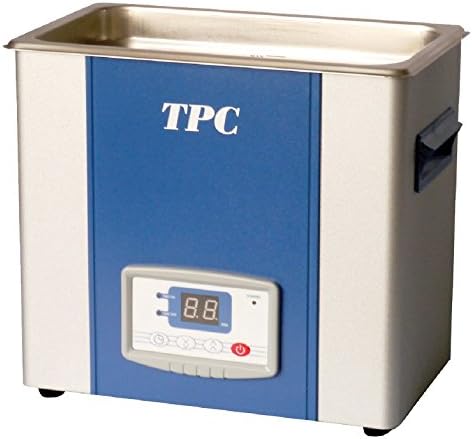
படம் 1: TPC Ultrasonic Cleaner UC400. This image shows the compact design of the ultrasonic cleaner, featuring a stainless steel tank at the top, a blue front panel with the "TPC" logo, and a digital control panel with a display and buttons at the bottom. Handles are visible on the sides.
கூறுகள்:
- துருப்பிடிக்காத எஃகு தொட்டி: Holds the cleaning solution and items to be cleaned.
- துருப்பிடிக்காத ஸ்டீல் கவர்: Reduces noise and prevents splashing during operation.
- கண்ட்ரோல் பேனல்: Features a digital display for time and temperature settings, along with control buttons.
- மின் கம்பி: அலகை ஒரு மின் நிலையத்துடன் இணைப்பதற்கு.
- வடிகால் அடைப்பான்: Located at the bottom for easy emptying of the tank.
4 அமைவு
- பேக்கிங்: Carefully remove the ultrasonic cleaner from its packaging. Inspect for any signs of damage. Retain packaging for future transport or storage.
- இடம்: Place the unit on a firm, level, and dry surface. Ensure there is adequate ventilation around the unit. Do not place it near heat sources or in direct sunlight.
- மின் இணைப்பு: Ensure the power switch is in the OFF position. Connect the power cord to a grounded electrical outlet with the correct voltage (விவரக்குறிப்புகளைப் பார்க்கவும்).
- தொட்டியை நிரப்புதல்: Open the cover and fill the stainless steel tank with the appropriate cleaning solution. Do not exceed the MAX fill line. Ensure the items to be cleaned are fully submerged but do not touch the bottom of the tank directly. Use a basket if provided.
5. இயக்க வழிமுறைகள்
- பவர் ஆன்: Plug in the unit and turn on the main power switch. The digital display will illuminate.
- சுத்தம் செய்யும் நேரத்தை அமைக்கவும்: Use the "Time" buttons on the control panel to set the desired cleaning duration. Typical cleaning cycles range from 5 to 15 minutes, depending on the items and level of contamination.
- Set Temperature (if applicable): If your model has a heating function, use the "Temp" buttons to set the desired solution temperature. Heating the solution can improve cleaning efficiency for certain applications. Allow time for the solution to reach the set temperature.
- சுத்தம் செய்யத் தொடங்குங்கள்: Press the "Start/Stop" button to begin the ultrasonic cleaning process. The unit will emit a high-frequency hum.
- செயல்பாட்டின் போது: Keep the cover closed during operation to minimize noise and prevent splashing. Do not touch the tank or solution.
- சுழற்சியின் முடிவு: The unit will automatically stop when the set time expires. You can also press the "Start/Stop" button to manually stop the process at any time.
- பொருட்களை அகற்று: Carefully open the cover. Use gloves or a basket to remove the cleaned items from the tank. Rinse items thoroughly with clean water if necessary and dry them.
- பவர் ஆஃப்: Turn off the main power switch and unplug the unit from the electrical outlet.
6. பராமரிப்பு
வழக்கமான பராமரிப்பு உங்கள் அல்ட்ராசோனிக் கிளீனரின் நீண்ட ஆயுளையும் உகந்த செயல்திறனையும் உறுதி செய்கிறது.
- தொட்டியை வடிகட்டுதல்: After each use or when the solution becomes visibly dirty, drain the tank using the drain valve.
- தொட்டியை சுத்தம் செய்தல்: Rinse the tank with clean water. For stubborn residues, use a soft cloth and a mild, non-abrasive cleaner. Do not use harsh chemicals or abrasive pads.
- வெளிப்புற சுத்தம்: யூனிட்டின் வெளிப்புறத்தை விளம்பரத்துடன் துடைக்கவும்amp cloth. Do not spray water directly onto the control panel or main unit.
- தீர்வு மாற்றீடு: Always use fresh cleaning solution for optimal results. Do not reuse heavily contaminated solutions.
- சேமிப்பு: When not in use, ensure the unit is clean, dry, and stored in a cool, dry place.
7. சரிசெய்தல்
| பிரச்சனை | சாத்தியமான காரணம் | தீர்வு |
|---|---|---|
| அலகு இயங்காது. | No power supply; power cord not connected; power switch off. | Check power outlet; ensure power cord is securely plugged in; turn on power switch. |
| No ultrasonic action (no hum). | Tank empty; unit not started; faulty transducer. | Fill tank with solution; press "Start" button; contact service if problem persists. |
| மோசமான சுத்தம் செய்தல் முடிவுகள். | Incorrect solution; insufficient cleaning time; overloaded tank; solution too cold. | Use appropriate cleaning solution; increase cleaning time; reduce load; allow solution to heat up. |
| அலகு அதிக வெப்பமடைகிறது. | Prolonged operation; insufficient ventilation. | Allow unit to cool down; ensure proper ventilation around the unit. |
8. விவரக்குறிப்புகள்
| அம்சம் | விவரம் |
|---|---|
| மாதிரி | UC400 |
| பிராண்ட் | TPC |
| பொருளின் எடை | 24 பவுண்டுகள் |
| பொருள் படிவம் | Stainless steel cover and tank with welded drain |
| தயாரிப்புக்கான குறிப்பிட்ட பயன்பாடுகள் | Sweep technology ensures exceptional cleaning efficiency |
| அலகு எண்ணிக்கை | 1.0 எண்ணிக்கை |
| பொருட்களின் எண்ணிக்கை | 1 |
9. உத்தரவாதம் மற்றும் ஆதரவு
For warranty information, technical support, or service inquiries, please contact your authorized TPC dealer or visit the official TPC website. Please have your model number (UC400) and purchase date available when contacting support.
குறிப்பு: Statements regarding dietary supplements have not been evaluated by the FDA and are not intended to diagnose, treat, cure, or prevent any disease or health condition. This product is intended for professional cleaning applications.


