1. அறிமுகம்
The Fortin EVO-Key is a universal immobilizer bypass module designed for automotive applications. It facilitates the integration of remote start or security systems by temporarily bypassing the vehicle's factory immobilizer system, allowing the engine to start without the physical presence of a transponder key. This manual provides essential information for the proper installation, operation, and maintenance of your EVO-Key module.
2. தயாரிப்பு முடிந்துவிட்டதுview
The EVO-Key module is a compact electronic device engineered to integrate seamlessly with various vehicle immobilizer systems. It comes preloaded, simplifying the initial setup process for compatible vehicles. Its primary function is to provide a secure and reliable method for remote starting vehicles equipped with transponder-based immobilizers.

படம் 2.1: மேல் view of the Fortin EVO-Key module, showing the Fortin logo and textured surface.

படம் 2.2: பின்புறம் view of the Fortin EVO-Key module, displaying the various wiring harness connectors for vehicle integration.
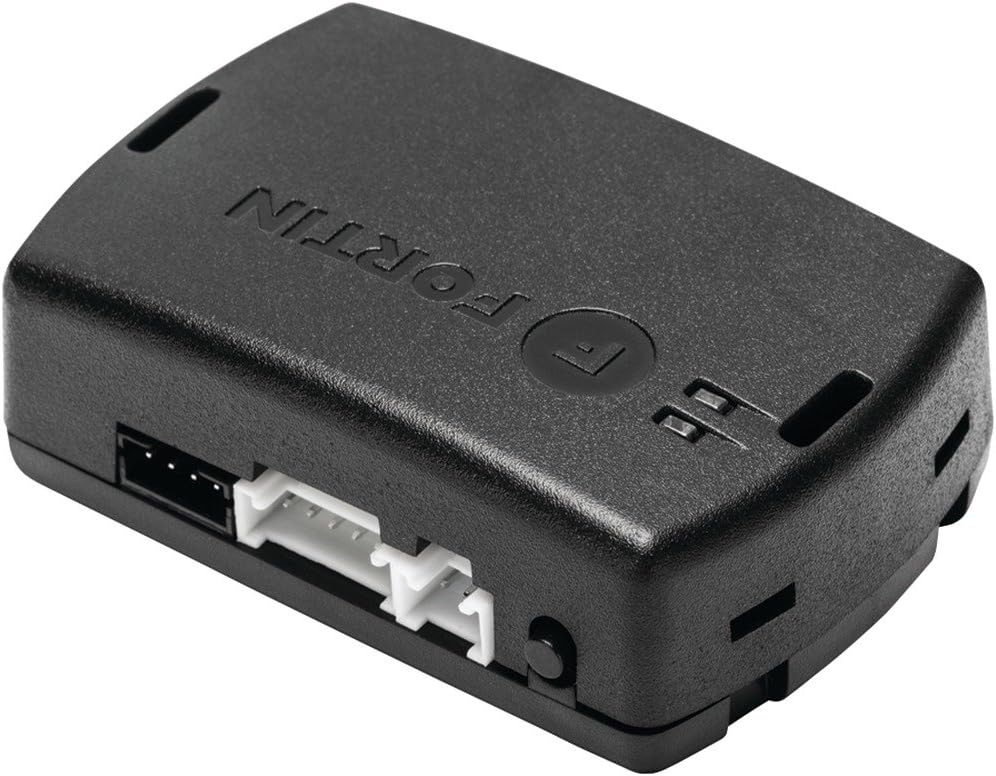
படம் 2.3: கோணல் view of the Fortin EVO-Key module, highlighting the side profile and connector ports.
3. அமைவு மற்றும் நிறுவல்
Installation of the Fortin EVO-Key module requires technical knowledge of automotive electrical systems and vehicle immobilizer protocols. It is strongly recommended that installation be performed by a certified professional installer.
3.1. வாகன இணக்கத்தன்மை
Before installation, verify the compatibility of the EVO-Key module with your specific vehicle make, model, and year. Refer to the official Fortin website for the most up-to-date compatibility list and detailed vehicle-specific wiring diagrams and programming instructions.
3.2. பொதுவான நிறுவல் படிகள் (தொழில்முறை நிறுவல் பரிந்துரைக்கப்படுகிறது)
- தயாரிப்பு: Disconnect the vehicle's battery before beginning any wiring.
- வயரிங்: Connect the EVO-Key module to the vehicle's electrical system and the remote start/security system according to the vehicle-specific wiring diagram provided by Fortin. Ensure all connections are secure and properly insulated.
- நிரலாக்கம்: Although the module is preloaded, vehicle-specific programming may still be required to synchronize it with your vehicle's immobilizer system. Follow the detailed programming instructions available on the Fortin website for your specific vehicle.
- சோதனை: After installation and programming, reconnect the battery and thoroughly test the remote start and immobilizer bypass functions to ensure correct operation.
4. இயக்க வழிமுறைகள்
Once properly installed and programmed, the Fortin EVO-Key module operates automatically in conjunction with your remote start or security system. It requires no direct user interaction for its primary function.
- When a remote start command is initiated by your remote start system, the EVO-Key module will temporarily bypass the vehicle's immobilizer.
- This allows the engine to start without the need for a physical key in the ignition.
- Upon engine shutdown or disarming of the remote start system, the immobilizer function is restored to its normal state.
5. பராமரிப்பு
The Fortin EVO-Key module is designed for long-term reliability and requires no routine user maintenance. To ensure optimal performance:
- அனைத்து வயரிங் இணைப்புகளும் பாதுகாப்பாகவும் அரிப்பிலிருந்து விடுபட்டதாகவும் இருப்பதை உறுதிசெய்யவும்.
- Keep the module free from excessive moisture, dust, and extreme temperatures.
- Avoid physical damage to the module or its wiring.
6. சரிசெய்தல்
If you experience issues with your Fortin EVO-Key module or the associated remote start/security system, consider the following troubleshooting steps:
- Vehicle Fails to Remote Start:
- அனைத்து வயரிங் இணைப்புகளும் சரியாகவும் பாதுகாப்பாகவும் உள்ளனவா என்பதைச் சரிபார்க்கவும்.
- Confirm the module was programmed correctly for your specific vehicle.
- Check the remote start system for any error codes or malfunctions.
- Immobilizer Warning Light:
- If the immobilizer warning light illuminates during remote start, it may indicate an issue with the bypass module's operation or programming.
- Re-verify programming steps or consult Fortin's technical support resources.
- பொதுவான செயலிழப்பு:
- Ensure the vehicle's battery is fully charged and in good condition.
- Consult the Fortin website for specific troubleshooting guides and firmware updates.
For complex issues, it is recommended to contact a professional automotive electronics technician or Fortin technical support.
7. விவரக்குறிப்புகள்
| அம்சம் | விவரம் |
|---|---|
| மாதிரி | EVO-கீ |
| பிராண்ட் | ஃபோர்டின் |
| பொருளின் எடை | 3.2 அவுன்ஸ் |
| தயாரிப்பு பரிமாணங்கள் | 4.8 x 3 x 1.5 அங்குலம் |
| உற்பத்தியாளர் | ஃபோர்டின் |
| இணக்கமான சாதனங்கள் | All Vehicles (check specific compatibility) |
| ரிமோட் கண்ட்ரோல் சேர்க்கப்பட்டுள்ளதா? | இல்லை |
| UPC | 770350002909 |
8. உத்தரவாதம் மற்றும் ஆதரவு
For detailed warranty information, technical support, and additional resources, please refer to the official Fortin website. Warranty terms and conditions may vary based on region and retailer.
- அதிகாரி Webதளம்: www.fortin.ca
- தொழில்நுட்ப ஆதரவு: Consult the support section on the Fortin webதொடர்புத் தகவல் மற்றும் அடிக்கடி கேட்கப்படும் கேள்விகளுக்கான தளம்.


