1. அறிமுகம்
Thank you for choosing the Avidsen 107104 Digital Multimeter. This compact, handheld device is designed for measuring various electrical parameters, including DC voltage, AC தொகுதிtage, DC current, and resistance. It features a 3.5-digit digital display for clear readings and double insulation for enhanced safety. Please read this manual thoroughly before use to ensure proper operation and to prevent potential hazards.
2. பாதுகாப்பு தகவல்
Always observe the following safety precautions when using the multimeter:
- இரட்டை காப்பு: The multimeter features double insulation for user protection. Do not attempt to bypass or modify this safety feature.
- அளவீட்டு வகைகள்: This device is rated CAT III 300V and CAT II 500V. Ensure that the measurement category and voltage rating are appropriate for the circuit being tested.
- சோதனை லீட்களை ஆய்வு செய்யுங்கள்: Before each use, inspect the test leads for any damage to the insulation or exposed metal. Do not use damaged leads.
- Do Not Exceed Maximum Input Values: Refer to the specifications section for maximum input values for each function. Exceeding these limits can damage the meter and pose a safety risk.
- உருகி பாதுகாப்பு: The multimeter is protected by fuses (500mA 500V Fastrapid and 10A 500V Fastrapid). If a fuse blows, replace it only with a fuse of the specified type and rating.
- பேட்டரி நிலை: Ensure batteries are adequately charged. A low battery indicator may affect measurement accuracy.
- சுற்றுச்சூழல் நிலைமைகள்: Operate the multimeter within the specified operating temperature range (0°C to +40°C).
- சரியான இணைப்பு: Always connect the common (COM) test lead first, then the live test lead. Disconnect the live test lead first, then the common test lead.
- ஈரமான நிலைமைகளைத் தவிர்க்கவும்: ஈரமான அல்லது d வெப்பநிலையில் மல்டிமீட்டரைப் பயன்படுத்த வேண்டாம்.amp சூழல்கள்.
3. தயாரிப்பு முடிந்துவிட்டதுview
The Avidsen 107104 Digital Multimeter features a clear digital display, a rotary function switch, and input jacks for test leads.

படம் 1: முன் view of the Avidsen 107104 Digital Multimeter, showing the display, rotary switch, and input terminals.
முக்கிய கூறுகள்:
- டிஜிட்டல் காட்சி: 3.5-digit LCD for displaying measurement values, with automatic polarity indication. Maximum display: 1999.
- ரோட்டரி செயல்பாட்டு சுவிட்ச்: Used to select the desired measurement function and range (e.g., DCV, ACV, DCA, Resistance, Diode, Continuity).
- உள்ளீட்டு ஜாக்ஸ்:
- COM (Common) Jack: For the black (negative) test lead.
- வாமா ஜாக்: For the red (positive) test lead when measuring voltage, resistance, or current up to 200mA.
- 10A ஜாக்: For the red (positive) test lead when measuring current up to 10A. Note: Maximum 10 seconds every 10 minutes for 10A measurements.
- சோதனை ஆய்வுகள்: Two insulated test probes (red and black) are included for making connections to the circuit under test.
4 அமைவு
4.1 பேட்டரி நிறுவல்
The Avidsen 107104 Multimeter operates on two 3V AAA batteries (included). To install or replace batteries:
- மல்டிமீட்டர் அணைக்கப்பட்டுள்ளதா என்பதை உறுதிப்படுத்தவும்.
- யூனிட்டின் பின்புறத்தில் பேட்டரி பெட்டியின் அட்டையைக் கண்டறியவும்.
- Use a screwdriver to remove the screw securing the battery compartment cover.
- அட்டையை கவனமாக அகற்றவும்.
- பெட்டியின் உள்ளே சுட்டிக்காட்டப்பட்டுள்ளபடி சரியான துருவமுனைப்பை (+ மற்றும் -) கவனித்து, இரண்டு 3V AAA பேட்டரிகளைச் செருகவும்.
- பேட்டரி பெட்டியின் அட்டையை மாற்றி, திருகு மூலம் பாதுகாக்கவும்.
Note: An accumulator level indicator is present to show battery status. Replace batteries when the indicator shows low power to maintain measurement accuracy.
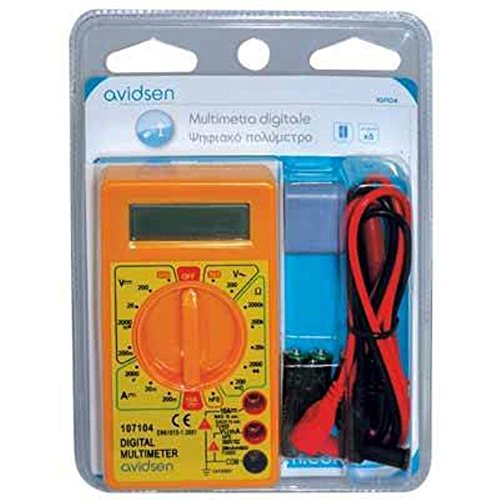
படம் 2: Avidsen 107104 Digital Multimeter shown in its retail packaging, which includes the multimeter, test leads, and batteries.
5. இயக்க வழிமுறைகள்
Before taking any measurements, ensure the test leads are securely plugged into the correct input jacks.
5.1 DC தொகுதியை அளவிடுதல்tagஇ (வி=)
- Insert the red test lead into the VΩmA jack and the black test lead into the COM jack.
- Set the rotary switch to the desired DCV range (e.g., 200m, 2000m, 20, 200, 500). If the voltage is unknown, start with the highest range and decrease as needed.
- அளவிடப்பட வேண்டிய கூறு அல்லது சுற்று முழுவதும் சோதனை ஆய்வுகளை இணைக்கவும்.
- தொகுதியைப் படியுங்கள்tagடிஜிட்டல் திரையில் e மதிப்பு.
5.2 அளவிடும் ஏசி தொகுதிtagஇ (V~)
- Insert the red test lead into the VΩmA jack and the black test lead into the COM jack.
- Set the rotary switch to the desired ACV range (e.g., 200, 500). If the voltage தெரியவில்லை, மிக உயர்ந்த வரம்பிலிருந்து தொடங்குங்கள்.
- Connect the test probes across the AC voltagமின் ஆதாரம்.
- தொகுதியைப் படியுங்கள்tagடிஜிட்டல் திரையில் e மதிப்பு.
5.3 Measuring DC Current (A=)
- 200mA வரையிலான மின்னோட்டங்களுக்கு: Insert the red test lead into the VΩmA jack and the black test lead into the COM jack.
- 10A வரையிலான மின்னோட்டங்களுக்கு: Insert the red test lead into the 10A jack and the black test lead into the COM jack. Caution: Do not measure more than 10 seconds every 10 minutes when using the 10A range.
- Set the rotary switch to the desired DCA range (e.g., 2000µ, 20m, 200m, 10A).
- Turn off the power to the circuit. Open the circuit where the current is to be measured.
- Connect the multimeter in series with the circuit.
- சுற்றுக்கு சக்தியை இயக்கவும்.
- டிஜிட்டல் காட்சியில் தற்போதைய மதிப்பைப் படிக்கவும்.
- Turn off the power, disconnect the multimeter, and restore the circuit.
5.4 அளவிடும் எதிர்ப்பு (Ω)
- Insert the red test lead into the VΩmA jack and the black test lead into the COM jack.
- Set the rotary switch to the desired Resistance range (e.g., 200, 2000, 20k, 200k, 2000k).
- Ensure the circuit or component to be measured is de-energized.
- கூறு முழுவதும் சோதனை ஆய்வுகளை இணைக்கவும்.
- டிஜிட்டல் டிஸ்ப்ளேவில் ரெசிஸ்டன்ஸ் மதிப்பைப் படிக்கவும்.
5.5 டையோடு சோதனை ( )
)
- Insert the red test lead into the VΩmA jack and the black test lead into the COM jack.
- Set the rotary switch to the Diode test position.
- சிவப்பு ஆய்வை அனோடுடனும், கருப்பு ஆய்வை டையோடின் கேத்தோடுடனும் இணைக்கவும். ஒரு முன்னோக்கிய தொகுதிtage drop (typically 0.5V to 0.8V for silicon diodes) will be displayed.
- Reverse the probes. The display should show "OL" (Open Loop) for a good diode.
5.6 தொடர்ச்சித் தேர்வு ()
- Insert the red test lead into the VΩmA jack and the black test lead into the COM jack.
- Set the rotary switch to the Continuity test position.
- Connect the test probes across the component or circuit.
- If the resistance is below a certain threshold (typically around 50Ω), the multimeter will emit an audible beep, indicating continuity. The display will also show the resistance value.
6. பராமரிப்பு
6.1 சுத்தம் செய்தல்
விளம்பரத்துடன் வழக்கைத் துடைக்கவும்amp துணி மற்றும் லேசான சோப்பு. சிராய்ப்பு பொருட்கள் அல்லது கரைப்பான்களைப் பயன்படுத்த வேண்டாம். பயன்படுத்துவதற்கு முன்பு மல்டிமீட்டர் முழுமையாக உலர்ந்திருப்பதை உறுதிசெய்யவும்.
6.2 பேட்டரி மாற்று
Refer to section 4.1 for battery replacement instructions. Replace batteries promptly when the low battery indicator appears to ensure accurate readings.
6.3 உருகி மாற்று
If the multimeter fails to measure current, the fuse may be blown. To replace a fuse:
- Ensure the multimeter is turned OFF and test leads are disconnected.
- Remove the battery compartment cover (refer to 4.1).
- Carefully locate the fuse(s) inside the compartment.
- ஊதப்பட்ட ஃபியூஸை மெதுவாக அகற்றவும்.
- Replace it only with a fuse of the exact specified type and rating:
- For VΩmA input: 500mA 500V Fastrapid (FØ 5 x 20 mm)
- For 10A input: 10A 500V Fastrapid (FØ 5 x 20 mm)
- பேட்டரி பெட்டியின் அட்டையை மாற்றி, அதைப் பாதுகாக்கவும்.
7. சரிசெய்தல்
| பிரச்சனை | சாத்தியமான காரணம் | தீர்வு |
|---|---|---|
| காட்சி இல்லை அல்லது மங்கலான காட்சி | இறந்த அல்லது குறைந்த பேட்டரிகள் | Replace batteries (see Section 4.1) |
| "OL" (ஓவர்லோட்) காட்டப்பட்டுள்ளது | Input value exceeds selected range or meter's maximum capacity | Select a higher range or ensure input is within meter's limits. |
| Incorrect or unstable readings | Low battery, poor test lead connection, incorrect range selection, external interference | Replace batteries, check connections, select appropriate range, move away from strong electromagnetic fields. |
| Cannot measure current | Blown fuse, incorrect test lead connection (e.g., using VΩmA jack for 10A measurement) | Check and replace fuse (see Section 6.3), ensure test lead is in the correct current jack (VΩmA or 10A). |
8. விவரக்குறிப்புகள்
- காட்சி: 3.5-digit LCD, Max. 1999, with automatic polarity indication.
- அளவீட்டு வீதம்: 2-3 updates per second.
- சக்தி ஆதாரம்: 2 x 3V AAA பேட்டரிகள் (சேர்க்கப்பட்டுள்ளது).
- உருகிகள்:
- 500mA 500V Fastrapid (for VΩmA input)
- 10A 500V Fastrapid (for 10A input)
- இரட்டை காப்பு: ஆம்.
- பாதுகாப்பு மதிப்பீடு: CAT III 300V, CAT II 500V.
- இயக்க வெப்பநிலை: 0°C முதல் +40°C வரை.
- சேமிப்பு வெப்பநிலை: -10°C முதல் +50°C வரை.
- பரிமாணங்கள்: 126 மிமீ x 70 மிமீ x 27 மிமீ.
- எடை: Approximately 210g (with batteries).
- செயல்பாடுகள்: டிசி தொகுதிtage, AC தொகுதிtage, DC Current, Resistance, Diode Test, Continuity Test.
9. உத்தரவாதம் மற்றும் ஆதரவு
Avidsen products are manufactured to high-quality standards. For warranty information or technical support, please refer to the warranty card included with your product or visit the official Avidsen webவாங்கியதற்கான சான்றாக உங்கள் கொள்முதல் ரசீதை வைத்திருங்கள்.


