அறிமுகம்
This manual provides comprehensive instructions for the installation, operation, maintenance, and troubleshooting of the ICP DAS X004 Self-Test Module (v2). Please read this manual thoroughly before using the device to ensure proper functionality and safety.
தயாரிப்பு முடிந்துவிட்டதுview
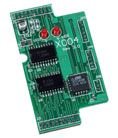
The ICP DAS X004 is a Self-Test Module, version 2, designed for industrial electrical applications, specifically within controls and indicators as an I/O module. It is a compact circuit board featuring integrated circuits and two prominent red indicator LEDs, suggesting its role in system diagnostics and status indication. Its design indicates it is intended for integration into larger systems, likely for verifying the operational integrity of connected components or the module itself.
முக்கிய அம்சங்கள் அடங்கும்:
- Compact circuit board design for easy integration.
- Integrated circuits for self-testing functionalities.
- Two red indicator LEDs for status feedback.
- Designed for industrial control and I/O applications.
அமைவு மற்றும் நிறுவல்
Follow these steps to properly set up and install your X004 Self-Test Module:
- தயாரிப்பு: Ensure all power to the host system or device where the X004 will be installed is disconnected. Gather any necessary tools, such as screwdrivers or anti-static wrist straps.
- மவுண்டிங்: Carefully align the X004 module with the designated slot or connector on your host system. Apply gentle, even pressure to seat the module firmly into place. Ensure all pins are correctly aligned to prevent damage.
- இணைப்புகள்: If applicable, connect any external wiring or cables to the module's terminals as per your system's wiring diagram. Double-check all connections for secure fit and correct polarity.
- பவர் ஆன்: Once the module is securely installed and all connections are verified, restore power to the host system. Observe the module's indicator LEDs for initial power-on status.
குறிப்பு: Always refer to your host system's documentation for specific compatibility and installation requirements.
இயக்க வழிமுறைகள்
The X004 Self-Test Module is designed to perform diagnostic checks on itself or connected components. Its operation is primarily indicated by the onboard LEDs.
- சக்தி காட்டி: Upon successful power-up, one of the red LEDs (typically labeled "PWR" or similar) should illuminate steadily, indicating the module is receiving power.
- Self-Test Status Indicator: The second red LED (typically labeled "STATUS" or "TEST") will provide feedback on the self-test process.
- சாலிட் ஆன்: Indicates a successful self-test or normal operational status.
- ஒளிரும்: May indicate a self-test in progress or a warning condition. Refer to the troubleshooting section for specific flash codes if applicable.
- முடக்கு: Could indicate a power issue, module failure, or that the self-test function is not active.
- Initiating Self-Test: The self-test sequence is typically initiated automatically upon power-up or can be triggered by a command from the host system, depending on the system's design. Consult your host system's manual for details on triggering the self-test.
பராமரிப்பு
The X004 Self-Test Module is designed for minimal maintenance. However, adhering to the following guidelines will help ensure its longevity and reliable operation:
- சுத்தம்: Disconnect power before cleaning. Use a soft, dry, lint-free cloth to gently wipe the module. Avoid using liquid cleaners, solvents, or abrasive materials, as these can damage the electronic components.
- சுற்றுச்சூழல் நிலைமைகள்: Ensure the module operates within its specified temperature and humidity ranges. Avoid exposure to excessive dust, moisture, or corrosive environments.
- ஆய்வு: Periodically inspect the module for any signs of physical damage, loose connections, or discoloration that might indicate overheating.
சரிசெய்தல்
If you encounter issues with your X004 Self-Test Module, refer to the following common problems and solutions:
| பிரச்சனை | சாத்தியமான காரணம் | தீர்வு |
|---|---|---|
| Module LEDs are OFF | No power supply; Module not seated correctly; Faulty module. | Check power connections to the host system. Ensure the module is fully seated in its slot. If issues persist, contact support. |
| Status LED is flashing continuously | Self-test in progress; Warning condition; Minor error. | Allow the self-test to complete. Consult host system documentation for specific flash codes. Verify system connections. |
| Module not recognized by host system | Improper installation; Driver issues; Compatibility problem. | Re-seat the module. Ensure correct drivers are installed on the host system if required. Verify compatibility with your host system. |
If the problem persists after attempting these solutions, please contact ICP DAS technical support.
விவரக்குறிப்புகள்
| பண்பு | மதிப்பு |
|---|---|
| மாதிரி எண் | X004 |
| விளக்கம் | Self-Test Module (v2) |
| உற்பத்தியாளர் | ICP DAS |
| பொருளின் எடை | 3 பவுண்டுகள் |
| ASIN | B014K1H3IG |
| முதல் தேதி கிடைக்கும் | ஆகஸ்ட் 14, 2014 |
உத்தரவாதம் மற்றும் ஆதரவு
For information regarding product warranty, technical support, or service, please contact ICP DAS directly. Details can typically be found on their official website or through the vendor from whom the product was purchased.
You can visit the official ICP DAS store on Amazon for more information: ICP DAS Store


