அறிமுகம்
This manual provides instructions for the HAVIT HV-KB366L RGB Backlit Mechanical Gaming Keyboard. This keyboard features blue mechanical switches, full anti-ghosting, and customizable RGB backlighting, designed for reliable performance.
அமைவு வழிமுறைகள்
விசைப்பலகை இணைக்கிறது
- உங்கள் கணினியில் கிடைக்கும் USB போர்ட்டைக் கண்டறியவும்.
- Connect the USB cable from the HAVIT HV-KB366L keyboard to the USB port on your computer.
- விசைப்பலகை ப்ளக்-அண்ட்-ப்ளே ஆகும், மேலும் உங்கள் இயக்க முறைமையால் தானாகவே அங்கீகரிக்கப்பட வேண்டும்.
கணினி இணக்கத்தன்மை
- Compatible with Windows 10 and other Windows operating systems.
- Mac OS supports 6-key rollover only.
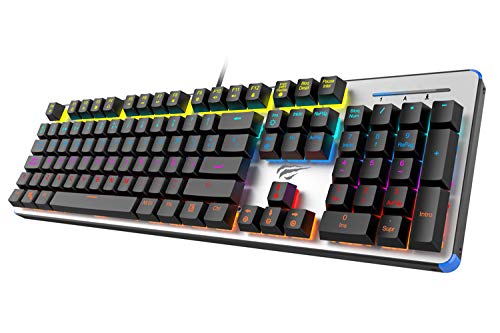
Figure 1: HAVIT HV-KB366L RGB Backlit Mechanical Gaming Keyboard. An overhead view விசைப்பலகை, காட்சிasing its full layout with RGB lighting on the keys and a white frame.
இயக்க வழிமுறைகள்
இயந்திர விசை சுவிட்சுகள்
The keyboard is equipped with blue mechanical switches, providing tactile feedback and an audible click with each keystroke. This design is intended for precise input during typing and gaming.
Anti-Ghosting Feature
The full key anti-ghosting mechanism ensures that all key presses are registered accurately, even when multiple keys are pressed simultaneously. This feature is beneficial for fast-paced gaming.
பின்னொளி சரிசெய்தல்
- To change the backlight color or mode, press the Fn ஒரே நேரத்தில் சாவி பின்னொளி key. Repeated presses will cycle through available modes and colors.
- Marquee Mode: In 7-color backlit mode (non-breathing), press the பின்னொளி key once to activate marquee mode. Press the பின்னொளி key again to deactivate marquee mode and return to 7-color backlit mode.
- ஒளிர்வு நிலைகள்: The backlight offers 4 levels of brightness adjustment.
- Breathing Rate: The breathing effect has 10 adjustable levels.
பராமரிப்பு
விசைப்பலகையை சுத்தம் செய்தல்
- சுத்தம் செய்வதற்கு முன் உங்கள் கணினியிலிருந்து விசைப்பலகையைத் துண்டிக்கவும்.
- விசைப்பலகையின் மேற்பரப்பைத் துடைக்க மென்மையான, உலர்ந்த துணியைப் பயன்படுத்தவும்.
- சாவிகளுக்கு இடையில் உள்ள தூசி மற்றும் குப்பைகளுக்கு, அழுத்தப்பட்ட காற்றைப் பயன்படுத்தவும்.
- கடுமையான இரசாயனங்கள் அல்லது சிராய்ப்புப் பொருட்களைப் பயன்படுத்துவதைத் தவிர்க்கவும், ஏனெனில் இவை பூச்சு அல்லது சாவி மூடிகளை சேதப்படுத்தும்.
ஆயுள்
The keyboard features an aluminum top housing with a sanded finish and a metal base, contributing to its overall durability and stable performance.
சரிசெய்தல்
விசைப்பலகை பதிலளிக்கவில்லை
- யூ.எஸ்.பி கேபிள் விசைப்பலகை மற்றும் கணினி இரண்டிலும் பாதுகாப்பாக இணைக்கப்பட்டுள்ளதா என்பதை உறுதிப்படுத்தவும்.
- உங்கள் கணினியில் வேறு USB போர்ட்டுடன் விசைப்பலகையை இணைக்க முயற்சிக்கவும்.
- Test the keyboard on another computer to determine if the issue is with the keyboard or the computer's USB port.
Backlight Not Working or Incorrect
- Verify that the keyboard is properly connected and receiving power.
- அழுத்தவும் Fn + Backlit key to cycle through backlight modes and ensure it is not turned off or set to a very low brightness.
- Refer to the "Backlight Adjustment" section for detailed instructions on changing modes and brightness.
விவரக்குறிப்புகள்
| பிராண்ட் | ஹவிட் |
| மாதிரி எண் | HV-KB366L |
| உற்பத்தியாளர் | ஹவிட் |
| தயாரிப்பு பரிமாணங்கள் | 50.5 x 17.6 x 6 சென்டிமீட்டர்கள் |
| பொருளின் எடை | 1.33 கிலோ |
| இணைப்பு தொழில்நுட்பம் | கம்பி (USB) |
| விசைப்பலகை விளக்கம் | கேமிங் மெக்கானிக்கல் விசைப்பலகை |
| சிறப்பு அம்சம் | RGB Backlit, Anti-Ghosting |
| வன்பொருள் இயங்குதளம் | லேப்டாப், பிசி |
| இயக்க முறைமை | Windows 10 (and compatible), Mac OS (6-key rollover) |
| தொகுதிtage | 5 வோல்ட் |
| உள்ளிட்ட கூறுகள் | USB கேபிள் |
உத்தரவாதம் & ஆதரவு
உத்தரவாத தகவல்
Specific warranty details for the HAVIT HV-KB366L keyboard are not provided in the product data. Please refer to the product packaging or contact HAVIT directly for warranty terms and conditions.
வாடிக்கையாளர் ஆதரவு
For technical assistance, troubleshooting, or further inquiries, please contact HAVIT customer support through their official webஉங்கள் வாங்குதலுடன் வழங்கப்பட்ட தளம் அல்லது தொடர்புத் தகவல்.


