1. தயாரிப்பு முடிந்துவிட்டதுview
The ZALMAN CNPS80G Rev.1 is a compact CPU cooler designed for efficient heat dissipation in various computer systems. It features an 85mm fan and an aluminum heatsink, providing cooling for both Intel and AMD processors. This manual provides detailed instructions for installation, operation, and maintenance.
- ரசிகர் அளவு: 85மிமீ
- மின்விசிறி வேகம்: 1000 - 2000 RPM (PWM கட்டுப்படுத்தப்பட்டது)
- விசிறி காற்றோட்டம்: 27.18 CFM
- சாக்கெட் இணக்கத்தன்மை:
- Intel: LGA115X / 775 / LGA1200
- AMD: AM4 / AM3+ / AM3
- பொருள்: Pure Aluminum heatsink

Figure 1: ZALMAN CNPS80G Rev.1 CPU Cooler. This image displays the cooler from a top-down perspective, highlighting its fan and aluminum fin structure.
2. தொகுப்பு உள்ளடக்கங்கள்
Before proceeding with installation, verify that all components are present in the package:
- ZALMAN CNPS80G Rev.1 CPU Cooler (with pre-attached fan)
- Intel Clip Support
- Intel Push-Pin Fasteners
- பயனர் கையேடு (இந்த ஆவணம்)
- Thermal Grease (ZM-STG2M)

Figure 2: Included components. This image shows the cooler, its packaging, Intel mounting hardware, thermal grease, and the instruction manual.
3. நிறுவல் வழிகாட்டி
This section details the installation process for the ZALMAN CNPS80G Rev.1 CPU Cooler. Ensure your system is powered off and disconnected from the power source before beginning installation.
3.1. Prepare the CPU and Motherboard
- Ensure your CPU is correctly seated in its socket on the motherboard.
- Clean the surface of the CPU and the cooler's base plate with isopropyl alcohol to remove any dust or old thermal paste.
- Apply a small amount of the provided thermal grease (ZM-STG2M) to the center of the CPU's integrated heat spreader (IHS). A pea-sized dot is generally sufficient. Do not spread the paste; the pressure from the cooler will distribute it evenly.
3.2. Mounting the Cooler (Intel Sockets: LGA115X / 775 / LGA1200)
- Attach the Intel Clip Support to the cooler's base if not already pre-installed.
- Align the four push-pins on the cooler's mounting bracket with the four mounting holes around the CPU socket on the motherboard.
- Press down firmly on each push-pin in a diagonal pattern (e.g., top-left, bottom-right, top-right, bottom-left) until you hear a click, indicating they are securely fastened.
- Gently tug on the cooler to ensure it is securely attached and does not wobble.
3.3. Mounting the Cooler (AMD Sockets: AM4 / AM3+ / AM3)
The ZALMAN CNPS80G Rev.1 utilizes a clip-based mounting system for AMD sockets. Ensure the motherboard's original AMD retention brackets are in place.
- Hook one side of the cooler's retention clip onto the corresponding tab of the AMD retention bracket on the motherboard.
- Apply gentle downward pressure on the opposite side of the cooler while pushing the lever down to secure the second clip onto the other tab of the AMD retention bracket.
- Ensure the cooler is firmly seated and does not move freely.

Figure 3: Socket Compatibility. This image illustrates the cooler and lists compatible Intel (LGA1200/115X/775) and AMD (AM4/AM3+/AM3) sockets.

Figure 4: Cooler with 4-pin fan connector. This image shows the cooler with its attached 4-pin PWM fan cable, ready for connection to the motherboard.
3.4. Connect the Fan Cable
Locate the "CPU_FAN" header on your motherboard. Connect the cooler's 4-pin fan cable to this header. Ensure the connector is oriented correctly.
4. ஆபரேஷன்
The ZALMAN CNPS80G Rev.1 CPU Cooler operates automatically once installed and connected. The 4-pin PWM (Pulse Width Modulation) fan adjusts its speed based on the CPU temperature, as controlled by your motherboard's BIOS/UEFI settings or operating system software.
- தானியங்கி வேகக் கட்டுப்பாடு: The fan speed will increase under higher CPU loads and decrease during idle periods to maintain optimal temperature and minimize noise.
- இரைச்சல் நிலை: The fan is designed for quiet operation, with a maximum noise level of 25.3 Decibels at full speed.

Figure 5: Optimized Cooling Solution. This image highlights the cooler's design for efficient heat dissipation and the benefits of its ultra-quiet 85mm PWM fan, which adjusts RPM based on CPU temperature for high performance and low noise.
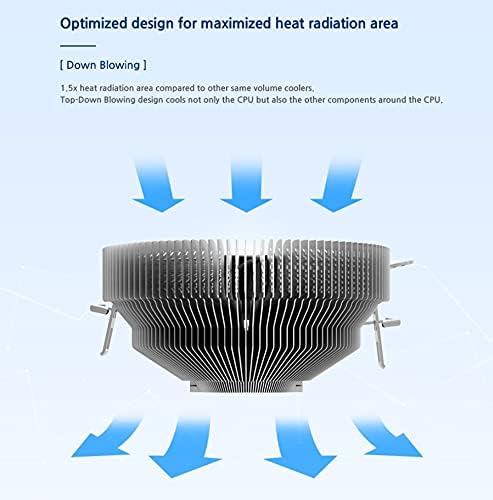
Figure 6: Optimized Heat Radiation. This diagram illustrates the down-blowing design of the cooler, which not only cools the CPU but also provides airflow to surrounding motherboard components, maximizing heat radiation area.
5. பராமரிப்பு
வழக்கமான பராமரிப்பு உங்கள் CPU குளிரூட்டியின் உகந்த செயல்திறன் மற்றும் நீண்ட ஆயுளை உறுதி செய்கிறது.
- தூசி அகற்றுதல்: Periodically inspect the heatsink fins and fan blades for dust accumulation. Use compressed air or a soft brush to gently remove dust. Ensure the fan is held stationary when using compressed air to prevent over-spinning and potential damage.
- வெப்ப பேஸ்டை மீண்டும் பயன்படுத்துதல்: ஏதேனும் காரணத்திற்காக நீங்கள் கூலரை அகற்றினால், CPU மற்றும் கூலரின் அடிப்பகுதி இரண்டிலிருந்தும் பழைய வெப்ப பேஸ்ட்டை சுத்தம் செய்து, மீண்டும் நிறுவுவதற்கு முன் புதிய வெப்ப பேஸ்டைப் பயன்படுத்த பரிந்துரைக்கப்படுகிறது.
6. சரிசெய்தல்
If you encounter issues with your ZALMAN CNPS80G Rev.1 CPU Cooler, refer to the following common problems and solutions:
- அதிக CPU வெப்பநிலைகள்:
- கூலர் பாதுகாப்பாக பொருத்தப்பட்டுள்ளதா என்பதையும், CPU உடன் சரியான தொடர்பை ஏற்படுத்துவதையும் உறுதிசெய்யவும்.
- வெப்ப பேஸ்ட் சரியாகவும் சமமாகவும் பயன்படுத்தப்பட்டுள்ளதா என்பதை சரிபார்க்கவும்.
- Check if the fan is spinning. If not, ensure the fan cable is properly connected to the "CPU_FAN" header.
- Clean any dust accumulation from the heatsink fins and fan blades.
- Confirm that your motherboard's BIOS/UEFI settings are configured to control the CPU fan speed based on temperature.
- மின்விசிறி சுழலவில்லை:
- Check the 4-pin fan cable connection to the "CPU_FAN" header on the motherboard.
- கணினி இயக்கப்பட்டிருப்பதை உறுதிசெய்யவும்.
- In some low-load scenarios, PWM fans may spin at very low RPM or temporarily stop if the CPU temperature is extremely low. Monitor CPU temperature to confirm.
- அதிக சத்தம்:
- மின்விசிறி கத்திகளில் குறுக்கிடக்கூடிய கேபிள்கள் அல்லது தடைகள் ஏதேனும் உள்ளதா எனச் சரிபார்க்கவும்.
- Ensure the fan is securely mounted and not vibrating against other components.
- Dust accumulation can cause imbalance and noise; clean the fan.
- Verify fan speed settings in BIOS/UEFI. If set to run at maximum speed constantly, it will be louder.
7. விவரக்குறிப்புகள்
| அம்சம் | விவரக்குறிப்பு |
|---|---|
| பிராண்ட் | சல்மான் |
| மாதிரி எண் | CNPS80G REV.1 |
| மின்விசிறி அளவு | 85மிமீ |
| மின்விசிறி வேகம் | 1000 - 2000 RPM (PWM) |
| காற்று ஓட்டம் திறன் | 27.18 CFM |
| இரைச்சல் நிலை | 25.3 டெசிபல்கள் |
| சாக்கெட் பொருந்தக்கூடிய தன்மை | Intel: LGA115X / 775 / LGA1200 AMD: AM4 / AM3+ / AM3 |
| குளிரூட்டும் முறை | காற்று |
| பொருள் | அலுமினியம் |
| பவர் இணைப்பான் வகை | 4-முள் |
| தொகுதிtage | 12 வோல்ட் |
| வாட்tage | 65 வாட்ஸ் |
| தயாரிப்பு பரிமாணங்கள் (LxWxH) | 4.02 x 4.84 x 2.4 அங்குலம் (102 x 123 x 61 மிமீ) |
| பொருளின் எடை | 0.009 அவுன்ஸ் |
| இணக்கமான சாதனங்கள் | டெஸ்க்டாப், சர்வர் |

Figure 7: Compact Size Diagram. This image provides dimensional specifications, showing the cooler's height of 50mm and overall dimensions, emphasizing its compact design for various system builds.
8. உத்தரவாதம் மற்றும் ஆதரவு
ZALMAN products are manufactured under strict quality control standards. For specific warranty terms and conditions, please refer to the warranty information provided with your purchase or visit the official ZALMAN webதளம்.
For technical support, troubleshooting assistance beyond this manual, or inquiries regarding product parts, please contact ZALMAN customer service through their official webதயாரிப்பு வாங்கிய தளம் அல்லது சில்லறை விற்பனையாளர்.
Official ZALMAN Webதளம்: www.zalman.com


