1. அறிமுகம்
The Triton 265709 Router Module is specifically designed for integration with the Triton Workcentre WX7. This module transforms your Workcentre into a fully functional router table, enabling precise woodworking operations such as shaping, planing, grooving, creating moldings, and notching. It is compatible with Triton router models TRA001, MOF001, and JOF001. Constructed from high-quality, durable materials, this module features extruded aluminum guides with micro-adjustments, rotating spacers, multi-position guards, and an efficient dust extraction nozzle. Quick-install horizontal and vertical featherboards are included for enhanced safety and control. Simple assembly and configuration ensure professional results for various woodworking tasks.
2. பாதுகாப்பு தகவல்
Always prioritize safety when operating power tools. Read and understand all instructions before use. Wear appropriate personal protective equipment (PPE), including eye protection, hearing protection, and a dust mask. Ensure the Workcentre and router module are stable and securely assembled. Disconnect power before making adjustments or changing accessories. Keep hands clear of the router bit during operation. Maintain a clean and well-lit work area. Do not operate the tool in damp அல்லது ஈரமான நிலைமைகள்.
3. தொகுப்பு உள்ளடக்கங்கள்
- 1 x Triton 265709 Router Module
- சட்டசபை வன்பொருள்
- Horizontal featherboards (2)
- Vertical featherboards (2)
- தூசி பிரித்தெடுக்கும் முனை
4 அமைவு
4.1 பேக்கிங் மற்றும் ஆய்வு
Carefully remove all components from the packaging. Inspect for any damage that may have occurred during transit. Report any damaged or missing parts to your supplier immediately.
4.2 Assembly of the Router Module
Follow the detailed assembly instructions provided with your Workcentre WX7 for integrating the 265709 Router Module. Ensure all fasteners are tightened securely. The module is designed for simple and straightforward assembly.

Figure 1: Assembled Triton 265709 Router Module, ready for installation into a Workcentre.
4.3 திசைவி நிறுவல்
The module is compatible with Triton routers TRA001, MOF001, and JOF001. Mount your chosen router to the underside of the module plate according to your router's specific instructions. Ensure the router bit is centered and securely fastened.

படம் 2: மேலிருந்து கீழ் view of the router module, showing the main guide, side guides, and featherboards.
4.4 Installing Featherboards
Attach the horizontal and vertical featherboards to the module as needed for your specific operation. These provide downward and inward pressure to keep the workpiece firmly against the table and fence, improving cut quality and safety.

Figure 3: Close-up of a featherboard, designed for quick installation and adjustment.
5. இயக்க வழிமுறைகள்
5.1 பொது செயல்பாடு
Once the router module is installed in your Workcentre WX7 and your router is mounted, you can begin various woodworking tasks. The module provides a stable platform for precise routing operations.

Figure 4: The Triton Router Module seamlessly integrated into a Workcentre WX7, providing a stable routing platform.
5.2 Adjusting Guides and Featherboards
The extruded aluminum guides feature micro-adjustments for precise positioning relative to the router bit. Use the rotating spacers to fine-tune the fence opening. Adjust the multi-position guards and featherboards to safely secure your workpiece during routing. Ensure all adjustments are locked before operation.

படம் 5: முன் view highlighting the adjustable fence, micro-adjustments, and multi-position guards.
5.3 தூசி பிரித்தெடுத்தல்
Connect a dust extraction system to the integrated dust extraction nozzle. This helps maintain a clear view of your work, reduces airborne dust, and keeps your workspace clean.

படம் 6: பக்கம் view of the router module, illustrating the dust extraction port for connection to a vacuum system.
5.4 Performing Routing Operations
Feed the workpiece smoothly and consistently against the fence and table. Always feed against the rotation of the router bit. For best results and safety, take multiple shallow passes rather than one deep pass, especially with harder materials or larger bits.

Figure 7: A user demonstrating a routing operation, pushing the workpiece against the fence and featherboards.
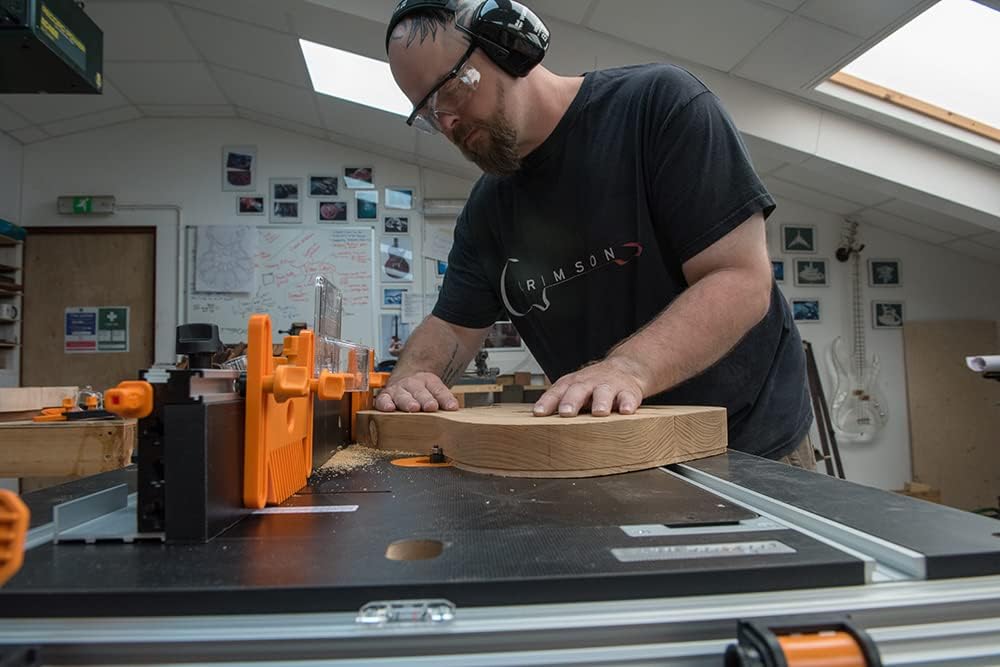
படம் 8: நெருக்கமான காட்சி view of a workpiece being routed, showing the dust and the precision of the cut.

Figure 9: A user routing a curved workpiece, demonstrating the versatility of the module for different shapes.
6. பராமரிப்பு
6.1 சுத்தம் செய்தல்
After each use, disconnect the power and clean the router module thoroughly. Remove all sawdust and debris from the table surface, guides, and dust extraction port. Use a soft brush or compressed air. Avoid using solvents that may damage plastic components.
6.2 ஆய்வு
Regularly inspect all fasteners to ensure they are tight. Check the condition of the featherboards and guards for wear or damage. Replace any worn or damaged parts immediately to maintain safe and effective operation.
7. சரிசெய்தல்
- Poor Cut Quality: Ensure router bit is sharp and clean. Check router speed settings for the material being cut. Verify that the workpiece is held firmly against the fence and table.
- அதிகப்படியான தூசி: Confirm the dust extraction system is properly connected and functioning. Clear any blockages in the dust extraction nozzle.
- Workpiece Movement: Adjust featherboards and guards to apply adequate pressure. Ensure the fence is securely locked in place.
- Module Not Stable: Verify that the router module is correctly installed and secured within the Workcentre WX7. Check all assembly fasteners.
8. விவரக்குறிப்புகள்
| அம்சம் | விவரக்குறிப்பு |
|---|---|
| உற்பத்தியாளர் | டிரைடன் |
| மாதிரி எண் | 265709 |
| தயாரிப்பு பரிமாணங்கள் (L x W x H) | 75 x 42 x 10 செ.மீ |
| எடை | 9.8 கிலோகிராம் |
| பொருள் | அலுமினியம் |
| நிறம் | பல வண்ணம் |
| இணக்கமான ரவுட்டர்கள் | Triton TRA001, MOF001, JOF001 |
| இணக்கத்தன்மை | Triton Workcentre WX7 |
| உள்ளிட்ட கூறுகள் | 1 Router Module |
9. உத்தரவாதம் மற்றும் ஆதரவு
For warranty information, please refer to the documentation provided with your original purchase or visit the official Triton Tools website. For technical support, spare parts, or service inquiries, please contact Triton Tools customer service directly. Keep your purchase receipt as proof of purchase.


