1. அறிமுகம்
The Muse M-192 CR is a versatile clock radio designed to provide reliable timekeeping, alarm functions, and FM radio reception. It features a large, easy-to-read digital display, dual alarms, and convenient functions such as snooze, sleep, and NAP. This manual provides detailed instructions for the proper setup, operation, and maintenance of your device.
2. பாதுகாப்பு வழிமுறைகள்
- சாதனத்தை இயக்குவதற்கு முன் அனைத்து வழிமுறைகளையும் கவனமாகப் படிக்கவும்.
- சாதனத்தை தண்ணீர் அல்லது ஈரப்பதத்திலிருந்து விலக்கி வைக்கவும்.
- காற்றோட்ட திறப்புகளைத் தடுக்க வேண்டாம். சரியான காற்றோட்டத்திற்கு அலகு சுற்றி போதுமான இடத்தை உறுதி செய்யவும்.
- Use only the AC adapter supplied with the unit.
- தீவிர வெப்பநிலை, நேரடி சூரிய ஒளி அல்லது அதிக ஈரப்பதம் ஆகியவற்றிற்கு சாதனத்தை வெளிப்படுத்துவதைத் தவிர்க்கவும்.
- யூனிட்டை பிரிக்கவோ அல்லது மாற்றவோ முயற்சிக்காதீர்கள். அனைத்து சேவைகளையும் தகுதிவாய்ந்த பணியாளர்களிடம் பரிந்துரைக்கவும்.
3. தொகுப்பு உள்ளடக்கங்கள்
பின்வரும் பொருட்களுக்கு தொகுப்பைச் சரிபார்க்கவும்:
- 1 x Muse M-192 CR Clock Radio
- 1 x ஏசி அடாப்டர்
- 1 x வழிமுறை கையேடு (இந்த ஆவணம்)
4. தயாரிப்பு முடிந்துவிட்டதுview
Familiarize yourself with the various parts and controls of your Muse M-192 CR Clock Radio.

படம் 1: முன் கோணம் view of the Muse M-192 CR Clock Radio, showcasing its large digital display and control buttons.
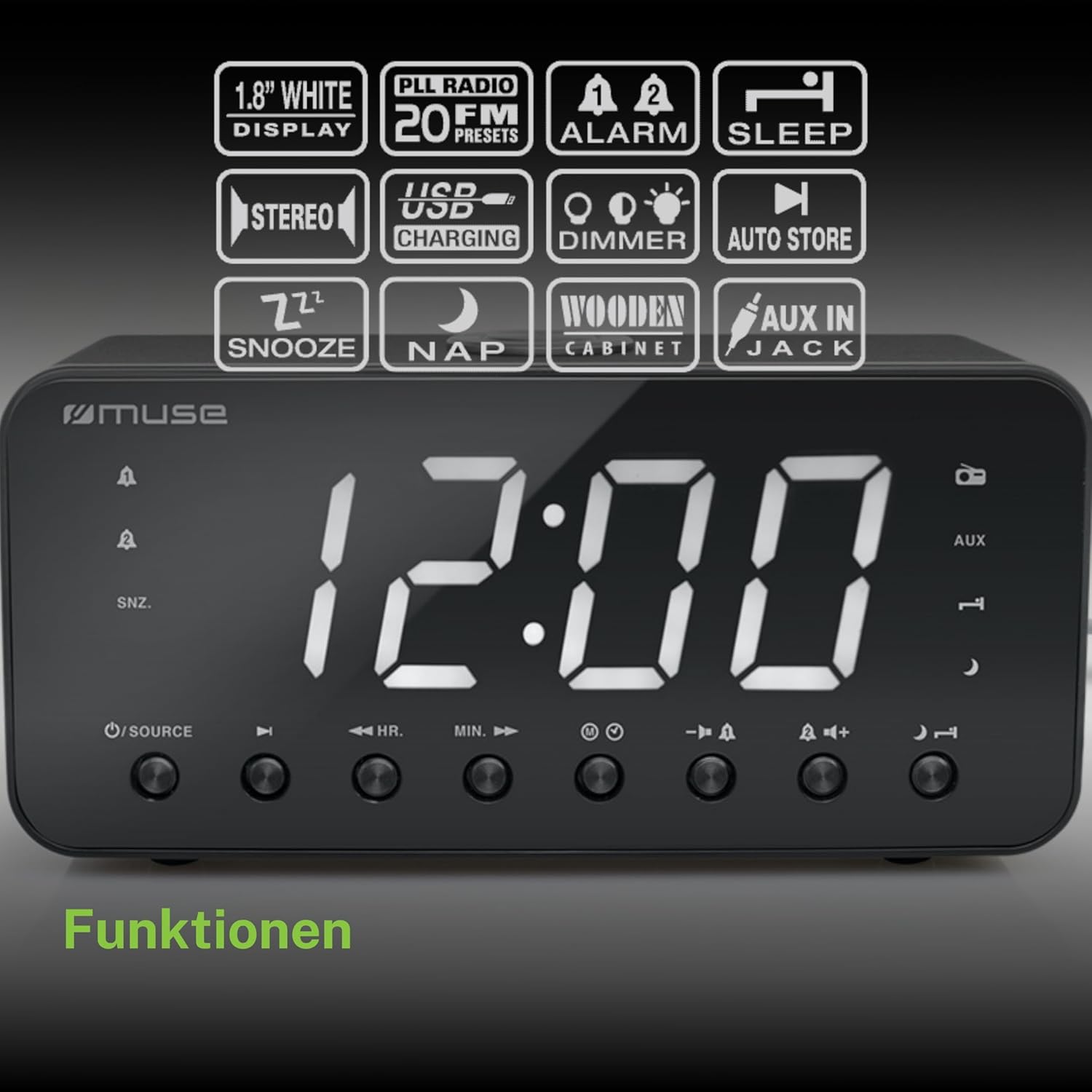
Figure 2: Diagram illustrating the key features and control buttons on the Muse M-192 CR Clock Radio, including the 1.8-inch white display, PLL FM radio with 20 presets, dual alarms, sleep, snooze, NAP functions, USB charging, dimmer, auto store, and AUX input jack.
முன் பேனல் கட்டுப்பாடுகள்:
- காட்சி: Large 1.8-inch white LED display for time and status.
- மூல பொத்தான்: Selects between FM radio and AUX input.
- HR (மணிநேரம்) பொத்தான்: Adjusts hour for time and alarm settings.
- நிமிடம் (நிமிடம்) பொத்தான்: Adjusts minute for time and alarm settings.
- ALARM 1 Button: Sets and activates/deactivates Alarm 1.
- ALARM 2 Button: Sets and activates/deactivates Alarm 2.
- SNOOZE/DIMMER Button: Activates snooze during an alarm; adjusts display brightness (High/Low/Off) when not alarming.
- ஸ்லீப் பட்டன்: Sets the sleep timer for radio playback.
- NAP Button: Sets a short nap alarm.
- தொகுதி மேல் / கீழ் பொத்தான்கள்: ஆடியோ ஒலியளவைச் சரிசெய்கிறது.
பின்புற பேனல் இணைப்புகள்:
- ஆக்ஸ் இன் ஜாக்: வெளிப்புற ஆடியோ சாதனங்களை இணைக்கிறது.
- யூ.எஸ்.பி சார்ஜிங் போர்ட்: Provides power to charge compatible devices.
- DC IN ஜாக்: மின்சாரத்திற்காக AC அடாப்டரை இணைக்கிறது.
- பேட்டரி பெட்டி: Holds backup batteries.
5 அமைவு
5.1 மின் இணைப்பு
- Insert the small plug of the supplied AC adapter into the DC IN jack on the rear of the clock radio.
- Plug the AC adapter into a standard wall outlet. The display will light up.
5.2 பேட்டரி காப்புப்பிரதி நிறுவல்
The clock radio requires 2 x 1.5V AAA batteries (not included) for backup power. These batteries maintain the time and alarm settings during a power outage.
- யூனிட்டின் அடிப்பகுதியில் உள்ள பேட்டரி பெட்டியின் அட்டையைத் திறக்கவும்.
- பெட்டியின் உள்ளே சுட்டிக்காட்டப்பட்டுள்ளபடி சரியான துருவமுனைப்பை (+ மற்றும் -) கவனித்து, இரண்டு AAA பேட்டரிகளைச் செருகவும்.
- பேட்டரி பெட்டியின் அட்டையை பாதுகாப்பாக மூடு.
Note: Battery backup only preserves settings; the display will not illuminate and alarms will not sound during a power outage if only running on battery backup.
6. இயக்க வழிமுறைகள்
6.1 நேரத்தை அமைத்தல்
- In standby mode (when the radio is off), press and hold the நேரம் அமை button (if available, otherwise use HR/MIN directly or a dedicated time set button not explicitly listed but implied by HR/MIN). If no dedicated button, proceed to step 2.
- அழுத்தவும் HR மணிநேரத்தை சரிசெய்ய பொத்தான்.
- அழுத்தவும் MIN நிமிடத்தை சரிசெய்ய பொத்தான்.
- Release the buttons to confirm the time. The time will automatically set after a few seconds of inactivity.
6.2 அலாரங்களை அமைத்தல் (அலாரம் 1 & அலாரம் 2)
The Muse M-192 CR features two independent alarms.
- அழுத்திப் பிடிக்கவும் அலாரம் 1 காட்சியில் அலாரம் நேரம் ஒளிரும் வரை பொத்தான்.
- பயன்படுத்தவும் HR மற்றும் MIN விரும்பிய அலாரம் நேரத்தை அமைக்க பொத்தான்கள்.
- அழுத்தவும் அலாரம் 1 எச்சரிக்கை மூலத்தைத் தேர்ந்தெடுக்க மீண்டும் பொத்தானை அழுத்தவும்: பஸர் or வானொலி.
- அழுத்தவும் அலாரம் 1 button a third time to confirm and activate Alarm 1. An alarm icon will appear on the display.
- செயல்முறையை மீண்டும் செய்யவும் அலாரம் 2 பயன்படுத்தி அலாரம் 2 பொத்தான்.
அலாரத்தை செயலிழக்கச் செய்ய, தொடர்புடையதை அழுத்தவும் அலாரம் button until its icon disappears from the display.
6.3 உறக்கநிலை செயல்பாடு
அலாரம் ஒலிக்கும்போது, அழுத்தவும் SNOOZE / DIMMER button to temporarily silence the alarm. The alarm will sound again after approximately 9 minutes.
6.4 தூக்க செயல்பாடு
தூக்க செயல்பாடு உங்களை தூங்க அனுமதிக்கும் வானொலியைக் கேட்டு, ஒரு குறிப்பிட்ட காலத்திற்குப் பிறகு தானாகவே அணைக்கப்படும்.
- வானொலி ஒலித்துக் கொண்டிருக்கும்போது, தூங்கு கிடைக்கக்கூடிய தூக்க நேரங்களை (எ.கா., 90, 60, 30, 15 நிமிடங்கள் அல்லது ஆஃப்) சுழற்சி செய்ய பொத்தானை மீண்டும் மீண்டும் அழுத்தவும்.
- தேர்ந்தெடுக்கப்பட்ட காலத்திற்கு ரேடியோ இயங்கும், பின்னர் தானாகவே அணைக்கப்படும்.
6.5 NAP Function
The NAP function sets a short alarm for a specified duration.
- அழுத்தவும் NAP button repeatedly to select a nap duration (e.g., 10, 20, 30, 60, 90, 120 minutes, or OFF).
- The alarm will sound after the selected duration.
6.6 Radio Operation (FM)
- அழுத்தவும் ஆதாரம் FM ரேடியோ பயன்முறையைத் தேர்ந்தெடுக்க பொத்தான்.
- அழுத்திப் பிடிக்கவும் HR or MIN button to automatically scan for the next available station. Briefly press to manually tune.
- ஐப் பயன்படுத்தி அளவை சரிசெய்யவும் வால்யூம் அதிக/கீழ் பொத்தான்கள்.
ரேடியோ முன்னமைவுகளை அமைத்தல்:
The unit supports up to 20 FM radio presets.
- Tune to your desired FM station.
- அழுத்திப் பிடிக்கவும் முன்னமைவு button (often combined with a number or memory button, if not explicitly labeled, refer to the full manual for specific button). If no dedicated PRESET button, the HR/MIN buttons might serve this function in radio mode.
- பயன்படுத்தவும் HR or MIN முன்னமைக்கப்பட்ட எண்ணைத் தேர்ந்தெடுக்க பொத்தான்கள் (P01-P20).
- அழுத்தவும் முன்னமைவு நிலையத்தைச் சேமிக்க மீண்டும் பொத்தானை அழுத்தவும்.
- முன்னமைவை நினைவுபடுத்த, சுருக்கமாக அழுத்தவும் முன்னமைவு பொத்தானை பின்னர் பயன்படுத்தவும் HR or MIN விரும்பிய முன்னமைக்கப்பட்ட எண்ணைத் தேர்ந்தெடுக்க.
6.7 AUX உள்ளீடு
Connect an external audio device (e.g., MP3 player, smartphone) to the AUX IN jack on the rear of the unit using a 3.5mm audio cable (not included).
- Connect one end of the audio cable to your external device's headphone jack.
- Connect the other end to the AUX IN jack on the clock radio.
- அழுத்தவும் ஆதாரம் button to select AUX mode. The display will show "AUX".
- Play audio from your external device. Adjust volume using the clock radio's வால்யூம் அதிக/கீழ் buttons and your external device's volume control.
6.8 USB சார்ஜிங்
The USB port on the rear of the unit can be used to charge compatible devices.

Figure 3: The Muse M-192 CR Clock Radio highlighting its jumbo white display and the USB charging port located on the rear of the unit.
- Connect your device's USB charging cable to the USB charging port on the clock radio.
- கடிகார ரேடியோ இயக்கப்பட்டிருப்பதை உறுதிசெய்யவும்.
- உங்கள் சாதனம் சார்ஜ் செய்யத் தொடங்க வேண்டும்.
Note: The USB port is for charging only and does not support data transfer or audio playback.
6.9 டிஸ்ப்ளே டிம்மர்
Adjust the brightness of the display to suit your preference.
- காத்திருப்பு பயன்முறையில், அழுத்தவும் SNOOZE / DIMMER மீண்டும் மீண்டும் பொத்தான்.
- Cycle through the brightness levels: High, Low, and Off.
7. பராமரிப்பு
- சுத்தம்: மென்மையான, உலர்ந்த துணியால் யூனிட்டைத் துடைக்கவும். சிராய்ப்பு கிளீனர்கள், மெழுகுகள் அல்லது கரைப்பான்களைப் பயன்படுத்த வேண்டாம்.
- காற்றோட்டம்: காற்றோட்ட திறப்புகளை தூசி மற்றும் குப்பைகள் இல்லாமல் சுத்தமாக வைத்திருங்கள்.
- சேமிப்பு: If storing the unit for an extended period, disconnect it from the power outlet and remove the backup batteries.
8. சரிசெய்தல்
| பிரச்சனை | சாத்தியமான காரணம் | தீர்வு |
|---|---|---|
| மின்சாரம் இல்லை / காட்சி முடக்கம் | AC அடாப்டர் இணைக்கப்படவில்லை அல்லது பழுதடைந்துள்ளது. | AC அடாப்டர் யூனிட்டிலும் வேலை செய்யும் சுவர் அவுட்லெட்டிலும் பாதுகாப்பாக செருகப்பட்டுள்ளதா என்பதை உறுதிப்படுத்தவும். |
| அலாரம் ஒலிக்கவில்லை | அலாரம் இயக்கப்படவில்லை அல்லது தவறாக அமைக்கப்படவில்லை. | Verify alarm time and source are set correctly and the alarm icon is visible on the display. |
| மோசமான FM ரேடியோ வரவேற்பு | ஆண்டெனா நீட்டிக்கப்படவில்லை அல்லது குறுக்கீடு செய்யப்படவில்லை. | Extend the FM wire antenna fully. Reposition the unit to improve reception. |
| காட்சி மிகவும் பிரகாசமாக/மங்கலாக உள்ளது | டிம்மர் அமைப்பை சரிசெய்ய வேண்டும். | அழுத்தவும் SNOOZE / DIMMER பிரகாச நிலைகளை மாற்ற பொத்தானை அழுத்தவும். |
9. விவரக்குறிப்புகள்

Figure 4: Technical drawing illustrating the dimensions of the Muse M-192 CR Clock Radio (226mm length, 86mm width, 108mm height).
- மாதிரி: எம்-192 சிஆர்
- காட்சி: 1.8-inch White Digital LED
- வானொலி: FM PLL Radio with 20 Presets
- அலாரம் செயல்பாடுகள்: Dual Alarm, Snooze, Sleep, NAP
- அலாரம் ஆதாரம்: Radio or Buzzer
- இணைப்பு: AUX-in, USB Charging Port
- சக்தி: AC Power (Adapter Included), Battery Backup (2 x 1.5V AAA batteries, not included)
- வெளியீட்டு சக்தி: 2 வாட்ஸ்
- பரிமாணங்கள் (L x W x H): 22.6 x 8.6 x 10.8 செ.மீ
- எடை: 800 கிராம்
10. உத்தரவாதம் மற்றும் ஆதரவு
For detailed warranty information and technical support, please refer to the documentation provided with your purchase or contact your retailer. Keep your proof of purchase for any warranty claims.


