அறிமுகம்
The TechniSat TechniPlayer LP 300 is a professional DJ USB turntable designed for high-quality vinyl playback and digital conversion. This direct-drive turntable features a quartz-controlled motor, allowing for stable rotation and precise speed control. It includes advanced features such as needle illumination, adjustable tracking force, a balanced S-shaped tonearm, and an anti-skating function, catering to both professional DJs and home audio enthusiasts. Additionally, the integrated USB port enables easy digitization of your vinyl collection into MP3 files, with accompanying software provided. A switchable phono preamplifier ensures versatile connectivity to various audio systems, including phono or AUX-IN inputs.

படம் 1: The TechniSat TECHNIPLAYER LP 300 turntable with its dust cover open, showcasing தட்டு, டோன்ஆர்ம் மற்றும் கட்டுப்பாடுகள்.
அமைவு வழிமுறைகள்
1. அன்பேக்கிங் மற்றும் கூறு சரிபார்ப்பு
பேக்கேஜிங்கிலிருந்து அனைத்து கூறுகளையும் கவனமாக அகற்றவும். பின்வரும் பொருட்கள் இருப்பதை உறுதிசெய்யவும்:
- TECHNIPLAYER LP 300 Turntable Unit
- System holder with needle (cartridge)
- அலுமினிய தட்டு
- Felt platter mat
- Palet (record weight/stabilizer)
- எதிர் எடை
- USB கேபிள்
- மென்பொருள் குறுவட்டு
- பயனர் கையேடு
2. வேலை வாய்ப்பு
Place the turntable on a stable, level surface away from direct sunlight, heat sources, and strong vibrations. Ensure adequate ventilation around the unit.
3. சட்டசபை
- தட்டினை நிறுவவும்: Carefully place the aluminum platter onto the center spindle of the turntable.
- Place the Felt Mat: Lay the felt platter mat on top of the aluminum platter.
- Attach the Cartridge: Mount the system holder with the needle (cartridge) to the tonearm headshell. Ensure it is securely fastened.
- எதிர் எடையை நிறுவவும்: Slide the counterweight onto the rear of the tonearm. Adjust it later for proper tracking force.
- Place the Palet: The palet can be placed on the record during playback for added stability.

படம் 2: விரிவான view of the tonearm and cartridge assembly, crucial for proper record playback.
4. ஆடியோ சிஸ்டத்துடன் இணைத்தல்
The TechniPlayer LP 300 offers both phono and AUX-IN connectivity via its switchable preampஆயுள்.
- RCA ஆடியோ வெளியீடு (L/R): Connect the RCA cables from the turntable's audio output to your amplifier's PHONO input (if available) or AUX-IN input. Use the PHONO/LINE switch on the rear of the turntable to select the appropriate output level.
- என அமைக்கவும் ஃபோனோ if connecting to an amplifier with a dedicated PHONO input.
- என அமைக்கவும் வரி if connecting to an amplifier's AUX-IN or other line-level input.
- USB இணைப்பு: Connect the USB cable from the turntable to your computer for digitizing records.

படம் 3: The rear panel of the turntable, illustrating the RCA audio outputs and the USB port for connecting to an amplifier or computer.
5. மின் இணைப்பு
Connect the power cable to the turntable and then to a suitable wall outlet.
இயக்க வழிமுறைகள்
1. ஆன் / ஆஃப் செய்தல்
To power on the turntable, rotate the START/STOP knob clockwise. The platter will begin to rotate. To power off, rotate the knob counter-clockwise until it clicks.

படம் 4: The start/stop control and speed selection buttons (33/45 RPM) located on the turntable's top panel.
2. ஒரு பதிவை இயக்குதல்
- Place the Record: Place your vinyl record on the platter. If desired, use the palet for added stability.
- வேகத்தைத் தேர்ந்தெடுக்கவும்: அழுத்தவும் 33 or 45 button to select the appropriate playback speed for your record.
- Adjust Tracking Force: Refer to your cartridge's specifications for the recommended tracking force. Adjust the counterweight by rotating it until the tonearm is balanced and then set the desired tracking force using the numbered ring.
- Set Anti-Skating: Adjust the anti-skating dial to match the tracking force setting. This prevents the tonearm from drifting inwards or outwards.
- Lower the Tonearm: Use the cueing lever to gently lower the tonearm onto the record's lead-in groove.
- பிளேபேக்கைத் தொடங்கு: The record will begin playing.
- End Playback: At the end of the record, use the cueing lever to lift the tonearm and return it to its rest.
3. Using the Target Light
தி இலக்கு ஒளி provides illumination for the stylus, which is useful in low-light conditions for precise cueing. Press the button next to the target light to extend and illuminate it. Press again to retract it.
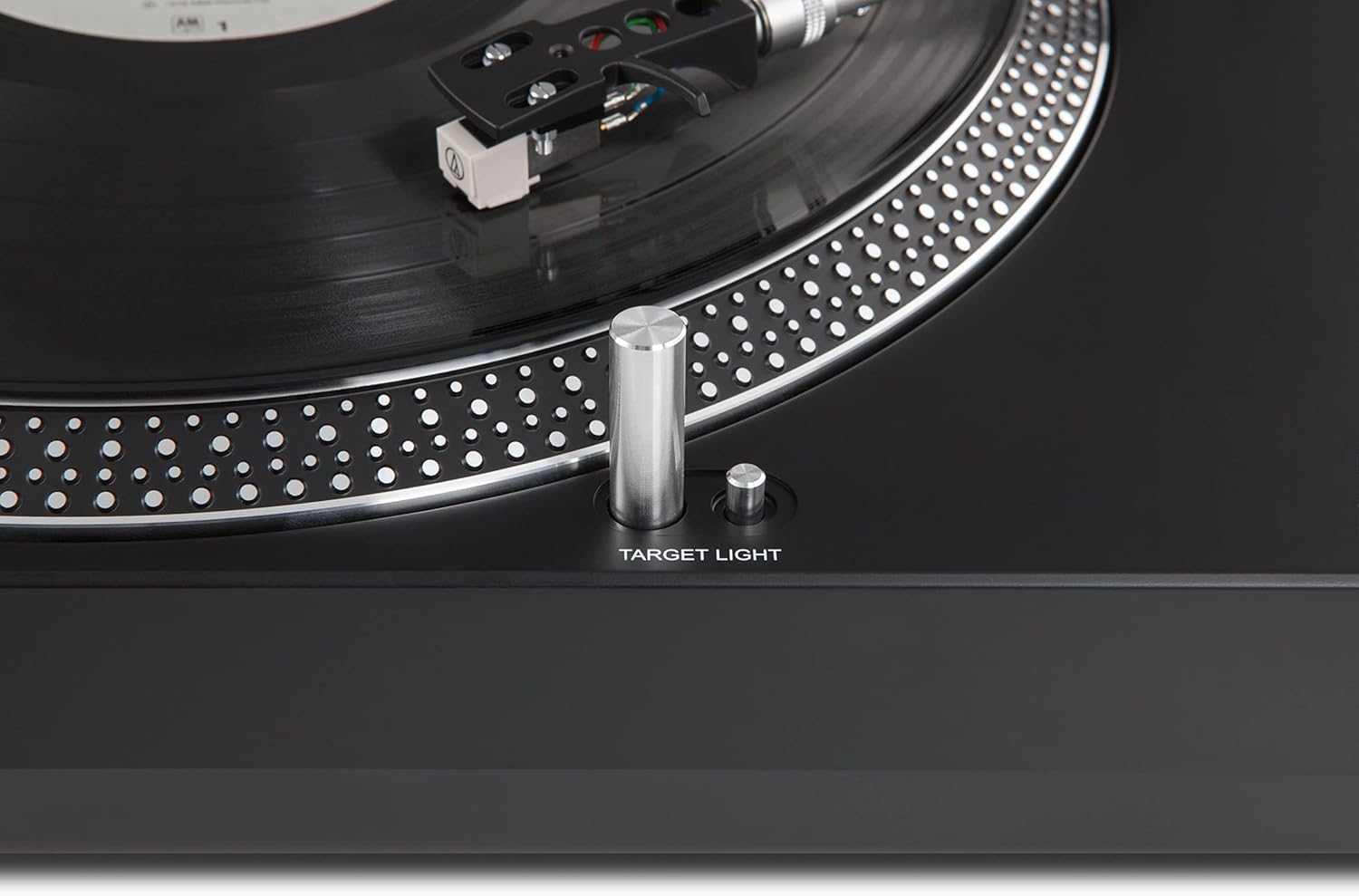
படம் 5: The target light, which illuminates the stylus for accurate placement on the record.
4. Adjusting Pitch
தி PITCH ADJ. slider allows for fine adjustment of the playback speed. Move the slider up or down to increase or decrease the pitch, respectively. This is particularly useful for DJ applications or correcting minor speed variations.

படம் 6: The pitch adjustment slider, enabling precise control over the playback speed.
5. USB Digitization
To convert your vinyl records to digital MP3 files, connect the turntable to your computer using the provided USB cable. Install the included software from the CD. Follow the software's instructions to record and save your audio. The software is compatible with both Mac and PC operating systems.
பராமரிப்பு
1. Cleaning the Stylus (Needle)
A clean stylus is essential for optimal sound quality and to prevent damage to your records. Use a soft brush, specifically designed for stylus cleaning, and gently brush from back to front. Never brush from side to side.
2. டர்ன்டேபிள் யூனிட்டை சுத்தம் செய்தல்
Wipe the turntable's surface with a soft, dry, lint-free cloth. For stubborn marks, a slightly damp துணியைப் பயன்படுத்தலாம், ஆனால் திரவம் அலகுக்குள் நுழையாமல் பார்த்துக் கொள்ளுங்கள். சிராய்ப்பு கிளீனர்கள் அல்லது கரைப்பான்களைத் தவிர்க்கவும்.
3. தூசி மூடி பராமரிப்பு
The dust cover protects your turntable from dust and debris. Clean it with a soft, damp cloth. Avoid using dry cloths as they can scratch the acrylic surface.
சரிசெய்தல்
| பிரச்சனை | சாத்தியமான காரணம் | தீர்வு |
|---|---|---|
| சக்தி இல்லை | மின் கேபிள் இணைக்கப்படவில்லை; அவுட்லெட் இயக்கப்படவில்லை. | மின் கேபிள் இணைப்பைச் சரிபார்க்கவும்; மற்றொரு சாதனத்துடன் அவுட்லெட்டைச் சோதிக்கவும். |
| ஒலி அல்லது குறைந்த ஒலி இல்லை | Incorrect PHONO/LINE switch setting; amplifier input issue; damaged cartridge/stylus. | Ensure PHONO/LINE switch matches amplifier input; check amplifier connections and volume; inspect cartridge/stylus for damage. |
| சிதைந்த ஒலி | Dirty stylus; incorrect tracking force or anti-skating; damaged record. | Clean stylus; re-adjust tracking force and anti-skating; try a different record. |
| தவறான பிளேபேக் வேகம் | Wrong speed selected (33/45 RPM); pitch adjustment off. | Select correct speed; adjust pitch slider to center or desired setting. |
இங்கே பட்டியலிடப்படாத சிக்கல்களை நீங்கள் சந்தித்தாலோ அல்லது பரிந்துரைக்கப்பட்ட தீர்வுகள் சிக்கலைத் தீர்க்கவில்லை என்றாலோ, வாடிக்கையாளர் ஆதரவைத் தொடர்பு கொள்ளவும்.
விவரக்குறிப்புகள்
| பிராண்ட் | டெக்னிசாட் |
| மாதிரி பெயர் | எல்பி 300 |
| மாதிரி எண் | 0000/9413 |
| இயக்கி வகை | Direct Drive (Quartz Controlled) |
| சுழற்சி வேகங்கள் | 33, 45 ஆர்.பி.எம். |
| பொருள் | Aluminum (Platter) |
| இணைப்புகள் | Analog Audio Output (RCA L/R), USB 2.0 |
| சிறப்பு அம்சங்கள் | Balanced S-shaped tonearm, Adjustable tracking force, Anti-skating, Needle illumination, Integrated switchable phono preamplifier, PC recording software included (Mac/PC) |
| இணக்கமான சாதனங்கள் | Personal Computer, Smartphone (for digital audio output) |
| Operating System (for software) | Windows (and Mac for software) |
| எடை | 5.3 கிலோகிராம் |
| பரிமாணங்கள் (LxHxP) | 45.00 x 13.90 x 35.00 cm (approximate, from feature bullets) |
உத்தரவாத தகவல்
The TechniSat TECHNIPLAYER LP 300 comes with a 2 வருட உற்பத்தியாளரின் உத்தரவாதம். This warranty covers defects in materials and workmanship under normal use. Please retain your proof of purchase for warranty claims. For specific terms and conditions, refer to the warranty card included with your product or visit the official TechniSat webதளம்.
குறிப்பு: Spare parts availability is currently listed as "unavailable" by the manufacturer. Software updates are also listed as "information not available."
ஆதரவு
For technical assistance, product inquiries, or warranty service, please contact TechniSat customer support.
- ஆன்லைன் ஆதரவு: Visit the official TechniSat webஅடிக்கடி கேட்கப்படும் கேள்விகள், ஆதரவு வளங்கள் மற்றும் தொடர்பு படிவங்களுக்கான தளம்.
- தொடர்பு தகவல்: Refer to the contact details provided in your product packaging or on the TechniSat webதொலைபேசி அல்லது மின்னஞ்சல் ஆதரவுக்கான தளம்.
Before contacting support, please have your product model (LP 300) and serial number (if applicable) ready.


