1. அறிமுகம்
This manual provides detailed instructions for the safe and efficient use of your Crivit Silvercrest FM Scan Radio, Model 43142. Please read this manual thoroughly before operating the device and retain it for future reference. This portable radio features automatic station search, 10 station memory presets, a digital display for frequency and time, and alarm, snooze, and sleep functions.
2. தொகுப்பு உள்ளடக்கங்கள்
Ensure all items are present upon unpacking:
- Crivit Silvercrest FM Scan Radio (Model 43142)
- இயர்போன்கள்
- மணிக்கட்டு பட்டா
- Batteries (if included in your specific package)
3. தயாரிப்பு முடிந்துவிட்டதுview
வானொலியின் கூறுகள் மற்றும் கட்டுப்பாடுகளுடன் உங்களைப் பழக்கப்படுத்திக் கொள்ளுங்கள்.
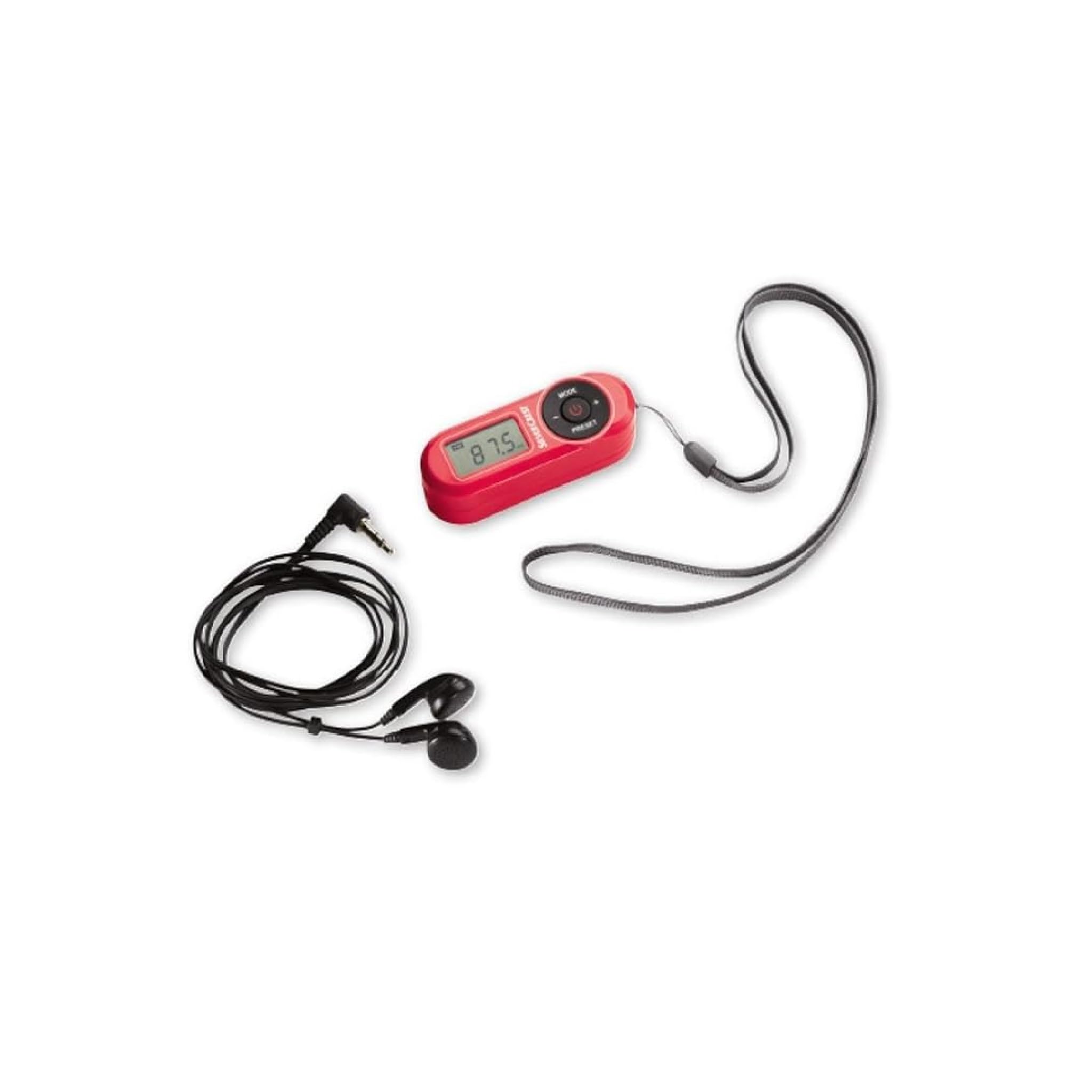
படம் 1: முன் view of the Crivit Silvercrest FM Scan Radio, showing the digital display, control buttons, and included accessories (earphones and wrist strap).
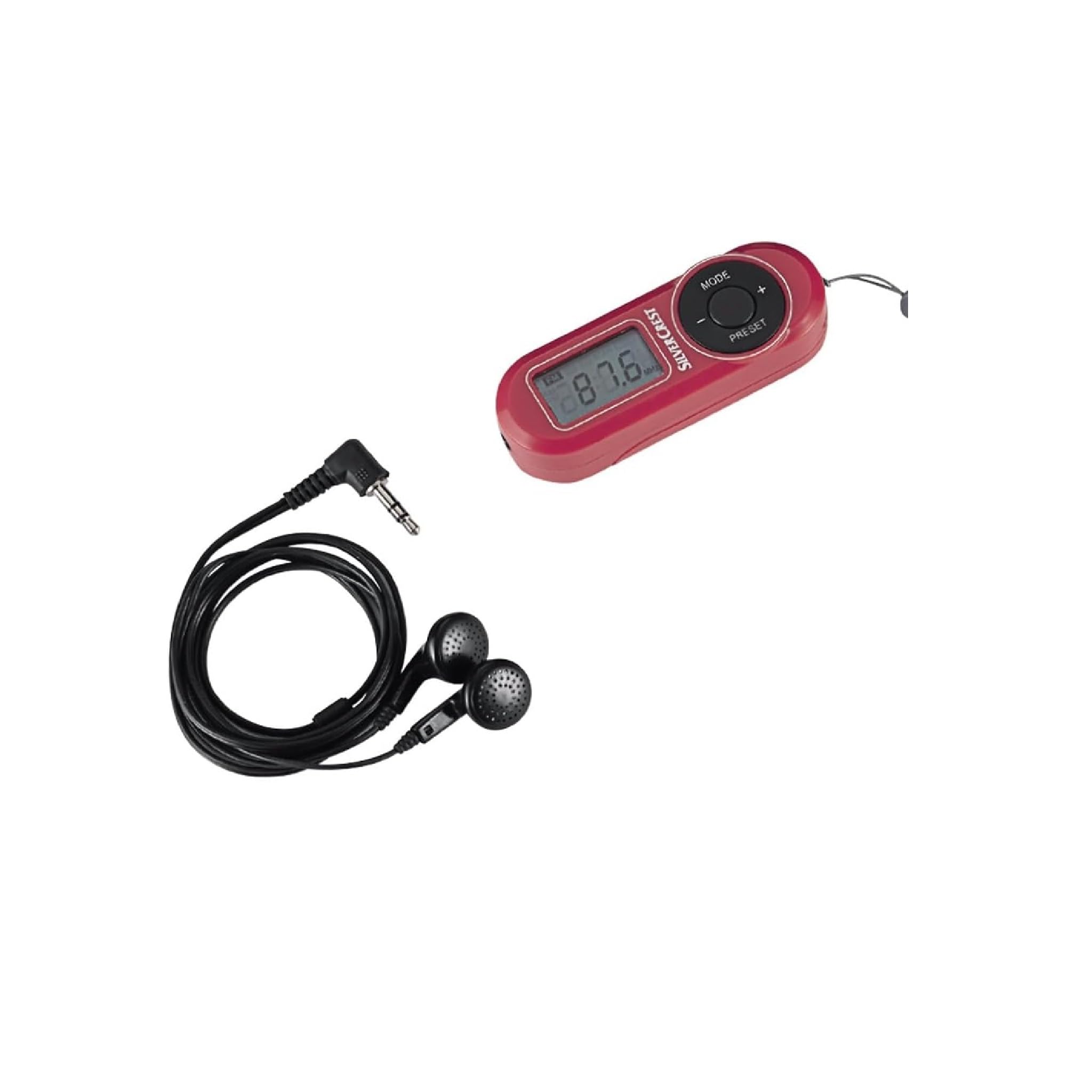
படம் 2: நெருக்கமான காட்சி view of the radio's control panel, highlighting the MODE, PRESET, and volume buttons, along with the Silvercrest branding.
கட்டுப்பாடுகள் மற்றும் காட்சி:
- Digital LC-Display: Shows frequency, time, and alarm status.
- பயன்முறை பொத்தான்: Switches between functions (e.g., radio, time setting).
- +/- பொத்தான்கள்: Adjusts volume, tunes frequency, or navigates menu options.
- PRESET பொத்தான்: Accesses and saves radio station presets.
- பவர் பட்டன்: ரேடியோவை ஆன்/ஆஃப் செய்கிறது.
- தலையணி ஜாக்: 3.5 mm audio output for earphones.
4 அமைவு
4.1 பேட்டரி நிறுவல்
- ரேடியோவின் பின்புறத்தில் பேட்டரி பெட்டியின் அட்டையைக் கண்டறியவும்.
- திறக்க மூடியை சறுக்கி அல்லது உயர்த்தவும்.
- Insert the required batteries (e.g., AAA, as specified in the battery compartment) ensuring correct polarity (+/-).
- பேட்டரி பெட்டியின் அட்டையை பாதுகாப்பாக மூடு.
4.2 ஹெட்ஃபோன்களை இணைக்கிறது
The included earphones serve as the radio's antenna. For optimal reception, ensure they are fully plugged in.
- Insert the 3.5 mm jack of the earphones into the headphone port on the radio.
- Adjust the earphone cable for best reception.
5. இயக்க வழிமுறைகள்
5.1 பவர் ஆன்/ஆஃப்
- To turn on the radio, press and hold the சக்தி பொத்தான்.
- ரேடியோவை அணைக்க, அழுத்திப் பிடிக்கவும் சக்தி மீண்டும் பொத்தான்.
5.2 Automatic Station Search
The radio features an automatic station search function to find available FM stations.
- With the radio powered on, press the பயன்முறை button until the radio function is active.
- அழுத்திப் பிடிக்கவும் முன்னமைவு button (or a specific scan button if available) to initiate an automatic scan. The radio will scan and store available stations into memory presets.
5.3 Saving and Recalling Presets
வானொலியில் 10 எஃப்எம் நிலையங்கள் வரை சேமிக்க முடியும்.
- To Save a Station: Tune to the desired station. Press and hold the முன்னமைவு button until a preset number flashes on the display. Use the +/- buttons to select a preset number (P1-P10), then press முன்னமைவு மீண்டும் உறுதிப்படுத்த.
- To Recall a Station: சுருக்கமாக அழுத்தவும் முன்னமைவு button to cycle through the stored stations.
5.4 தொகுதி சரிசெய்தல்
பயன்படுத்தவும் +/- buttons to increase or decrease the volume level during playback.
5.5 Alarm, Snooze, and Sleep Functions
The radio includes an alarm clock with snooze and sleep timer features.
- அலாரத்தை அமைத்தல்: In time display mode, press and hold the பயன்முறை button until the alarm time flashes. Use the +/- buttons to set the hour and minute, pressing பயன்முறை to confirm each.
- உறக்கநிலை செயல்பாடு: When the alarm sounds, press any button (except power off) to activate snooze. The alarm will sound again after a short interval.
- தூக்க செயல்பாடு: ஸ்லீப் டைமரை அமைக்க, அழுத்தவும் பயன்முறை button repeatedly until the sleep timer option appears. Use the +/- buttons to select the desired sleep duration (e.g., 15, 30, 60 minutes). The radio will automatically turn off after the set time.
6. பராமரிப்பு
6.1 சுத்தம் செய்தல்
To clean the radio, use a soft, dry cloth. Do not use abrasive cleaners, solvents, or strong chemicals, as these can damage the surface.
6.2 சேமிப்பு
When not in use for extended periods, remove the batteries to prevent leakage and store the radio in a cool, dry place away from direct sunlight and extreme temperatures.
7. சரிசெய்தல்
| பிரச்சனை | சாத்தியமான காரணம் | தீர்வு |
|---|---|---|
| No power/Radio does not turn on | பேட்டரிகள் தீர்ந்து போயுள்ளன அல்லது தவறாகச் செருகப்பட்டுள்ளன. | சரியான துருவமுனைப்பை உறுதிசெய்து, பேட்டரிகளை புதியவற்றால் மாற்றவும். |
| மோசமான வானொலி வரவேற்பு | Earphones not fully plugged in or poor signal area. | Ensure earphones are fully inserted. Adjust earphone cable position. Move to an area with better signal. |
| இயர்போன்களில் இருந்து ஒலி இல்லை | Volume too low or earphones faulty. | Increase volume. Test with another pair of earphones. |
| காட்சி காலியாகவோ அல்லது மினுமினுப்பாகவோ உள்ளது | குறைந்த பேட்டரி சக்தி. | பேட்டரிகளை மாற்றவும். |
8. விவரக்குறிப்புகள்
| அம்சம் | விவரம் |
|---|---|
| பிராண்ட் | கிரிவிட் |
| மாதிரி எண் | 43142 |
| ட்யூனர் தொழில்நுட்பம் | FM |
| ரேடியோ பேண்டுகள் ஆதரிக்கப்படுகின்றன | FM (87.5 - 108 MHz) |
| வன்பொருள் இடைமுகம் | 3.5 மிமீ ஆடியோ |
| இணக்கமான சாதனங்கள் | ஹெட்ஃபோன்கள் |
| சிறப்பு அம்சங்கள் | Portable, Automatic Station Search, 10 Presets, Alarm, Snooze, Sleep Function |
| உள்ளிட்ட கூறுகள் | Earphones, Wrist Strap, Batteries (if applicable) |
| சக்தி ஆதாரம் | பேட்டரியால் இயங்கும் |
| தயாரிப்பு பரிமாணங்கள் | 10 x 5 x 2 செ.மீ |
| நிறம் | சிவப்பு |
| இணைப்பு தொழில்நுட்பம் | Bluetooth (Note: This may refer to internal components or a miscategorization, primary audio output is 3.5mm jack) |
| பரிந்துரைக்கப்பட்ட பயன்பாடுகள் | Personal use, Music, Travel |
9. உத்தரவாதம் மற்றும் ஆதரவு
For warranty information and customer support, please refer to the documentation provided at the time of purchase or contact the retailer. Keep your proof of purchase for any warranty claims.


