அறிமுகம்
நன்றி, நன்றி.asing the Trevi RR 501 BT Portable Bluetooth, USB, SD, MP3 Stereo Boombox. This manual provides essential information for the safe and efficient use of your new device. Please read these instructions carefully before operating the unit and retain them for future reference.
பாதுகாப்பு தகவல்
- இந்த கருவியை மழை அல்லது ஈரப்பதத்திற்கு வெளிப்படுத்த வேண்டாம்.
- காற்றோட்டம் திறப்புகளைத் தடுக்க வேண்டாம்.
- மின் கம்பி கிள்ளப்படவில்லை அல்லது நடக்கவில்லை என்பதை உறுதிப்படுத்தவும்.
- உற்பத்தியாளரால் குறிப்பிடப்பட்ட இணைப்புகள் / துணைக்கருவிகளை மட்டுமே பயன்படுத்தவும்.
- மின்னல் தாக்கும் போது அல்லது நீண்ட நேரம் பயன்படுத்தப்படாத போது சாதனத்தை துண்டிக்கவும்.
- அனைத்து சேவைகளையும் தகுதிவாய்ந்த சேவை பணியாளர்களிடம் பார்க்கவும்.
- அலகைத் திறக்க வேண்டாம் casing; உள்ளே பயனர் சேவை செய்யக்கூடிய பாகங்கள் எதுவும் இல்லை.
தொகுப்பு உள்ளடக்கங்கள்
பின்வரும் பொருட்கள் உங்கள் தொகுப்பில் சேர்க்கப்பட்டுள்ளதா என்பதைச் சரிபார்க்கவும்:
- Trevi RR 501 BT Boombox Unit
- ஏசி பவர் கேபிள்
- பயனர் கையேடு (இந்த ஆவணம்)
தயாரிப்பு முடிந்துவிட்டதுview
Familiarize yourself with the main components of your Trevi RR 501 BT Boombox.
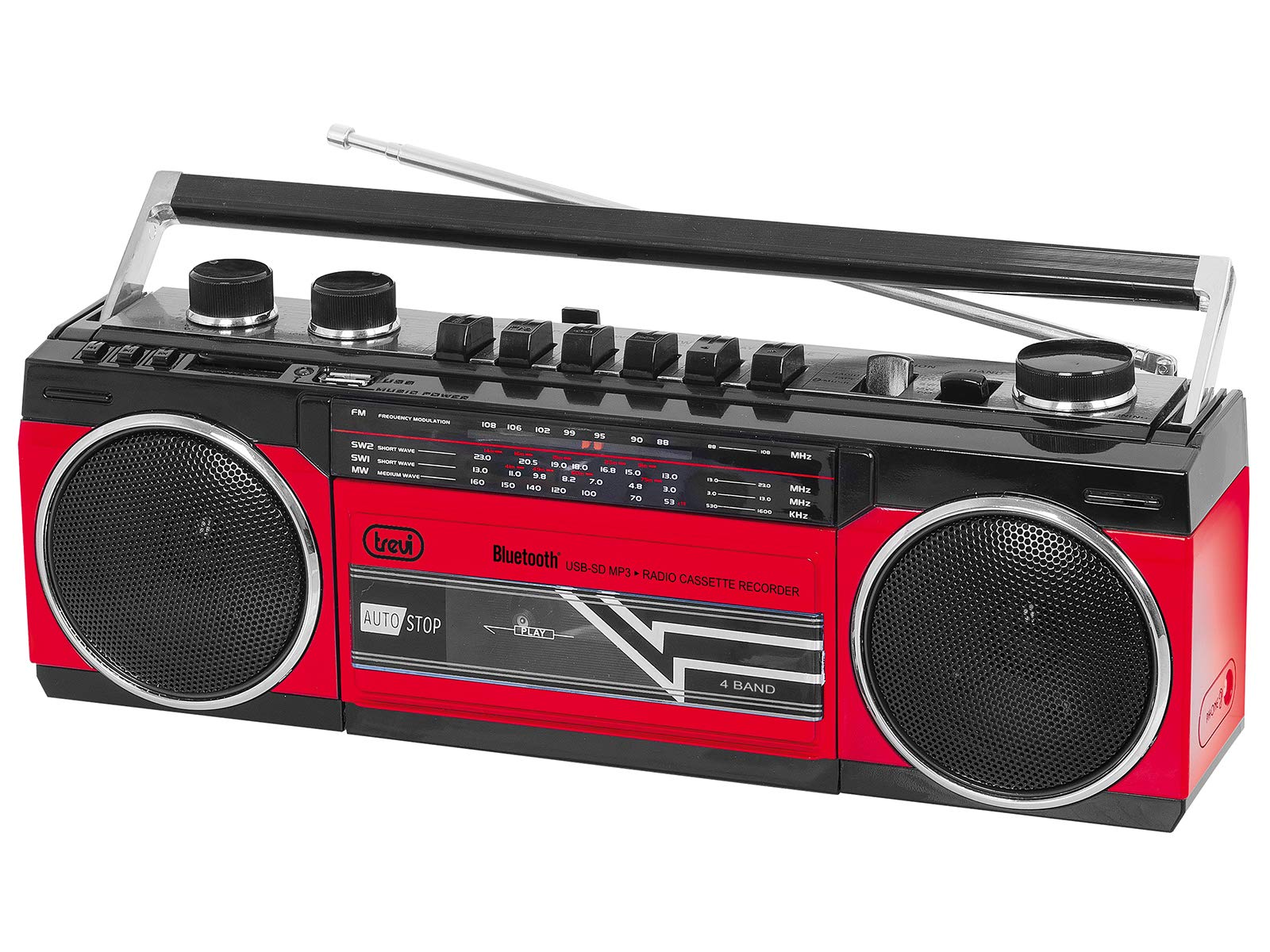
படம் 1: முன் view of the Trevi RR 501 BT Boombox, showing the dual speakers, control panel, and cassette deck.

படம் 2: கோணல் view of the Trevi RR 501 BT Boombox, highlighting the side profile மற்றும் கையாளவும்.
முக்கிய கூறுகள்:
- பேச்சாளர்கள்: Two integrated stereo speakers.
- கண்ட்ரோல் பேனல்: Buttons for playback, mode selection, and tuning.
- தொகுதி நாப்: ஆடியோ வெளியீட்டு அளவை சரிசெய்கிறது.
- டியூனிங் குமிழ்: For radio frequency selection.
- முறை தேர்வு Switches between Radio, Bluetooth, USB, SD, and Cassette modes.
- கேசட் டெக்: For playing and recording audio cassettes.
- USB போர்ட்: USB ஃபிளாஷ் டிரைவ் பிளேபேக்கிற்கு.
- SD கார்டு ஸ்லாட்: SD கார்டு பிளேபேக்கிற்கு.
- ஆண்டெனா: FM வானொலி வரவேற்புக்கான தொலைநோக்கி ஆண்டெனா.
- ஆற்றல் உள்ளீடு: ஏசி பவர் கேபிளை இணைப்பதற்கு.
- பேட்டரி பெட்டி: (Located on the bottom/rear) For optional battery operation.
அமைவு
மின் இணைப்பு:
- ஏசி பவர்: Insert the AC power cable into the AC input jack on the back of the unit, then plug the other end into a standard wall outlet.
- பேட்டரி சக்தி (விரும்பினால்): Open the battery compartment cover (usually on the bottom or rear). Insert the required number of D-size batteries (not included), ensuring correct polarity (+/-). Close the compartment cover securely.
Note: When using AC power, batteries are automatically disconnected. Remove batteries if the unit will not be used for an extended period.
இயக்க வழிமுறைகள்
ஆன்/ஆஃப்:
To turn the unit on, rotate the தொகுதி குமிழ் clockwise until you hear a click. To turn off, rotate the தொகுதி குமிழ் counter-clockwise until it clicks off.
Radio Operation (FM):
- அலகு இயக்கவும்.
- அமைக்கவும் பயன்முறை தேர்வாளர் to "RADIO".
- உகந்த வரவேற்புக்காக தொலைநோக்கி ஆண்டெனாவை நீட்டவும்.
- சுழற்று ட்யூனிங் நாப் to select your desired FM station.
- சரிசெய்யவும் தொகுதி குமிழ் to your preferred listening level.
புளூடூத் இணைப்பு:
- அலகு இயக்கவும்.
- அமைக்கவும் பயன்முறை தேர்வாளர் to "BT" (Bluetooth). The unit will enter pairing mode, indicated by a flashing LED.
- உங்கள் புளூடூத்-இயக்கப்பட்ட சாதனத்தில் (எ.கா., ஸ்மார்ட்போன், டேப்லெட்), புளூடூத்தை இயக்கி, கிடைக்கும் சாதனங்களைத் தேடுங்கள்.
- Select "Trevi RR 501 BT" from the list of devices.
- Once paired, the LED indicator will stop flashing and remain solid. You can now play audio from your device through the boombox.
USB/SD பிளேபேக்:
- அலகு இயக்கவும்.
- USB ஃபிளாஷ் டிரைவை அதில் செருகவும் USB போர்ட் அல்லது ஒரு SD அட்டையை SD கார்டு ஸ்லாட். Ensure the media contains MP3 audio files.
- அமைக்கவும் பயன்முறை தேர்வாளர் to "USB/SD". The unit will automatically begin playing the first compatible audio file.
- Use the playback control buttons (e.g., Play/Pause, Next, Previous) on the unit to manage your audio.
கேசட் பிளேபேக்:
- அலகு இயக்கவும்.
- அழுத்தவும் நிறுத்து/வெளியேறு button on the cassette deck to open the cassette compartment.
- Insert an audio cassette with the open edge facing upwards and the tape side facing you. Close the compartment door.
- அமைக்கவும் பயன்முறை தேர்வாளர் to "TAPE".
- அழுத்தவும் விளையாடு பிளேபேக்கைத் தொடங்க பொத்தானை அழுத்தவும்.
- பயன்படுத்தவும் ரீவைண்ட் மற்றும் வேகமாக முன்னோக்கி டேப்பை நகர்த்த பொத்தான்கள்.
- அழுத்தவும் நிறுத்து/வெளியேறு to stop playback and open the compartment.
Cassette Recording:
- Insert a blank cassette into the cassette deck.
- Select the desired audio source (Radio, Bluetooth, USB, SD) using the பயன்முறை தேர்வாளர்.
- Start playback of the source audio.
- அழுத்தவும் பதிவு button (usually red) on the cassette deck. The விளையாடு button will also engage. Recording will begin.
- பதிவு செய்வதை நிறுத்த, அழுத்தவும் நிறுத்து/வெளியேறு பொத்தான்.
பராமரிப்பு
- சுத்தம்: அலகின் வெளிப்புறத்தை சுத்தம் செய்ய மென்மையான, உலர்ந்த துணியைப் பயன்படுத்தவும். சிராய்ப்பு கிளீனர்கள் அல்லது கரைப்பான்களைப் பயன்படுத்த வேண்டாம்.
- Cassette Deck Care: அவ்வப்போது டேப் ஹெட்களை சுத்தம் செய்து, ரோலர்களை பஞ்சு துணியால் லேசாக அழுத்தவும்.ampஐசோபிரைல் ஆல்கஹாலுடன் சேர்க்கப்பட்டது.
- சேமிப்பு: When not in use for extended periods, store the unit in a cool, dry place, away from direct sunlight and extreme temperatures. Remove batteries if applicable.
சரிசெய்தல்
| பிரச்சனை | சாத்தியமான காரணம் | தீர்வு |
|---|---|---|
| சக்தி இல்லை | Power cable not connected; Batteries depleted or incorrectly inserted. | Check AC power connection; Replace batteries or ensure correct polarity. |
| மோசமான வானொலி வரவேற்பு | ஆண்டெனா நீட்டிக்கப்படவில்லை; பலவீனமான சமிக்ஞை. | Fully extend the telescopic antenna; Reposition the unit for better signal. |
| புளூடூத் இணைக்கப்படவில்லை | Unit not in BT mode; Device too far; Already paired with another device. | Ensure mode is set to BT; Move device closer; Disconnect from other devices. |
| USB/SD இயங்கவில்லை. | தவறான பயன்முறை; இணக்கமற்றது file வடிவம்; சிதைந்த ஊடகம். | Set mode to USB/SD; Ensure files are MP3; Try different USB/SD media. |
| கேசட் பிளேபேக் சிக்கல்கள் | Cassette inserted incorrectly; Tape heads dirty. | Re-insert cassette correctly; Clean tape heads and pinch rollers. |
விவரக்குறிப்புகள்
| பிராண்ட் | ட்ரெவி |
| மாதிரி எண் | 0RR50102 |
| இணைப்பு தொழில்நுட்பம் | புளூடூத், யு.எஸ்.பி |
| பேச்சாளர் வகை | ஸ்டீரியோ |
| பரிமாணங்கள் (L x W x H) | 50 x 50 x 28 சென்டிமீட்டர்கள் |
| சக்தி ஆதாரம் | AC |
| பொருளின் எடை | 1.25 கிலோகிராம் |
| வெளியீட்டு சக்தி | 6 வாட்ஸ் |
| நிறம் | சிவப்பு |
| உடை | ரெட்ரோ |
உத்தரவாதம் மற்றும் ஆதரவு
For warranty information and technical support, please refer to the warranty card included with your product or visit the official Trevi website. Information regarding spare parts availability and software updates is not provided in the product specifications.
எந்தவொரு உத்தரவாதக் கோரிக்கைகளுக்கும் உங்கள் கொள்முதல் ஆதாரத்தை வைத்திருங்கள்.


