1. அறிமுகம்
This manual provides detailed instructions for the installation, operation, and maintenance of your Intelbras MHDX-1004 4-Channel Multi HD Digital Video Recorder (DVR). This DVR is designed for surveillance applications, offering recording capabilities for up to four security cameras and comes with a pre-installed 1TB WD Purple hard drive for reliable 24/7 video storage.
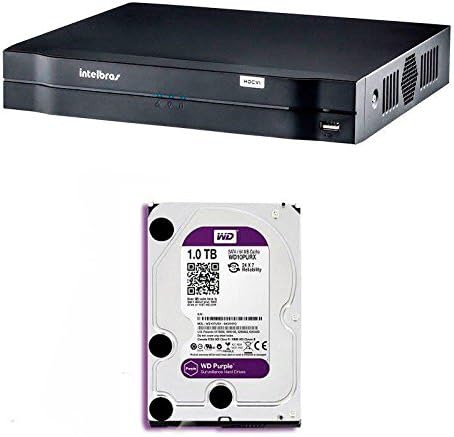
படம் 1.1: முன் view of the Intelbras MHDX-1004 Digital Video Recorder. This image shows the front view of the Intelbras MHDX-1004 Digital Video Recorder, featuring the Intelbras logo, status indicators, and a front USB port.

படம் 1.2: Intelbras MHDX-1004 DVR with 1TB WD Purple hard drive. This image illustrates the Intelbras MHDX-1004 DVR unit alongside a 1TB WD Purple surveillance hard drive, indicating the pre-installed storage solution.
2. தொகுப்பு உள்ளடக்கங்கள்
பின்வரும் பொருட்களுக்கு தொகுப்பைச் சரிபார்க்கவும்:
- Intelbras MHDX-1004 DVR unit with pre-installed 1TB WD Purple HDD
- பவர் அடாப்டர்
- யூ.எஸ்.பி மவுஸ்
- விரைவு தொடக்க வழிகாட்டி (இந்த ஆவணம்)
3 அமைவு
3.1. உடல் இணைப்புகள்
Before powering on the DVR, connect all necessary cables as described below. Refer to Figure 3.1 for a visual guide to the rear panel connections.
- வீடியோ உள்ளீடுகள்: Connect your security cameras to the BNC video input ports (1-4). The DVR supports Multi HD technologies (HDCVI, HDTVI, AHD, IP, Analog).
- வீடியோ வெளியீடுகள்: Connect a monitor to either the HDMI or VGA port for local display.
- ஆடியோ உள்ளீடுகள்/வெளியீடு: Connect audio input devices to the RCA audio input ports and an audio output device (e.g., speakers) to the RCA audio output port.
- நெட்வொர்க்: Connect an Ethernet cable from your router or network switch to the RJ45 LAN port for network access and remote viewing.
- USB போர்ட்கள்: Connect the included USB mouse to one of the USB ports. The other USB port can be used for data backup or connecting other USB devices.
- ஆற்றல் உள்ளீடு: Connect the power adapter to the DC 12V power input port.
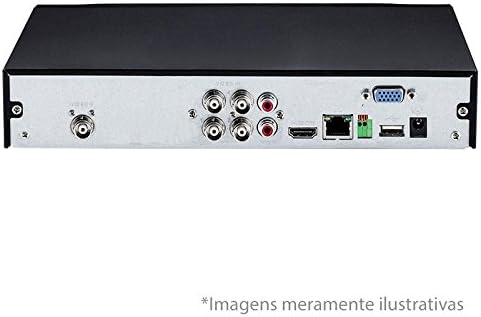
படம் 3.1: Rear panel connections of Intelbras MHDX-1004 DVR. This image displays the rear panel of the Intelbras MHDX-1004 DVR, showing various ports including BNC video inputs, HDMI, VGA, audio, Ethernet, and USB connections.
3.2. Hard Drive Installation (Pre-installed)
The Intelbras MHDX-1004 DVR comes with a 1TB WD Purple surveillance-grade hard drive pre-installed. No additional installation is required for initial setup. If you need to replace or upgrade the hard drive in the future, ensure the DVR is powered off and disconnected from the power source before opening the casing. Refer to the detailed instructions in the full user manual for hard drive replacement procedures.

படம் 3.2: உள் view of Intelbras MHDX-1004 DVR with 1TB WD Purple HDD installed. This image provides an internal view of the Intelbras MHDX-1004 DVR, clearly showing the 1TB WD Purple hard drive securely installed within the chassis.
3.3. பவர் ஆன் மற்றும் ஆரம்ப கட்டமைப்பு
After all connections are made, connect the power adapter to an electrical outlet. The DVR will power on automatically. Follow the on-screen wizard for initial setup, which typically includes:
- மொழி தேர்வு
- தேதி மற்றும் நேர அமைப்புகள்
- Network configuration (DHCP recommended for most users)
- Setting up a strong administrator password (crucial for security)
- Hard drive initialization (if prompted, though pre-installed drives are usually pre-formatted)
4. இயக்க வழிமுறைகள்
4.1. பயனர் இடைமுக வழிசெலுத்தல்
Navigate the DVR's graphical user interface (GUI) using the connected USB mouse. Right-click to access the main menu, and left-click to select options or confirm actions.
4.2. வாழ View
Upon startup, the DVR will display the live view இணைக்கப்பட்ட கேமராக்களின் எண்ணிக்கை. நீங்கள் ஒற்றை கேமராவிற்கு இடையில் மாறலாம் view மற்றும் பல கேமரா கட்டம் views (எ.கா., 4-சேனல் view) திரையின் அடிப்பகுதியில் உள்ள ஐகான்களைப் பயன்படுத்தியோ அல்லது வலது கிளிக் செய்து பொருத்தமான விருப்பத்தைத் தேர்ந்தெடுப்பதன் மூலமோ.
4.3. பதிவுசெய்தல்
DVR பல்வேறு பதிவு முறைகளை ஆதரிக்கிறது:
- தொடர் பதிவு: பதிவுகள் 24/7.
- மோஷன் கண்டறிதல் பதிவு: கேமராவின் புலத்தில் இயக்கம் கண்டறியப்படும்போது மட்டுமே பதிவு செய்கிறது view.
- திட்டமிடப்பட்ட பதிவு: Records according to a predefined schedule.
Configure recording settings via the Main Menu > Record > Record Schedule. Ensure the hard drive is initialized and healthy for recording functionality.
4.4. பின்னணி
கிழிview பதிவு செய்யப்பட்ட footage:
- Go to Main Menu > Playback.
- விரும்பிய தேதி மற்றும் கேமரா சேனலைத் தேர்ந்தெடுக்கவும்.
- Use the timeline to navigate to the specific time. Different colors on the timeline indicate different recording types (e.g., green for continuous, yellow for motion).
- Use playback controls (play, pause, fast forward, rewind) as needed.
4.5. தரவு காப்புப்பிரதி
முக்கியமான விஷயம்tage can be backed up to a USB flash drive or over the network.
- USB காப்புப்பிரதி: Insert a formatted USB drive into a USB port. Go to Main Menu > Backup, select the camera, time range, and file type, then initiate the backup.
- நெட்வொர்க் காப்புப்பிரதி: Use the Intelbras client software on a connected computer to download footagநேரடியாக DVR இலிருந்து.
4.6. தொலைநிலை அணுகல்
ரிமோட்டுக்கு viewing on a smartphone or computer, ensure the DVR is connected to the internet. Configure network settings (e.g., port forwarding or P2P/Cloud service) and install the appropriate Intelbras mobile app or client software on your device. Refer to the full user manual for detailed network configuration steps.
5. பராமரிப்பு
5.1. வழக்கமான சுத்தம்
Keep the DVR unit clean and free from dust. Use a soft, dry cloth to wipe the exterior. Ensure ventilation openings are not obstructed to prevent overheating.
5.2. நிலைபொருள் புதுப்பிப்புகள்
Periodically check the Intelbras official website for firmware updates. Firmware updates can improve performance, add new features, and enhance security. Follow the instructions provided with the firmware update package carefully.
5.3. ஹார்ட் டிரைவ் சுகாதார சோதனை
The pre-installed WD Purple hard drive is designed for continuous surveillance. However, it is good practice to periodically check its health status through the DVR's system information or storage management menu. For more information on WD Purple drives, you can visit the WD Purple product page.

படம் 5.1: 1TB WD Purple surveillance hard drive. A detailed image of the 1TB WD Purple hard drive, designed specifically for 24/7 surveillance systems, showing its label and specifications.
5.4. கடவுச்சொல் மேலாண்மை
Regularly change your administrator password and ensure it is strong (a combination of uppercase, lowercase, numbers, and symbols). Do not share your password.
6. சரிசெய்தல்
If you encounter issues with your DVR, refer to the following common troubleshooting steps:
- வீடியோ வெளியீடு இல்லை:
- Check HDMI/VGA cable connections to the monitor and DVR.
- மானிட்டர் இயக்கப்பட்டிருப்பதை உறுதிசெய்து, சரியான உள்ளீட்டு மூலத்திற்கு அமைக்கவும்.
- Try a different monitor or cable.
- பதிவு இல்லை:
- Verify the hard drive status in the DVR's menu (Main Menu > Storage > HDD Manage). Ensure it is initialized and healthy.
- Check recording schedules and settings (Main Menu > Record > Record Schedule).
- Ensure cameras are properly connected and displaying live video.
- Network Issues / Remote Access Failure:
- ஈதர்நெட் கேபிள் இணைப்பைச் சரிபார்க்கவும்.
- Verify network settings (IP address, gateway, DNS) in Main Menu > Network.
- Ensure your router is functioning correctly and providing internet access.
- Confirm port forwarding or P2P/Cloud service settings are correctly configured.
- System Malfunctions:
- Restart the DVR by disconnecting and reconnecting the power.
- If issues persist, consider restoring the DVR to factory default settings (Main Menu > System > Default), but be aware this will erase all configurations.
7. விவரக்குறிப்புகள்
| அம்சம் | விவரக்குறிப்பு |
|---|---|
| மாதிரி | MHDX-1004 |
| பிராண்ட் | இன்டெல்பிராஸ் |
| சேனல்களின் எண்ணிக்கை | 4 |
| Video Input Technology | Multi HD (HDCVI, HDTVI, AHD, IP, Analog) |
| வீடியோ வெளியீடுகள் | HDMI, VGA |
| Audio Inputs/Output | ஆர்சிஏ |
| சேமிப்பு திறன் | 1 TB WD Purple HDD (pre-installed) |
| இணைப்பு | Ethernet (RJ45), USB |
| இணக்கமான சாதனங்கள் | பாதுகாப்பு கேமராக்கள் |
| ASIN | B078K2QS7V |
| EAN | 7896637650984 |
8. உத்தரவாதம் மற்றும் ஆதரவு
8.1. உத்தரவாதத் தகவல்
Your Intelbras MHDX-1004 DVR is covered by a manufacturer's warranty. Please refer to the warranty card included in your product packaging or visit the official Intelbras webஉங்கள் பிராந்தியத்திற்கு குறிப்பிட்ட விரிவான உத்தரவாத விதிமுறைகள் மற்றும் நிபந்தனைகளுக்கான தளத்தைப் பார்வையிடவும்.
8.2. தொழில்நுட்ப ஆதரவு
For technical assistance, product inquiries, or further support, please contact Intelbras customer service through their official website or the contact information provided in your product documentation. Ensure you have your product model and serial number ready when contacting support.


