1. அறிமுகம்
This manual provides detailed instructions for the installation, operation, and maintenance of your TOPGREENER TDOS5-JD Dual Load Motion Sensor Switch. This device is designed to automatically control two separate loads, such as lights and a fan, based on occupancy or vacancy detection using Passive Infrared (PIR) technology. Please read this manual thoroughly before installation and use to ensure proper function and safety.
2. பாதுகாப்பு தகவல்
- எச்சரிக்கை: To avoid fire, shock, or death, turn off power at the circuit breaker or fuse box and test that the power is off before wiring.
- Installation must be performed by a qualified electrician or in accordance with all local and national electrical codes.
- This device requires a தரை கம்பி சரியான செயல்பாட்டிற்கு.
- இந்த சாதனம் செய்கிறது not require a neutral wire.
- Do not use this device with loads exceeding its specified ratings.
- உட்புற பயன்பாட்டிற்கு மட்டுமே.
3. தொகுப்பு உள்ளடக்கங்கள்
- TOPGREENER TDOS5-JD Dual Load Motion Sensor Switch
- அறிவுறுத்தல் கையேடு
- பெருகிவரும் திருகுகள்
- கம்பி கொட்டைகள்
4. தயாரிப்பு அம்சங்கள்
- Dual Load Control: Connect and automate two separate loads (e.g., lights and a fan) from a single unit.
- பி.ஐ.ஆர் மோஷன் சென்சார்: Detects motion with a 180° field of view, covering up to 40ft in front and 20ft on either side. Advanced PIR technology helps reduce false triggers.
- Walk-Through Feature: Automatically turns off loads after 2.5 minutes if no further motion is detected within 30 seconds of the initial trigger.
- பல இயக்க முறைகள்:
- Occupancy Sensor Mode (OCCS): Loads turn ON automatically when motion is detected and OFF after a set time delay when the area is vacant.
- Dual Occupancy Mode (OCCD): Both loads operate in occupancy mode.
- Vacancy Sensor Mode (VACD): Loads are turned ON manually and turn OFF automatically after a set time delay when the area is vacant.
- சரிசெய்யக்கூடிய கால தாமதம்: Configurable options for 15 seconds (Test mode), 5 minutes, 10 minutes, 20 minutes, and 30 minutes.
- நியூட்ரல் வயர் தேவையில்லை: நியூட்ரல் வயர் இல்லாத பழைய வீடுகள் அல்லது இடங்களில் நிறுவலை எளிதாக்குகிறது.
- Ground Wire Required: Essential for safe operation.
- மின் மதிப்பீடுகள்: 120/277VAC@60Hz; 800W incandescent/halogen, 150W LED/CFL, 1/4HP motor.
- இணக்கம்: Compliant with Title 20 & Title 24.
- Single-Pole Only: Designed for single-pole applications.
5. நிறுவல்
நீங்கள் தொடங்குவதற்கு முன்: Ensure power is OFF at the circuit breaker. This device is for single-pole installations only and requires a ground wire.
- பவரை அணைக்கவும்: நீங்கள் மாற்றும் சுவிட்சைக் கட்டுப்படுத்தும் சர்க்யூட் பிரேக்கரைக் கண்டுபிடித்து அதை அணைக்கவும். ஒரு மின்னழுத்தத்தைப் பயன்படுத்தி மின்சாரம் நிறுத்தப்பட்டுள்ளதா எனச் சரிபார்க்கவும்.tagஇ சோதனையாளர்.
- ஏற்கனவே உள்ள சுவிட்சை அகற்று: Carefully remove the wall plate and unscrew the existing switch from the wall box. Disconnect the wires.
- கம்பிகளை அடையாளம் காணவும்: You should have a Line (hot) wire, two Load wires (one for each load, e.g., light and fan), and a Ground wire. This switch does not require a neutral wire.
- Wire the Sensor Switch: Connect the wires from the wall box to the corresponding wires on the TDOS5-JD switch using wire nuts.
- இணைக்கவும் Line (hot) wire from the wall box to the switch's Line wire.
- இணைக்கவும் Load 1 wire (e.g., for lights) from the wall box to the switch's Load 1 wire.
- இணைக்கவும் Load 2 wire (e.g., for fan) from the wall box to the switch's Load 2 wire.
- இணைக்கவும் தரையில் கம்பி from the wall box to the switch's Ground wire.
- சுவிட்சை ஏற்றவும்: Carefully fold the wires into the wall box and secure the switch with the provided screws. Attach the wall plate.
- சக்தியை மீட்டமை: சர்க்யூட் பிரேக்கரில் மீண்டும் மின்சாரத்தை இயக்கவும்.
- Warm-Up Period: After installation, allow 1-2 minutes for the device to warm up and calibrate before it functions correctly.
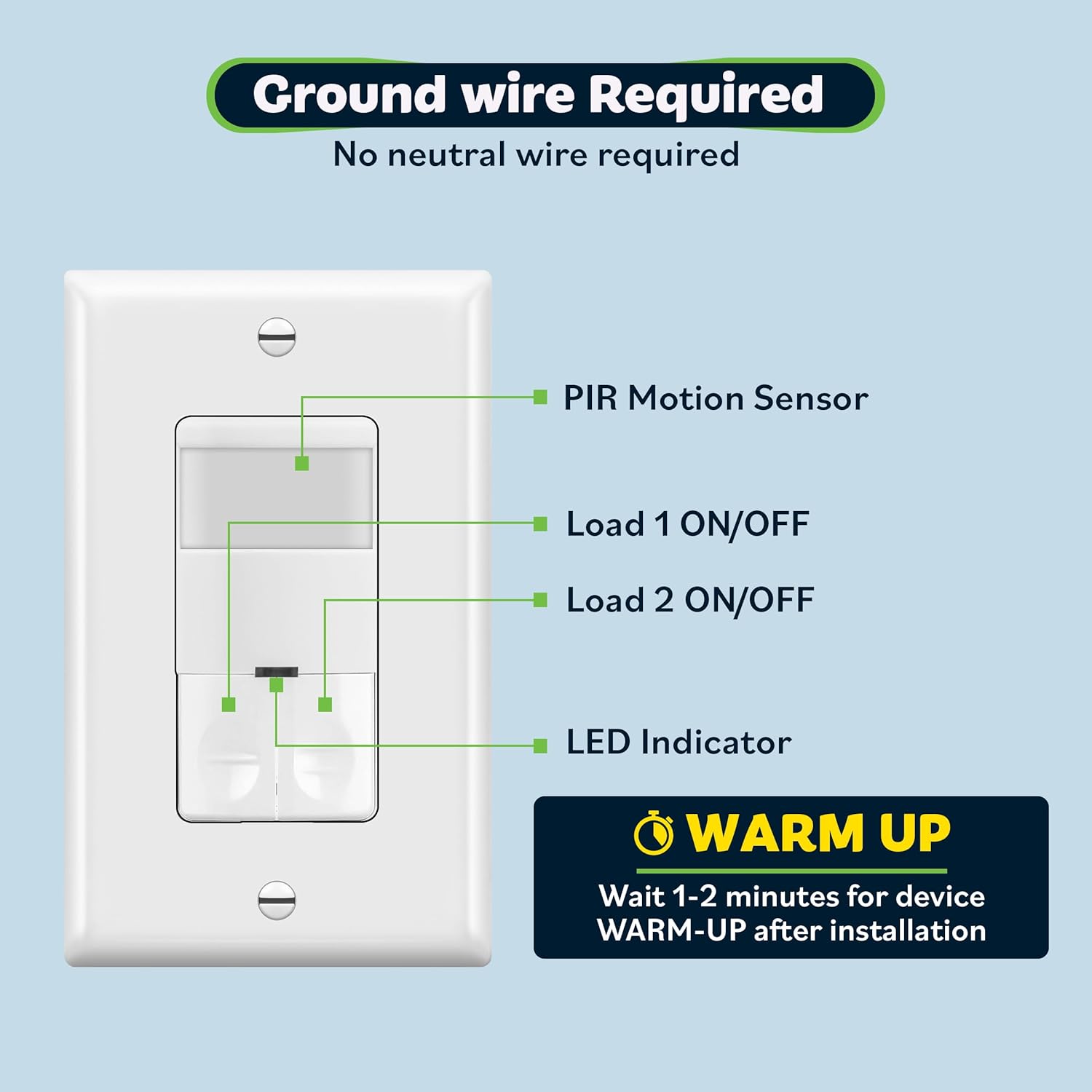
படம் 1: Components of the TDOS5-JD sensor switch, indicating the PIR sensor, Load 1/2 ON/OFF buttons, LED indicator, and a note about the warm-up period after installation. It also highlights that a ground wire is required and no neutral wire is needed.
படம் 2: An image showing the TOPGREENER TDOS5-JD motion sensor switch being carefully inserted into a standard electrical wall box during the installation process.
6. ஆபரேஷன்
Once installed and powered, the TDOS5-JD switch will operate according to the selected mode (Occupancy or Vacancy) and configured settings.
- தானியங்கி கட்டுப்பாடு: In Occupancy modes, the sensor detects motion and automatically turns on the connected loads. After the area becomes vacant for the set time delay, the loads will turn off. In Vacancy mode, loads are turned on manually and turn off automatically.
- கையேடு ஆன்/ஆஃப்: The switch features two ON/OFF buttons, one for each load, allowing for manual control. Pressing an ON/OFF button will toggle the respective load.
- LED காட்டி: A small LED indicator provides visual feedback on the switch's status.

படம் 3: A person carrying a laundry basket walks into a room, and the lights automatically turn on, illustrating the hands-free lighting capability of the motion sensor switch.

படம் 4: A modern bathroom setting where the TOPGREENER dual load sensor switch controls both the overhead lights and the exhaust fan automatically, demonstrating its energy-saving potential.
7. Customization and Settings
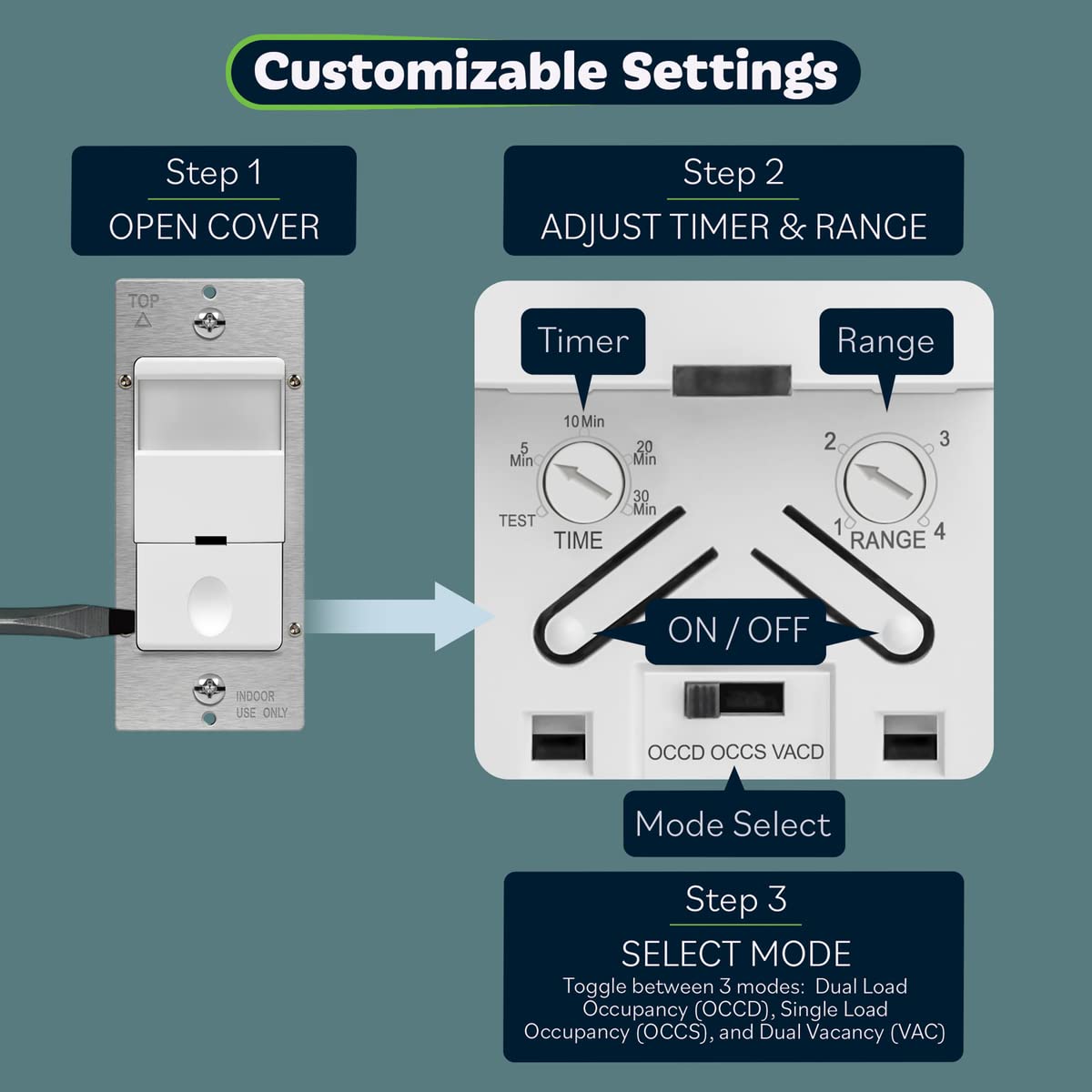
The TDOS5-JD switch offers adjustable settings for time delay, sensitivity (range), and operating mode. These settings are located behind the faceplate.
- அணுகல் அமைப்புகள்: Gently pry open the outer cover of the switch to reveal the adjustment dials and mode switch.
- Adjust Time Delay: Use a small screwdriver to turn the 'TIME' dial to select the desired delay: Test (15 seconds), 5 minutes, 10 minutes, 20 minutes, or 30 minutes.
- Adjust Sensor Range: Use a small screwdriver to turn the 'RANGE' dial to adjust the motion detection sensitivity from 1 (lowest) to 4 (highest).
- இயக்க பயன்முறையைத் தேர்ந்தெடுக்கவும்: Use the small switch labeled 'OCCD OCCS VACD' to choose your desired mode:
- OCCD: Dual Occupancy Mode
- OCCS: Single Occupancy Mode
- VACD: காலியிட முறை

படம் 5: A detailed diagram illustrating the steps to customize the sensor switch settings. It shows how to open the cover, and then adjust the 'Time' dial (Test, 5, 10, 20, 30 Min), 'Range' dial (1-4), and the 'Mode Select' switch (OCCD, OCCS, VACD).

படம் 6: An image depicting a modern bathroom with the sensor switch installed on the wall. A magnified inset shows the adjustable time delay and range dials, emphasizing the customization options for automatic light control.
8. சரிசெய்தல்
| பிரச்சனை | சாத்தியமான காரணம் | தீர்வு |
|---|---|---|
| Lights/Fan do not turn ON with motion. | No power; incorrect wiring; sensor blocked; incorrect mode; range too low. | Check circuit breaker. Verify wiring connections. Ensure sensor lens is clear. Confirm correct operating mode (OCCS/OCCD). Increase sensor range. |
| Lights/Fan stay ON too long or turn OFF too quickly. | Incorrect time delay setting; continuous motion detected; walk-through feature activated. | Adjust time delay setting. Ensure no constant motion within sensor's view. Understand walk-through feature behavior. |
| Lights/Fan turn ON without apparent motion (false triggers). | Sensor too sensitive; heat sources or air drafts; sensor facing high-traffic area. | Decrease sensor range. Relocate sensor away from heat sources (HVAC vents, direct sunlight) or drafts. Adjust sensor direction if possible. |
| Timer not functioning as expected (e.g., only extreme settings work). | Dial mechanism issue; specific unit calibration. | Carefully re-adjust the time dial. If issue persists, contact customer support. |
| One load works, but the other does not. | Incorrect wiring for the non-working load; faulty bulb/fan. | Verify wiring connections for Load 1 and Load 2. Test the bulb or fan directly to ensure it is functional. |
9. விவரக்குறிப்புகள்
- மாதிரி எண்: TDOS5-JD
- பரிமாணங்கள்: 2.5 x 2.5 x 4.5 அங்குலம்
- எடை: 6 அவுன்ஸ்
- சக்தி ஆதாரம்: கம்பியூட்டப்பட்ட மின்சாரம்
- தொகுதிtage: 120/277VAC, 60Hz
- Incandescent/Halogen Load: 800W அதிகபட்சம்
- LED/CFL Load: 150W அதிகபட்சம்
- மோட்டார் மதிப்பீடு: 1/4HP max
- கவரேஜ் பகுதி: 1200 சதுர அடி வரை
- புலம் View: 180 டிகிரி
- அதிகபட்ச வரம்பு: 40 feet (in front), 20 feet (sides)
- இயக்க வெப்பநிலை: 32-131°F (0-55°C)
- வயரிங்: Ground wire required, no neutral wire required
- சான்றிதழ்கள்: UL Listed, Compliant with Title 20 & Title 24
10. பராமரிப்பு
The TOPGREENER TDOS5-JD motion sensor switch requires minimal maintenance.
- சுத்தம்: Periodically wipe the sensor lens and faceplate with a soft, damp cloth. Do not use abrasive cleaners or solvents, as these can damage the finish or sensor.
- ஆய்வு: Occasionally check the switch for any visible damage or loose connections. If any issues are found, turn off power at the circuit breaker and address them or consult a qualified electrician.
11. உத்தரவாதம் மற்றும் ஆதரவு
TOPGREENER products are designed for reliability and performance. For specific warranty information, including terms and conditions, please refer to the warranty documentation provided with your purchase or visit the official TOPGREENER website. For technical support or assistance with troubleshooting, please contact TOPGREENER customer service.
உற்பத்தியாளர்: டாப்கிரீனர்
தொடர்பு தகவல்: Please visit the TOPGREENER official webமிகவும் புதுப்பித்த தொடர்பு விவரங்கள் மற்றும் ஆதரவு ஆதாரங்களுக்கான தளம்.


