அறிமுகம்
The XPOWER FC-300 is a professional-grade air circulator utility fan designed for heavy-duty applications requiring significant air movement for drying, cooling, or ventilation. This manual provides essential information for the safe and effective operation, maintenance, and troubleshooting of your FC-300 unit.
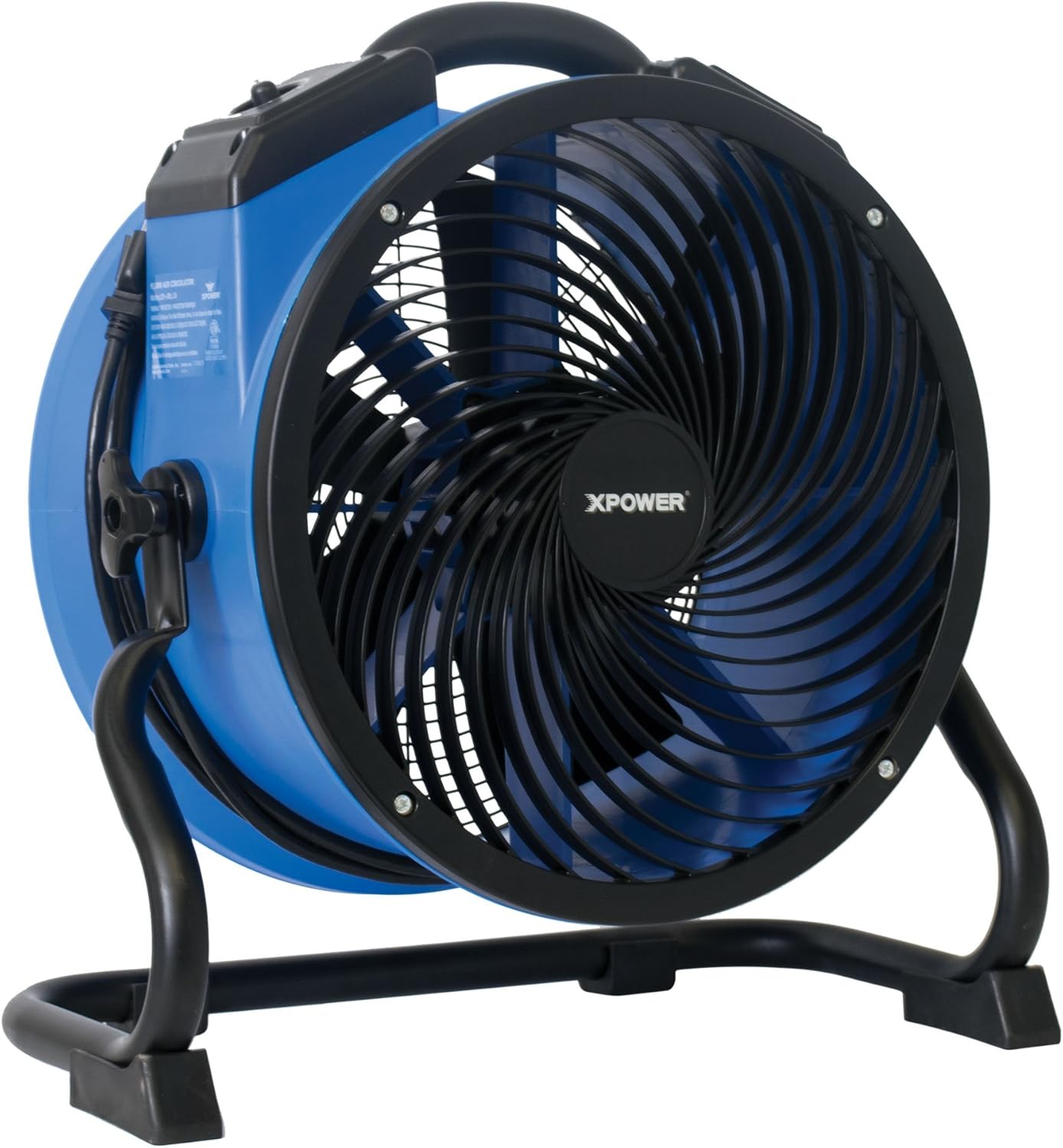
Image: The XPOWER FC-300 Air Circulator Utility Fan, showcasing its blue and black housing with a sturdy stand.
பாதுகாப்பு தகவல்
Please read and understand all safety instructions before operating the XPOWER FC-300. Failure to follow these instructions may result in electric shock, fire, or serious injury.
- எப்போதும் யூனிட்டை சரியாக தரையிறக்கப்பட்ட மின் நிலையத்துடன் இணைக்கவும்.
- சேதமடைந்த கம்பி அல்லது பிளக் மூலம் எந்த மின்விசிறியையும் இயக்க வேண்டாம். மின்விசிறியை நிராகரிக்கவும் அல்லது தேர்வு மற்றும்/அல்லது பழுதுபார்ப்பதற்காக அங்கீகரிக்கப்பட்ட சேவை வசதிக்கு திரும்பவும்.
- கார்பெட்டின் கீழ் தண்டு ஓடாதே. த்ரோ விரிப்புகள், ஓட்டப்பந்தயங்கள் அல்லது அதுபோன்ற உறைகளால் கம்பியை மூட வேண்டாம். ட்ராஃபிக் பகுதியிலிருந்து விலகி, அது தடம் புரளாமல் இருக்கும் இடத்தில் தண்டு அமைக்கவும்.
- செயல்பாட்டின் போது குழந்தைகள் மற்றும் செல்லப்பிராணிகளை அலகுக்கு அருகில் இருந்து விலக்கி வைக்கவும்.
- Do not insert fingers or foreign objects into the grille or any openings.
- யூனிட்டை சர்வீஸ் செய்வதற்கு அல்லது சுத்தம் செய்வதற்கு முன் மின்சாரத்தை துண்டிக்கவும்.
- This unit is ETL / CETL safety certified, indicating compliance with recognized safety standards.
தயாரிப்பு முடிந்துவிட்டதுview
The XPOWER FC-300 is designed for optimal air circulation and durability. Key components include:
- நீடித்த வீடுகள்: Injection-molded for resilience.
- கண்ட்ரோல் பேனல்: Features a 4-speed operating switch and a 3-hour timer.
- Rugged Rack/Stand: Allows for 360-degree rotational angle adjustment.
- Grab-N-Go Handle: எளிதான பெயர்வுத்திறனுக்காக.
- Heavy-Duty Wrap-Around Cord Design: வசதியான சேமிப்பு மற்றும் போக்குவரத்துக்கு.

படம்: முன்பக்கம் view of the XPOWER FC-300, highlighting the fan blades and protective grille.
அமைவு
- பேக்கிங்: Carefully remove the FC-300 from its packaging. Inspect the unit for any signs of damage.
- இடம்: Place the unit on a stable, level surface. Ensure there are no obstructions to the airflow intake or exhaust.
- மின் இணைப்பு: Plug the 10-foot heavy-duty power cord into a standard, grounded electrical outlet.
- சரிசெய்யும் கோணம்: The FC-300 features a rugged rack/stand that allows for a 360-degree rotational angle. Loosen the knobs on the side of the stand, adjust the fan to the desired angle, and then tighten the knobs securely.

படம்: பக்கம் view of the FC-300 demonstrating its ability to rotate 360 degrees on its stand, indicated by arrows.
இயக்க வழிமுறைகள்
கண்ட்ரோல் பேனல்
The control panel is located on the top of the unit and includes a speed selector and a timer knob.

Image: Close-up of the FC-300's control panel, showing the rotary switch for OFF and speeds 1-4, and the timer knob.
சக்தி மற்றும் வேகக் கட்டுப்பாடு
- To turn the unit ON, rotate the speed selector knob from 'OFF' to your desired speed setting (1-4).
- Speed 1 provides the lowest airflow, while Speed 4 provides the maximum 2100 CFM airflow.
- To turn the unit OFF, rotate the speed selector knob back to 'OFF'.
டைமர் செயல்பாடு
The FC-300 is equipped with a 3-hour 'Set-N-Forget' timer. Rotate the timer knob to set the desired operating duration up to 3 hours. The unit will automatically shut off once the set time has elapsed.
Airflow Applications
The FC-300's advanced air fin guide technology and 360-degree directional airflow make it versatile for various applications:
- Focused Airflow: The unique grille design creates a focused airflow that can travel up to 170 feet, ideal for directing air to specific areas.

Image: Diagram showing the FC-300 generating a focused air stream that extends up to 170 feet.
- Whole Room Circulation: Position the fan to bounce air off walls to ensure air reaches every corner of a room, preventing stale or stagஇல்லாத காற்று.

Image: Diagram depicting how the FC-300 can be used to circulate air throughout a room by directing airflow to rebound off walls.
- Drying and Ventilation: For faster drying, position the fan to constantly recirculate air, creating a consistent stream of airflow. For ventilation, direct the airflow towards an open window or door.

Image: Diagram showing the FC-300 recirculating air to create a gentle and consistent airflow, which helps shorten drying times.
- Floor Drying: Point the fan downward to dry areas around the fan up to 85 feet in diameter.

Image: Diagram showing the FC-300 directed downwards to dry a circular area on the floor up to 85 feet in diameter.

Image: The FC-300 positioned on a tiled floor, demonstrating its compact size and utility in a typical setting.
பராமரிப்பு
Regular maintenance ensures optimal performance and longevity of your FC-300.
- சுத்தம்: சுத்தம் செய்வதற்கு முன் யூனிட்டை மின்சாரத்திலிருந்து துண்டிக்கவும். மென்மையான, டி கம்பியைப் பயன்படுத்தவும்.amp cloth to wipe down the exterior housing. For the fan blades and grille, use a brush or vacuum cleaner to remove dust and debris. Do not use harsh chemicals or abrasive cleaners.
- சேமிப்பு: The FC-300 features a lightweight and compact injection molded housing that allows units to be stacked up to 5 high for easy storage. Utilize the wrap-around cord design to secure the power cord neatly before storing.
- ஆய்வு: Periodically inspect the power cord and plug for any damage. If damage is found, discontinue use and contact customer support.
சரிசெய்தல்
If you encounter issues with your FC-300, refer to the following common troubleshooting steps:
| பிரச்சனை | சாத்தியமான காரணம் | தீர்வு |
|---|---|---|
| அலகு இயக்கப்படவில்லை | No power supply; Power cord not fully plugged in; Circuit breaker tripped | மின் நிலையத்தைச் சரிபார்க்கவும்; கம்பி பாதுகாப்பாக இணைக்கப்பட்டுள்ளதா என்பதை உறுதிப்படுத்தவும்; சர்க்யூட் பிரேக்கரை மீட்டமைக்கவும். |
| குறைக்கப்பட்ட காற்றோட்டம் | Intake or exhaust blocked; Fan blades dirty | Clear obstructions; Clean fan blades and grille |
| செயல்பாட்டின் போது அசாதாரண சத்தம் | Loose components; Debris inside unit | Turn off and unplug the unit. Carefully inspect for loose parts or debris and remove if safe to do so. If noise persists, contact customer support. |
If these steps do not resolve the issue, please contact XPOWER customer service for further assistance.
விவரக்குறிப்புகள்
| அம்சம் | விவரம் |
|---|---|
| மாதிரி பெயர் | எஃப்சி-300 |
| காற்று ஓட்டம் திறன் | நிமிடத்திற்கு 2100 கன அடி (CFM) |
| சக்தி ஆதாரம் | கம்பியூட்டப்பட்ட மின்சாரம் |
| வாட்tage | 100W (1.5 Amps) |
| தொகுதிtage | 220 வோல்ட் |
| சக்தி நிலைகளின் எண்ணிக்கை | 4 |
| டைமர் | 3-hour Set-N-Forget |
| தயாரிப்பு பரிமாணங்கள் (அளவு x அளவு x அளவு) | 18.6" x 19.2" x 9.4" |
| பொருளின் எடை | 13 பவுண்டுகள் |
| கேபிள் நீளம் | 10 அடி |
| நிறம் | கருப்பு, நீலம் |
| சான்றிதழ்கள் | ETL / CETL பாதுகாப்பு சான்றளிக்கப்பட்டது |
உத்தரவாதம் மற்றும் ஆதரவு
உத்தரவாதம்
The XPOWER FC-300 comes with a 1 வருட வரையறுக்கப்பட்ட உத்தரவாதம் வாங்கிய தேதியிலிருந்து. இந்த உத்தரவாதமானது சாதாரண பயன்பாட்டின் கீழ் பொருட்கள் மற்றும் வேலைப்பாடுகளில் உள்ள குறைபாடுகளை உள்ளடக்கும். உத்தரவாதக் கோரிக்கைகளுக்கு உங்கள் வாங்கியதற்கான ஆதாரத்தை வைத்திருங்கள்.
வாடிக்கையாளர் ஆதரவு
For any questions, technical assistance, or warranty inquiries, please contact XPOWER's California-based customer service team. They are available to provide comprehensive support and ensure a satisfactory customer experience.
Contact information can typically be found on the official XPOWER webதளத்தில் அல்லது தயாரிப்பு பேக்கேஜிங்கில்.


