1. அறிமுகம் மற்றும் முடிந்துவிட்டதுview
The Dio DiOCAMRI01 is an advanced 360° HD WiFi camera designed for indoor surveillance, offering comprehensive monitoring while prioritizing user privacy. This camera features a motorized lens, 1080p resolution, and infrared night vision, ensuring clear visuals day and night. Its unique geo-fencing capability automatically activates a privacy mode when you are home, retracting the lens to ensure your personal space remains private. The camera also includes motion and noise detection, two-way audio communication, and local recording options via a Micro SD card.
This manual provides essential information for the proper installation, operation, and maintenance of your DiOCAMRI01 camera.
2. பாதுகாப்பு தகவல்
- பயன்படுத்துவதற்கு முன் அனைத்து வழிமுறைகளையும் கவனமாக படிக்கவும்.
- சாதனத்துடன் வழங்கப்பட்ட பவர் அடாப்டரை மட்டுமே பயன்படுத்தவும்.
- கேமராவை தண்ணீர், ஈரப்பதம் அல்லது அதிக வெப்பநிலைக்கு வெளிப்படுத்த வேண்டாம்.
- கேமராவை வெப்ப மூலங்களுக்கு அருகில் அல்லது நேரடி சூரிய ஒளியில் வைப்பதைத் தவிர்க்கவும்.
- கேமராவை நீங்களே பிரிக்கவோ அல்லது சரிசெய்யவோ முயற்சிக்காதீர்கள். அனைத்து சேவைகளையும் தகுதிவாய்ந்த பணியாளர்களிடம் பரிந்துரைக்கவும்.
- Ensure the camera is securely mounted if using wall or ceiling installation.
3. தொகுப்பு உள்ளடக்கங்கள்
உங்கள் தொகுப்பில் அனைத்து கூறுகளும் உள்ளனவா என்பதைச் சரிபார்க்கவும்:
- DiOCAMRI01 HD WiFi Camera
- பவர் அடாப்டர்
- Mounting Kit (screws, wall plugs, mounting bracket)
- பயனர் கையேடு (இந்த ஆவணம்)
4. தயாரிப்பு அம்சங்கள்
- தொலை கண்காணிப்பு: Day and night vision (infrared night vision up to 10m).
- Wide-Angle Motorized Lens: Offers 360° horizontal and 150° vertical rotation for comprehensive coverage.
- தனியுரிமை பாதுகாப்பு: Geo-fencing feature automatically puts the camera in standby mode and closes the lens when the owner is present. Manual standby mode is also available via the app.
- Motion and Noise Detection: Adjustable sensitivity with 3 levels. Sends direct notifications to your smartphone.
- இருவழி ஆடியோ: Built-in microphone and intercom function allow you to hear and speak through the camera.
- உள்ளூர் பதிவு: Supports Micro SD card (up to 128GB, not included) for manual or automatic recording upon detection. Remote viewing of recordings is available via the smartphone app.
- எளிதான அமைவு: Quick and intuitive installation via the DiO Cam+ mobile application.
- நெகிழ்வான மவுண்டிங்: Designed for discreet integration, can be mounted on a wall, ceiling, or placed on a shelf.
5 அமைவு
5.1 ஆரம்ப அமைப்பு
- மின் இணைப்பு: Connect the camera to a power outlet using the provided power adapter. The camera will power on.
- Download DiO Cam+ App: தேடுங்கள் "DiO Cam+" in your smartphone's app store (iOS or Android) and download the application.
- பதிவு/உள்நுழை: Open the app and follow the on-screen instructions to create an account or log in if you already have one.
- கேமராவைச் சேர்: Within the DiO Cam+ app, select the option to add a new device. Follow the in-app wizard to connect your camera to your Wi-Fi network. This typically involves scanning a QR code on the camera or entering Wi-Fi credentials.
- இடம்: Position the camera in your desired location. It can be placed on a flat surface, or mounted on a wall or ceiling using the included mounting kit. Ensure the camera has a clear line of sight to the area you wish to monitor.
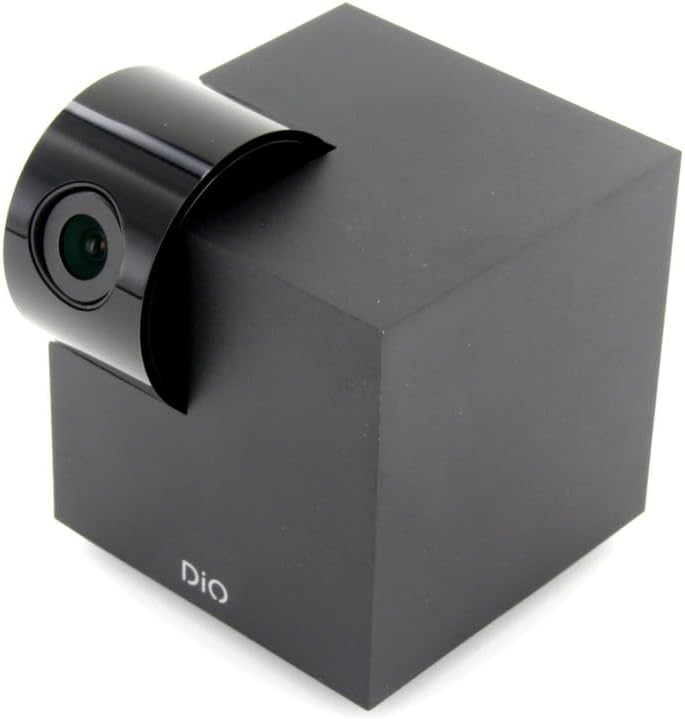
Figure 5.1: The DiOCAMRI01 camera in its standard upright position.

Figure 5.2: Camera placed on a shelf, demonstrating discreet integration.

Figure 5.3: Camera mounted on a ceiling for overhead surveillance.
5.2 மைக்ரோ SD கார்டு நிறுவல் (விருப்பத்தேர்வு)
To enable local video recording, insert a Micro SD card (up to 128GB, not included) into the designated slot on the camera. Ensure the camera is powered off before inserting or removing the card.
5.3 கேமரா அணுகலைப் பகிர்தல்
The DiO Cam+ app allows you to easily share access to your camera with family members or trusted friends. Navigate to the camera settings within the app and select the sharing option to invite others to view நேரடி ஒளிபரப்பு மற்றும் பதிவுகள்.
6. இயக்க வழிமுறைகள்
6.1 நேரலை View மற்றும் ரிமோட் கண்ட்ரோல்
Once connected, open the DiO Cam+ app to access the live video feed from your camera. From the live view screen, you can:
- சரிசெய்யவும் View கோணம்: Use the on-screen controls to remotely rotate the camera lens up to 350° horizontally and 150° vertically to cover all corners of your room.
- இருவழி ஆடியோ: Tap the microphone icon to speak through the camera's speaker, and listen to audio from the camera's microphone.
- Take Snapshots/Record Video: Capture still images or start manual video recordings directly from the live view.

Figure 6.1: Camera interacting with the DiO Cam+ smartphone application.

படம் 6.2: பக்கம் view of the camera, highlighting the rotating lens mechanism.
6.2 Privacy Features (Geo-Fencing and Manual Standby)
The DiOCAMRI01 camera offers advanced privacy protection:
- Geo-Fencing: Configure geo-fencing in the app to automatically switch the camera to privacy mode when your smartphone enters a predefined home zone. In privacy mode, the camera lens will retract, ensuring no recording or live viewing ஏற்படுகிறது.
- Manual Standby: You can manually activate or deactivate the camera's standby mode (privacy mode) at any time through the DiO Cam+ app.
- Scheduled Standby: Set a schedule within the app for the camera to automatically enter or exit standby mode at specific times.

Figure 6.3: Camera with lens retracted, indicating privacy mode.
6.3 Motion and Noise Detection
The camera can detect motion and noise within its field of view. When triggered, it will send a notification to your smartphone and can automatically begin recording to the Micro SD card.
- உணர்திறன் சரிசெய்தல்: Adjust the detection sensitivity (3 levels) in the app settings to minimize false alarms.
- பதிவு விருப்பங்கள்: Configure recording duration (1, 3, or 5 minutes per clip) or continuous recording if a Micro SD card is installed.
7. பராமரிப்பு
- சுத்தம்: Use a soft, dry cloth to clean the camera body and lens. Do not use liquid cleaners or abrasive materials.
- மென்பொருள் புதுப்பிப்புகள்: Regularly check the DiO Cam+ app for firmware updates to ensure optimal performance and security. Follow the in-app instructions for any available updates.
- மைக்ரோ எஸ்டி கார்டு மேலாண்மை: அவ்வப்போது மறுview and manage recordings on your Micro SD card. Format the card through the app if necessary to maintain performance.
8. சரிசெய்தல்
- கேமரா ஆஃப்லைன்: Ensure the camera is powered on and connected to your Wi-Fi network. Check your Wi-Fi router and internet connection. Try restarting the camera and your router.
- பயன்பாட்டுடன் இணைக்க முடியவில்லை: Verify your Wi-Fi password. Ensure your smartphone is connected to a 2.4GHz Wi-Fi network during initial setup, as the camera may not support 5GHz networks.
- மோசமான வீடியோ தரம்: Check your internet connection speed. Ensure the camera lens is clean and free from obstructions. Adjust camera placement for optimal lighting.
- Motion/Noise Detection Not Working: Check the sensitivity settings in the app. Ensure the detection zones are correctly configured.
- No Recording to SD Card: Ensure the Micro SD card is correctly inserted and formatted. Check if the card is full. The camera supports up to 128GB.
- Privacy Mode Not Activating: Verify that geo-fencing is enabled and configured correctly in the app, and that your smartphone's location services are active.
9. விவரக்குறிப்புகள்
| அம்சம் | விவரக்குறிப்பு |
|---|---|
| மாதிரி எண் | DIOCAM-RI01 |
| மவுண்டிங் வகை | சுவர் மவுண்ட் |
| வீடியோ பிடிப்பு தீர்மானம் | 1080p |
| நிறம் | வெள்ளை |
| பொருட்களின் எண்ணிக்கை | 1 |
| உள்ளிட்ட கூறுகள் | DiOCAMRI01 WiFi HD 360° Rotating 1080P 2MP Camera with Geo-Fencing |
| வயர்லெஸ் கம்யூனிகேஷன் டெக்னாலஜி | Wi-Fi |
| படிவம் காரணி | Dome (Cube with rotating lens) |
| பயனுள்ள வீடியோ தீர்மானம் | 1080 |
| Viewing கோணம் | 360 டிகிரி (கிடைமட்ட) |
| நைட் விஷன் ரேஞ்ச் | 10 மீட்டர் |
| பொருள் | உலோகம் |
| தொகுதிtage | 5 வோல்ட் |
| வாட்tage | 5 வாட்ஸ் |
| பொருளின் பரிமாணங்கள் (L x W x H) | 9.4 x 4.9 x 31.9 சென்டிமீட்டர்கள் |
| உற்பத்தியாளர் | சாக்கான் |
| சிறப்பு அம்சங்கள் | Local Recording, Night Vision |
| பேட்டரிகள் சேர்க்கப்பட்டுள்ளது | இல்லை |
| பேட்டரிகள் தேவை | இல்லை |
| பரிந்துரைக்கப்பட்ட பயன்பாடுகள் | Motion Detection, Night Vision |
| இணைப்பு தொழில்நுட்பம் | வயர்லெஸ் |
| உட்புறம்/வெளிப்புற பயன்பாடு | உட்புறம் |
| இணக்கமான சாதனங்கள் | ஸ்மார்ட்போன் |
| சக்தி ஆதாரம் | Battery Powered (Note: Product specs indicate 'No batteries required', implying external power) |
| இணைப்பு நெறிமுறை | Wi-Fi |
| கட்டுப்படுத்தி வகை | அண்ட்ராய்டு |
10. உத்தரவாதம் மற்றும் ஆதரவு
For information regarding warranty coverage, technical support, or service, please refer to the official Dio webஉங்கள் கொள்முதல் மையத்தைத் தொடர்பு கொள்ளவும் அல்லது தளத்திற்குச் செல்லவும். உத்தரவாதக் கோரிக்கைகளுக்கு உங்கள் வாங்கியதற்கான ஆதாரத்தை வைத்திருங்கள்.
உற்பத்தியாளர்: சாக்கான்


