1. அறிமுகம்
The SABRENT 4-Bay USB 3.0 Docking Station (DS-U3B4) provides a convenient solution for accessing and managing multiple 2.5-inch or 3.5-inch SATA SSDs and HDDs. This tool-free, trayless design supports simultaneous operation of up to four drives and offers high-speed data transfer via USB 3.2 Gen 1 (5Gbps). It is compatible with Windows, macOS, and Linux systems, requiring no additional drivers for basic functionality. The docking station also features an offline cloning function for direct drive duplication without a computer connection.

Image: The SABRENT 4-Bay USB 3.0 Docking Station, a black rectangular device with four top-loading bays for hard drives and LED indicators on the front.
2. தொகுப்பு உள்ளடக்கங்கள்
- SABRENT 4-Bay USB 3.0 Docking Station (DS-U3B4)
- USB கேபிள்
- Power Adapter (Input 100–240V~50/60Hz, Output 12V/6.5A)
- பயனர் கையேடு
3. தயாரிப்பு அம்சங்கள்
- Four-Bay SATA Access: Supports up to four 2.5-inch or 3.5-inch SATA SSDs or HDDs simultaneously.
- கருவி இல்லாத நிறுவல்: Quickly insert or remove drives without tools or trays.
- Fast USB 3.2 Performance: Data transfer speeds up to 5Gbps via USB 3.2 Gen 1. Backward compatible with USB 2.0.
- Trayless Hot-Swap Design: Drives can be swapped without system reboot.
- உலகளாவிய இணக்கத்தன்மை: Works with Windows, macOS, and Linux systems without drivers.
- Independent Power Switches: Each bay has its own independent power switch and LED status indicator.
- ஆஃப்லைன் குளோனிங்: Duplicate drives directly from source to target without a computer connection.
4. அமைவு வழிமுறைகள்
- பவர் இணைக்கவும்: Plug the provided power adapter into the DC IN port on the back of the docking station and then into a wall outlet.
- USB இணைக்க: Connect the provided USB cable from the USB 3.0 port on the back of the docking station to an available USB 3.0 (or higher) port on your computer.
- Set PC/CLONE Switch: Ensure the PC/CLONE switch on the back of the docking station is set to the "PC" position for computer connectivity.
- டிரைவ்களைச் செருகவும்: With the docking station powered off, carefully insert your 2.5-inch or 3.5-inch SATA SSDs/HDDs into the available bays. Ensure they are seated firmly.
- பவர் ஆன்: Flip the ON/OFF switch on the back of the docking station to the "ON" position. The power LED and individual bay LEDs should illuminate, indicating successful connection.

Image: The SABRENT 4-Bay USB 3.0 Docking Station with 2.5-inch SSDs and 3.5-inch HDDs inserted into its bays.
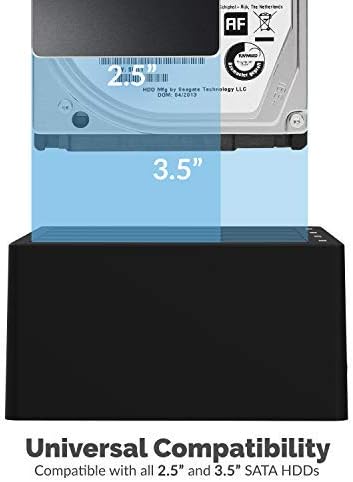
Image: A 3.5-inch hard drive being inserted into a bay of the docking station, illustrating universal compatibility.

Image: Close-up of the back panel of the docking station, highlighting the USB 3.0 port, DC IN port, and ON/OFF switch.
5. இயக்க வழிமுறைகள்
5.1. Data Transfer Mode (PC Mode)
- Ensure the docking station is set up as described in Section 4.
- Your operating system should automatically detect the inserted drives. They will appear as individual external drives.
- You can now access, read, write, and transfer data to and from the drives as you would with any other external storage device.
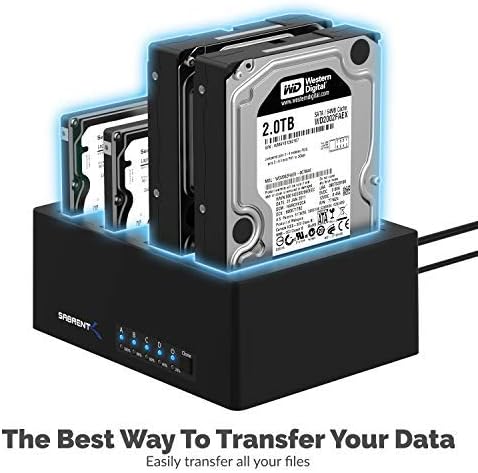
Image: The SABRENT 4-Bay USB 3.0 Docking Station with multiple hard drives, illustrating its use for data transfer.
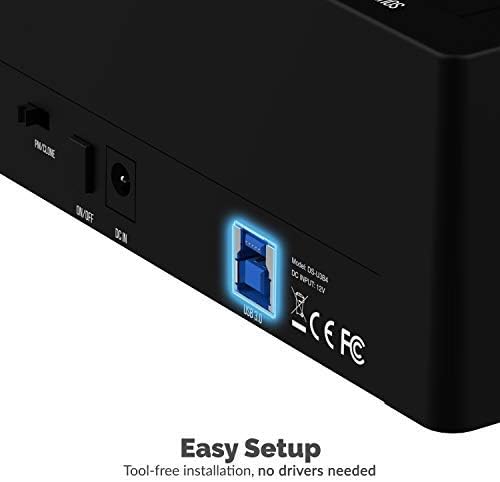
Image: A visual representation of data being transferred at 5Gbps from the docking station to a computer.
5.2. Offline Cloning Function
The offline cloning feature allows you to duplicate a source drive to a target drive without connecting to a computer. The target drive must have equal or greater capacity than the source drive.
- பவர் ஆஃப்: Ensure the docking station is powered off.
- டிரைவ்களைச் செருகவும்: செருகவும் மூல இயக்கி into Bay A (marked "SOURCE A"). Insert the இலக்கு இயக்கி into Bay B (marked "TARGET B").
- Set PC/CLONE Switch: Slide the PC/CLONE switch on the back of the docking station to the "CLONE" position.
- Start Cloning: Press and hold the "CLONE" button on the front of the docking station for approximately 3-5 seconds until the 20% LED indicator starts flashing. Release the button.
- குளோனிங்கை உறுதிப்படுத்தவும்: Press the "CLONE" button again briefly to confirm and start the cloning process. The LED indicators (25%, 50%, 75%, 100%) will illuminate sequentially to show the cloning progress.
- நிறைவு: The cloning process is complete when all four LED indicators (25%, 50%, 75%, 100%) remain steadily lit.
- Power Off & Remove: Power off the docking station and carefully remove the cloned drives.
Video: An official product video demonstrating the offline cloning feature of the SABRENT 4-Bay USB 3.0 Docking Station. It shows how to insert drives, activate the clone mode, and monitor the progress via LED indicators.
6. பராமரிப்பு
- டாக்கிங் ஸ்டேஷனை சுத்தமாகவும் தூசி இல்லாமல் வைத்திருக்கவும். சுத்தம் செய்ய மென்மையான, உலர்ந்த துணியைப் பயன்படுத்தவும்.
- சாதனத்தை அதிக வெப்பநிலை அல்லது ஈரப்பதத்திற்கு வெளிப்படுத்துவதைத் தவிர்க்கவும்.
- அலகை நீங்களே பிரிக்கவோ அல்லது சரிசெய்யவோ முயற்சிக்காதீர்கள். தகுதிவாய்ந்த சேவை பணியாளர்களைப் பார்க்கவும்.
7. சரிசெய்தல்
- கண்டறியப்படாத இயக்கிகள்:
- Ensure all power and USB cables are securely connected.
- Verify the ON/OFF switch is in the "ON" position.
- Check that the PC/CLONE switch is set to "PC" for computer access.
- Ensure drives are properly seated in their bays.
- உங்கள் கணினியில் வேறு USB போர்ட்டுடன் இணைக்க முயற்சிக்கவும்.
- மெதுவான பரிமாற்ற வேகம்:
- Ensure the docking station is connected to a USB 3.0 (or higher) port on your computer.
- Verify your drives are capable of USB 3.0 speeds.
- Offline Cloning Fails:
- Confirm the target drive has equal or greater capacity than the source drive.
- Ensure the PC/CLONE switch is set to "CLONE".
- Follow the cloning steps precisely, including pressing and holding the clone button, then pressing again to confirm.
8. விவரக்குறிப்புகள்
| அம்சம் | விவரக்குறிப்பு |
|---|---|
| மாதிரி எண் | DS-U3B4 |
| பொருள் | பிளாஸ்டிக் |
| இணக்கமான டிரைவ் வகைகள் | 2.5" / 3.5" SATA SSD/HDD |
| ஆதரிக்கப்படும் சாதனங்களின் அதிகபட்ச எண்ணிக்கை | 4 |
| தரவு பரிமாற்ற வீதம் | 5Gbps வரை (USB 3.2 ஜெனரல் 1) |
| வன்பொருள் இடைமுகம் | USB 3.0 |
| பவர் சப்ளை உள்ளீடு | 100–240V~50/60Hz |
| பவர் சப்ளை வெளியீடு | 12V/6.5A |
| இணக்கமான இயக்க முறைமைகள் | விண்டோஸ், மேகோஸ், லினக்ஸ் |
| தயாரிப்பு பரிமாணங்கள் | 6.3 x 4.72 x 2.76 அங்குலம் |
| பொருளின் எடை | 1 பவுண்டுகள் |
9. உத்தரவாதம் மற்றும் ஆதரவு
SABRENT products are designed for reliability and performance. For warranty information, technical support, or further assistance, please refer to the official SABRENT webதளத்தில் அல்லது அவர்களின் வாடிக்கையாளர் சேவையை நேரடியாகத் தொடர்பு கொள்ளவும். உத்தரவாதக் கோரிக்கைகளுக்கு உங்கள் கொள்முதல் ரசீதை வைத்திருங்கள்.


