அறிமுகம்
This manual provides detailed instructions for the setup, operation, and maintenance of your PROMETHEAN PRM-35 Short-Throw DLP Home Theater Projector. Please read this manual thoroughly before using the projector to ensure proper operation and to extend the life of your device. Keep this manual for future reference.
பாதுகாப்பு தகவல்
தீ, மின்சார அதிர்ச்சி அல்லது காயம் ஏற்படாமல் இருக்க பின்வரும் பாதுகாப்பு முன்னெச்சரிக்கை நடவடிக்கைகளைக் கவனியுங்கள்:
- காற்றோட்ட திறப்புகளை அடைக்காதீர்கள். சரியான காற்றோட்டத்திற்காக ப்ரொஜெக்டரைச் சுற்றி போதுமான இடத்தை உறுதி செய்யுங்கள்.
- மழை அல்லது ஈரப்பதத்தில் ப்ரொஜெக்டரை வெளிப்படுத்த வேண்டாம்.
- ப்ரொஜெக்டரைத் திறக்க வேண்டாம் casing. அனைத்து சேவைகளையும் தகுதிவாய்ந்த சேவை பணியாளர்களிடம் பரிந்துரைக்கவும்.
- ப்ரொஜெக்டர் லென்ஸை நேரடியாகப் பார்ப்பதைத் தவிர்க்கவும்amp பிரகாசமான ஒளி உங்கள் கண்களைப் பாதிக்கக்கூடும் என்பதால், இயக்கத்தில் உள்ளது.
- Use only the power cord supplied with the projector or a suitable replacement.
- Unplug the projector from the power outlet before cleaning or when not in use for extended periods.
தொகுப்பு உள்ளடக்கங்கள்
உங்கள் தொகுப்பில் அனைத்து பொருட்களும் உள்ளதா என சரிபார்க்கவும்:
- PROMETHEAN PRM-35 Projector
- பவர் கார்ட்
- ரிமோட் கண்ட்ரோல்
- HDMI Cable (may vary by region/bundle)
- பயனர் கையேடு (இந்த ஆவணம்)

Image: The PROMETHEAN PRM-35 projector shown alongside its remote control, power cord, and an HDMI cable, illustrating the typical package contents.
தயாரிப்பு முடிந்துவிட்டதுview
முன் View

படம்: முன்பக்கம் view of the PROMETHEAN PRM-35 projector, highlighting the lens, brand logo, and various certifications.
The front of the projector features the main projection lens, which includes manual focus and digital zoom capabilities. The PROMETHEAN logo and other product identifiers are also visible.
பின்புறம் View (Connectivity Ports)
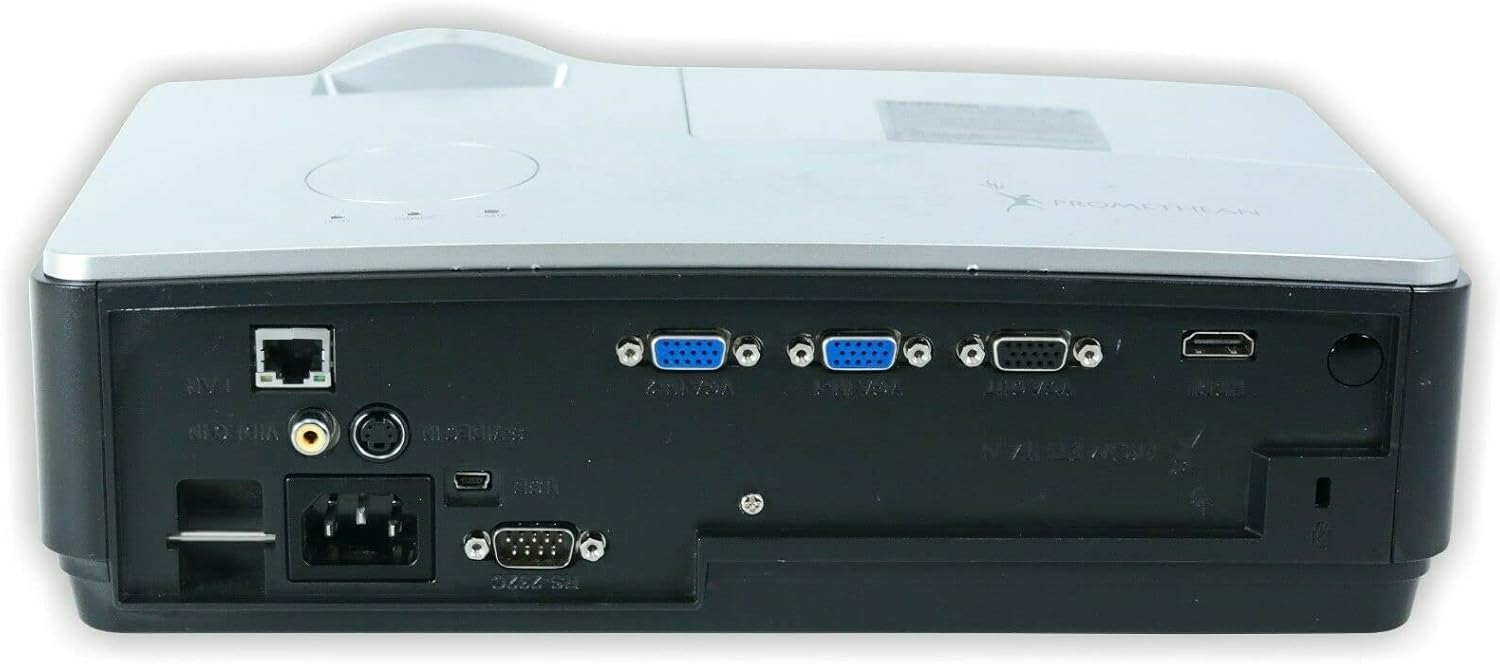
படம்: பின்புறம் view of the PROMETHEAN PRM-35 projector, displaying a variety of input and output ports including HDMI, VGA, USB, S-Video, and network connections.
The rear panel provides all the necessary input and output ports for connecting to various devices. These include HDMI, VGA, S-Video, USB Mini Type-A, RS232, RJ-45 (LAN), and audio jacks.
பக்கம் Views (Ventilation)

படம்: பக்கம் view of the PROMETHEAN PRM-35 projector, showing the ventilation grilles for heat dissipation.

படம்: இன்னொரு பக்கம் view of the PROMETHEAN PRM-35 projector, also featuring ventilation grilles.
Both sides of the projector feature ventilation grilles to ensure proper airflow and prevent overheating. It is crucial to keep these vents unobstructed during operation.
மேல் View
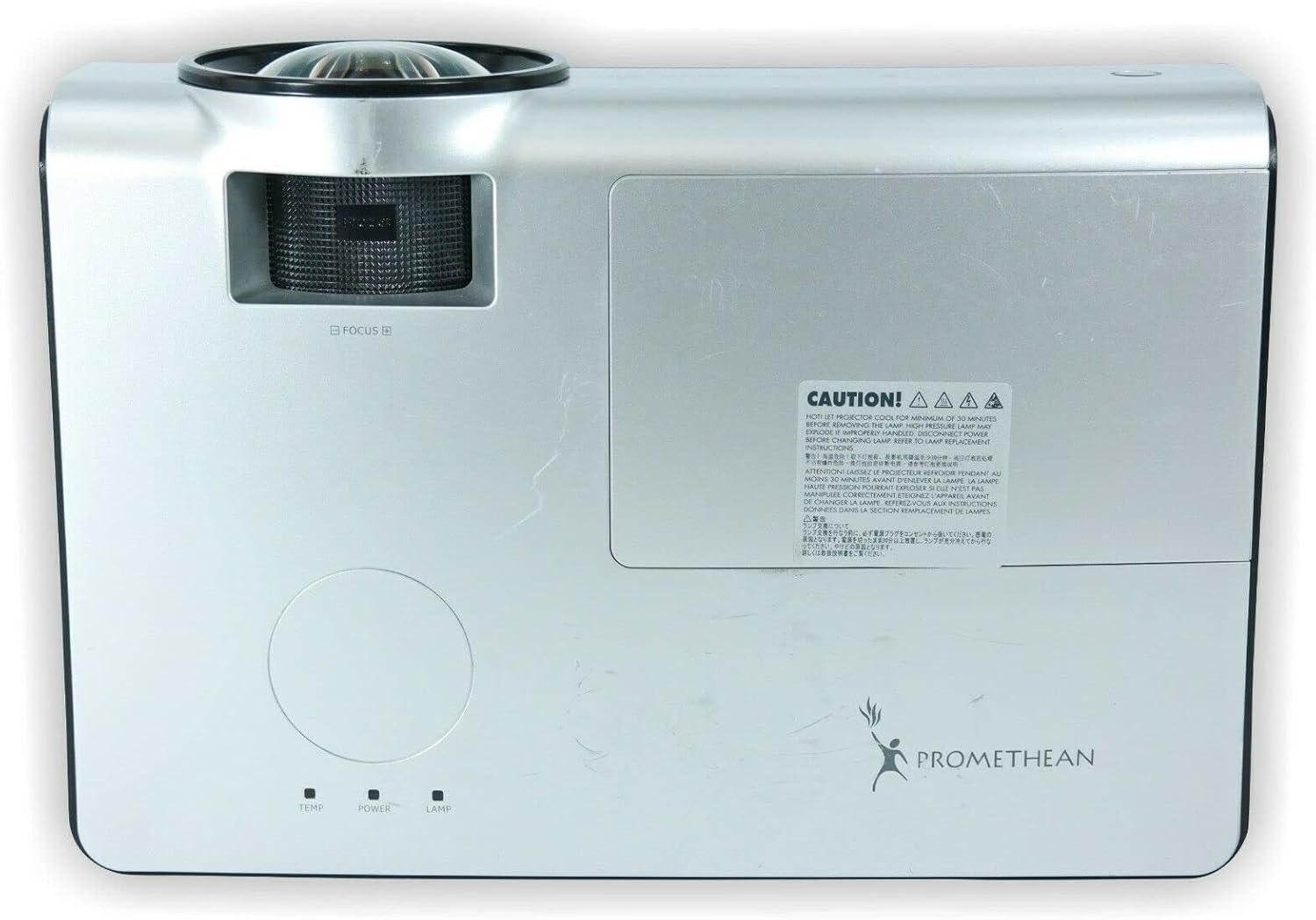
படம்: மேல் view of the PROMETHEAN PRM-35 projector, showing the control panel area and lamp அணுகல் கவர்.
The top panel includes indicator lights for temperature, power, and lamp status, along with a caution label regarding lamp வெப்பம்.
கீழே View

படம்: கீழே view of the PROMETHEAN PRM-35 projector, showing mounting points and regulatory labels.
The bottom of the projector features mounting points for ceiling or table top projection, along with product information and regulatory compliance labels.
அமைவு
1. வேலை வாய்ப்பு
Position the projector on a stable, flat surface or mount it securely. For short-throw projection, place the projector close to the screen. Ensure there is adequate space around the projector for ventilation.
- Table Top Projection: ப்ரொஜெக்டரை திரையின் முன் ஒரு மேசையில் வைக்கவும்.
- Ceiling Projection: Use a compatible ceiling mount (sold separately) and ensure the projector is securely fastened.
- பின்புற ப்ரொஜெக்ஷன்: If your screen supports it, the projector can be placed behind the screen. Adjust settings in the projector menu for rear projection.
2. சக்தியுடன் இணைக்கிறது
- Connect the power cord to the projector's power input port on the rear panel.
- பவர் கார்டின் மறுமுனையை தரையிறக்கப்பட்ட மின் நிலையத்தில் செருகவும்.
- ப்ரொஜெக்டரில் உள்ள பவர் இன்டிகேட்டர் லைட் எரிய வேண்டும்.
3. உள்ளீட்டு மூலங்களை இணைத்தல்
The PRM-35 offers multiple connectivity options:
- , HDMI: For high-definition digital video and audio. Connect an HDMI cable from your source device (e.g., Blu-ray player, game console, PC) to the HDMI port on the projector.
- விஜிஏ: For analog video connection from computers. Connect a VGA cable from your PC to one of the VGA/SVGA D-Sub ports.
- எஸ்-வீடியோ: நிலையான வரையறை வீடியோவிற்கு.
- USB Mini Type-A: For certain data or control functions.
- RS232 (DB-9pin): ப்ரொஜெக்டரின் தொடர் கட்டுப்பாட்டிற்கு.
- RJ-45 (LAN): For network connectivity and control (e.g., Crestron RoomView).
- ஆடியோ: Use the headphone jack for audio output or connect external speakers if desired.
4. Focus and Digital Zoom Adjustment
Once the projector is powered on and displaying an image:
- கவனம்: Rotate the focus ring around the projector lens until the image appears sharp and clear on the screen.
- டிஜிட்டல் ஜூம்: Use the remote control or projector's on-screen display (OSD) menu to adjust the digital zoom. This feature allows you to enlarge or reduce the image size without moving the projector.
புரொஜெக்டரை இயக்குதல்
ஆன்/ஆஃப்
- பவர் ஆன்: அழுத்தவும் சக்தி button on the projector's control panel or the remote control. The power indicator light will change to solid green.
- பவர் ஆஃப்: அழுத்தவும் சக்தி button again. A confirmation message may appear. Press சக்தி a second time to confirm shutdown. The projector will enter a cooling cycle before fully powering off. Do not unplug the projector during the cooling cycle.
Menu Navigation (OSD)
Use the buttons on the projector's control panel or the remote control to navigate the On-Screen Display (OSD) menu:
- பயன்படுத்தவும் மெனு button to open or close the OSD.
- பயன்படுத்தவும் அம்பு பொத்தான்கள் (மேல், கீழ், இடது, வலது) மெனு விருப்பங்கள் வழியாக செல்ல.
- அழுத்தவும் உள்ளிடவும் or OK ஒரு விருப்பத்தைத் தேர்ந்தெடுக்க அல்லது அமைப்பை உறுதிப்படுத்த பொத்தானை அழுத்தவும்.
- பயன்படுத்தவும் வெளியேறு or மீண்டும் button to return to the previous menu or exit the OSD.
உள்ளீட்டு மூல தேர்வு
இணைக்கப்பட்ட சாதனங்களுக்கு இடையில் மாற:
- அழுத்தவும் ஆதாரம் or உள்ளீடு button on the remote control or projector.
- A list of available input sources will appear on the screen.
- பயன்படுத்தவும் அம்பு buttons to highlight the desired source and press உள்ளிடவும் or OK.
படம் சரிசெய்தல்
Access the Picture menu in the OSD to fine-tune image quality:
- பிரகாசம்: படத்தின் ஒட்டுமொத்த ஒளிர்வு அல்லது இருளைச் சரிசெய்கிறது.
- மாறுபாடு: Controls the difference between the lightest and darkest areas.
- நிறம்: வண்ணங்களின் தீவிரத்தை சரிசெய்கிறது.
- நிறம்: Fine-tunes the color balance (primarily for NTSC video sources).
- கூர்மை: Enhances or softens the edges of objects in the image.
- தோற்ற விகிதம்: Selects the display format (e.g., 16:10, 16:9, 4:3). The native aspect ratio is 16:10.
ஆடியோ அமைப்புகள்
The PRM-35 has built-in speakers. Adjust audio settings via the OSD:
- தொகுதி: Controls the output level of the built-in speakers.
- முடக்கு: Temporarily silences the audio.
3D Modes (PC 3D Ready)
The projector supports PC 3D Ready functionality. To experience 3D content:
- Ensure your PC's graphics card and software support 3D output.
- Use compatible 3D glasses (sold separately).
- Refer to your PC's 3D software instructions for specific setup.
பராமரிப்பு
வழக்கமான பராமரிப்பு உங்கள் ப்ரொஜெக்டரின் உகந்த செயல்திறன் மற்றும் நீண்ட ஆயுளை உறுதி செய்கிறது.
ப்ரொஜெக்டரை சுத்தம் செய்தல்
- வெளிப்புறம்: மென்மையான, பஞ்சு இல்லாத துணியைப் பயன்படுத்தவும்ampened with a mild, non-abrasive cleaner. Do not spray cleaner directly onto the projector.
- லென்ஸ்: Use a professional lens cleaning kit or a soft, dry microfiber cloth specifically designed for optical lenses. Avoid touching the lens with your fingers.
- காற்றோட்டம் திறப்புகள்: Periodically check and gently clean the ventilation grilles to prevent dust buildup, which can impede airflow. Use a soft brush or compressed air (held upright to prevent propellant discharge).
Lamp வாழ்க்கை மற்றும் மாற்றீடு
The PRM-35 projector lamp has a long lifespan, up to 6000 hours. When the lamp அதன் வாழ்க்கையின் முடிவை அடைகிறது, lamp indicator light on the projector will illuminate or flash, and a message may appear on the screen.
Note: This projector features a filter-free design, eliminating the need for filter replacement or cleaning, which reduces maintenance time and cost.
எல்amp replacement, it is recommended to contact qualified service personnel or refer to the detailed lamp replacement guide available from Promethean support.
சேமிப்பு
If storing the projector for an extended period:
- Power off the projector correctly and allow it to cool down completely.
- அனைத்து கேபிள்களையும் துண்டிக்கவும்.
- Store the projector in a cool, dry place, away from direct sunlight and extreme temperatures.
- Use the original packaging or a protective case to prevent dust and damage.
சரிசெய்தல்
This section addresses common issues you might encounter with your PRM-35 projector.
| பிரச்சனை | சாத்தியமான காரணம் | தீர்வு |
|---|---|---|
| திரையில் படம் இல்லை |
|
|
| படம் மங்கலாக உள்ளது |
|
|
| ப்ரொஜெக்டர் அதிக வெப்பமடைகிறது அல்லது அணைகிறது |
|
|
| ரிமோட் கண்ட்ரோல் வேலை செய்யவில்லை |
|
|
விவரக்குறிப்புகள்
| அம்சம் | விவரம் |
|---|---|
| பிராண்ட் | புரோமேதியன் |
| மாதிரி | PRM-35 |
| காட்சி வகை | டி.எல்.பி |
| நேட்டிவ் ரெசல்யூஷன் | 1280x800 |
| படத்தின் பிரகாசம் | 2500 ANSI லுமன்ஸ் |
| மாறுபாடு விகிதம் | 2000:1 |
| தோற்ற விகிதம் | 16:10 (பூர்வீகம்) |
| Video Modes Supported | 720p, 1080i, 1080p |
| 3D முறைகள் | PC 3D Ready |
| தூரத்தை எறியுங்கள் | குறுகிய வீசுதல் |
| இணைப்பு | HDMI, VGA, USB Mini Type-A, RS232, S-Video, RJ-45 (LAN), Headphone Jack |
| சிறப்பு அம்சங்கள் | Portable, Short Throw, 3D-Ready, Closed Captioning, Crestron RoomView, Built-in Speakers, Filter-free design |
| பொருளின் எடை | 6 பவுண்ட் (தோராயமாக) |
| தயாரிப்பு பரிமாணங்கள் | 11 x 12 x 4 அங்குலம் (தோராயமாக) |
| Lamp வாழ்க்கை | 6000 மணி நேரம் வரை |
| இணக்கத்தன்மை | PC and MAC computers |
உத்தரவாதம் மற்றும் ஆதரவு
For information regarding the warranty coverage for your PROMETHEAN PRM-35 projector, please refer to the warranty card included with your purchase or visit the official PROMETHEAN webதளம். உத்தரவாத விதிமுறைகள் பிராந்தியம் மற்றும் சில்லறை விற்பனையாளரைப் பொறுத்து மாறுபடலாம்.
For technical support, service, or to purchase replacement parts, please contact PROMETHEAN customer support through their official channels. You may need your product model number (PRM-35) and serial number when contacting support.
Official PROMETHEAN Webதளம்: www.prometheanworld.com (This is a placeholder link, please refer to actual manufacturer web(ஆதரவுக்கான தளம்.)


