1. அறிமுகம்
This manual provides detailed instructions for the installation, operation, and maintenance of your Anlapus FULL HD 1080P H.265+ Surveillance Kit. This system includes an 8-channel DVR with a pre-installed 1TB hard drive, 4 bullet cameras, and 4 dome cameras, designed to provide comprehensive security monitoring for your property.

Figure 1.1: Anlapus 8-channel DVR surveillance system components.
2. தொகுப்பு உள்ளடக்கங்கள்
கீழே பட்டியலிடப்பட்டுள்ள அனைத்து பொருட்களும் உங்கள் தொகுப்பில் சேர்க்கப்பட்டுள்ளதா என்பதைச் சரிபார்க்கவும். ஏதேனும் பொருட்கள் காணவில்லை அல்லது சேதமடைந்திருந்தால், வாடிக்கையாளர் ஆதரவைத் தொடர்பு கொள்ளவும்.
- 1x 8-Channel DVR (with 1TB HDD pre-installed)
- 4x 1080P Bullet Surveillance Cameras
- 4x 1080P Dome Surveillance Cameras
- 8x 60ft BNC Video Cables
- 3x Power Adapters (12V 2A)
- 2x 1-to-4 Power Splitters
- 1x யூ.எஸ்.பி மவுஸ்
- 1x வழிமுறை கையேடு (இந்த ஆவணம்)
- 8x Mounting Screw Bags
- 8x Warning Stickers

Figure 2.1: Contents of the Anlapus surveillance kit package.
3. தயாரிப்பு அம்சங்கள்
- முழு HD 1080P தீர்மானம்: Captures clear and detailed images with 2.0-megapixel quality.
- மேம்பட்ட H.265+ வீடியோ சுருக்கம்: குறைக்கிறது file sizes by up to 50% compared to H.264, allowing for longer recording times and more efficient storage.
- மேம்படுத்தப்பட்ட இரவு பார்வை: Equipped with 24 IR LEDs and an IR-CUT filter, providing clear black and white night vision up to 24 meters (80 feet).
- IP66 வானிலை எதிர்ப்பு மதிப்பீடு: Cameras are designed for both indoor and outdoor use, capable of withstanding various extreme weather conditions.
- மோஷன் கண்டறிதல் & எச்சரிக்கைகள்: Configurable motion detection zones with instant email alerts and push notifications to your smartphone.
- பல பதிவு முறைகள்: Supports 24/7 continuous recording, motion-activated recording, scheduled recording, and manual recording.
- தொலைநிலை அணுகல்: View live feeds and recorded footage from anywhere using the free mobile application on your smartphone or tablet.
- Pre-installed 1TB Hard Drive: Ready for immediate use, eliminating the need to purchase and install a separate hard drive.

Figure 3.1: Day and Night Vision.
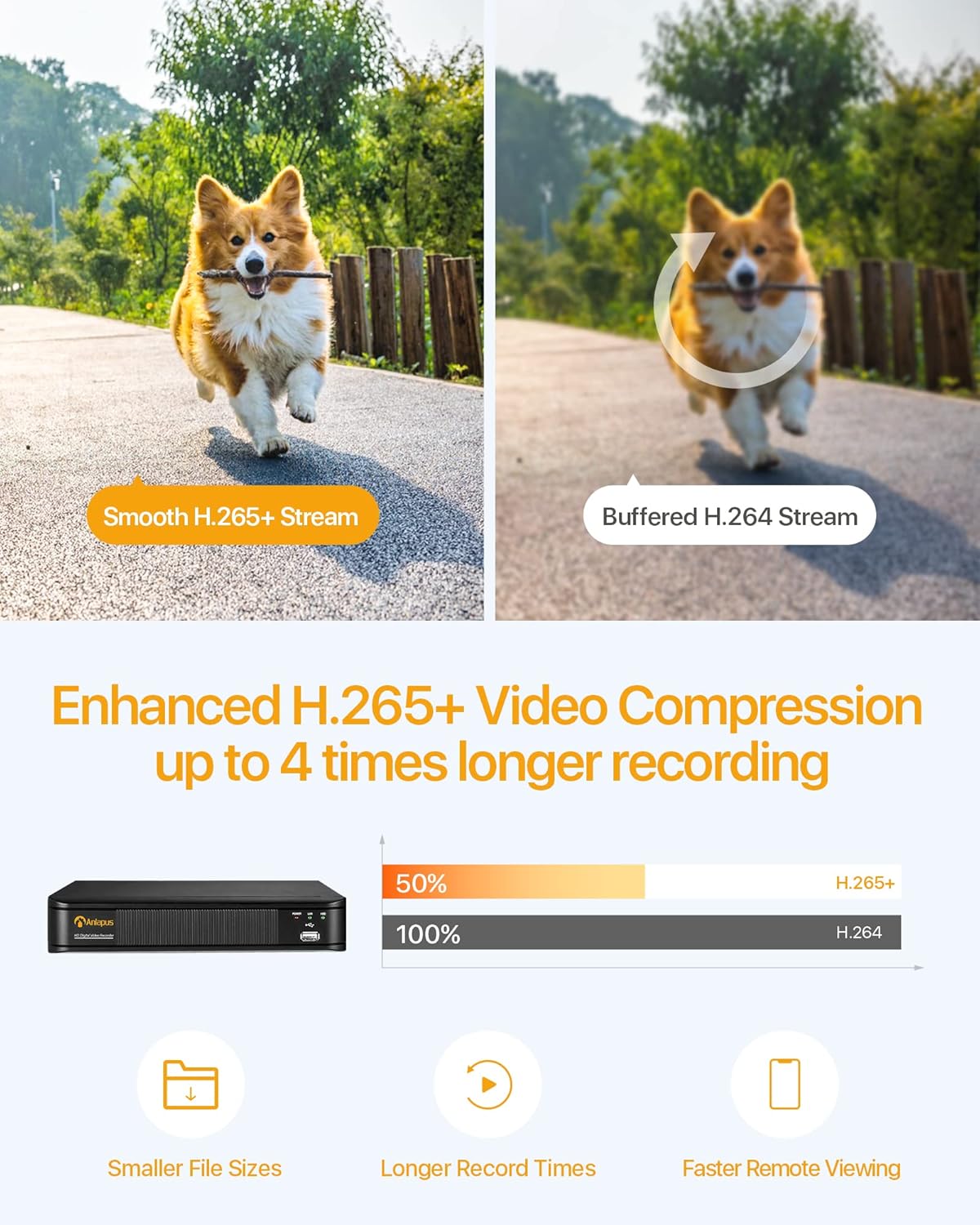
Figure 3.2: H.265+ Video Compression Benefits.

Figure 3.3: Day and Night Surveillance Exampலெ.

Figure 3.4: All-Weather Protection and Applications.
4. கணினி கூறுகள் முடிந்ததுview
4.1 DVR (Digital Video Recorder)
The DVR is the central unit for recording, storing, and managing video footage from all connected cameras. It features multiple video input ports, audio input/output, VGA and HDMI outputs for display, and USB ports for mouse control and data backup.
4.2 Surveillance Cameras
The kit includes both bullet and dome cameras. Both types offer 1080P resolution, night vision capabilities, and IP66 weatherproof housing. Bullet cameras are typically used for directional surveillance, while dome cameras offer a more discreet appearance and are often vandal-resistant.

Figure 4.1: Camera and DVR Connection Diagram.
5. அமைவு வழிகாட்டி
5.1 ஆரம்ப இணைப்பு
- கேமராக்களை இணைக்கவும்: Use the provided BNC video cables to connect each camera to the 'VIDEO IN' ports on the back of the DVR.
- Power Cameras: Use the power adapters and 1-to-4 power splitters to provide power to all cameras.
- Connect DVR to Display: Connect the DVR to a monitor or TV using either an HDMI or VGA cable.
- Connect DVR to Network: Connect the DVR's 'NETWORK' port to your router using an Ethernet cable for remote access.
- USB மவுஸை இணைக்கவும்: Plug the USB mouse into one of the DVR's USB ports for navigation.
- Power On DVR: Connect the DVR to its power adapter and plug it into an electrical outlet. The system will boot up.

Figure 5.1: Simple Connection for Mobile Access.
5.2 மொபைல் ஆப் அமைப்பு
- பயன்பாட்டைப் பதிவிறக்குக: தேடுங்கள் the official Anlapus security app on Google Play Store or Apple App Store and install it on your smartphone.
- பதிவு கணக்கு: Open the app and follow the on-screen instructions to register a new user account.
- சாதனத்தைச் சேர்: Scan the QR code displayed on your DVR's monitor or manually enter the device ID to add your DVR to the app.
- View கேமராக்கள்: சேர்த்தவுடன், நீங்கள் view live feeds from your cameras and access recorded footagஇ தொலைவில்.
6. இயக்க வழிமுறைகள்
6.1 பதிவு முறைகள்
Your DVR supports several recording modes:
- Continuous Recording (24/7): Records continuously, overwriting the oldest footagவன் வட்டு நிரம்பும்போது.
- மோஷன் கண்டறிதல் பதிவு: Records only when motion is detected, saving storage space.
- திட்டமிடப்பட்ட பதிவு: Set specific times for recording.
- கைமுறையாக பதிவு செய்தல்: கைமுறையாகப் பதிவைத் தொடங்கி நிறுத்துங்கள்.
Configure these settings via the DVR's main menu using the USB mouse.

Figure 6.1: 24/7 Recording View.
6.2 இயக்கக் கண்டறிதல் & எச்சரிக்கைகள்
The system can be configured to detect motion and send alerts:
- Configure Detection Zones: In the DVR settings, define specific areas within the camera's view இயக்கம் கண்டறிவதற்காக.
- Set Sensitivity: தவறான அலாரங்களைக் குறைக்க இயக்கக் கண்டறிதல் உணர்திறனை சரிசெய்யவும்.
- விழிப்பூட்டல்களை இயக்கு: Activate email alerts and push notifications through the DVR settings and mobile app. When motion is detected, you will receive an alert on your smartphone.

Figure 6.2: Motion Detection and Smartphone Alert.

Figure 6.3: Smart Motion Detection Features.
6.3 Remote Access & Playback
Access your surveillance system from anywhere:
- வாழ்க View: Open the mobile app to view live video streams from all connected cameras.
- பின்னணி: Use the app's playback function to review பதிவு செய்யப்பட்ட footage stored on the DVR's hard drive. You can select specific dates and times.
- பல சாதனம் Viewing: The system supports simultaneous viewing on multiple devices, including smartphones, tablets, and desktop computers.

Figure 6.4: Mobile App Playback Interface.

Figure 6.5: Multi-Device Remote Viewing.
7. பராமரிப்பு
- சுத்தமான கேமராக்கள்: கேமரா லென்ஸ்களை அவ்வப்போது மென்மையான, டி-ஸ்க்ரப்பரைப் பயன்படுத்தி சுத்தம் செய்யவும்.amp தெளிவான படத் தரத்தை உறுதி செய்ய துணியைப் பயன்படுத்துங்கள். சிராய்ப்பு கிளீனர்களைத் தவிர்க்கவும்.
- கேபிள்களை சரிபார்க்கவும்: Ensure all cables are securely connected and free from damage. Replace any damaged cables immediately.
- DVR காற்றோட்டம்: அதிக வெப்பமடைவதைத் தடுக்க DVR நன்கு காற்றோட்டமான இடத்தில் வைக்கப்பட்டுள்ளதா என்பதை உறுதிப்படுத்திக் கொள்ளுங்கள். காற்றோட்டக் குழாய்களில் தடைகள் இல்லாமல் வைக்கவும்.
- நிலைபொருள் புதுப்பிப்புகள்: உற்பத்தியாளரைச் சரிபார்க்கவும் webஉகந்த செயல்திறன் மற்றும் பாதுகாப்பை உறுதி செய்வதற்காக, ஃபார்ம்வேர் புதுப்பிப்புகளுக்காக அவ்வப்போது தளத்தைப் பார்வையிடவும்.
- தரவு காப்புப்பிரதி: முக்கியமான foo-வை தொடர்ந்து காப்புப் பிரதி எடுக்கவும்.tage from the DVR's hard drive to an external USB device.

Figure 7.1: USB Data Backup.
8. சரிசெய்தல்
- வீடியோ சிக்னல் இல்லை: Check all cable connections between cameras and DVR, and between DVR and display. Ensure cameras and DVR are powered on.
- மோசமான படத்தின் தரம்: Clean camera lenses. Ensure cameras are properly focused (if adjustable). Check cable integrity.
- தொலைநிலை அணுகல் இல்லை: Verify the DVR is connected to the internet. Check network settings on the DVR and ensure your router is functioning correctly. Confirm the mobile app is properly configured and the device is added.
- மோஷன் கண்டறிதல் வேலை செய்யவில்லை: Review motion detection settings in the DVR menu. Adjust sensitivity and detection zones. Ensure alerts are enabled in both DVR and mobile app settings.
- DVR பதிவு செய்யவில்லை: Check hard drive status in DVR settings. Ensure recording schedules or motion detection settings are correctly configured.
மேலும் உதவிக்கு, ஆதரவு பிரிவைப் பார்க்கவும் அல்லது வாடிக்கையாளர் சேவையைத் தொடர்பு கொள்ளவும்.
9. விவரக்குறிப்புகள்
| பிராண்ட் | அன்லாபஸ் |
| மாதிரி எண் | AJ-AM8A4B-4W441E-106202S |
| வீடியோ தீர்மானம் | 1080p முழு எச்டி |
| வீடியோ சுருக்கம் | H.265 + |
| DVR சேனல்கள் | 8 சேனல்கள் |
| சேமிப்பு திறன் | 1 TB HDD (முன் நிறுவப்பட்டது) |
| கேமரா வகை | Bullet and Dome Cameras |
| நைட் விஷன் ரேஞ்ச் | 24 மீட்டர் (80 அடி) வரை |
| வானிலை எதிர்ப்பு மதிப்பீடு | IP66 |
| இணைப்பு தொழில்நுட்பம் | வயர்டு |
| சக்தி ஆதாரம் | Cable Electric (12 Volts DC) |
| தயாரிப்பு பரிமாணங்கள் (L x W x H) | 19.99 x 19.99 x 19.99 cm (DVR) |
| பொருளின் எடை | 7.36 kilograms (total package) |
| உற்பத்தியாளர் | அன்லாபஸ் |
10. உத்தரவாதம் மற்றும் ஆதரவு
The manufacturer, ZOSI (parent company of Anlapus), provides the following support and warranty:
- 30 நாள் திருப்தி உத்தரவாதம்: If you are not satisfied, you may be eligible for a refund or exchange within 30 days.
- வாழ்நாள் தொழில்நுட்ப உதவி: Comprehensive technical support is available for the lifetime of the product.
- 2 ஆண்டு உத்தரவாதம்: இந்த தயாரிப்பு உற்பத்தி குறைபாடுகளுக்கு எதிராக 2 வருட உத்தரவாதத்தால் மூடப்பட்டுள்ளது.
For technical support or warranty claims, please refer to the contact information provided with your product packaging or visit the official Anlapus/ZOSI webதளம்.


