அறிமுகம்
This manual provides detailed instructions for the setup, operation, and maintenance of your JENSEN JTA-230R 3-Speed Stereo Turntable with Built-in Speakers. Please read this manual thoroughly before using the product to ensure proper function and longevity.
முக்கிய அம்சங்கள்
- Belt-driven 3-speed stereo turntable: Supports 33-1/3, 45, and 78 RPM records.
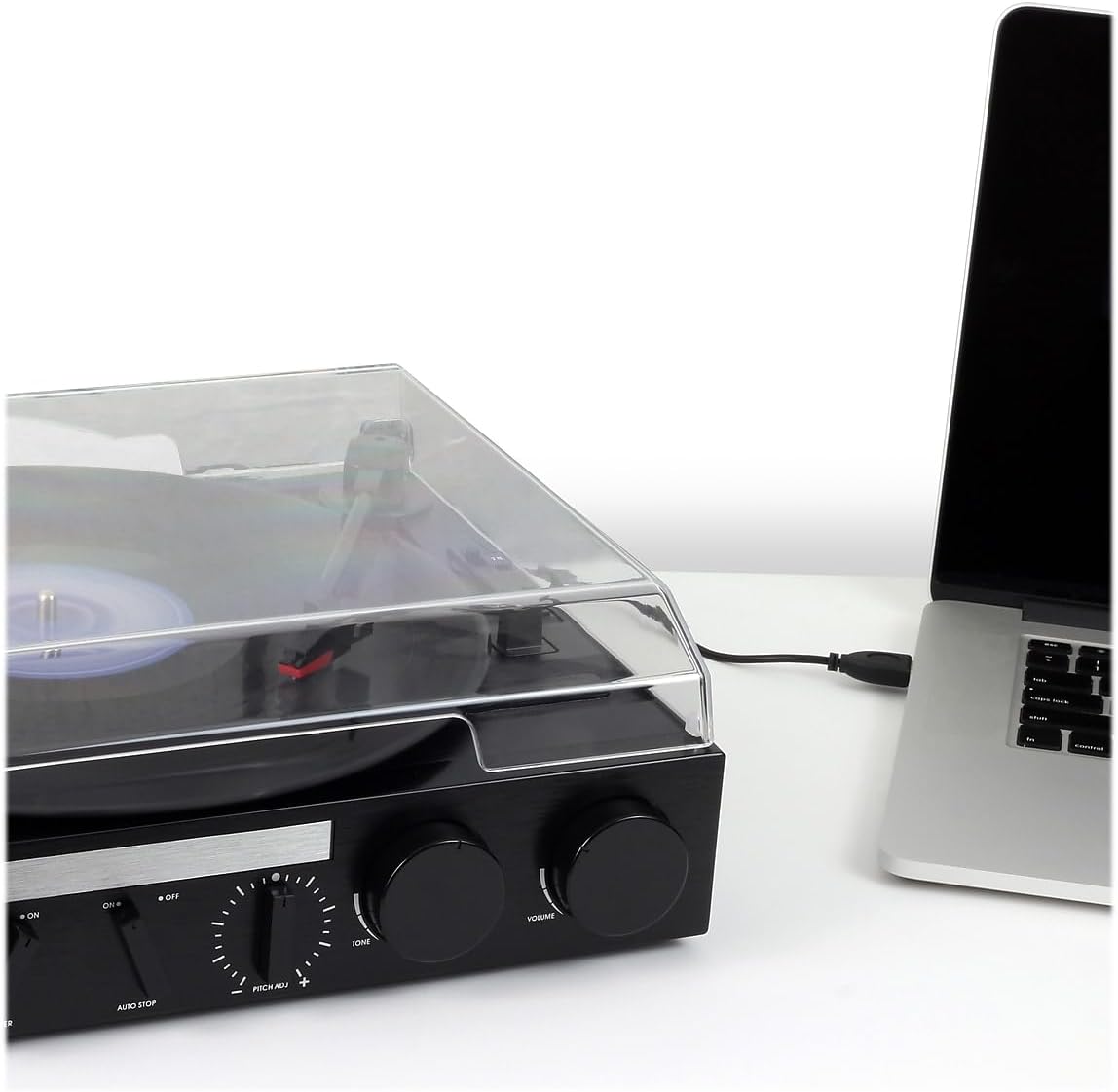
- USB port with included cable and software: Enables recording, editing, and converting vinyl records to digital MP3 format.
- Auxiliary input: Allows connection of external audio devices such as iPods, MP3 players, or other digital audio players.
- Stereo headphone output: For private listening.
- RCA line outputs: For connecting the turntable to an external home music system or ampஆயுள்.
- Built-in stereo speakers: Provides integrated audio playback.
- Front-mounted pitch control: For fine-tuning record speed.
- Tone control: For adjusting sound quality.
அமைவு
- பேக்கிங்: டர்ன்டேபிளை அதன் பேக்கேஜிங்கிலிருந்து கவனமாக அகற்றவும். எதிர்கால போக்குவரத்து அல்லது சேமிப்பிற்காக அனைத்து பேக்கிங் பொருட்களையும் வைத்திருங்கள்.
- இடம்: Place the turntable on a stable, level surface away from direct sunlight, heat sources, and excessive dust or vibration.
- தூசி மூடி: The unit includes a clear dust cover to protect the platter and tonearm when not in use. Ensure it is properly hinged.
- மின் இணைப்பு: Connect the AC power adapter to the DC input jack on the rear of the unit, then plug the adapter into a standard wall outlet.
- ஸ்டைலஸ் பாதுகாப்பு: Remove the clear plastic stylus protector from the needle before first use.

இயக்க வழிமுறைகள்
வினைல் ரெக்கார்ட் விளையாடுகிறது
- பவர் ஆன்: Turn the POWER/VOLUME knob clockwise to power on the unit. The power indicator light will illuminate.
- செயல்பாட்டைத் தேர்ந்தெடுக்கவும்: Set the FUNCTION switch to 'PHONO'.
- இடப் பதிவு: Open the dust cover and carefully place a vinyl record on the turntable platter.
- வேகத்தைத் தேர்ந்தெடுக்கவும்: Set the SPEED SELECTOR switch (33/45/78) to match the playback speed of your record. For 45 RPM records, place the included 45 RPM adapter on the center spindle.
- லிஃப்ட் டோன்ஆர்ம்: க்யூயிங் லீவரைப் பயன்படுத்தி டோன்ஆர்மை மெதுவாக உயர்த்தவும்.
- நிலை டோன்ஆர்ம்: Move the tonearm over the desired track of the record.
- கீழ் தொனி கை: Slowly lower the tonearm onto the record using the cueing lever. The record will begin to play.
- ஒலியளவைச் சரிசெய்யவும்: Adjust the volume using the POWER/VOLUME knob.
- ஆட்டோ ஸ்டாப்: The AUTO STOP switch can be set to ON or OFF. When ON, the turntable will automatically stop spinning when the record finishes. When OFF, the turntable will continue to spin.
- End Playback: At the end of the record, lift the tonearm, return it to the tonearm rest, and lower the cueing lever. Turn the POWER/VOLUME knob counter-clockwise to power off the unit.

வானொலியைப் பயன்படுத்துதல்
- பவர் ஆன்: Turn the POWER/VOLUME knob clockwise.
- செயல்பாட்டைத் தேர்ந்தெடுக்கவும்: Set the FUNCTION switch to 'AM' or 'FM' for radio playback.
- டியூன் நிலையம்: Rotate the TUNING knob to select your desired radio station.
- ஒலியளவைச் சரிசெய்யவும்: Adjust the volume using the POWER/VOLUME knob.
Connecting External Devices (AUX Input)
- சாதனத்தை இணைக்கவும்: Use an audio cable (not included) to connect your external audio device (e.g., MP3 player, smartphone) to the AUX IN jack on the front of the turntable.
- செயல்பாட்டைத் தேர்ந்தெடுக்கவும்: Set the FUNCTION switch to 'AUX'.
- ப்ளே ஆடியோ: Start playback on your external device. The audio will play through the turntable's built-in speakers.
- ஒலியளவைச் சரிசெய்யவும்: Adjust the volume using the POWER/VOLUME knob on the turntable and/or the volume control on your external device.
ஹெட்ஃபோன்களைப் பயன்படுத்துதல்
Plug your headphones into the HEADPHONE jack on the front of the unit for private listening. The built-in speakers will be muted when headphones are connected.
Connecting to an External Audio System (RCA Line Out)
Use RCA cables (not included) to connect the RCA LINE OUT jacks on the rear of the turntable to an available audio input on your home stereo system or powered speakers. This allows you to play vinyl records through a larger sound system.
Converting Vinyl to MP3 (USB Recording)
The JTA-230R includes a USB port and software for converting your vinyl records to digital MP3 fileகள். இந்த வழிமுறைகளைப் பின்பற்றவும்:
- மென்பொருளை நிறுவவும்: Install the provided software (e.g., Audacity) onto your computer.
- USB இணைக்க: வழங்கப்பட்ட USB கேபிளைப் பயன்படுத்தி டர்ன்டேபிளை உங்கள் கணினியுடன் இணைக்கவும்.
- பதிவுக்குத் தயாராகுங்கள்: Open the software on your computer and follow its instructions to prepare for recording.
- Play Record: Start playing your vinyl record on the turntable as described in the 'Playing a Vinyl Record' section.
- Record and Save: Use the software to record the audio. Once recorded, you can edit and save the tracks as MP3 files on your computer for playback on digital devices.
பராமரிப்பு
அலகு சுத்தம் செய்தல்
- அலகின் வெளிப்புறத்தை மென்மையான, d துணியால் துடைக்கவும்.amp துணி. சிராய்ப்பு கிளீனர்கள் அல்லது கரைப்பான்களைப் பயன்படுத்த வேண்டாம்.
- தட்டு மற்றும் ஸ்டைலஸில் தூசி சேராமல் இருக்க, பயன்பாட்டில் இல்லாதபோது தூசி மூடியை மூடி வைக்கவும்.
ஸ்டைலஸ் கேர்
- The stylus (needle) is a delicate component. Handle it with care.
- Clean the stylus periodically using a soft brush, brushing gently from back to front.
- A worn or damaged stylus can harm your records and degrade sound quality. Replace the stylus if it appears bent, chipped, or if sound quality diminishes significantly.
சரிசெய்தல்
| பிரச்சனை | சாத்தியமான காரணம் | தீர்வு |
|---|---|---|
| சக்தி இல்லை | Power cord not connected; Power outlet not active; Unit not turned on. | Ensure power cord is securely plugged in; Check power outlet; Turn POWER/VOLUME knob clockwise. |
| பேச்சாளர்களிடமிருந்து ஒலி இல்லை | Volume too low; Function switch incorrect; Headphones connected. | Increase volume; Set FUNCTION switch to 'PHONO', 'AM', 'FM', or 'AUX' as appropriate; Disconnect headphones. |
| சிதைந்த ஒலி | Dirty record; Worn stylus; Incorrect speed; Tone control setting. | Clean record; Replace stylus; Verify correct speed (33/45/78 RPM); Adjust TONE control. |
| Record speed too fast or too slow | Incorrect speed selector setting; Pitch control adjustment. | Set SPEED SELECTOR to match record (33-1/3, 45, or 78 RPM); Adjust PITCH ADJ. knob for fine-tuning. |
| பதிவுகளைத் தவிர்த்தல் | Dirty or scratched record; Turntable not level; Stylus worn or damaged. | Clean record; Ensure turntable is on a stable, level surface; Replace stylus. |
விவரக்குறிப்புகள்
- மாதிரி எண்: JTA-230R
- தயாரிப்பு பரிமாணங்கள்: 11.34 x 12 x 4.96 அங்குலம்
- பொருளின் எடை: 1 பவுண்டுகள் (454 கிராம்)
- பிராண்ட்: ஜென்சன்
- அதிகபட்ச சுழற்சி வேகம்: 78 ஆர்பிஎம்
- பொருள்: பிளாஸ்டிக்
- நிறம்: கருப்பு
- சிறப்பு அம்சம்: போர்ட்டபிள்
- இணக்கமான சாதனங்கள்: Headphone, MP3 Player, Speaker, Tablet
- சேர்க்கப்பட்ட கூறுகள்: தயாரிப்பு, கையேடு
உத்தரவாதம் மற்றும் ஆதரவு
Information regarding product warranty and customer support is not available in the provided data. Please refer to the product packaging or manufacturer's webவிவரங்களுக்கு தளம்.


