அறிமுகம்
This manual provides detailed instructions for the setup, operation, and maintenance of your DIGIQUEST Universal Easy Plus Remote Control. Designed for simplicity and ease of use, this remote features large, intuitive buttons, making it suitable for all users, including those in hotel or hospital environments. Please read this manual carefully before using the product.
தயாரிப்பு அம்சங்கள்
- எளிய கட்டமைப்பு
- Large, Intuitive Buttons for enhanced visibility
- Bright LED indicator
- Dedicated Teletext Button
- Equipped exclusively with main functions to avoid complexity
- Compatible with all TV brands
தொகுப்பு உள்ளடக்கங்கள்
- 1 x DIGIQUEST Universal Easy Plus Remote Control
- 1 x பயனர் கையேடு (இந்த ஆவணம்)
அமைவு
1. பேட்டரி நிறுவல்
The DIGIQUEST Universal Easy Plus remote control requires 2 x 1.5V LR03 - AAA batteries (not included).
- ரிமோட் கண்ட்ரோலின் பின்புறத்தில் பேட்டரி பெட்டியைக் கண்டறியவும்.
- பேட்டரி அட்டையைத் திறக்க ஸ்லைடு செய்யவும்.
- இரண்டு AAA பேட்டரிகளைச் செருகவும், பெட்டியின் உள்ளே சுட்டிக்காட்டப்பட்டுள்ளபடி சரியான துருவமுனைப்பு (+ மற்றும் -) இருப்பதை உறுதிசெய்யவும்.
- பேட்டரி அட்டையை பாதுகாப்பாக மூடு.
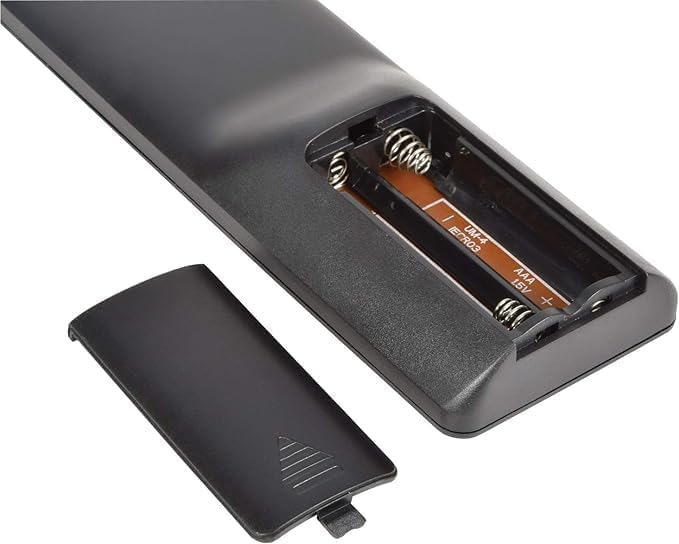
Image: The open battery compartment of the remote control, showing slots for two AAA batteries.
2. ரிமோட் கண்ட்ரோலை புரோகிராமிங் செய்தல்
The remote offers four simple methods to configure it quickly with your TV. Choose the method that best suits your needs.
- நேரடி குறியீடு உள்ளீடு:
Enter the corresponding code for your TV brand directly. A list of over 10,000 available codes is typically provided in the included code booklet (if applicable) or can be found online on the DIGIQUEST support webதளம்.
- தானியங்கி தேடல்:
The remote can automatically search for the correct code for your TV. Follow the instructions in the code booklet for initiating an automatic search. This process typically involves holding down a specific button until the TV responds.
- கைமுறை தேடல்:
If automatic search is unsuccessful, you can perform a manual search. This involves cycling through codes one by one until your TV responds. Refer to the code booklet for detailed steps.
- Learning Function (from original remote):
If you have your original TV remote control, the Easy Plus remote can learn functions directly from it. This method allows you to customize button assignments. Place the two remotes face-to-face and follow the learning procedure outlined in the code booklet.

படம்: முன்பக்கம் view of the DIGIQUEST Universal Easy Plus remote control, showcasing its large buttons.
இயக்க வழிமுறைகள்
Once programmed, the remote control is ready for use. Below is a description of the main buttons and their functions:

படம்: ஒரு நெருக்கமான படம் view of the large, clearly labeled buttons on the remote control.
| பொத்தான் | செயல்பாடு |
|---|---|
| பவர் (சிவப்பு பொத்தான்) | டிவியை ஆன் அல்லது ஆஃப் செய்கிறது. |
| TV | Selects the TV input source. |
| முடக்கு (X உடன் பேச்சாளர்) | டிவி ஒலியை முடக்குகிறது அல்லது ஒலியை நீக்குகிறது. |
| உரை | Activates or deactivates Teletext mode. |
| வால்யூம் அப் (+) | Increases the TV volume. |
| ஒலியை குறை (-) | Decreases the TV volume. |
| Channel Up (P^) | Changes to the next channel. |
| Channel Down (Pv) | முந்தைய சேனலில் மாற்றங்கள். |
| எண் பொத்தான்கள் (0-9) | டிவி சேனல்களை நேரடியாகத் தேர்ந்தெடுக்கவும். |
| தகவல் | Displays program information (if available). |
| AV | Switches between available audio/video input sources. |
பராமரிப்பு
சுத்தம் செய்தல்
To clean the remote control, use a soft, dry cloth. Do not use abrasive cleaners, solvents, or alcohol, as these may damage the surface or internal components.
பேட்டரி மாற்று
ரிமோட் கண்ட்ரோலின் பதில் மெதுவாகும்போது அல்லது வேலை செய்வதை நிறுத்தும்போது பேட்டரிகளை மாற்றவும். எப்போதும் இரண்டு பேட்டரிகளையும் ஒரே நேரத்தில் புதிய AAA பேட்டரிகளால் மாற்றவும். பழைய மற்றும் புதிய பேட்டரிகளையோ அல்லது வெவ்வேறு வகையான பேட்டரிகளையோ கலக்க வேண்டாம்.
சரிசெய்தல்
- ரிமோட் வேலை செய்யவில்லை:
- பேட்டரிகள் சரியான துருவமுனைப்புடன் சரியாகச் செருகப்பட்டுள்ளதா எனச் சரிபார்க்கவும்.
- பழைய பேட்டரிகளை புதியவற்றுடன் மாற்றவும்.
- ரிமோட் கண்ட்ரோலுக்கும் டிவியின் அகச்சிவப்பு ரிசீவருக்கும் இடையில் எந்த தடைகளும் இல்லை என்பதை உறுதிப்படுத்திக் கொள்ளுங்கள்.
- Re-program the remote control using one of the methods described in the "Programming the Remote Control" section.
- சில பொத்தான்கள் வேலை செய்யவில்லை:
- The remote might not be fully compatible with all functions of your specific TV model. Try the learning function if available.
- Ensure the remote is correctly programmed for your TV. Try re-programming with a different code if available for your TV brand.
- Remote range is poor:
- பேட்டரிகளை மாற்றவும்.
- Ensure you are within the maximum operating range (up to 10 meters) and have a clear line of sight to the TV.
விவரக்குறிப்புகள்
| அம்சம் | விவரம் |
|---|---|
| பிராண்ட் | DIGIQUEST |
| மாதிரி பெயர் | ஈஸி பிளஸ் |
| நிறம் | கருப்பு |
| இணைப்பு தொழில்நுட்பம் | அகச்சிவப்பு |
| சிறப்பு அம்சம் | உலகளாவிய பொருந்தக்கூடிய தன்மை |
| இணக்கமான சாதனங்கள் | தொலைக்காட்சி |
| Maximum Number of Supported Devices | 1 |
| கட்டுப்படுத்தி வகை | பொத்தான் கட்டுப்பாடு |
| அதிகபட்ச வரம்பு | 10 மீட்டர் |
| சக்தி ஆதாரம் | 2 x AAA 1.5V பேட்டரிகள் (சேர்க்கப்படவில்லை) |
| உற்பத்தியாளர் | DIGIQUEST |
| பிறப்பிடமான நாடு | சீனா |

படம்: பக்கம் view of the remote control, illustrating its dimensions and ergonomic design.
உத்தரவாதம் மற்றும் ஆதரவு
Information regarding product warranty and customer support is not available in the provided product details. Please refer to the product packaging or the official DIGIQUEST website for the most up-to-date warranty information and support contacts.
மேலும் உதவிக்கு, நீங்கள் இங்கு வருகை தரலாம் DIGIQUEST Brand Store.


