1. அறிமுகம்
The Mackie ProFX12v3 is a 12-channel professional analog mixer designed for versatile audio applications, including live sound, home recording, content creation, and live streaming. It features renowned Onyx mic preamps, a GigFX effects engine, and USB I/O capabilities for high-quality audio processing and recording.

படம் 1: மேல்view of the Mackie ProFX12v3 Mixer.
முக்கிய அம்சங்கள் அடங்கும்:
- 7 Onyx Mic Preamps: Offering up to 60dB of gain for ultra-low noise performance, ideal for high-gain microphones.
- GigFX Effects Engine: Provides 24 different FX options, including reverbs, delays, and choruses, for adding professional touches to your sound.
- 24-bit/192kHz 2x4 USB I/O: Enables high-resolution recording and allows for creating custom mixes for monitoring during playback.
- Single-Knob Compression: Simple control for managing dynamic range on individual channels.
- கலப்பு கட்டுப்பாடு: A dedicated knob to blend between your computer's output and a direct feed from the mixer, useful for overdubs.
வீடியோ 1: ஒரு 360-டிகிரி view of the Mackie ProFX12v3 Professional Mixer, showcasing its design and layout.
2 அமைவு
2.1 அன்பாக்சிங் மற்றும் உள்ளடக்கங்கள்
Upon unboxing your Mackie ProFX12v3 mixer, ensure all components are present:
- ProFXv3 Series, 12-Channel Professional Effects Mixer
- பவர் கார்ட்
- யூ.எஸ்.பி தண்டு
- விரைவு தொடக்க வழிகாட்டி
2.2 மின் இணைப்பு
Connect the provided power cord to the mixer's power input on the rear panel and then to a suitable AC power outlet. Ensure the power switch is in the OFF position before connecting. Once connected, you can switch the mixer ON.
2.3 USB இணைப்பு
For computer integration, connect the USB cord from the mixer's rear USB port to an available USB port on your computer. You may need to download and install specific Mackie drivers from the official website for full functionality, especially for accessing all USB channels (e.g., 3 and 4) and ensuring optimal 24-bit/192kHz recording quality.

Figure 2: Rear panel connections for power and USB.
2.4 ஆடியோ உள்ளீட்டு இணைப்புகள்
Connect your microphones, instruments, and other audio sources to the appropriate input channels on the mixer. The ProFX12v3 features combo jacks for XLR and 1/4-inch inputs, as well as dedicated line inputs.
- XLR உள்ளீடுகள்: For microphones. Activate +48V Phantom Power for condenser microphones using the dedicated button on the main section.
- 1/4-inch Inputs: For instruments (guitars, keyboards) or line-level devices.
- Hi-Z Inputs: Dedicated high-impedance inputs on select channels allow direct connection of guitars or basses without an external DI box.
3. மிக்சரை இயக்குதல்
3.1 Channel Controls Overview
Each input channel on the ProFX12v3 features a comprehensive set of controls to shape your sound:
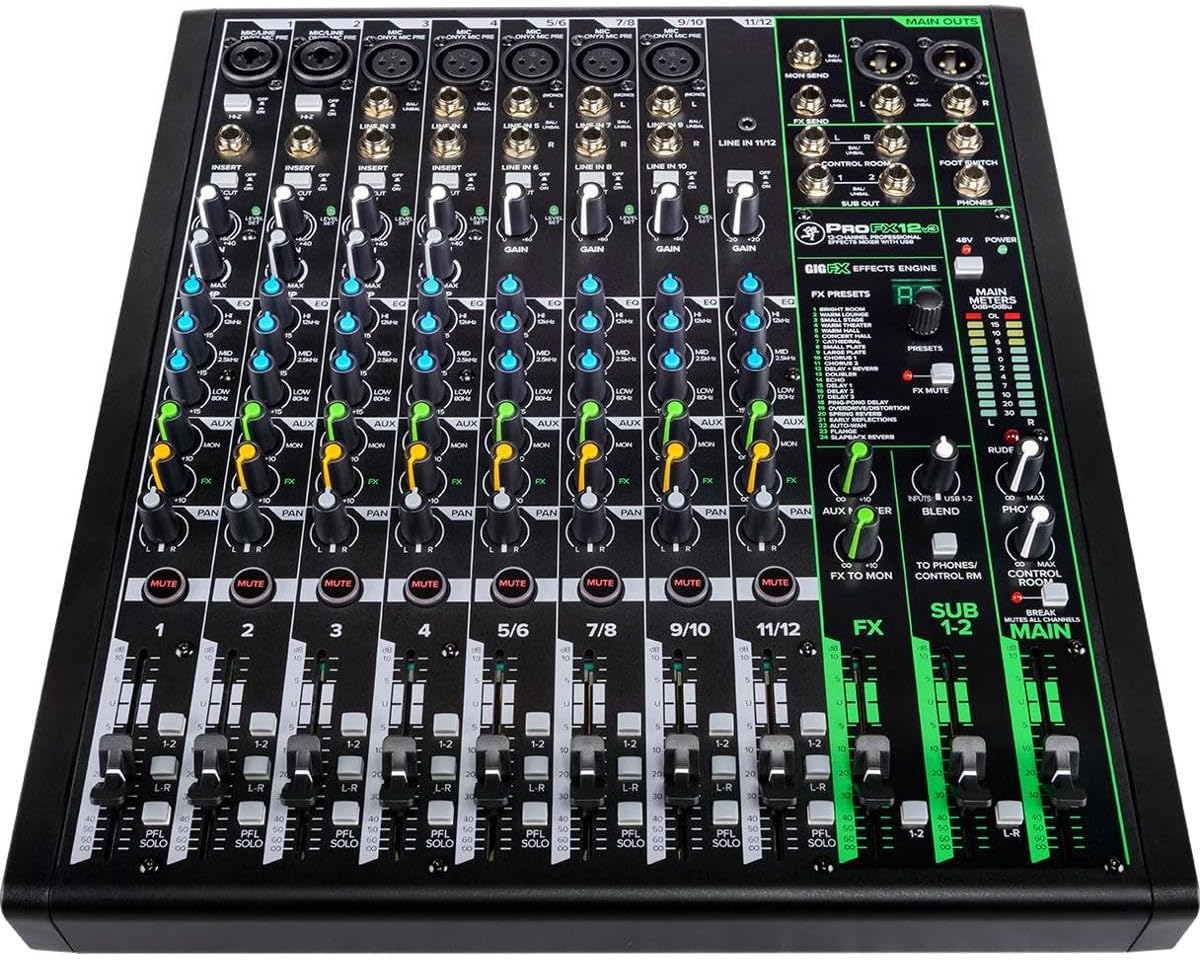
படம் 3: விரிவானது view of the mixer's control surface.
- கெயின் நாப்: Adjusts the input sensitivity for each channel. Set this to achieve a strong signal without clipping (indicated by the OL LED).
- EQ பிரிவு: High, Mid, and Low frequency controls allow you to sculpt the tone of each input.
- ஆக்ஸ் அனுப்பு: Controls the amount of signal sent to the auxiliary output, often used for monitor mixes or external effects.
- FX அனுப்பு: Controls the amount of signal sent to the internal GigFX effects engine.
- பான் குமிழ்: ஸ்டீரியோ புலத்திற்குள் (இடமிருந்து வலமாக) சேனலின் சிக்னலை நிலைநிறுத்துகிறது.
- முடக்கு பொத்தான்: Silences the channel's output.
- Solo Button (PFL): Isolates the channel's signal for monitoring through headphones without affecting the main mix.
- Level Fader: பிரதான கலவையில் சேனலின் ஒட்டுமொத்த ஒலியளவை சரிசெய்கிறது.
3.2 GigFX Effects Engine
The GigFX effects engine offers 24 high-quality digital effects. Use the PRESETS knob to select an effect and the FX MASTER fader to control the overall level of the effects in the main mix. Individual channel FX sends allow you to apply effects selectively.

Figure 4: GigFX Effects Engine and Main Meters.
3.3 USB Audio Interface Operation
The 2x4 USB audio interface allows for flexible recording and monitoring:
- பதிவு: Send the main mix or specific sub-mixes to your computer for recording in 24-bit/192kHz quality.
- கண்காணிப்பு: Use the BLEND knob to adjust the balance between the direct mixer signal and the USB return from your computer. This is crucial for zero-latency monitoring during overdubs.
3.4 Main Output and Monitoring
The main mix is controlled by the MAIN faders and output via balanced XLR or 1/4-inch jacks. Monitor your mix using headphones connected to the PHONES jack, with its dedicated level control. The main meters provide visual feedback on your output levels, helping you avoid clipping.
காணொளி 2: ஒரு ஓவர்view of the Mackie ProFX12v3's professional features and controls.
4. பராமரிப்பு
To ensure the longevity and optimal performance of your Mackie ProFX12v3 mixer, follow these maintenance guidelines:
- சுத்தம்: Regularly wipe the mixer's surface with a soft, dry cloth. Avoid using liquid cleaners or solvents, as they can damage the finish or internal components.
- தூசி பாதுகாப்பு: Keep the mixer covered when not in use to prevent dust accumulation, which can affect faders and knobs.
- கேபிள் மேலாண்மை: Ensure cables are neatly organized and not under tension to prevent damage to connectors and ports.
- சுற்றுச்சூழல் நிலைமைகள்: Operate the mixer in a dry, well-ventilated area away from extreme temperatures, humidity, and direct sunlight.
5. சரிசெய்தல்
If you encounter issues with your mixer, consider the following common troubleshooting steps:
- சக்தி இல்லை: Ensure the power cord is securely connected to both the mixer and the outlet, and that the power switch is ON. Check the power outlet with another device.
- ஒலி வெளியீடு இல்லை: Verify that all level faders (channel, main, headphones) are up. Check all cable connections. Ensure mute buttons are disengaged. Confirm output routing in your DAW if using USB.
- சிதைந்த ஒலி: Reduce input gain on the affected channel. Check for clipping (OL LED). Ensure output levels are not exceeding the main meters.
- USB இணைப்பு சிக்கல்கள்: Reinstall Mackie USB drivers. Try a different USB port or cable. Ensure your DAW's audio settings are correctly configured to recognize the mixer.
- Effects Not Working: Check the FX send knob on the channel and the FX MASTER fader. Ensure the FX Mute button is not engaged.
6. விவரக்குறிப்புகள்
| அம்சம் | விவரம் |
|---|---|
| பிராண்ட் | மேக்கி |
| மாதிரி | ProFX12v3 |
| சேனல்களின் எண்ணிக்கை | 12 |
| பொருளின் எடை | 10.9 பவுண்டுகள் |
| தயாரிப்பு பரிமாணங்கள் | 13 x 14.8 x 4 அங்குலம் |
| இணைப்பு தொழில்நுட்பம் | USB |
| வன்பொருள் இடைமுகம் | 1/4-inch Audio, 3.5mm Audio, Headphone, USB |
| தொகுதிtage | 110 வோல்ட் |
| பொருள் வகை | எஃகு |
| வண்ண பெயர் | கருப்பு |
| முதல் தேதி கிடைக்கும் | ஆகஸ்ட் 15, 2019 |
7. உத்தரவாதம் மற்றும் ஆதரவு
For detailed warranty information, technical support, or service inquiries, please refer to the official Mackie website or contact Mackie customer support directly. Keep your purchase receipt as proof of purchase for warranty claims.


