1. அறிமுகம்
This manual provides essential information for setting up, operating, and maintaining your Acer Aspire 5 Slim Laptop, Model A515-54-59W2. Designed for everyday computing, this laptop combines a 15.6-inch Full HD IPS display with a 10th Generation Intel Core i5 processor, 8GB of DDR4 RAM, and a fast 256GB PCIe NVMe SSD. It features Intel Wi-Fi 6 for reliable connectivity, a fingerprint reader for secure access, and a backlit keyboard for comfortable typing in various lighting conditions.
2 அமைவு
2.1. அன்பாக்சிங் மற்றும் ஆரம்ப ஆய்வு
பேக்கேஜிங்கிலிருந்து அனைத்து பொருட்களையும் கவனமாக அகற்றவும். பின்வரும் கூறுகள் இருப்பதை உறுதிசெய்யவும்:
- Acer Aspire 5 Slim Laptop (Model A515-54-59W2)
- ஏசி அடாப்டர்
- பவர் கார்ட்
Inspect the laptop and accessories for any signs of damage. If any items are missing or damaged, contact your retailer or Acer support immediately.
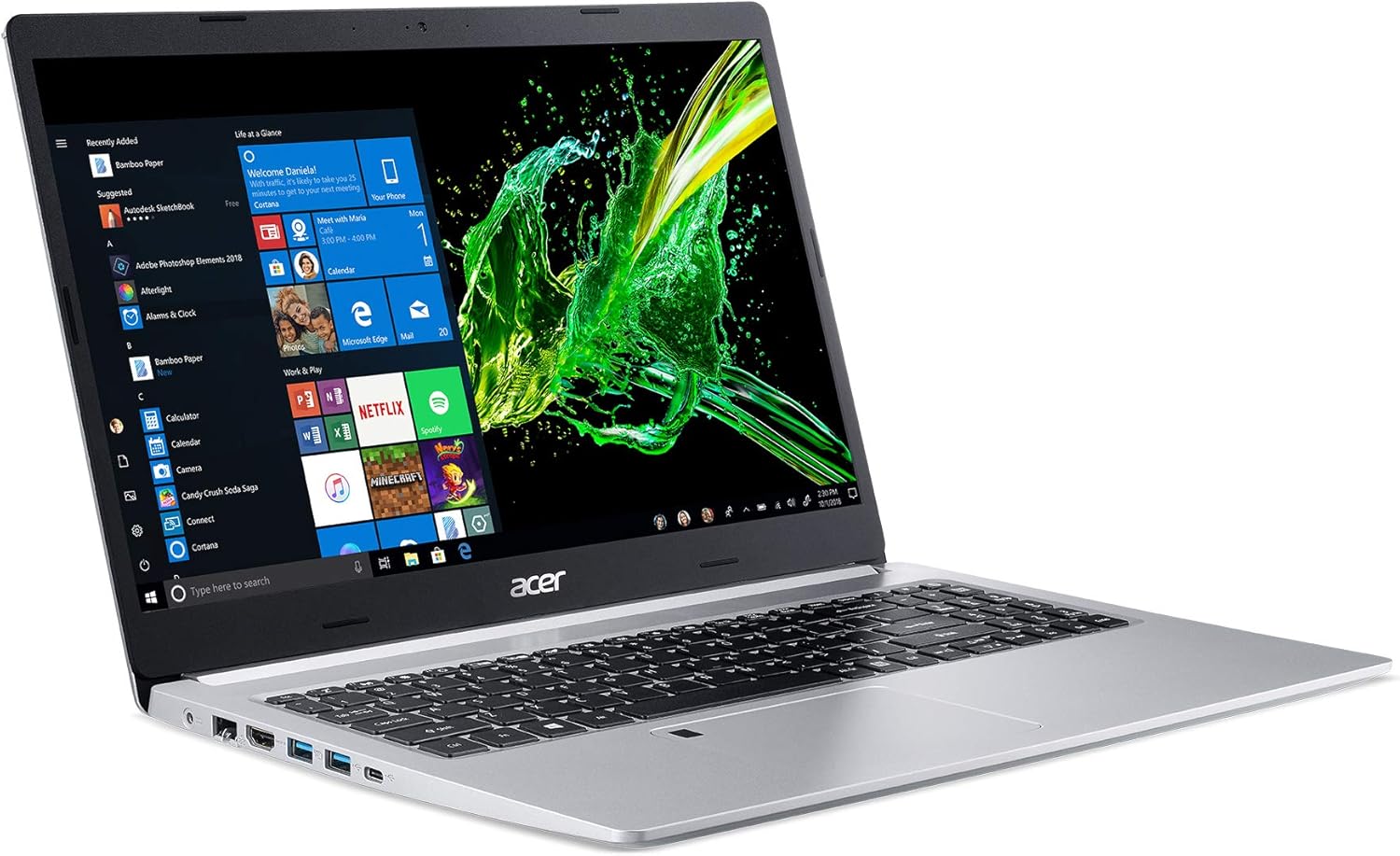
Figure 1: Acer Aspire 5 Slim Laptop
2.2. Initial Power-On and Operating System Setup
- Connect the AC adapter to the laptop's power port and then plug the power cord into an electrical outlet.
- மடிக்கணினி மூடியைத் திறக்கவும். மடிக்கணினி தானாகவே இயங்கக்கூடும், அல்லது விசைப்பலகையில் அமைந்துள்ள ஆற்றல் பொத்தானை அழுத்த வேண்டியிருக்கலாம்.
- Follow the on-screen instructions to complete the Windows 10 Home setup process. This typically includes selecting your region, language, connecting to a Wi-Fi network, and creating a user account.
3 அம்சங்கள்
3.1. காட்சி
The Acer Aspire 5 features a vibrant 15.6-inch Full HD (1920 x 1080) widescreen LED-backlit IPS display. This display technology provides wide viewing angles and accurate color reproduction, enhancing your visual experience for work and entertainment.

படம் 2: காட்சி அம்சங்கள்
3.2 செயல்திறன்
Equipped with a 10th Generation Intel Core i5-10210U Processor, 8GB of DDR4 memory, and a 256GB PCIe NVMe SSD, the laptop delivers responsive performance for multitasking, productivity applications, and web browsing. The SSD ensures fast boot times and quick application loading.

Figure 3: Intel Core i5 10th Generation Processor
3.3. இணைப்பு
The laptop offers comprehensive connectivity options:
- வயர்லெஸ்: Intel Wireless Wi-Fi 6 AX201 (802.11ax) Dual-Band (2.4GHz and 5GHz) with 2x2 MU-MIMO technology, Bluetooth 4.2
- கம்பி: 10/100/1000 கிகாபிட் ஈதர்நெட் லேன் (RJ-45 போர்ட்)
- USB போர்ட்கள்: 1 x USB 3.1 (Type-C) port (Gen 1 up to 5 Gbps), 2 x USB 3.1 Gen 1 Ports (one with Power-off Charging), 1 x USB 2.0 Port
- வீடியோ வெளியீடு: 1 x HDMI Port with HDCP support

Figure 4: Extensive Connectivity Options
3.4 பேட்டரி ஆயுள்
Enjoy extended productivity with up to 9.5 hours of battery life, allowing you to work or stream on the go without frequent recharging.

Figure 5: Up to 9.5 Hours Battery Life
3.5. விசைப்பலகை மற்றும் டச்பேட்
The laptop features a backlit keyboard for comfortable typing in dimly lit environments. The precision touchpad supports multi-gesture input, and an integrated Acer Fingerprint Reader provides secure and convenient login via Windows Hello.

Figure 6: Backlit Keyboard and Fingerprint Reader
3.6. 360 Degree View
Observe the design and port placement of the Acer Aspire 5 from various angles.
Video 1: Acer Aspire 5 A515-54 360 Degree View. This short video provides a comprehensive look at the laptop's exterior, showcasing இது மெலிதானது.file மற்றும் துறைமுக இடங்கள்.
4. இயக்க வழிமுறைகள்
4.1. பவர் ஆன்/ஆஃப்
- பவர் ஆன் செய்ய: மூடியைத் திறக்கவும் அல்லது ஆற்றல் பொத்தானை அழுத்தவும்.
- மூடுவதற்கு: விண்டோஸ் ஸ்டார்ட் பொத்தானைக் கிளிக் செய்து, பின்னர் பவர் > ஷட் டவுன் என்பதைத் தேர்ந்தெடுக்கவும்.
- மறுதொடக்கம் செய்ய: விண்டோஸ் ஸ்டார்ட் பொத்தானைக் கிளிக் செய்து, பின்னர் பவர் > மறுதொடக்கம் என்பதைத் தேர்ந்தெடுக்கவும்.
- தூங்க: Close the lid or click the Windows Start button, then select Power > Sleep.
4.2. விசைப்பலகை மற்றும் டச்பேடைப் பயன்படுத்துதல்
- The backlit keyboard can be toggled on/off or adjusted using the dedicated function keys (Fn + F8, for example, depending on model configuration).
- The touchpad supports standard mouse functions (tap to click, two-finger scroll, pinch to zoom) and Windows gestures.
- The fingerprint reader, integrated into the touchpad, allows for quick and secure login. Follow Windows Hello setup instructions to configure.
4.3. பெரிஃபெரல்களை இணைக்கிறது
Utilize the various ports (USB, HDMI) to connect external devices such as mice, keyboards, external drives, or external monitors. For optimal performance, use USB 3.1 ports for high-speed devices.

படம் 7: இடது பக்க போர்ட்கள்

படம் 8: வலது பக்க போர்ட்கள்
4.4. Using Wi-Fi and Bluetooth
- வைஃபை: வயர்லெஸ் நெட்வொர்க்குடன் இணைக்க, பணிப்பட்டியில் உள்ள வைஃபை ஐகானைக் கிளிக் செய்து, உங்களுக்கு விருப்பமான நெட்வொர்க்கைத் தேர்ந்தெடுத்து, கேட்கப்பட்டால் கடவுச்சொல்லை உள்ளிடவும்.
- புளூடூத்: To pair a Bluetooth device, go to Windows Settings > Devices > Bluetooth & other devices, turn on Bluetooth, and select 'Add Bluetooth or other device'.
4.5. காட்சி அமைப்புகளை சரிசெய்தல்
Right-click on the desktop and select 'Display settings' to adjust resolution, scale, and orientation. For color optimization, Acer Color Intelligence technology is pre-configured.
5. பராமரிப்பு
5.1. சுத்தம் செய்தல்
- Use a soft, lint-free cloth to clean the screen and exterior surfaces. Avoid harsh chemicals.
- தூசி மற்றும் குப்பைகளை அகற்ற விசைப்பலகை மற்றும் டச்பேடை தவறாமல் சுத்தம் செய்யவும்.
- Ensure ventilation vents are clear of obstructions to prevent overheating.
5.2. மென்பொருள் புதுப்பிப்புகள்
Keep your operating system and drivers updated to ensure optimal performance and security. Windows Update can be accessed via Settings > Update & Security > Windows Update.
5.3. பேட்டரி பராமரிப்பு
பேட்டரி ஆயுளை நீட்டிக்க, பேட்டரியை அடிக்கடி முழுமையாக டிஸ்சார்ஜ் செய்வதைத் தவிர்க்கவும். மடிக்கணினியை நீண்ட நேரம் பயன்படுத்தாதபோது குளிர்ந்த, உலர்ந்த இடத்தில் சேமிக்கவும்.
6. சரிசெய்தல்
- மடிக்கணினி இயக்கப்படவில்லை: AC அடாப்டர் பாதுகாப்பாக இணைக்கப்பட்டுள்ளதையும், பவர் அவுட்லெட் செயல்படுவதையும் உறுதிசெய்து கொள்ளுங்கள். வேறு அவுட்லெட்டை முயற்சிக்கவும்.
- மெதுவான செயல்திறன்: Close unnecessary applications, check for background updates, or restart the laptop.
- வைஃபை இணைப்பு சிக்கல்கள்: Restart your router and modem. Ensure Wi-Fi is enabled on the laptop and drivers are updated.
- திரை சிக்கல்கள்: Adjust display settings. If the screen remains blank or distorted, contact support.
7. விவரக்குறிப்புகள்
| அம்சம் | விவரம் |
|---|---|
| மாதிரி பெயர் | A515-54-59W2 |
| திரை அளவு | 15.6 அங்குலம் |
| திரை தெளிவுத்திறன் | 1920 x 1080 pixels (Full HD IPS) |
| செயலி | 10th Gen Intel Core i5-10210U (up to 4.2 GHz) |
| ரேம் | 8 ஜிபி DDR4 |
| சேமிப்பு | 256 ஜிபி PCIe NVMe SSD |
| கிராபிக்ஸ் | ஒருங்கிணைந்த Intel UHD கிராபிக்ஸ் 620 |
| இயக்க முறைமை | விண்டோஸ் 10 முகப்பு |
| வயர்லெஸ் இணைப்பு | Intel Wi-Fi 6 AX201 (802.11ax), Bluetooth 4.2 |
| துறைமுகங்கள் | 1x USB 3.1 Type-C, 2x USB 3.1 Gen 1, 1x USB 2.0, 1x HDMI, 1x RJ-45 Ethernet |
| பேட்டரி ஆயுள் | 9.5 மணி நேரம் வரை |
| எடை | 3.97 பவுண்டுகள் (1.8 கிலோ) |
| பரிமாணங்கள் (LxWxH) | 14.31 x 9.86 x 0.71 அங்குலம் |
| நிறம் | வெள்ளி |
| சிறப்பு அம்சம் | Numeric Keypad, Fingerprint Reader, Backlit Keyboard |
8. உத்தரவாதம் மற்றும் ஆதரவு
உத்தரவாதத் தகவல் மற்றும் தொழில்நுட்ப ஆதரவிற்கு, உங்கள் தயாரிப்புடன் சேர்க்கப்பட்டுள்ள ஆவணங்களைப் பார்க்கவும் அல்லது அதிகாரப்பூர்வ ஏசர் ஆதரவைப் பார்வையிடவும். webஉத்தரவாதக் கோரிக்கைகளுக்கு உங்கள் வாங்கியதற்கான ஆதாரத்தை வைத்திருங்கள்.


