அறிமுகம்
நன்றி, நன்றி.asing the iLuv Bubble Gum True Wireless Air Earbuds. This manual provides detailed instructions on how to set up, operate, maintain, and troubleshoot your new earbuds. Please read this manual thoroughly before use to ensure proper operation and to maximize the lifespan of your device.
பாதுகாப்பு தகவல்
To ensure safe and proper use of your iLuv Bubble Gum True Wireless Air Earbuds, please observe the following precautions:
- இயர்பட்கள் அல்லது சார்ஜிங் கேஸை அதிக வெப்பநிலை, ஈரப்பதம் அல்லது திரவங்களுக்கு வெளிப்படுத்த வேண்டாம்.
- சாதனத்தை கீழே போடுதல், தாக்குதல் அல்லது பிரித்தல் ஆகியவற்றைத் தவிர்க்கவும்.
- சிராய்ப்பு கிளீனர்கள் அல்லது கடுமையான இரசாயனங்கள் பயன்படுத்த வேண்டாம்.
- கேட்கும் திறனைப் பாதிக்காமல் இருக்க மிதமான ஒலி அளவில் கேளுங்கள்.
- குழந்தைகள் மற்றும் செல்லப்பிராணிகளுக்கு எட்டாதவாறு வைக்கவும்.
தொகுப்பு உள்ளடக்கங்கள்
உங்கள் தொகுப்பில் அனைத்து பொருட்களும் உள்ளதா என சரிபார்க்கவும்:
- iLuv Bubble Gum True Wireless Air Earbuds (Left and Right)
- வயர்லெஸ் சார்ஜிங் கேஸ்
- USB சார்ஜிங் கேபிள் (வகை-C)
- பயனர் கையேடு (இந்த ஆவணம்)
தயாரிப்பு முடிந்துவிட்டதுview

படம் 1: iLuv Bubble Gum True Wireless Air Earbuds in their open charging case. The image shows both earbuds, one in its charging slot and the other slightly elevated, with the charging case open. The iLuv logo is visible on the earbuds, and blue indicator lights are present on both the earbuds and the front of the charging case.
The iLuv Bubble Gum True Wireless Air Earbuds consist of two independent earbuds and a portable charging case. Each earbud features a touch-sensitive surface for controls and an LED indicator. The charging case has LED indicators on the front to show battery status.
அமைவு
1. இயர்பட்ஸ் மற்றும் கேஸை சார்ஜ் செய்தல்
முதல் பயன்பாட்டிற்கு முன், இயர்பட்கள் மற்றும் சார்ஜிங் கேஸை முழுமையாக சார்ஜ் செய்யவும்.
- Place both earbuds into the charging case. Ensure they are properly seated in their respective slots (L for left, R for right).
- USB சார்ஜிங் கேபிளை கேஸில் உள்ள சார்ஜிங் போர்ட்டுடன் இணைக்கவும், மறுமுனையை USB பவர் அடாப்டர் (சேர்க்கப்படவில்லை) அல்லது கணினியின் USB போர்ட்டுடன் இணைக்கவும்.
- The LED indicators on the charging case will illuminate to show charging status. Once fully charged, the indicators may turn solid or turn off, depending on the model.
- The earbuds' LED indicators will show charging status while inside the case. They will typically turn off when fully charged.
குறிப்பு: A full charge provides up to 20 hours of total listening power with the charging case.
2. உங்கள் சாதனத்துடன் இணைத்தல்
The iLuv Bubble Gum True Wireless Air Earbuds feature 1-step pairing for convenience.
- Ensure Bluetooth is enabled on your smartphone, tablet, or other audio device.
- Open the charging case. The earbuds will automatically enter pairing mode. The LED indicator on one of the earbuds will flash, indicating it's ready to pair.
- On your device, search for Bluetooth devices and select "iLuv Bubble Gum Air" (or similar name) from the list.
- Once connected, a voice prompt will confirm successful pairing, and the earbud LED indicators will stop flashing.
உதவிக்குறிப்பு: If the earbuds do not connect automatically, try turning off and on your device's Bluetooth, or place the earbuds back in the case, close it, and then reopen it.
இயக்க வழிமுறைகள்
இயர்பட்ஸ் அணிந்து
Gently insert each earbud into your ear canal. Adjust them for a comfortable and secure fit. The "L" and "R" markings on the earbuds indicate left and right.
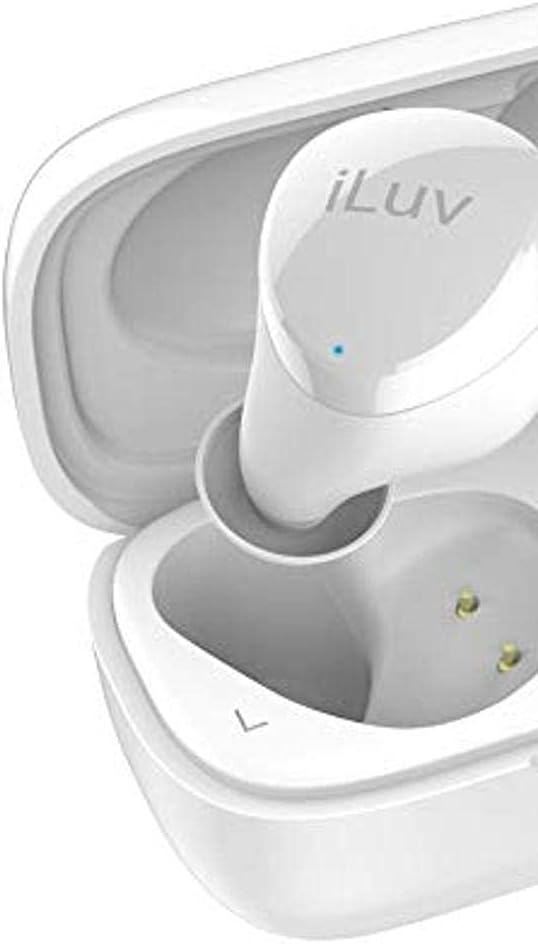
படம் 2: நெருக்கமான காட்சி view of the left iLuv Bubble Gum True Wireless Air earbud, showing the "L" marking and the iLuv logo on its surface. A small blue LED indicator is visible near the logo.

படம் 3: நெருக்கமான காட்சி view of the right iLuv Bubble Gum True Wireless Air earbud, showing the "R" marking and the iLuv logo on its surface. A small blue LED indicator is visible near the logo.
தொடு கட்டுப்பாடுகள்
The earbuds feature simple touch controls on their outer surface:
- விளையாடு/இடைநிறுத்தம்: இரண்டு இயர்பட்டிலும் ஒருமுறை தட்டவும்.
- அடுத்த ட்ராக்: வலதுபக்க இயர்பட்டில் இருமுறை தட்டவும்.
- முந்தைய ட்ராக்: இடதுபக்க இயர்பட்டில் இருமுறை தட்டவும்.
- பதில்/முடிவு அழைப்பு: உள்வரும் அழைப்பின் போது இரண்டு இயர்பட்களில் ஏதேனும் ஒன்றை ஒருமுறை தட்டவும்.
- அழைப்பை நிராகரி: உள்வரும் அழைப்பின் போது, இரண்டு இயர்பட்களில் ஏதேனும் ஒன்றை 2 வினாடிகள் அழுத்திப் பிடிக்கவும்.
- குரல் உதவியாளரைச் செயலாக்கு: இரண்டு இயர்பட்டில் ஏதாவது ஒன்றை மூன்று முறை தட்டவும்.
குறிப்பு: ஒலியளவு கட்டுப்பாடு பொதுவாக உங்கள் இணைக்கப்பட்ட சாதனம் வழியாக நிர்வகிக்கப்படுகிறது.
பராமரிப்பு
சுத்தம் செய்தல்
வழக்கமான சுத்தம் செய்தல் உகந்த செயல்திறன் மற்றும் சுகாதாரத்தை பராமரிக்க உதவுகிறது:
- இயர்பட்கள் மற்றும் சார்ஜிங் கேஸைத் துடைக்க மென்மையான, உலர்ந்த, பஞ்சு இல்லாத துணியைப் பயன்படுத்தவும்.
- பிடிவாதமான அழுக்குக்கு, சிறிது dampதண்ணீர் அல்லது லேசான, சிராய்ப்பு இல்லாத கிளீனர் கொண்ட துணியை en.
- Do not allow any liquid to enter the openings.
- Gently clean the ear tips and speaker mesh with a cotton swab or a small, soft brush to remove earwax or debris.
சேமிப்பு
பயன்பாட்டில் இல்லாதபோது, இயர்பட்களைப் பாதுகாக்கவும், அவற்றை சார்ஜ் செய்யவும் அவற்றை அவற்றின் சார்ஜிங் கேஸில் சேமிக்கவும். நேரடி சூரிய ஒளி மற்றும் அதிக வெப்பநிலையிலிருந்து விலகி, குளிர்ந்த, உலர்ந்த இடத்தில் கேஸை சேமிக்கவும்.
பேட்டரி பராமரிப்பு
பேட்டரி ஆயுளை நீட்டிக்க:
- பேட்டரியை அடிக்கடி முழுமையாக சார்ஜ் செய்வதைத் தவிர்க்கவும்.
- நீண்ட நேரம் பயன்படுத்தப்படாவிட்டாலும், சாதனத்தை தொடர்ந்து சார்ஜ் செய்யவும்.
- சாதனத்தை 0°C (32°F)க்குக் கீழே அல்லது 45°C (113°F) க்கு மேல் வெப்பநிலையில் வெளிப்படுத்த வேண்டாம்.
சரிசெய்தல்
உங்கள் இயர்பட்களில் சிக்கல்கள் ஏற்பட்டால், பின்வரும் பொதுவான சிக்கல்கள் மற்றும் தீர்வுகளைப் பார்க்கவும்:
| பிரச்சனை | சாத்தியமான காரணம் | தீர்வு |
|---|---|---|
| இயர்பட்ஸ் இணைக்கப்படவில்லை அல்லது இணைக்கப்படவில்லை. | சாதனத்தில் புளூடூத் முடக்கப்பட்டுள்ளது; இயர்பட்கள் இணைத்தல் பயன்முறையில் இல்லை; குறுக்கீடு. | Ensure Bluetooth is on. Place earbuds in case, close, then reopen. Forget device on your phone and re-pair. Move closer to your device. |
| No sound or sound cutting in/out. | Low battery; out of range; interference; earbud not properly seated. | Charge earbuds and case. Stay within 10 meters of your device. Avoid strong Wi-Fi signals. Ensure earbuds are clean and properly inserted. |
| ஒரு இயர்பட்டில் சத்தம் இல்லை. | Earbud not connected; low battery; earbud issue. | Place both earbuds back in the case, close, then reopen. Ensure both are charged. Try re-pairing. |
| இயர்பட்ஸ் சார்ஜ் ஆகவில்லை. | Charging cable issue; dirty charging contacts; case battery empty. | Check cable connection. Clean charging contacts on earbuds and case with a dry cotton swab. Charge the case. |
If the problem persists, please contact iLuv customer support.
விவரக்குறிப்புகள்
| அம்சம் | விவரம் |
|---|---|
| மாதிரி பெயர் | ILVBBGTWSAIROR |
| வயர்லெஸ் கம்யூனிகேஷன் டெக்னாலஜி | புளூடூத் 5.0 |
| படிவம் காரணி | காதில் |
| கட்டுப்பாட்டு முறை | தொடவும் |
| உள்ளிட்ட கூறுகள் | வயர்லெஸ் சார்ஜிங் கேஸ் |
| பேட்டரி செல் கலவை | லித்தியம் அயன் |
| Total Listening Power (with case) | 20 மணி நேரம் வரை |
| பொருள் | பிளாஸ்டிக் |
| நிறம் | Orange (Note: Product title indicates White, but specifications list Orange. User manual will reflect the provided specification data.) |
| பொருளின் எடை | 100 g (Parcel Dimensions) |
குறிப்பு: விவரக்குறிப்புகள் அறிவிப்பு இல்லாமல் மாற்றத்திற்கு உட்பட்டவை.
உத்தரவாதம் மற்றும் ஆதரவு
iLuv products are designed and manufactured to the highest quality standards. For detailed warranty information and customer support, please visit the official iLuv webதளத்தில் அல்லது அவர்களின் வாடிக்கையாளர் சேவைத் துறையைத் தொடர்பு கொள்ளவும். உத்தரவாதக் கோரிக்கைகளுக்கு உங்கள் வாங்கியதற்கான ஆதாரத்தை வைத்திருங்கள்.
மேலும் உதவிக்கு, தயவுசெய்து செல்க: www.iluv.com/support


