1. அறிமுகம்
Thank you for choosing the JUNUO C05 Money Counter. This device is designed for efficient and accurate counting of banknotes, incorporating advanced counterfeit detection technologies. This manual provides essential information for the safe and effective operation, maintenance, and troubleshooting of your money counter.

Figure 1: JUNUO C05 Money Counter
2. பாதுகாப்பு தகவல்
- மின்சாரம் வழங்கல் தொகுதியை உறுதி செய்யவும்tage matches the specifications indicated on the machine.
- ஈரமான கைகளால் அல்லது ஈரமான கைகளில் இயந்திரத்தை இயக்க வேண்டாம்.amp சூழல்கள்.
- நேரடி சூரிய ஒளி, அதிக வெப்பநிலை மற்றும் வலுவான காந்தப்புலங்களிலிருந்து இயந்திரத்தை விலக்கி வைக்கவும்.
- சுத்தம் செய்வதற்கு முன் அல்லது பராமரிப்பு செய்வதற்கு முன் மின் கம்பியைத் துண்டிக்கவும்.
- இயந்திரத்தை நீங்களே பிரிக்கவோ அல்லது சரிசெய்யவோ முயற்சிக்காதீர்கள். உதவிக்கு தகுதியான சேவை பணியாளர்களைத் தொடர்பு கொள்ளவும்.
- செயல்பாட்டின் போது குழந்தைகளை இயந்திரத்திலிருந்து விலக்கி வைக்கவும்.
3. தொகுப்பு உள்ளடக்கங்கள்
தொகுப்பில் அனைத்து பொருட்களும் உள்ளதா என சரிபார்க்கவும்:
- JUNUO C05 Money Counter
- பவர் கார்ட்
- சுத்தம் செய்யும் தூரிகை
- பயனர் கையேடு (இந்த ஆவணம்)

Figure 2: Money Counter with included accessories (power cord and cleaning brush)
4. தயாரிப்பு முடிந்துவிட்டதுview மற்றும் கூறுகள்
Familiarize yourself with the main parts of the JUNUO C05 Money Counter:

படம் 3: பின்புறம் view of the JUNUO C05 Money Counter with labeled components
- ஹாப்பர்: Where bills are placed for counting.
- ஸ்டேக்கர்: Where counted bills are collected.
- கண்ட்ரோல் பேனல்: Buttons for various functions and settings.
- காட்சி திரை: Shows count, error codes, and mode indicators.
- மின்விசை மாற்றும் குமிழ்: இயந்திரத்தை இயக்குகிறது அல்லது அணைக்கிறது.
- பவர் சாக்கெட்: மின் கம்பியை இணைக்கிறது.
- சரிசெய்தல் குமிழ்: Used to adjust the bill feeding gap.
- RJ232 துறைமுகம்: For external display connection (optional).
- உள்ளிழுக்கும் கைப்பிடி: எளிதான பெயர்வுத்திறனுக்காக.
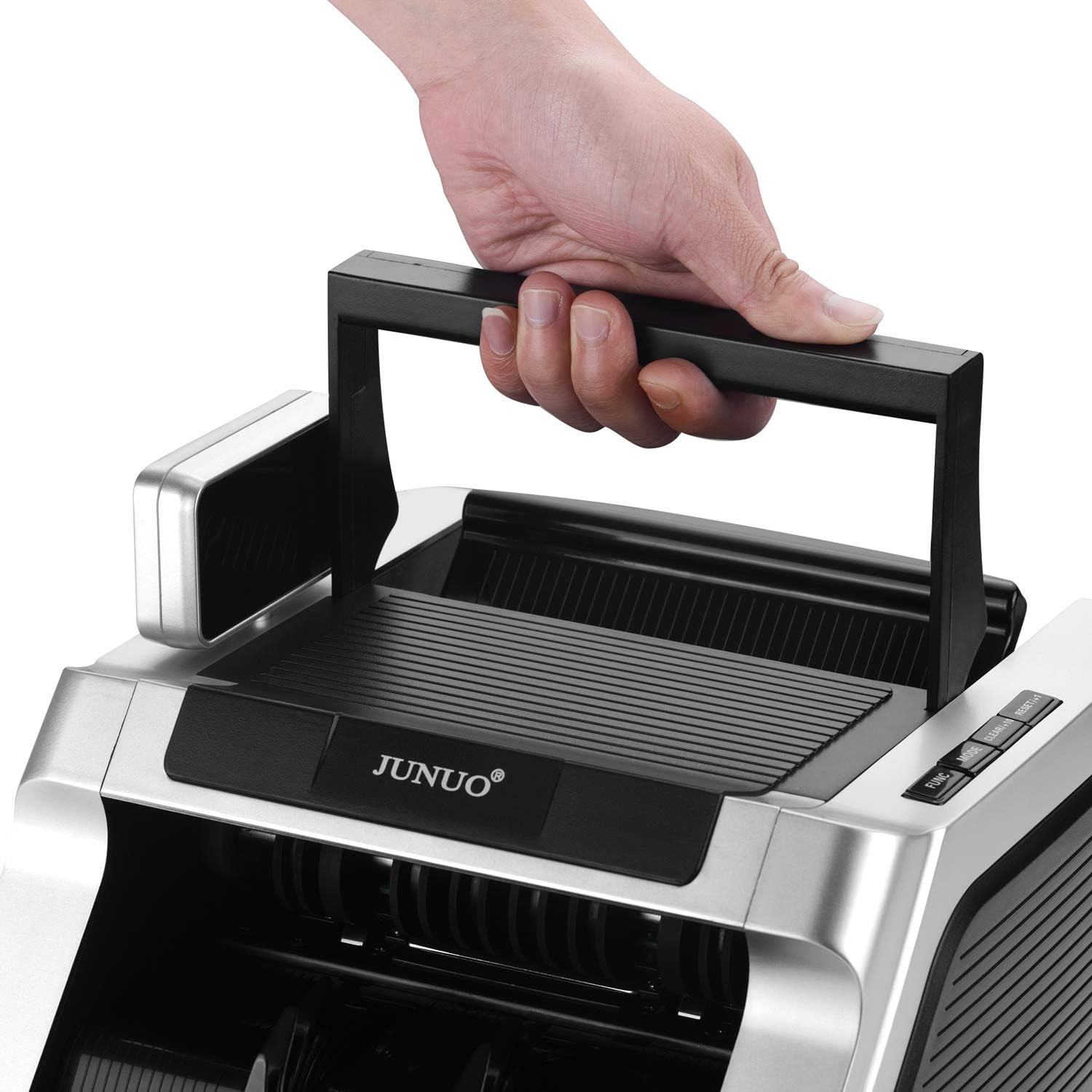
Figure 4: Retractable handle for convenient transport
5 அமைவு
- பேக்கிங்: பேக்கேஜிங்கிலிருந்து பண கவுண்டர் மற்றும் அனைத்து ஆபரணங்களையும் கவனமாக அகற்றவும்.
- இடம்: Place the machine on a stable, flat, and dry surface, ensuring adequate ventilation.
- மின் இணைப்பு: Connect the power cord to the power socket on the back of the machine, then plug the other end into a suitable electrical outlet.
- ஆரம்ப பவர் ஆன்: Flip the power switch to the 'ON' position. The machine will perform a self-diagnostic test. Ensure the display lights up and no error codes are shown.
6. இயக்க வழிமுறைகள்
6.1 அடிப்படை எண்ணுதல்
- Ensure the machine is powered on and in standby mode.
- Place a stack of bills neatly into the hopper. Ensure bills are aligned and not folded or wrinkled.
- The machine will automatically start counting. The count will be displayed on the screen.
- Once counting is complete, remove the counted bills from the stacker.
Important Note: This machine counts the number of bills only. It does not display a total monetary value.
6.2 போலியான பொருட்களைக் கண்டறிதல்
The JUNUO C05 features three detection methods that can be used simultaneously or separately:
- UV (Ultraviolet) Detection: Checks for UV security features present in genuine banknotes.
- MG (Magnetic) Detection: Verifies magnetic ink patterns on banknotes.
- IR (Infrared) Detection: Detects infrared security features, including half-note and chain-note detection.
If a suspicious bill is detected, the machine will stop, and an error code will appear on the display. Remove the suspect bill and press the 'RESET' button to resume counting.

Figure 5: Display indicating active UV and MG detection
6.3 இயக்க முறைகள்
Use the control panel buttons to select different operating modes:
- சேர் பயன்முறை: Press the 'ADD' button. The machine will accumulate the count of multiple batches. The total count will be displayed.
- BATCH முறை: Press the 'BATCH' button. Use the numeric keys (if available) or repeated presses to set a desired batch quantity (e.g., 100 bills). The machine will stop counting once the set quantity is reached. Remove the batch and press 'START' to continue counting the next batch.
- RESET/CLEAR: Press 'RESET' or 'CLEAR' to clear the current count or error message and return to standby mode.
7. பராமரிப்பு
Regular maintenance ensures optimal performance and longevity of your money counter.
7.1 சுத்தம் செய்தல்
- பவர் ஆஃப்: சுத்தம் செய்வதற்கு முன்பு எப்போதும் இயந்திரத்தை அணைத்துவிட்டு இணைப்பைத் துண்டிக்கவும்.
- தூசி அகற்றுதல்: Use the provided cleaning brush or a soft, dry cloth to remove dust and debris from the hopper, stacker, and internal sensors. Pay special attention to the bill path.
- சென்சார் சுத்தம்: Gently wipe the UV, MG, and IR sensors with a soft, lint-free cloth. Avoid using abrasive materials or harsh chemicals.
7.2 சேமிப்பு
When not in use, store the machine in a clean, dry, and dust-free environment. Cover it to prevent dust accumulation.
8. சரிசெய்தல்
பொதுவான பிரச்சினைகள் மற்றும் அவற்றின் தீர்வுகளுக்கு கீழே உள்ள அட்டவணையைப் பார்க்கவும்:
| பிரச்சனை | சாத்தியமான காரணம் | தீர்வு |
|---|---|---|
| இயந்திரம் இயக்கப்படவில்லை. | மின் கம்பி இணைக்கப்படவில்லை; மின் சுவிட்ச் அணைக்கப்பட்டுள்ளது; அவுட்லெட்டிலிருந்து மின்சாரம் இல்லை. | பவர் கார்டு இணைப்பைச் சரிபார்க்கவும்; பவர் ஸ்விட்ச் இயக்கத்தில் இருப்பதை உறுதிசெய்யவும்; மற்றொரு சாதனத்துடன் அவுட்லெட்டைச் சோதிக்கவும். |
| அடிக்கடி பில்கள் சிக்கிக் கொள்கின்றன. | Bills are wrinkled, folded, or poorly stacked; bill feeding gap incorrect; dust on sensors. | Straighten bills and stack neatly; adjust the bill feeding gap using the knob; clean sensors. |
| தவறான எண்ணுதல். | Dust on sensors; bills not properly aligned. | Clean sensors thoroughly; ensure bills are neatly stacked and aligned in the hopper. |
| Counterfeit detection errors (false positives). | Dust on sensors; heavily worn or damaged bills. | Clean sensors; try counting the bill again or manually inspect it. |
9. விவரக்குறிப்புகள்
| அம்சம் | விவரம் |
|---|---|
| பிராண்ட் | JUNUO |
| மாதிரி எண் | C05 |
| எண்ணும் வேகம் | நிமிடத்திற்கு 1000 பில்கள் வரை |
| ஹாப்பர் திறன் | 100 ரூபாய் நோட்டுகள் |
| கண்டறிதல் முறைகள் | UV (Ultraviolet), MG (Magnetic), IR (Infrared) |
| மின் நுகர்வு | Less than 60W (working), less than 3W (idle) |
| இரைச்சல் நிலை | 60 dB க்கும் குறைவானது |
| பொருளின் எடை | தோராயமாக 11.38 பவுண்டுகள் |
| தொகுப்பு பரிமாணங்கள் | தோராயமாக 14 x 11.25 x 9.25 அங்குலம் |
10. உத்தரவாதம் மற்றும் ஆதரவு
The JUNUO C05 Money Counter comes with a 1 வருட உத்தரவாதம் வாங்கிய தேதியிலிருந்து. இந்த உத்தரவாதமானது உற்பத்தி குறைபாடுகளை உள்ளடக்கியது மற்றும் சாதாரண பயன்பாட்டு நிலைமைகளின் கீழ் நம்பகமான செயல்பாட்டை உறுதி செய்கிறது.
For technical support, warranty claims, or service inquiries, please refer to the contact information provided with your purchase documentation or visit the official JUNUO webதளம்.


