அறிமுகம்
This manual provides essential information for the safe and efficient use of your Grundig 24 GCH 5900B HD Ready TV. Please read these instructions carefully before operating the device and retain them for future reference. This television features HDR technology for enhanced contrast, Dolby Digital sound for clear audio, and a built-in satellite receiver for convenience.
பாதுகாப்பு தகவல்
- Ensure the television is placed on a stable surface to prevent tipping.
- Do not expose the TV to rain or moisture to avoid electric shock.
- அதிக வெப்பத்தைத் தடுக்க காற்றோட்டம் திறப்புகளை தெளிவாக வைத்திருங்கள்.
- மின்னல் தாக்கும் போது அல்லது நீண்ட நேரம் பயன்படுத்தப்படாத போது, டிவியை மின் இணைப்பிலிருந்து துண்டிக்கவும்.
- அனைத்து சேவைகளையும் தகுதிவாய்ந்த சேவை பணியாளர்களிடம் பார்க்கவும்.
அமைவு
1 பேக்கிங்
Carefully remove the TV and all accessories from the packaging. Check for any damage during transit. Keep packaging materials for future transport or storage.
2. ஸ்டாண்ட் நிறுவல்
If you are not wall-mounting the TV, attach the stand according to the diagrams provided in the separate assembly guide. Ensure all screws are securely tightened.

படம்: முன்பக்கம் view of the Grundig 24 GCH 5900B HD Ready TV with its stand attached. The screen displays a vibrant image of cherries on a plate.
3. கேபிள்களை இணைத்தல்
- பவர் கேபிள்: பவர் கேபிளை டிவியின் பவர் உள்ளீட்டுடன் இணைக்கவும், பின்னர் ஒரு சுவர் அவுட்லெட்டுடன் இணைக்கவும்.
- ஆண்டெனா/செயற்கைக்கோள்: Connect your antenna or satellite cable to the appropriate input on the TV. This model includes a built-in satellite receiver.
- வெளிப்புற சாதனங்கள்: Use HDMI or other available ports to connect devices like DVD players, game consoles, or sound systems.
4. முதல் முறை அமைவு வழிகாட்டி
Upon first power-on, the TV will guide you through an initial setup process. This includes language selection, country, and channel scanning. Follow the on-screen prompts to complete the setup.
இயங்குகிறது
1. ரிமோட் கண்ட்ரோல் ஓவர்view
The remote control allows you to access all TV functions. Familiarize yourself with the button layout.
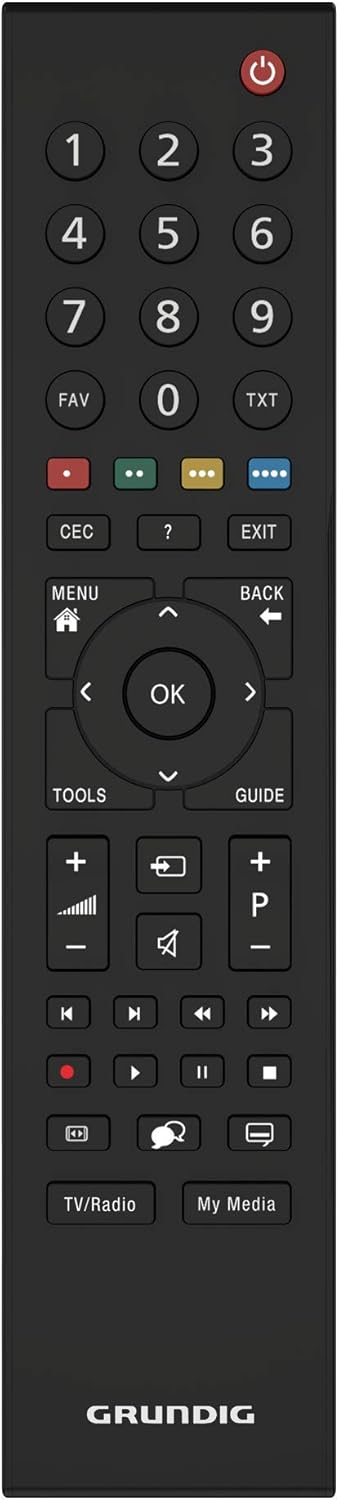
படம்: மேலிருந்து கீழ் நோக்கி view of the black Grundig TV remote control. Key buttons include Power, Number Pad, Volume Up/Down, Channel Up/Down, Menu, OK, and navigation arrows.
2. அடிப்படை செயல்பாடுகள்
- சக்தி: அழுத்தவும் சிவப்பு பவர் பட்டன் to turn the TV on or off.
- தொகுதி: பயன்படுத்தவும் VOL +/- ஒலி அளவை சரிசெய்ய பொத்தான்கள்.
- சேனல்: பயன்படுத்தவும் சி.எச் +/- சேனல்களை மாற்ற பொத்தான்கள்.
- உள்ளீடு தேர்வு: அழுத்தவும் ஆதாரம் button (if available, or similar icon) to select between different input sources (HDMI, AV, TV, Satellite).
3. மெனு வழிசெலுத்தல்
அழுத்தவும் மெனு button to access the main menu. Use the arrow buttons (மேல், கீழ், இடது, வலது) to navigate through options and the OK button to confirm selections. The பின் or வெளியேறு button will return you to the previous screen or exit the menu.
4. மேம்பட்ட அம்சங்கள்
- HDR தொழில்நுட்பம்: Your Grundig TV utilizes HDR (High Dynamic Range) technology to enhance contrast and deliver more realistic images. This technology increases the contrast between bright whites and deep blacks, providing a more immersive viewஅனுபவம்.
- Dolby Digital Sound: The integrated Dolby Digital sound technology ensures natural and clear audio, even at high volumes.
- Built-in Satellite Receiver: The TV includes a built-in satellite receiver, eliminating the need for an external set-top box and reducing cable clutter. This allows for easy and seamless viewing of satellite channels.
பராமரிப்பு
1. திரையை சுத்தம் செய்தல்
மென்மையான, உலர்ந்த, பஞ்சு இல்லாத துணியால் திரையை மெதுவாகத் துடைக்கவும். பிடிவாதமான அடையாளங்களுக்கு, சிறிது dampதுணியை தண்ணீர் அல்லது சிறப்பு திரை துப்புரவாளர் கொண்டு துடைக்கவும். திரவத்தை நேரடியாக திரையில் தெளிக்க வேண்டாம்.
2. டிவி உடலை சுத்தம் செய்தல்
Use a soft, dry cloth to wipe the exterior of the TV. Avoid using abrasive cleaners or solvents.
சரிசெய்தல்
உங்கள் டிவியில் சிக்கல்கள் ஏற்பட்டால், பின்வரும் பொதுவான சிக்கல்கள் மற்றும் தீர்வுகளைப் பார்க்கவும்:
- சக்தி இல்லை: Ensure the power cable is securely connected to both the TV and the wall outlet. Check if the outlet is functioning by plugging in another device.
- படம் இல்லை, ஆனால் ஒலி: Check the input source selection. Ensure the connected device (e.g., DVD player) is powered on and functioning correctly.
- ஒலி இல்லை, ஆனால் படம்: ஒலி அளவைச் சரிபார்த்து, டிவி ஒலியடக்கப்படவில்லை என்பதை உறுதிப்படுத்தவும். வெளிப்புற ஆடியோவைப் பயன்படுத்தினால், இணைப்புகள் மற்றும் அமைப்புகளைச் சரிபார்க்கவும்.
- ரிமோட் கண்ட்ரோல் வேலை செய்யவில்லை: பேட்டரிகளைச் சரிபார்த்து, தேவைப்பட்டால் அவற்றை மாற்றவும். ரிமோட்டுக்கும் டிவியின் ஐஆர் சென்சாருக்கும் இடையில் எந்தத் தடைகளும் இல்லை என்பதை உறுதிப்படுத்திக் கொள்ளுங்கள்.
- மோசமான படத் தரம்: Check antenna/cable connections. If using an external device, try a different HDMI cable or input port.
For persistent issues, please contact Grundig customer support.
விவரக்குறிப்புகள்
| பிராண்ட் | கிரண்டிக் |
| மாதிரி | 24 GCH 5900B |
| மாதிரி ஆண்டு | 2019 |
| திரை அளவு | 24 அங்குலம் (59 செமீ) |
| காட்சி தொழில்நுட்பம் | LED |
| தீர்மானம் | 720p HD Ready (Max. Vertical Resolution: 768 Pixels) |
| புதுப்பிப்பு விகிதம் | 60 ஹெர்ட்ஸ் |
| இணைப்பு வகை | கேபிள் |
| மவுண்டிங் வகை | சுவர் மவுண்ட் |
| தயாரிப்பு பரிமாணங்கள் | 12.3 x 55.2 x 34.3 செ.மீ |
| தயாரிப்பு எடை | 2.4 கிலோகிராம் |
உத்தரவாதம் மற்றும் ஆதரவு
Your Grundig 24 GCH 5900B HD Ready TV comes with a manufacturer's warranty. Please refer to the warranty card included in your product packaging for specific terms and conditions. For technical support, service, or warranty claims, please contact your local Grundig service center or authorized dealer. Keep your purchase receipt as proof of purchase.


